Video Marketing
Veo 3.1 vs Runway Gen-4.5 vs Kling 3.0: Best AI Video Generator After Sora's Shutdown
The short answer for 2026: Veo 3.1 is the best all-round AI video generator, Runway Gen-4.5 is the best tool for creators who need precise control and consistent characters, and Kling 3.0 is the best value at roughly $0.10 per second. With OpenAI shutting down Sora's app on April 26, 2026 (the API follows on September 24), these three are where most creators are landing.
I produce product videos for SaaS companies, so I have been testing AI generators not for fun clips but for real B-roll, intros, and concept shots that ship to clients. Here is what actually holds up.
Key takeaways
- Sora's web and app experiences shut down April 26, 2026; its API dies September 24, 2026. Migration is not optional.
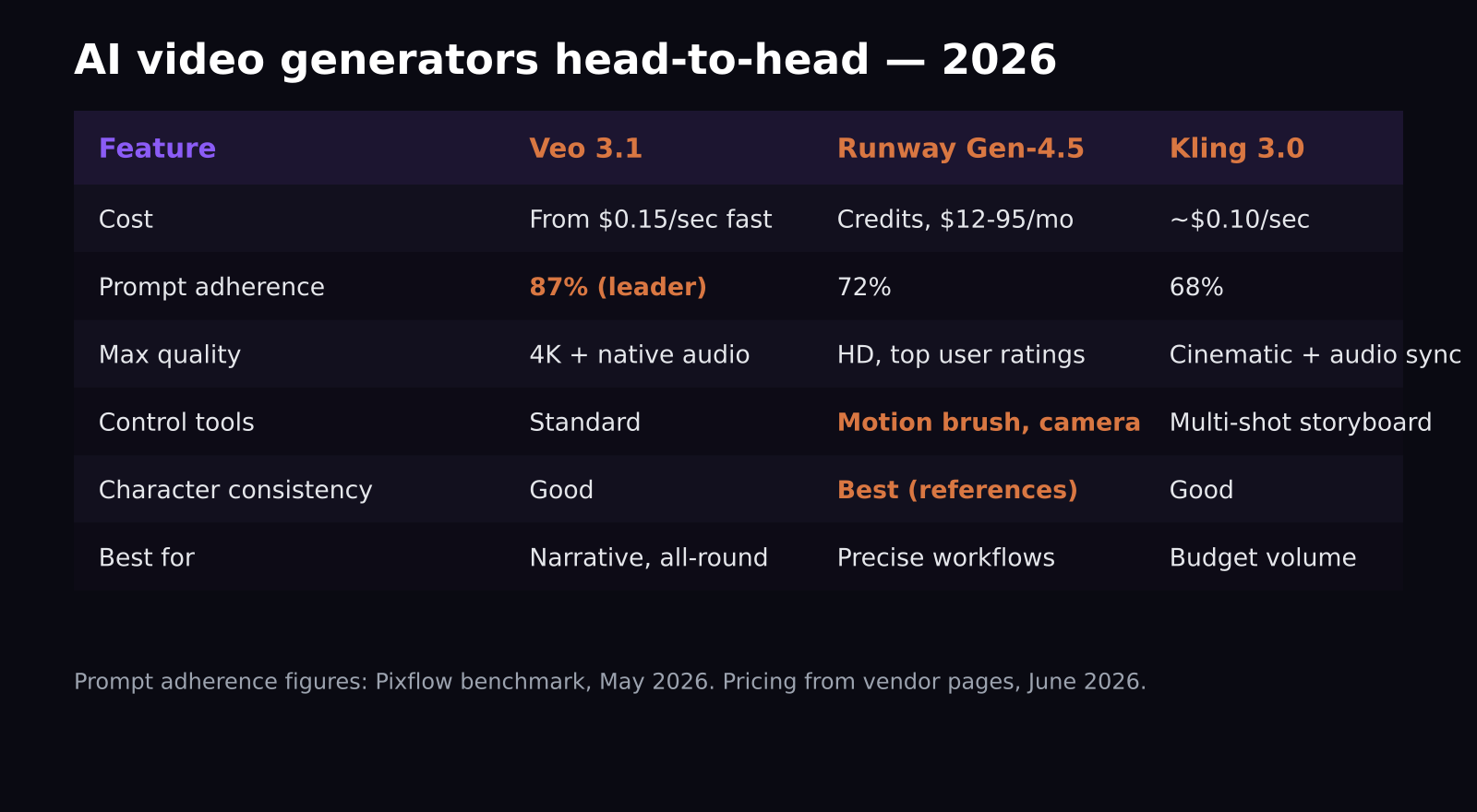
- Veo 3.1 leads prompt adherence at 87% in Pixflow's May 2026 benchmark, vs 72% for Runway Gen-4.5 and 68% for Kling 3.0.
- Kling 3.0 is the price leader at about $0.10/second; Veo 3.1 fast mode starts around $0.15/second.
- Runway's Unlimited plan (around $76-95/month) is the best deal for high-volume creators.
- Runway wins on workflow control: motion brush, camera paths, and reference-driven character consistency.
What happened to Sora?
Sora launched in late 2024, topped the charts, and even landed a billion-dollar Disney deal, then OpenAI pulled it on March 25, 2026, discontinuing the app a month later. Whatever the internal reasons, the practical effect is that thousands of creators built workflows on a tool that vanished in under 18 months. That is the real lesson of this comparison: pick on fundamentals, but keep your assets and prompts portable.
Which AI video generator has the best quality?
Veo 3.1, by most measures. It outputs true 4K with native audio in landscape and portrait, and in Pixflow's May 2026 benchmark it followed detailed prompts correctly 87% of the time, well clear of Runway Gen-4.5 at 72% and Kling 3.0 at 68%. For narrative scenes and establishing shots, it is the strongest all-rounder, and its physics (water, hair, cloth) holds up under scrutiny.
Kling 3.0 is closer than the adherence number suggests. It matches Veo on cinematic lighting and complex motion, and its multi-shot storyboard mode with audio synced across cuts is something neither rival does as cleanly. On the independent Video Arena leaderboard, user preference in blind tests has shuffled all year; as of May 2026 the top cluster includes Kling 3.0 and Veo 3.1 alongside newer entrants like Seedance 2.0. Translation: the quality gap at the top is narrow and changes monthly.
Which is cheapest: Veo, Runway, or Kling?
For pay-per-output, Kling 3.0 wins at roughly $0.10 per second, which works out to about $3 for a typical clip. Veo 3.1's fast mode starts around $0.15 per second. For comparison, Sora 2 charged $0.75 per second, which explains why so few production shops mourned it on cost grounds.
Runway prices differently, with credit-based subscriptions: a Standard plan around $12-15/month for occasional use, and an Unlimited plan around $76-95/month. If you generate dozens of clips a week, Unlimited beats every per-second model on the market. That is the plan I run, because iterating on a product shot can easily take 15 generations before one is client-ready, and per-second pricing punishes iteration.
When is Runway the right choice?
When control matters more than raw fidelity. Runway Gen-4.5 gives you motion brush (paint exactly what should move and how), granular camera moves, and reference-driven character consistency that keeps the same person or mascot recognizable across shots. For a SaaS brand video where your animated character appears in five scenes, that consistency is the whole ballgame, and Runway is clearly ahead there.
From my own workflow: I use Veo for one-off establishing shots and anything needing audio, and Runway when a client's brand character or a specific camera move has to be repeatable. Kling covers volume work, like generating ten background loops for a tutorial set.
What do these tools mean for SaaS marketing videos?
Since most of my readers make or commission software marketing content, here is the practical breakdown by asset type. For launch-video B-roll and mood shots, Veo 3.1 is the default: the 4K output holds up on a landing page hero, and native audio means an ambient soundbed comes free. For social cutdowns where a brand character reacts across a series, Runway's reference-driven consistency is the only reliable option; Veo and Kling will both drift the character's face between generations. For YouTube Shorts and TikTok volume, where you might need thirty variations to find two that perform, Kling's pricing makes experimentation rational.
What none of them should do is fake your product UI. I have tested this repeatedly: AI-generated interface footage is always subtly wrong, with buttons that do not exist and text that almost says something. Buyers who get to a demo and find the product looks different feel misled. Use AI for everything around the product; show the real software for the product itself.
A note on rights: all three vendors now offer commercial use on paid tiers, but indemnification differs. Google and Runway offer stronger protection for enterprise customers than Kling currently does, which matters if you produce content for risk-averse B2B clients.
How should a creator decide in 2026?
Ask three questions. First, do you need repeatable characters or precise motion control? If yes, Runway. Second, are you generating at high volume on a budget? If yes, Kling 3.0, or Runway Unlimited if you prefer flat-rate. Third, do you just want the best-looking single clip from a text prompt, with audio, in 4K? That is Veo 3.1.
And keep your prompt library, reference images, and exports in your own storage. Sora's shutdown proved that in AI video, the platform is temporary; your assets are not.
One more practical tip from production work: build a small test suite of five prompts that represent your real use cases, a product-adjacent scene, a character shot, a text-heavy frame, a physics moment, and a fast camera move, and run it against any new model version the week it ships. These tools change monthly, and a one-hour test against your own prompts tells you more than any leaderboard. It is exactly how I caught Runway's character-consistency lead and Kling's audio-sync strength before either showed up in published benchmarks.
Budget-wise, a realistic starting stack for a solo creator in mid-2026 is around $90 per month: Runway Unlimited for iteration-heavy work plus pay-as-you-go Kling credits for volume, adding Veo per-second only when a client deliverable needs 4K with audio. That combination covers virtually every request I have had this year.
Frequently asked questions
Is Sora still available in 2026?
No for most users. The Sora web and app experiences were discontinued on April 26, 2026, and the API will shut down on September 24, 2026. Creators have migrated mainly to Veo 3.1, Runway Gen-4.5, and Kling 3.0.
What is the cheapest AI video generator in 2026?
Among the top tier, Kling 3.0 at roughly $0.10 per second (about $3 per video). For heavy users, Runway's Unlimited subscription at around $76-95/month is effectively cheaper per clip.
Can these tools replace a human video team?
For B-roll, concept shots, and backgrounds, largely yes. For product walkthroughs and tutorials where accuracy matters, you still need a human showing the real software; AI-generated UI footage misrepresents the product and buyers notice.
Want your product explained this clearly — in video?
Tutorials, walkthroughs, reviews, and shorts for SaaS, AI, and WordPress products.
Work With SaaS Master