WordPress
WordPress 7.0 “Armstrong”: What the New Native AI Layer Means for Your Site
WordPress 7.0 "Armstrong," released this week alongside WordCamp Europe 2026 in Krakow, is the most consequential WordPress release in years: it ships a native AI layer, so AI stops being something every plugin bolts on separately and becomes part of WordPress core. If you run a WordPress site, this changes which plugins you need, what you pay for AI features, and who controls your API keys.
I have spent years making WordPress tutorial videos, and most of the AI plugin chaos I have documented, five plugins each demanding their own OpenAI key, billing separately, and conflicting in the editor, is exactly what 7.0 is designed to end.
Key takeaways
- WordPress 7.0 "Armstrong" shipped in early June 2026, announced around WordCamp Europe in Krakow (June 4-6, with 2,458 attendees from 81 countries).
- The new AI Client lets any plugin talk to Claude, ChatGPT, or Gemini through one shared system instead of separate integrations.
- A Connectors screen gives site owners a single place to manage AI providers and credentials.
- The new Abilities API lets plugins declare what they can do, so AI agents and other tools can discover and use those capabilities.
- AI features remain optional: the AI plugin adds title/excerpt generation, image generation and editing, and suggested alt text to the editor.
What is actually new in WordPress 7.0?
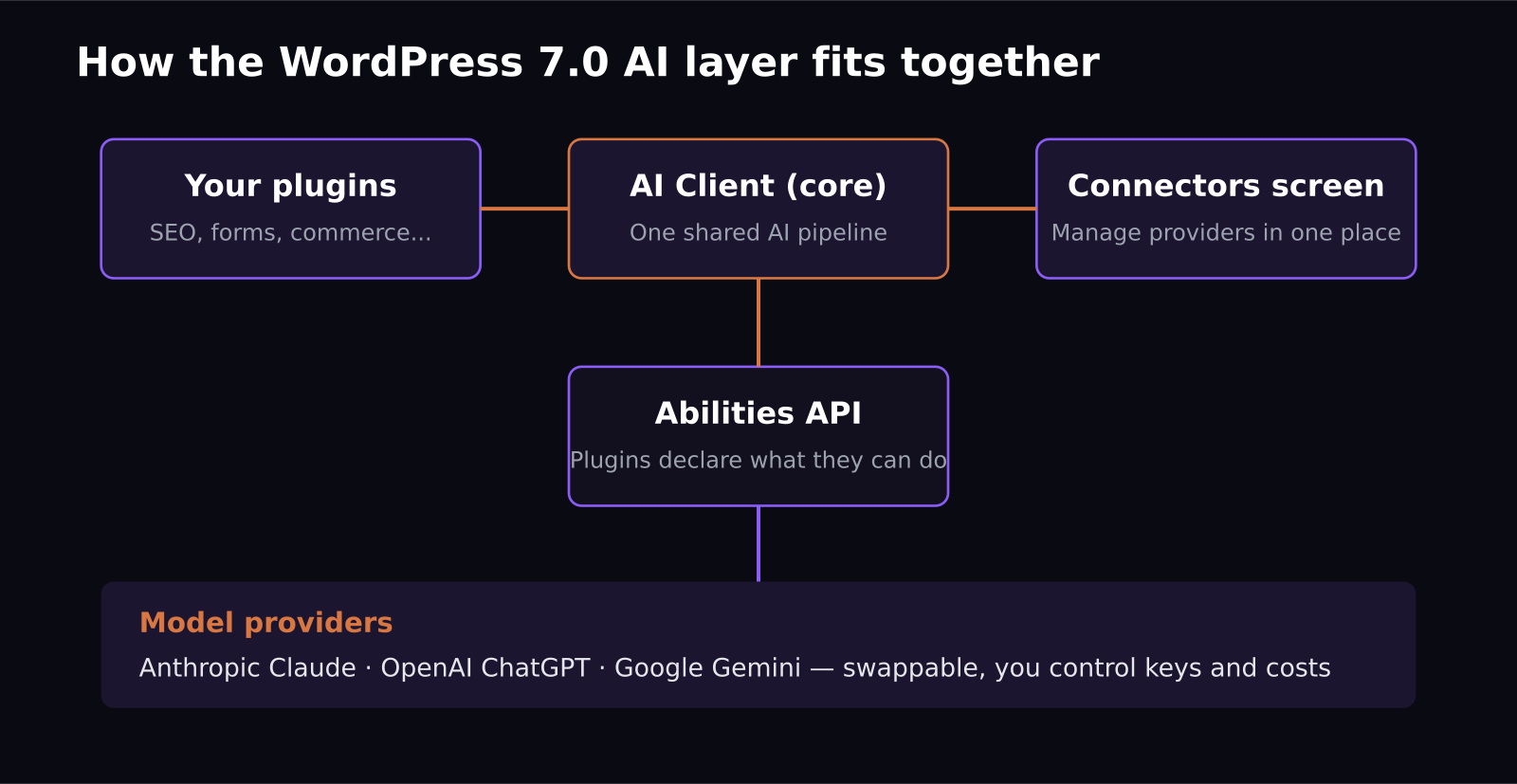
Three pieces matter. First, the AI Client: a common system in core for connecting to AI models, so plugin developers stop shipping their own HTTP wrappers around OpenAI or Anthropic APIs. Plugins communicate with Claude, ChatGPT, and Gemini through one pipeline.
Second, the Connectors screen: one admin page where you wire up providers like OpenAI, Anthropic, or Google Gemini. You add your key once, and every compatible plugin uses it. That means one bill, one place to revoke access, and a clear view of what is connected to your site.
Third, and most interesting long-term, the Abilities API. Plugins can now declare what they can do in a machine-readable way that other tools can discover. A form plugin might declare "create a form"; an AI assistant on the site can find that ability and use it. This is WordPress quietly preparing for the agent era, where software talks to software.
Do you have to use AI in WordPress 7.0?
No, and this is worth stressing. The AI features live in an optional AI plugin, not forced into every install. If you enable it, you get practical, unglamorous tools in the editor: title and excerpt generation, image generation and editing, and suggested alt text. The alt text feature alone is a quiet accessibility win, since most sites I audit have half their images missing it.
WordPress 7.0 also ships non-AI improvements: a social-friendly Reader on WordPress.com that can pull in Bluesky, Mastodon, and Fediverse timelines, a distraction-free writing mode, and podcast and video tools.
What should site owners do this month?
Three concrete steps. First, before updating, check your existing AI plugins. Many will migrate to the shared AI Client over the coming months; plugins that insist on their own separate API setup are now legacy patterns, and that is a signal about maintenance quality. Second, after updating, visit the Connectors screen and consolidate: if you are paying for AI through three different plugin subscriptions, you can likely replace some of that with one provider key. Third, audit who on your team can edit connectors. Centralized AI access is convenient, but it also means one screen now controls AI spending for the whole site, so treat it like you treat payment settings.
For agencies and freelancers, there is a service opportunity here: clients will need exactly this consolidation done for them, and a "WordPress 7.0 AI readiness" review is an easy productized offer this summer.
How does this compare to what came before?
Context helps explain why this release matters. For the past two years, the WordPress AI story was a gold rush of plugins: every SEO suite, page builder, and form tool shipped its own "AI assistant," each with its own settings page, its own API key field, and often its own markup of model costs. I made videos covering a dozen of them, and the pattern was always the same: useful feature, redundant plumbing, and a monthly fee that was mostly resold API credits.
WordPress 7.0 collapses that plumbing into core. It is the same move WordPress made with REST APIs in 2016 and with blocks in 2018: take the thing everyone is building badly in parallel and ship one good shared version. The plugins that thrive after such shifts are the ones that compete on actual features rather than on owning the integration layer. Expect a wave of plugin consolidation over the next year, and expect the "AI credits" upsell business model to quietly fade as users realize they can bring their own key for a fraction of the cost.
There is also a performance angle worth noting for site owners: one shared AI pipeline means fewer duplicate scripts and background requests than five separate AI plugins each phoning home. On the sites I have tested since the release candidate, removing redundant AI plugins after consolidation noticeably trimmed admin load times.
What does this mean for plugin developers?
Two things. Adopt the AI Client instead of maintaining your own model integrations; you cut maintenance cost and instantly support whatever providers the user has connected. And declare your plugin's capabilities through the Abilities API early. Discoverability is going to matter: when site assistants and external AI agents look for "what can this site do," plugins that registered abilities will be the ones that get used. WordPress powers roughly 40% of the web, so conventions set here tend to become conventions everywhere.
The strategic read: WordPress is positioning itself as neutral ground in the AI platform wars. It does not sell you a model; it gives you a socket that fits Claude, ChatGPT, and Gemini, and lets you switch. For site owners burned by tool shutdowns and price hikes this year, that switchability is the headline feature.
One forward-looking note: the Abilities API plus the rise of agentic AI points at a future where visitors do not browse your site so much as ask an assistant to do something with it: book the appointment, compare the plans, start the trial. Sites whose capabilities are declared and discoverable will be usable by those agents; sites that are pixels and JavaScript will not. WordPress 7.0 is the first mainstream CMS release built with that future explicitly in mind, and that, more than the alt-text generator, is why I am calling it the most consequential release in years. If you run a SaaS marketing site on WordPress, getting your key actions registered as abilities this year is cheap insurance on where search and discovery are heading.
Frequently asked questions
Is WordPress 7.0 a paid upgrade?
No. WordPress core remains free open source. You pay only for the AI provider usage you connect (for example, API credits with OpenAI, Anthropic, or Google) and any premium plugins you choose.
Will my existing AI plugins break in WordPress 7.0?
Generally no; the AI layer is additive. But expect well-maintained plugins to migrate to the shared AI Client and Connectors system over the next few releases, and treat plugins that do not as a maintenance red flag.
Which AI models work with WordPress 7.0?
The AI Client supports connecting providers including Anthropic's Claude, OpenAI's ChatGPT models, and Google Gemini through the Connectors screen, and the architecture is built to add more providers over time.
Want your product explained this clearly — in video?
Tutorials, walkthroughs, reviews, and shorts for SaaS, AI, and WordPress products.
Work With SaaS Master