AI Tools
How I Used Claude AI and MiniMax M3 Together to Build a SaaS Landing Page
In short
Claude Code handles the logic, MiniMax M3 handles images at a tenth of the cost. Here's exactly how pairing them speeds up SaaS landing page builds today.
Claude Code writes clean logic and layout, but it cannot generate a realistic product photo or a custom illustration, so it falls back on plain vector placeholders. MiniMax M3 fixes the other half: it is a coding-capable model with native image and video generation, priced at roughly a tenth of what Claude Opus 4.8 costs per token, so pairing the two lets you build a full SaaS landing page, images included, inside one Claude Desktop session. Here is how the workflow actually works and what it costs.
Key takeaways
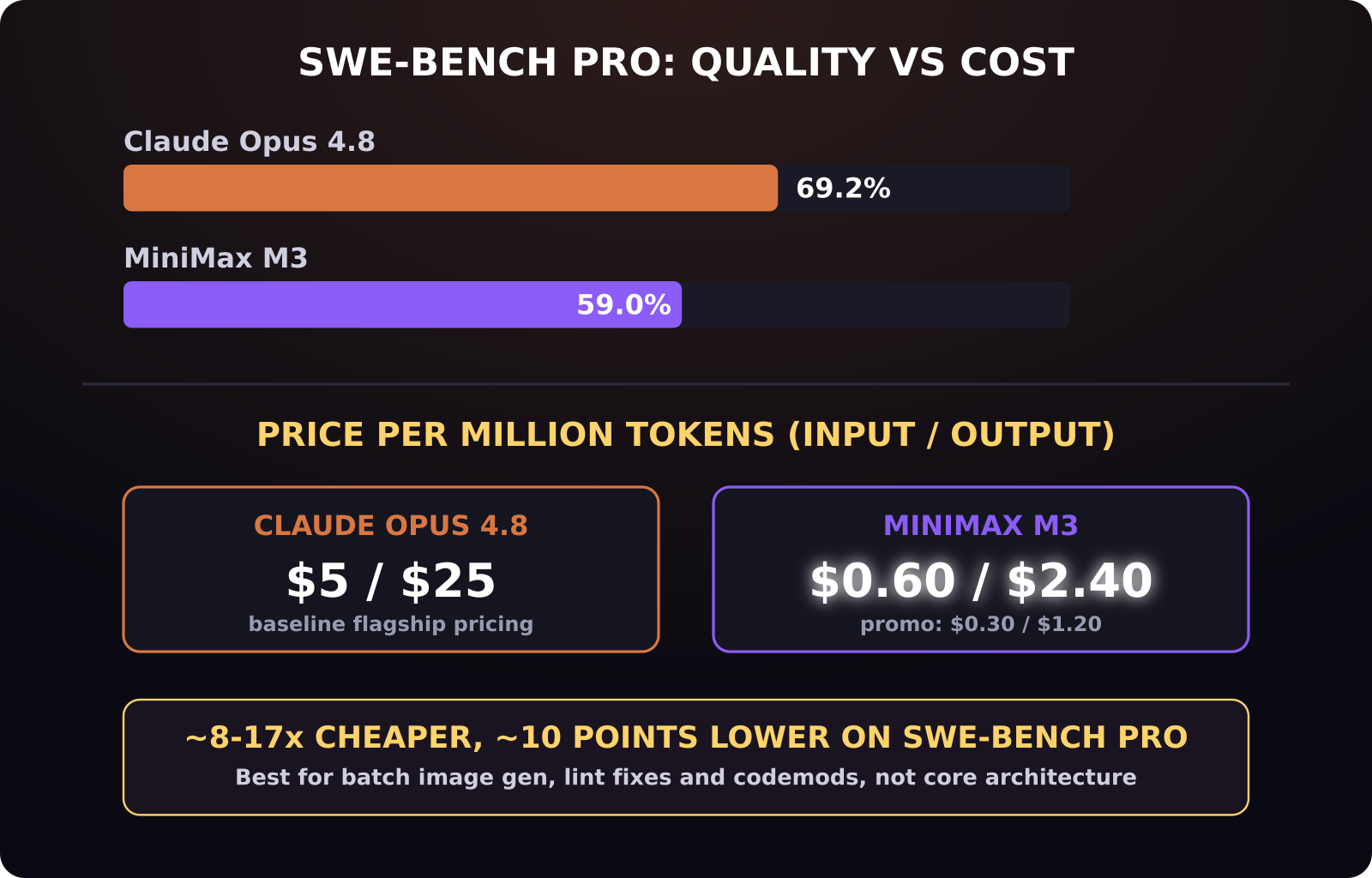
- MiniMax M3 prices at 0.60 dollars per million input tokens and 2.40 dollars per million output tokens standard, with promotional pricing as low as 0.30 and 1.20 dollars, versus Claude Opus 4.8's roughly 5 and 25 dollars per million tokens.
- On SWE-Bench Pro, MiniMax M3 scores 59 percent against Claude Opus 4.8's 69.2 percent, a real quality gap you should weigh against the roughly 8 to 10x cost difference.
- MiniMax M3 supports a 1 million token context window and native multimodal input and output, covering text, image, and video in the same model.
- The workflow: generate a MiniMax API key on the MiniMax platform, then pass it to Claude Desktop so Claude can call MiniMax directly mid-conversation to generate images while it writes the surrounding code.
- MiniMax M3's weights are released on Hugging Face and GitHub, so it can also run self-hosted for teams that want to avoid per-token API billing entirely.
[[video:GM32tNeSP3E]]
Why pair two different AI models for one landing page?
Claude has become the default coding layer for a lot of SaaS teams, largely because Claude Code and Anthropic's MCP tooling give it infrastructure maturity that newer models have not caught up to yet. It writes clean Framer Motion animation code, structures a Next.js project sensibly, and handles multi-file edits without losing track of context. What it does not do natively is generate a finished image. Ask it for a hero graphic and you get an SVG placeholder or a described layout, not a rendered visual.
MiniMax M3 was built the other way around: a coding-capable model with native multimodal generation, meaning it can produce realistic images and short video clips as part of the same request stream that also writes code. Instead of picking one model for everything, the workflow in the video treats them as a duo, Claude for logic and structure, MiniMax M3 for anything that needs to look like a real photo or graphic rather than a wireframe.
How much does this actually cost per project?
This is where the pairing gets interesting instead of just being a novelty. MiniMax M3's standard pricing is 0.60 dollars per million input tokens and 2.40 dollars per million output tokens. During its current promotional window that drops to 0.30 and 1.20 dollars. Compare that to Claude Opus 4.8, which runs in the neighborhood of 5 dollars input and 25 dollars output per million tokens, and MiniMax M3 is somewhere between 8x and 17x cheaper depending on which pricing window you land in.
The catch is quality. MiniMax M3 scores 59 percent on SWE-Bench Pro, a coding benchmark, versus Claude Opus 4.8's 69.2 percent. That is a real 10-point gap, not noise. It also scores 66 percent on Terminal-Bench 2.1 and 83.5 on BrowseComp, respectable for a model at this price point but not frontier-tier. For high-stakes architecture decisions or gnarly refactors, that gap matters. For batch image generation, lint-fixer loops, formatter passes, and repetitive codemod tasks, the price advantage outweighs it, which is exactly why the video uses Claude for the primary build and MiniMax M3 specifically for the image-heavy side quests.
How do you actually connect MiniMax M3 to Claude Desktop?
The setup is a short, one-time process. You create a MiniMax API key inside the MiniMax platform dashboard, then add that key into a Claude Desktop session, effectively giving Claude a tool it can call whenever an image or video needs generating. Once connected, you do not have to manually switch apps or copy prompts between two separate tools. You describe what you want inside the same Claude conversation that is writing your code, and Claude routes the generation request to MiniMax M3 in the background, then drops the result back into your project.
In the demo build, this played out as a live Framer Motion landing page: Claude wrote the animated hero section and page structure, and MiniMax M3 generated the background imagery and product visuals that replaced the placeholder blocks Claude would otherwise have left behind.
What does this look like for an existing SaaS backend?
Beyond building something from scratch, the same setup was used to upgrade an existing digital signage SaaS application, replacing generic stock template images across the product with realistic, batch-generated visuals. That is a meaningfully different use case than a one-off landing page: it is bulk asset generation across an existing codebase, which is exactly the kind of repetitive, high-volume task where MiniMax M3's per-token cost advantage compounds. Regenerating dozens or hundreds of template images at Claude Opus pricing would add up fast; at MiniMax M3 pricing, it is a rounding error.
Does the 1 million token context window matter here?
For most single-page builds, not particularly, since a landing page's code and design brief will not come close to that ceiling. It matters more for larger projects: if you are asking the model to reason across an entire multi-page app, a big component library, or a long design spec alongside the code it is writing, a 1 million token window means fewer context truncation issues and less re-explaining earlier decisions later in the session. Combined with the fact that MiniMax M3's weights are open on Hugging Face and GitHub, teams with the infrastructure to self-host can also skip per-token billing entirely and run the large context window on their own hardware.
Is this workflow worth setting up for your own SaaS project?
If your team already pays for Claude and regularly needs custom visuals, product mockups, or batch image replacement work, connecting a MiniMax API key is a low-effort way to stop settling for vector placeholders without paying Claude-tier prices for image-heavy tasks. If your project is small and you only need a handful of images total, generating them separately in whatever image tool you already use is probably simpler than wiring up a second API. The workflow earns its complexity at volume: SaaS backends with dozens of template assets, or ongoing landing page work where new visuals are a recurring need, not a one-time task.
What are the practical failure modes of mixing two models in one build?
Splitting work between two models is not free of friction. The most common issue is a style mismatch: MiniMax M3 generates an image based on its own read of your prompt, and if that prompt is not specific enough about lighting, framing, or brand color, you can end up with visuals that do not match the rest of Claude's layout without a second or third generation pass. The fix is treating image prompts as seriously as code prompts, specifying exact hex colors, composition, and mood rather than a one-line description.
The second friction point is tooling maturity. Claude Code and Anthropic's MCP ecosystem assume Anthropic-style tool semantics, so a MiniMax API integration is closer to a custom-wired connection than a first-party plugin. That is fine for a one-time setup, but it means the integration is something your team owns and maintains, not something Anthropic ships and patches automatically the way it does with native Claude tooling.
How does this compare to just using an image generator separately?
You could just as easily generate images in a standalone tool and drop the files into your project manually. The advantage of wiring MiniMax M3 directly into the same Claude session is workflow continuity: Claude already has full context on your design system, component structure, and copy, so it can pass that context along with the image request instead of you re-explaining brand guidelines in a separate app every time you need a new asset. For a single image, that convenience is marginal. For a project generating dozens of assets across a build, the context-sharing adds up to meaningfully less manual re-explaining per image.
Is MiniMax M3 free to use?
No, but it is inexpensive. Standard pricing is 0.60 dollars per million input tokens and 2.40 dollars per million output tokens, with a promotional rate of 0.30 and 1.20 dollars currently available. Because its weights are open-sourced on Hugging Face and GitHub, self-hosting is also an option if you want to avoid per-token costs altogether.
Does MiniMax M3 replace Claude for coding?
Not for everything. MiniMax M3 scores 59 percent on SWE-Bench Pro against Claude Opus 4.8's 69.2 percent, so for complex architecture work or difficult debugging, Claude still has the edge. MiniMax M3 is a better fit for high-volume, lower-complexity tasks like batch image generation, lint fixing, and repetitive codemods where its price advantage outweighs the quality gap.
Do I need a developer to set up the Claude and MiniMax M3 integration?
No. The setup shown in the video is generating an API key inside the MiniMax platform dashboard and entering it into Claude Desktop, which does not require writing integration code yourself. Once the key is added, you can prompt for image or video generation directly inside your normal Claude conversation.
Was this article helpful?
Jorge Aguilar
Founder & Creator, SaaS Master
Producing SaaS and AI product videos since 2019 — 800+ videos for 200+ brands, covering tutorials, demos, walkthroughs, and explainers. Writing here about the tools, trends, and tactics that actually move the needle. LinkedIn · About · Work with me
Want your product explained this clearly — in video?
Tutorials, walkthroughs, reviews, and shorts for SaaS, AI, and WordPress products.
Work With SaaS Master