AI & SaaS
I Turned a Boring PDF Into an Interactive Flipbook With Flipsnack
In short
Flipsnack turns static PDFs into interactive flipbooks with embedded video, forms, and analytics. Here's exactly what it costs and how the editor works.
Flipsnack turns a flat PDF into an interactive flipbook with a page-flip animation, embedded video, clickable links, and a built-in lead capture form, without asking the reader to download anything. The free plan caps you at 3 flipbooks and 30 pages with a watermark, and the paid plans start at 35 dollars a month for the features most businesses actually need, like video embeds and real analytics. I walked through the whole editor end to end, from upload to publish, to see whether it is worth switching from plain PDF attachments.
Key takeaways
- Flipsnack converts an uploaded PDF into a page-flip flipbook in under a minute for most files, no design work required to get a basic version live.
- Paid plans start at 35 dollars a month (Starter, monthly billing) or roughly 16 dollars a month if you prepay the year; Professional at 30 to 38 dollars a month is the tier that unlocks video embeds, analytics, and watermark removal.
- The built-in vector editor lets you click into individual layers of an uploaded PDF, so you can swap text, colors, or images without re-exporting from Illustrator or Canva.
- Analytics track impressions, click-through rate, average read time, and captured leads directly inside Flipsnack, so you are not bolting on a separate tracking pixel.
- A custom domain and full white-label branding (logo, colors, footer, branded emails) only unlock on the Business plan, 85 dollars a month billed annually.
[[video:6pHq8BtOU08]]
What does Flipsnack actually do to a PDF?
You upload a PDF and Flipsnack renders each page as a flippable spread, complete with a page-turn sound and animation, inside an embeddable viewer. Under the hood it is not just wrapping your PDF in a fancier player. Once the file is processed, every page becomes editable inside Flipsnack's own design canvas, meaning you can add new elements on top of, or instead of, what was in the original file. That is the difference between this and a basic "PDF to flipbook" converter: the output is a living document you can keep updating without touching your original PDF again.
Processing speed depends on page count and how graphics-heavy the file is. A 20-page catalog with product photos processes in roughly the time it takes to make coffee; a 100-plus page annual report takes longer because Flipsnack is rebuilding vector layers for every page, not just rasterizing them into images.
How much does Flipsnack cost in 2026?
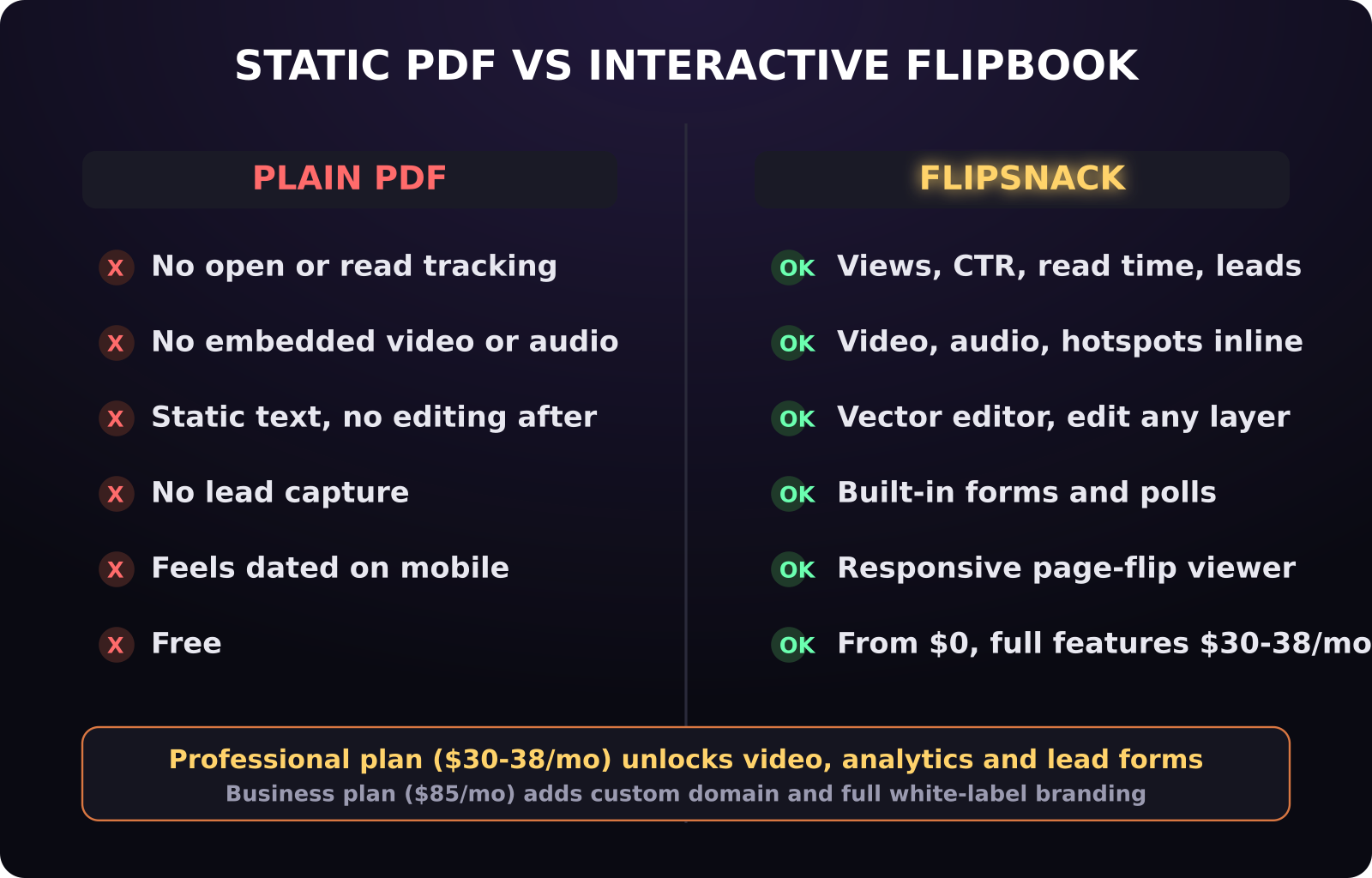
There are five tiers. The Free plan gives you 3 flipbooks and 30 pages each, watermarked, with no downloads and no analytics, which is fine for testing the editor but not for anything client-facing. Starter runs 35 dollars a month (or 192 dollars paid once a year, which works out to 16 dollars a month) and raises the ceiling to 5 flipbooks with 100 pages each, but still has no video, no analytics, and no branding control.
Professional is where the product becomes genuinely useful for a business: 30 dollars a month billed annually, or 38 dollars a month billed monthly, and it adds video and audio embedding, lead capture forms, watermark removal, Google Analytics integration, AI-powered content insights, password-protected sharing, and SVG graphics support. Business jumps to 85 dollars a month (annual billing only) and adds a custom domain plus full branding control across logo, colors, fonts, favicon, header, footer, and even the notification emails sent to readers. Enterprise pricing is quote-based and adds things like SSO and dedicated support.
Unlike a lot of AI-adjacent SaaS tools that reshuffle pricing every few months, Flipsnack's five-tier structure has stayed stable, which makes it easier to budget against if you are choosing it as a long-term catalog or proposal tool rather than a one-off project.
Can you actually redesign the layout after uploading?
Yes, and this is the feature that surprised me most. Flipsnack includes a full vector editor that lets you click into individual elements on any page, including inside a complex map or template graphic, and move, resize, recolor, or delete them independently. If your original PDF has a product photo grid and you want to swap one image without regenerating the whole file in your design tool, you do it directly inside Flipsnack.
The design customizer also controls things that have nothing to do with the original PDF: accent colors for the viewer chrome, background textures behind the flipbook, and the transition style between pages. You can choose the classic flip-with-sound effect, or switch to a flat slide or scroll layout if the page-turn animation feels gimmicky for a technical document.
What interactive elements can you add on top of a static page?
This is the core pitch over a plain PDF. On Professional and above you can embed video and audio directly onto a page, so a product page in your catalog can carry a 30-second demo clip instead of just a screenshot. You can drop in clickable hotspots with custom captions, multimedia slideshows, shopping links, GIFs, and actual forms and polls that submit data back to you, not just a mailto link.
Navigation controls are configurable too: a search bar so readers can jump to a specific page or product, download permission toggles if you want to let people save a copy, and arrow-based navigation for anyone who prefers clicking over dragging a corner to flip a page.
Does the analytics actually help with lead generation?
The analytics dashboard on Professional and above tracks views, click-through rate on any embedded link, average read time per page, and geographic or device data about who opened the flipbook. That last part matters more than it sounds: page-level read time tells you exactly where readers stop paying attention, which is a signal a plain PDF attachment can never give you, since email clients and PDF readers do not report back that kind of behavioral data.
The lead capture forms close the loop. You can drop a form directly into a page, for example right after a pricing table or product spec sheet, and captured submissions show up in the same dashboard alongside the engagement data, so you can see which page in the document actually drove someone to fill it out.
Is Flipsnack worth it compared to just sending a PDF?
If you send static PDFs today and have no way to see whether anyone opened past page one, Professional at 30 to 38 dollars a month is a reasonable trade for that visibility, plus the ability to embed video and forms without hiring a developer. If you only need a handful of documents online with no tracking or branding requirements, Starter or even the Free plan covers a basic use case at no real risk. The place it gets expensive fast is Business, at 85 dollars a month, which only makes sense once white-label branding and a custom domain are actually part of how you present the document to clients, not just a nice-to-have.
The realistic comparison is not Flipsnack versus a PDF, it is Flipsnack versus a landing page you would otherwise have to build and maintain yourself to get the same video embeds, forms, and analytics. For teams that already have a page builder or CMS doing that job, Flipsnack is redundant. For sales, marketing, or proposal teams who currently just attach a PDF and hope, it closes a real visibility gap.
Frequently asked questions
Does Flipsnack work on mobile devices?
Yes. Flipsnack's viewer is responsive and supports touch-based page turning on phones and tablets, and the mobile transition style (flip versus slide or scroll) is configurable separately from the desktop experience in the design customizer.
Is there a truly free way to try Flipsnack?
Yes, the Free plan is permanent, not a trial, and includes 3 flipbooks up to 30 pages each. It has a visible watermark, no downloads, and no analytics, so treat it as a way to test the editor and page-flip experience before committing to a paid tier.
Can I remove the Flipsnack watermark without upgrading to Business?
Yes. Watermark removal is included starting on the Professional plan, at 30 dollars a month billed annually or 38 dollars a month billed monthly. You do not need to jump to Business unless you also need a custom domain or full white-label branding.
Was this article helpful?
Jorge Aguilar
Founder & Creator, SaaS Master
Producing SaaS and AI product videos since 2019 — 800+ videos for 200+ brands, covering tutorials, demos, walkthroughs, and explainers. Writing here about the tools, trends, and tactics that actually move the needle. LinkedIn · About · Work with me
Want your product explained this clearly — in video?
Tutorials, walkthroughs, reviews, and shorts for SaaS, AI, and WordPress products.
Work With SaaS Master