AI Tools
Cursor vs Claude Code vs Windsurf: Which AI Coding Tool Wins in 2026?

Cursor, Claude Code, and Windsurf are the three AI coding tools everyone is comparing in mid-2026, and after this spring's price shake-ups the answer is clearer than it has been in a while. The short version: Cursor is the best all-round pick for most people at $20 a month, Claude Code is the strongest option for long autonomous coding sessions if you already pay for a Claude plan, and Windsurf is the one to try first if you want a generous free tier and predictable limits. I make videos explaining software for a living and I build my own projects with these tools, so this comparison comes from someone who cares about shipping working software, not winning editor debates.
Key takeaways
- Cursor Pro and Windsurf Pro both cost $20 a month in June 2026. Windsurf raised its price from $15 in May 2026 when it switched from credits to quotas.
- Claude Code comes included with a Claude Pro subscription at $20 a month, with Max plans at $100 and $200 for heavy users. There is no free tier.
- Cursor's in-house Composer 2.5 model, released May 18, 2026, scores 79.8 percent on SWE-Bench Multilingual at roughly a tenth of the cost of frontier models.
- Windsurf's quotas now refresh daily and weekly, so you can no longer burn an entire month of usage in one weekend sprint.
- Team pricing diverges sharply: Cursor Teams starts at $32 per seat on annual billing, while Windsurf Enterprise runs about $60 per user per month.
What changed in spring 2026?
Three things happened between March and June that reset this comparison. First, Cursor shipped Composer 2.5 on May 18, 2026. It is Cursor's own agent model, and on public benchmarks it lands at 79.8 percent on SWE-Bench Multilingual and 63.2 percent on CursorBench v3.1, putting it in the same conversation as the big frontier models while costing $0.50 per million input tokens and $2.50 per million output tokens through the API. Cursor effectively stopped being just a wrapper around other companies' models.
Second, Windsurf overhauled its billing in May 2026. The old credit system, where a busy week could empty your whole monthly allowance, was replaced with rolling quotas that reset on a daily and weekly basis. The Pro price went from $15 to $20 a month as part of that change, and a new Max tier appeared at $200 for power users. Losing the $15 price hurt, but in my experience predictable limits matter more than a five dollar difference, because nothing kills momentum like discovering you are out of credits mid-project.
Third, Cursor restructured team pricing in June 2026. Teams now come in Standard seats at $32 per seat per month on annual billing ($40 monthly) and Premium seats at $96 on annual billing ($120 monthly) for people who lean heavily on agents. Usage pools were split and spend forecasting got real-time visibility, which tells you exactly who Cursor is chasing: companies that got surprised by agent bills.
Which is cheapest: Cursor, Claude Code, or Windsurf?
For an individual, all three start at the same headline number: $20 a month. The real difference is what happens above and below that line.
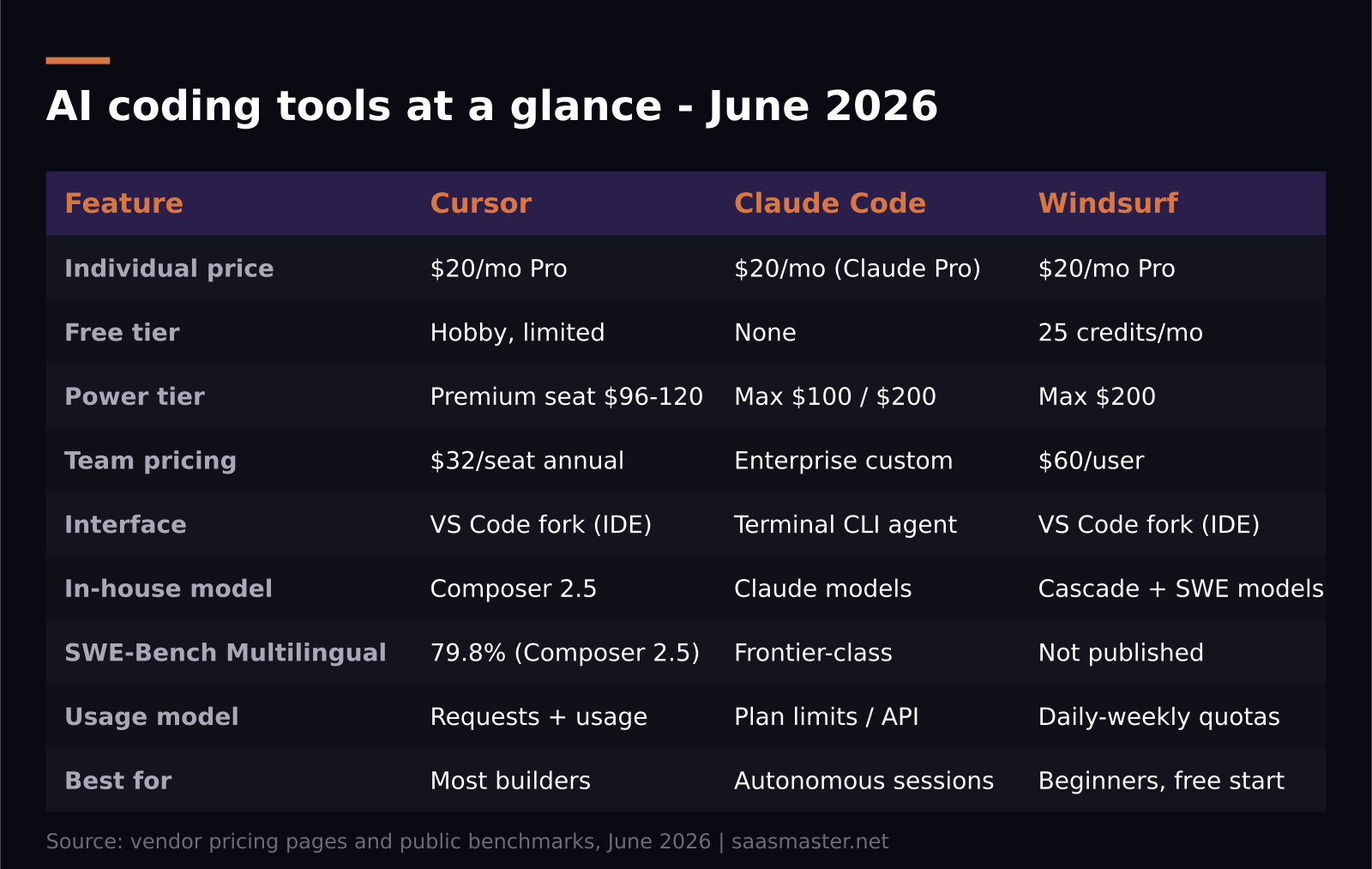
Below the line, Windsurf wins. Its free tier includes 25 credits a month, enough to evaluate the editor on real work. Cursor's free Hobby plan includes a limited number of agent requests, fine for a taste but not for a project. Claude Code has no free tier at all; the entry point is a Claude Pro subscription.
Above the line, it depends on how you work. Heavy agent users on Cursor can hit Pro limits and end up considering usage-based pricing or a Premium seat. Windsurf's Max tier at $200 covers extreme use with the quota system smoothing things out. Claude Code's Max plans at $100 and $200 a month are aimed at people running long autonomous sessions daily, and if that is your workflow, the Max plan is usually cheaper than paying Anthropic API rates directly, where a heavy month can run $100 to $200 on its own.
How good is Composer 2.5 in practice?
Benchmarks are a starting point, not a verdict, but Composer 2.5 changed how I use Cursor. Tasks I used to route to a slower frontier model, like multi-file refactors in a Next.js project, now complete noticeably faster with comparable quality. The economics matter too: at $0.50 in and $2.50 out per million tokens, Cursor can afford to let the agent run longer without the meter spinning visibly. There is also a faster variant priced at $3 per million input and $15 per million output that still undercuts the fast tiers of competing frontier models.
Where Composer 2.5 still trails, in my testing, is on gnarly debugging that requires long chains of reasoning across unfamiliar code. That is exactly where Claude Code tends to pull ahead.
When does Claude Code make more sense?
Claude Code is a different animal: a terminal-based agent rather than an editor. You describe the outcome, and it plans, edits files, runs tests, and iterates. For a non-developer this sounds intimidating, but in practice it can be the friendliest of the three because you spend less time staring at code and more time describing what you want.
Pick Claude Code if your work looks like delegation: "add Stripe billing to this app, write tests, and tell me what you changed." Long-horizon tasks, large refactors, and overnight runs are its home turf. The catch is cost visibility. On the $20 Pro plan you will hit limits quickly with daily agent work, and the jump to $100 Max is real money. It is also the least visual tool, which matters if you learn by watching diffs, although pairing it with any editor solves most of that.
What about Windsurf after the quota change?
Windsurf remains the most approachable of the three. The editor is a VS Code fork like Cursor, the Cascade agent is capable, and the quota system means a beginner cannot accidentally torch a month of usage in a day. The free tier is the best on offer, and $20 Pro is fair.
The honest downside is that Windsurf no longer has a price advantage, and its in-house models have not had a Composer 2.5 moment. At identical prices, Cursor's model advantage and bigger ecosystem make it the safer default for most individual developers. Windsurf's strongest cards now are the free tier, the predictable limits, and an enterprise offering at $60 per user that some teams prefer.
Which should a non-developer or vibe coder pick?
If you are building products with AI doing most of the typing, my recommendation is simple. Start with Windsurf's free tier to learn the workflow at zero cost. Move to Cursor Pro at $20 when you start building seriously, because Composer 2.5 gives you the most capability per dollar in an interface that shows you what is happening. Add Claude Code when your projects get big enough that you want to hand off entire features, especially if you already pay for Claude.
The tools have converged on price and diverged on philosophy: Cursor bets on its own fast model inside an editor, Claude Code bets on deep autonomous reasoning in a terminal, and Windsurf bets on accessibility and predictability. In 2026 that means there is no wrong answer at $20, only a wrong match for how you like to work.
Frequently asked questions
Is Claude Code free to use?
No. Claude Code has no free tier. It is included with a Claude Pro subscription at $20 a month, and heavy users typically need the Max plans at $100 or $200 a month, or pay-as-you-go API pricing.
Did Windsurf raise its prices in 2026?
Yes. In May 2026 Windsurf raised Pro from $15 to $20 a month and replaced its credit system with daily and weekly quotas. It also added a $200 Max tier for power users. The free tier with 25 monthly credits remains.
What is the cheapest way to try all three?
Use Windsurf's free tier and Cursor's free Hobby plan side by side on the same small project, then spend one month of Claude Pro at $20 to test Claude Code. Total cost: $20 for a fair three-way trial.
SaaS Master
Creator behind SaaS Master — tutorials, walkthroughs, reviews, and explainers that help SaaS, AI, and WordPress products get understood and chosen. Writing here about the tools, trends, and tactics that actually move the needle. Work with me →
Want your product explained this clearly — in video?
Tutorials, walkthroughs, reviews, and shorts for SaaS, AI, and WordPress products.
Work With SaaS Master