Video Marketing
YouTube AI Labels Are Automatic Now: A Creator Disclosure Guide for 2026
YouTube's AI disclosure labels stopped being optional in practice this spring: starting in May 2026, the platform rolled out detection signals that automatically apply an AI label to videos with significant photorealistic AI content, whether or not the creator disclosed it. At the same time, the label moved from the buried description area to prime real estate, directly below the player on long-form videos and as an on-screen overlay on Shorts. If you publish video in 2026 and touch AI anywhere in your pipeline, and almost everyone does, you need a disclosure workflow now, not a vague intention to be honest later.
Key takeaways
- Since May 2026, YouTube auto-applies an AI label when its systems detect significant photorealistic AI use, even if the creator never checked the disclosure box.
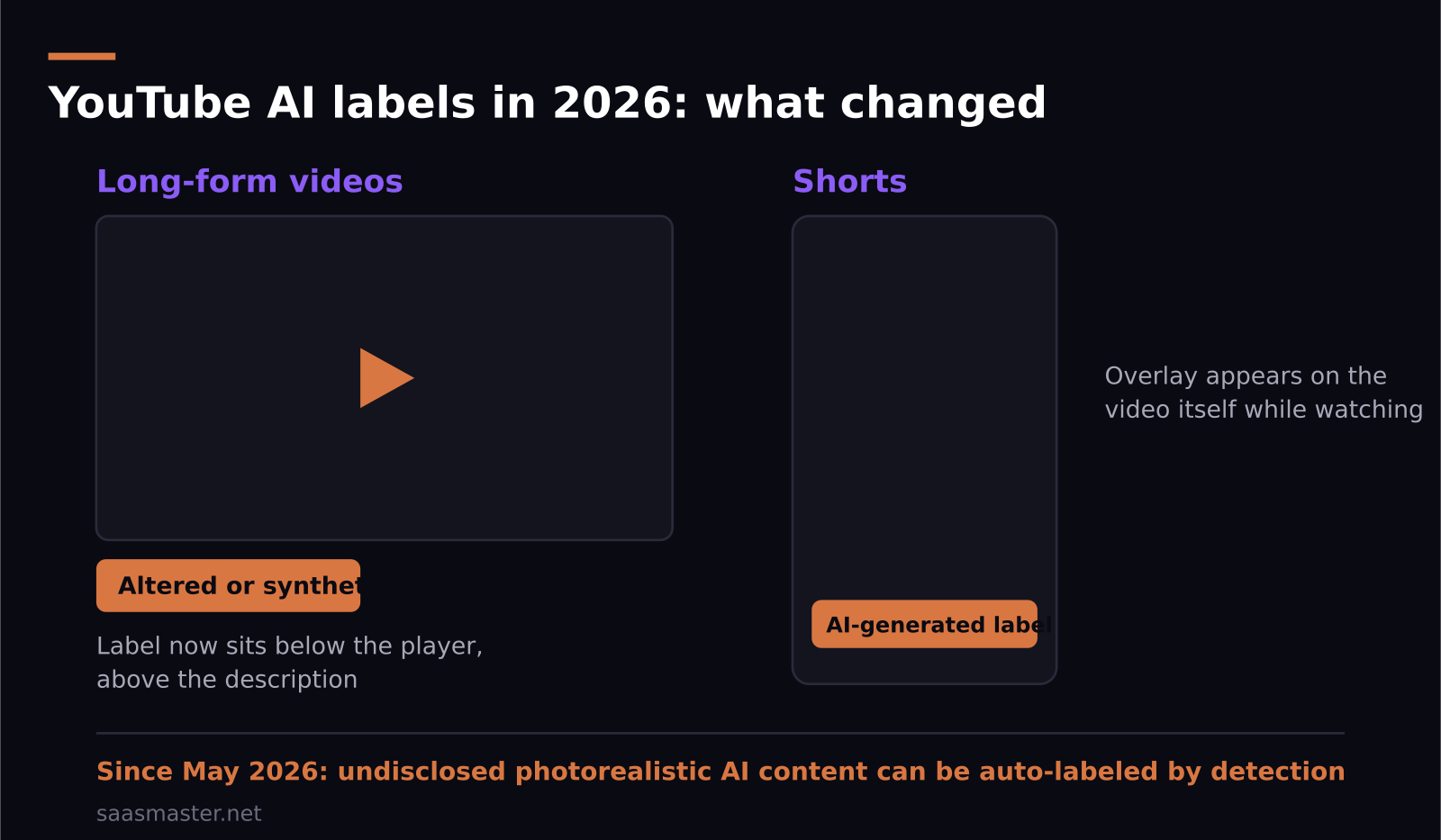
- Labels are now prominent: below the video player above the description on long-form, and as an overlay directly on Shorts.
- Disclosure targets photorealistic and meaningfully altered or synthetic content, not AI-assisted scripts, ideas, or routine editing.
- YouTube is simultaneously shipping its own AI creator tools, including the Inspiration Tab, an instrumental track generator for replacing copyrighted audio, and the Reimagine editing feature for Shorts.
- The 2026 creator update pairs these rules with broader shifts: diversified monetization, TV-style production recognition, and stronger kids-content safeguards.
What changed with YouTube's AI labels in 2026?
Two things, and the combination matters more than either alone. First, placement. The disclosure label used to live in the expanded description where, frankly, nobody saw it. Now it sits directly below the player on long-form videos and overlays the video itself on Shorts. Viewers cannot miss it, which means the label is no longer a formality; it is part of your packaging, as visible as your title.
Second, enforcement. YouTube announced in late May 2026 that it is using internal signals to identify AI-generated content on its own. If a creator does not disclose and the systems detect significant photorealistic AI use, the platform applies the label automatically. The honor system now has a backstop, and the worst position to be in is having YouTube label your video for you, because an auto-applied label looks like you tried to hide something.
What do you actually have to disclose?
The rule targets synthetic or meaningfully altered content that a viewer could mistake for reality: photorealistic AI faces and scenes, realistic AI voices presenting real events, altered footage of real people and places. That is the line, realism, not AI involvement in general.
What you do not need to label, based on YouTube's guidance: AI-assisted scripts and brainstorming, idea generation, captions, color correction, beauty filters, and clearly stylized or animated AI content that no reasonable viewer would take as real footage. The Inspiration Tab suggesting your title does not make your video synthetic media.
For a software content channel like mine, the practical examples look like this. An AI-cloned voice reading my tutorial narration: I disclose it, because a realistic human voice is exactly what the rule covers. AI-generated b-roll that looks like real office footage: disclose. A clearly synthetic diagram, animation, or stylized intro: no label needed. When a case sits in the gray zone, I disclose anyway, because the downside of an unnecessary label is small and the downside of an auto-applied one is not.
Will an AI label hurt your views?
Nobody outside YouTube has clean data on this yet, so be skeptical of anyone quoting a precise penalty. My experience and my expectation: the label itself does less damage than creators fear, and far less than getting caught without one. Viewers in 2026 have seen thousands of labeled videos; the label reads as paperwork, not scandal.
What does hurt is mismatch. If your video presents itself as authentic personal footage and carries a synthetic-media label, viewers feel deceived and the comments will say so. If your video is openly a product walkthrough with AI narration, the label confirms what the video already signals and nothing bad happens. The strategy is alignment: make the content's relationship with AI legible in the video itself, and the label becomes redundant rather than damning.
Which AI tools is YouTube itself giving creators?
While tightening disclosure, YouTube keeps shipping generation features, which tells you the platform's position: AI use is encouraged, hiding it is not. Three tools worth knowing in 2026. The Inspiration Tab in YouTube Studio generates video ideas, titles, and thumbnail suggestions from your channel's data; I treat its output as a brainstorming partner rather than an oracle, but it is decent at surfacing topics your audience already wants. The instrumental track generator creates music to replace copyrighted audio, which quietly solves one of the most common Shorts headaches. And Reimagine, the AI editing feature for Shorts, handles generative edits inside the app.
Note that using YouTube's own generative tools does not exempt you from labels; if the output is photorealistic synthetic content, the same disclosure rules apply regardless of whose AI made it.
How should creators set up a disclosure workflow?
Make it boring and systematic. Mine looks like this and takes under a minute per video. At upload, I run through three questions: does this video contain a realistic AI voice, photorealistic generated or altered visuals, or synthetic depictions of real people, places, or events? If any answer is yes, I check the disclosure box, full stop. I also keep one line in my production notes per video listing which AI tools touched it, so the answer is never from memory.
Then go one step further than the checkbox: say it in the video when it matters. A half-sentence, the narration in this section is AI-generated, costs nothing and builds the kind of trust that labels cannot. Disclosure handled well is not a confession; it is a production credit.
It is also worth syncing your disclosure habits across platforms, because YouTube is not acting alone. If you repurpose the same video for TikTok, Instagram, or a client's site, the cheapest approach is to hold every export to YouTube's standard, since it is currently the strictest of the major platforms and the one with automated detection in production. One disclosure decision at the project level, applied everywhere, beats re-litigating the question per platform. It also future-proofs your back catalog: detection systems only get better, and videos published quietly in 2026 will still be scannable in 2028.
The bigger 2026 update wraps these rules in a friendlier package than the headlines suggest: monetization is diversifying beyond ads, TV-style productions get better recognition, and kids-content safeguards tightened. The platform is not anti-AI; it is anti-ambiguity. Creators who internalize that distinction early will spend zero time fighting labels and all their time making videos.
Frequently asked questions
Do I have to label a video if AI only wrote the script?
No. AI-assisted scripts, brainstorming, captions, and routine editing do not require disclosure. The rules target photorealistic or meaningfully synthetic content a viewer could mistake for real footage or real voices.
What happens if I do not disclose AI content on YouTube?
Since May 2026, YouTube's detection systems can apply the label automatically when they find significant photorealistic AI use. Repeat or deceptive cases risk further policy action, and an auto-applied label is more damaging to viewer trust than a voluntary one.
Where does the AI label appear in 2026?
On long-form videos it appears directly below the player, above the description. On Shorts it appears as an overlay on the video itself while you watch.
SaaS Master
Creator behind SaaS Master — tutorials, walkthroughs, reviews, and explainers that help SaaS, AI, and WordPress products get understood and chosen. Writing here about the tools, trends, and tactics that actually move the needle. Work with me →
Want your product explained this clearly — in video?
Tutorials, walkthroughs, reviews, and shorts for SaaS, AI, and WordPress products.
Work With SaaS Master