WordPress
Elementor AI vs Rank Math AI vs AI Engine: Which WordPress AI Plugin Is Worth Paying For?
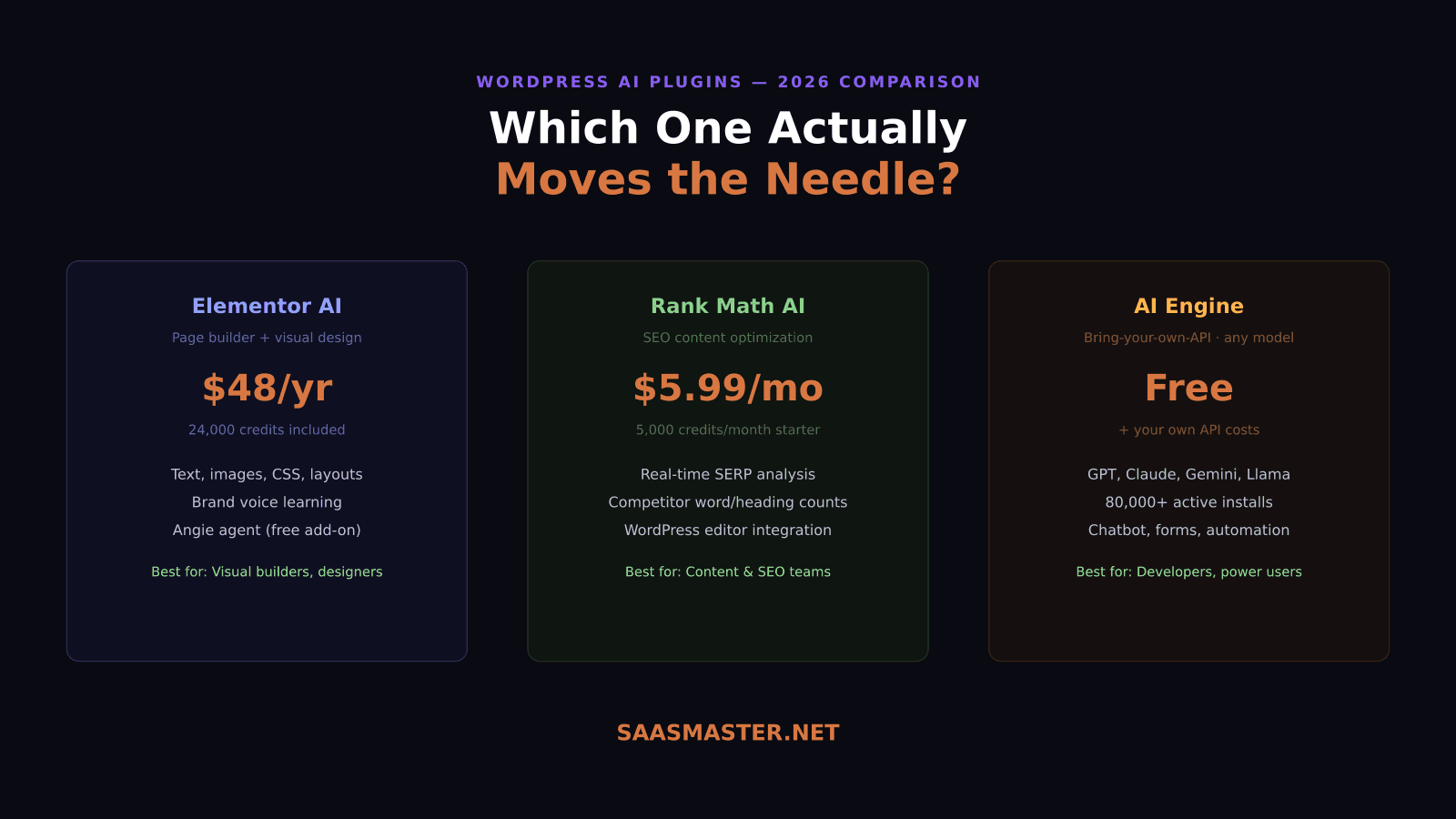
Three WordPress AI plugins. Three completely different jobs. Elementor AI generates your page layouts and images. Rank Math AI tells you exactly what to write to rank on Google. AI Engine connects your site to whatever language model you want. If you are trying to choose between them, you are probably asking the wrong question — but let's break down what each actually does and when each is worth the money.
Key takeaways
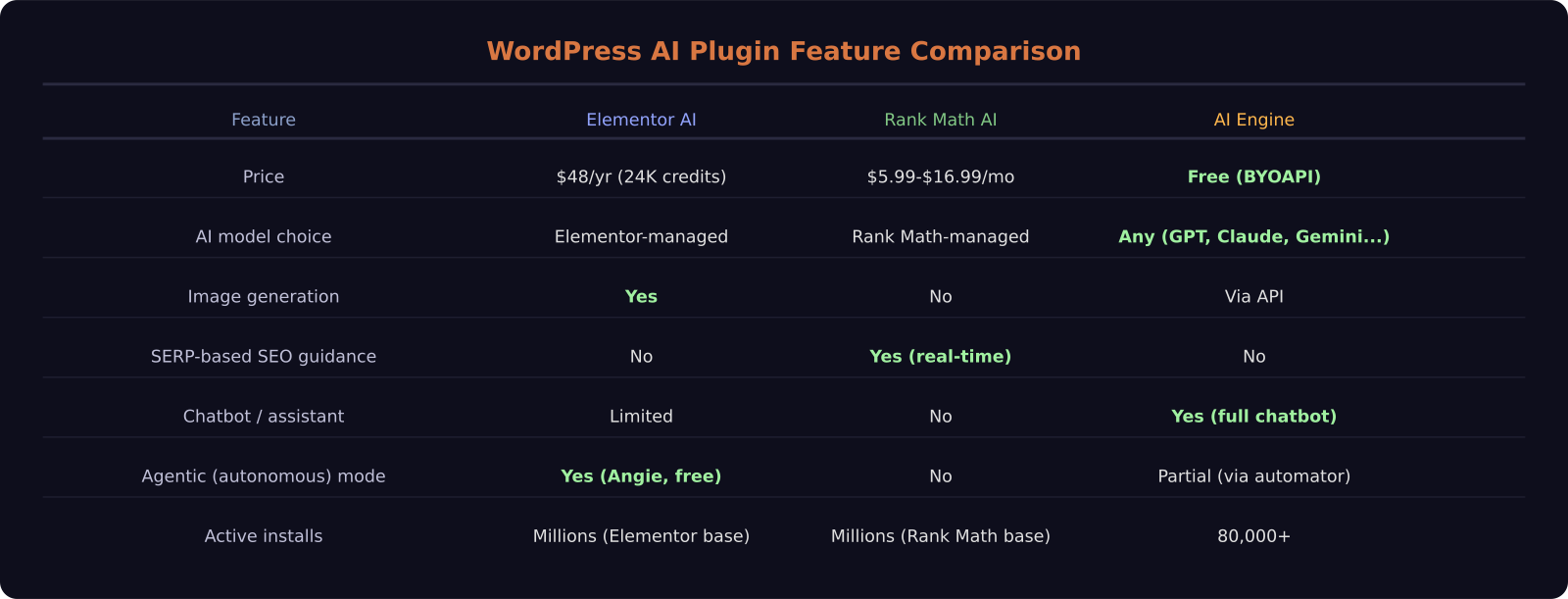
- Elementor AI ($48/year) handles visual design, image generation, and now includes Angie, a free autonomous AI agent that writes and deploys WordPress code
- Rank Math Content AI ($5.99-$16.99/month) does one thing better than anything else: real-time SERP analysis that tells you exactly what competitors are doing to rank
- AI Engine is free but requires your own API keys — 80,000+ active installs make it the most widely used AI plugin in the WordPress ecosystem
- These tools do not compete with each other — they serve entirely different workflows
- The most powerful setup in 2026 combines all three
Elementor AI: the visual creator's choice
Elementor AI is built into the Elementor page builder, which means it has context your content editor does not — it knows the layout, the section, the brand colors, and the components you are working with. When you ask it to generate a hero section, it does not just write words: it generates a full container with layout, text, and image together.
The credit system works like this: $48 per year gets you 24,000 credits. One text generation costs 1 credit. Generating an image costs 33 credits. Generating a full container layout costs 40 credits. For a small agency doing client sites, that math works out comfortably. For a high-volume content operation generating AI images for every post, you will burn through credits faster.
The AI Context feature is the part I find genuinely useful — it reads your site and learns your brand's tone of voice. Once it has that context, generated content does not sound generic. It sounds like your brand, which is the part that usually requires significant editing after AI generation.
The Angie agent deserves its own mention: it is free, it runs inside the WordPress dashboard, and it uses Model Context Protocol to read your site's data. You describe a widget or a custom Elementor component, and Angie writes and deploys production-ready code to a sandboxed test environment. You review it, then push it live. For non-developers who want custom WordPress functionality without hiring a developer, this is a significant capability shift. More on Angie in a moment.
Rank Math Content AI: for content that actually ranks
Rank Math Content AI does not try to be a general AI assistant. It does one thing: it analyzes the current search results for your target keyword, pulls data on the top-ranking pages, and tells you exactly what you need to write to compete. Word count, heading count, image count, key terms — all sourced from live SERP analysis, not from the model's training data.
The reason this matters is that Google's ranking signals are temporal. What worked six months ago may not work today. A model trained on historical data cannot tell you what the current top-ranked pages are doing. Rank Math pulls live data every time you use it, so the guidance reflects the actual competition right now.
Pricing: $5.99 per month for 5,000 credits, $16.99 per month for 30,000 credits. The monthly subscription is separate from the main Rank Math plugin, which has its own pricing tier. If organic traffic is your primary acquisition channel and you publish regularly, this tool pays for itself quickly — one well-ranked post from better-optimized content covers the monthly cost.
The limitation is scope. Rank Math Content AI is for content optimization. It will not generate images, it will not build your layout, and it does not connect to external APIs. If you need AI assistance beyond content writing and SEO optimization, you need a different tool in your stack.
AI Engine: maximum flexibility, minimum handholding
AI Engine is the most popular AI plugin in the WordPress ecosystem by active install count — over 80,000 sites run it. It is also the most flexible: you bring your own API keys for OpenAI, Anthropic, Google, or open-source models, and AI Engine gives you a WordPress interface to use them.
What does that unlock? A full chatbot you can embed anywhere on your site. AI-powered forms. Content generation in the WordPress editor. Automated workflows triggered by site events. Because you control the API key, you can swap models without changing plugins. Want to test DeepSeek V4 Flash at $0.14 per million tokens instead of GPT-4? You swap the key and you are done.
The free plugin handles core functionality. Premium versions add features like custom AI assistants per page and advanced analytics. The real cost is your API usage — which can range from nearly zero for a low-traffic site to significant for a chatbot fielding thousands of conversations per month. The upside is that you are not paying for credits you do not use, and you can route expensive queries to cheaper models.
AI Engine requires more setup than the others. You need API keys, you need to configure the models, and you need to think about cost controls. For developers and technically comfortable site owners, it is the strongest choice. For non-technical users who want something that just works, Elementor AI or Rank Math Content AI are easier starting points.
Can you use all three at once?
Yes, and that is actually the strongest setup for a content-driven WordPress site in 2026. AI Engine handles the chatbot and any custom AI features. Rank Math Content AI guides every piece of content you publish toward better rankings. Elementor AI handles visual design and layout when you need it. Angie — free through Elementor — handles custom development tasks when they arise.
The total cost for all three at entry tier: $48/year for Elementor AI, $71.88/year for Rank Math Content AI at the starter plan, and free for AI Engine. That is under $120 per year in plugin subscriptions, plus your API usage costs.
The creator perspective
I run a WordPress site and have tested all three. Rank Math Content AI changed how I approach any new post — I do not start writing until I know what the current top-ranking content looks like for my keyword. Elementor AI saves time on visual layout. AI Engine is on the site primarily to power the support chatbot. None of them do the other's job well, which is why I use all three rather than treating this as a competition.
Frequently asked questions
Is Elementor AI worth the money in 2026?
Yes, if you build pages with Elementor. The $48/year for 24,000 credits covers a reasonable amount of content and image generation. The Angie autonomous agent — which is free on top of the base subscription — adds significant value for anyone who needs custom WordPress functionality without developer costs.
Does Rank Math AI help with SEO?
Rank Math Content AI is specifically designed for SEO content optimization. It does live SERP analysis to show you exactly what top-ranking pages are doing — word count, headings, key terms, image count — so you can write content that matches what Google is currently rewarding for your target keyword.
What models does AI Engine support?
AI Engine supports any model you have API access to, including OpenAI (GPT-5.5, GPT-4.1), Anthropic (Claude), Google (Gemini), and open-source models. You provide your own API keys, which means you control costs and can swap models at any time.
Was this article helpful?
SaaS Master
Creator behind SaaS Master — tutorials, walkthroughs, reviews, and explainers that help SaaS, AI, and WordPress products get understood and chosen. Writing here about the tools, trends, and tactics that actually move the needle. Work with me →
Want your product explained this clearly — in video?
Tutorials, walkthroughs, reviews, and shorts for SaaS, AI, and WordPress products.
Work With SaaS Master