Mureka AI Music Review 2026: How to Generate Full Songs from a Prompt
In short
Mureka AI review 2026: pricing, features, how the V7.5 and O1 models work, and how it compares to Suno and Udio for creators.
Mureka lets you type a sentence and get back a complete song — vocals, instruments, arrangement, and master — ready for commercial use. After testing the platform extensively in 2026, I can confirm it is one of the few AI music tools that actually sounds like music rather than a royalty-free stock loop, and its custom model training feature puts it in a category of its own for creators who want a distinct sound.
Key takeaways
- Mureka is built by Skywork AI (subsidiary of Kunlun Tech, SZSE:300418) and has nearly 10 million users as of mid-2026.
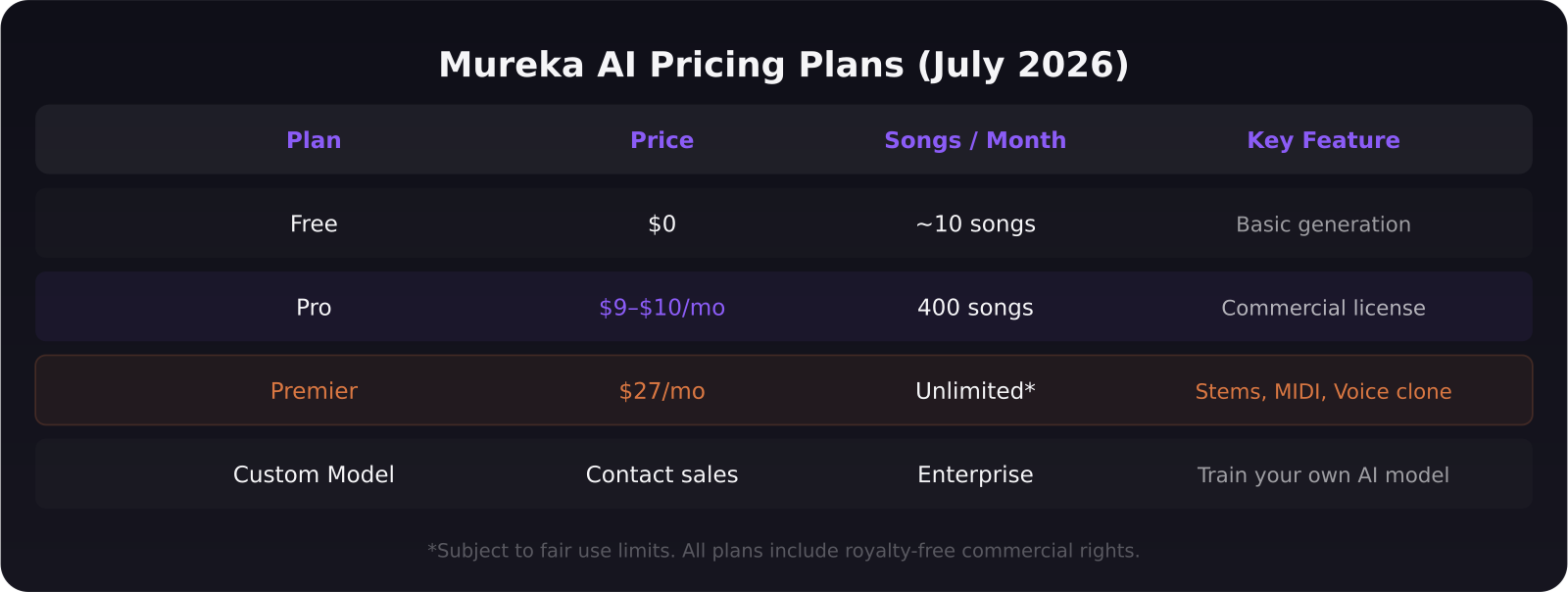
- The free tier generates roughly 10 songs per month. Pro ($9–$10/month) gets you 400. Premier ($27/month) adds WAV stems, MIDI export, and voice cloning.
- Every Mureka output comes with royalty-free commercial rights — you can use songs in YouTube videos, ads, and client work without licensing fees.
- The V7.5 and O1 models support 200+ music styles and 10+ vocal languages.
- No other major AI music platform currently offers custom model training for individuals at this price point.
[[video:bWdnpCbldtI]]
What is Mureka and who built it?
Mureka is an AI music generation platform that converts text prompts, lyrics, or melody ideas into fully produced songs. It was built by Skywork AI, a subsidiary of Kunlun Tech — a Chinese tech company publicly listed on the Shenzhen Stock Exchange. The platform launched its consumer product in 2024 and has iterated rapidly since, with the V7.5 model (released July 2025) and the latest O1 model driving what most users experience today.
The closest competitors are Suno and Udio, but Mureka differentiates on two points: stem export at the Premier tier and custom model training for power users. If you want to upload your own reference tracks and train Mureka to generate music that sounds like a specific artist or brand, that is a feature no other mainstream AI music tool offers at this price.
How does Mureka generate music?
Mureka uses two modes. Easy Mode is the fastest path: you type one sentence — "upbeat pop track for a product launch video, female vocal" — and the platform generates a complete song in under 90 seconds. Custom Mode adds controls for lyrics (your own or AI-generated), genre, vocal gender, language, BPM, and instrumentation. Both modes produce full tracks with vocals, melody, bass, drums, and mixing applied.
The platform supports over 200 music styles: hip-hop, lo-fi, cinematic, acoustic folk, jazz, EDM, and dozens of regional subgenres. Vocal quality has improved significantly with the O1 model — less robotic, more nuanced emotional expression. In testing, slower ballads and acoustic genres sound the most convincing. Heavy electronic and orchestral pieces are good but occasionally clip in the low end.
What does Mureka cost in 2026?
The free tier gives you enough credits to generate roughly 10 songs per month, which is enough to evaluate the platform but not enough for regular creative use. Pro at $9–$10 per month unlocks 400 songs and a commercial license, which covers most independent creators and small agencies. Premier at $27 per month is where the platform gets serious: WAV downloads with full stems (vocals, drums, bass, melody, synths as separate files), MIDI export, Studio mode for advanced editing, and voice cloning to generate tracks in a specific vocalist's style.
Custom model training is priced separately and involves contacting Skywork AI's enterprise team. This feature allows you to train Mureka on 10–50 of your own reference tracks and generate music that matches a consistent brand signature — useful for podcast networks, marketing agencies, or artists building a unique AI-assisted catalog.
What makes Mureka different from Suno and Udio?
All three tools generate songs from text prompts and all three have improved audio quality significantly over the past year. The differences come down to workflow and output control. Suno remains the most accessible: the interface is simple, generation is fast, and the free tier is generous. Udio has strong genre diversity, particularly in hip-hop and electronic styles, and offers clean stem separation on paid tiers.
Mureka's advantages: custom model training (unique to the platform), higher stem quality on Premier, MIDI export for musicians who want to pull arrangements into a DAW, and multi-language vocal support across 10+ languages. If you work with international clients or create for non-English markets, Mureka is the clear choice among the three.
Mureka's disadvantages: the interface is denser than Suno, the free tier song count is lower, and voice cloning requires the Premier tier where Udio offers it at a lower price point.
Can you use Mureka music commercially?
Yes. All plans including the free tier include royalty-free commercial usage rights. You can place Mureka music in client videos, ads, YouTube content, podcasts, and streaming platforms without paying additional licensing fees. The one exception to verify independently is sync licensing for film and television — Mureka's terms cover most commercial contexts, but large-scale broadcast deals warrant a direct check with the platform.
This is the critical difference from traditional stock music libraries, where per-use fees accumulate quickly. For AI tool video production — product demos, walkthroughs, explainer videos — having a library of custom-generated, commercially licensed tracks is genuinely valuable.
Who should use Mureka?
Mureka is best suited for video content creators who need a high volume of unique background music, marketing agencies producing social and ad content for multiple clients, podcasters who want branded intro and outro tracks, and developers or SaaS teams building in-app audio features. Mureka is less ideal for artists who want to claim full artistic authorship of their music — the AI does the composition and production, and that comes with attribution questions depending on your platform and audience.
For SaaS companies creating software walkthrough videos, a Pro subscription at $10/month gives you unlimited custom background tracks that match your brand tone — with zero licensing exposure.
Frequently asked questions
Is Mureka music truly royalty-free for commercial use?
Yes, according to Mureka's terms as of July 2026, all generated music carries a commercial license across all tiers. This covers ads, YouTube, podcasts, and client deliverables. Sync licensing for broadcast television should be verified directly with Mureka for large-scale deals.
How does Mureka's custom model training work?
You upload 10–50 reference tracks that represent the style you want to capture, and Skywork AI trains a private model on that data. The model is then available in your account for generation. This feature requires an enterprise agreement and is not part of standard consumer plans.
How does Mureka compare to Suno in 2026?
Suno is easier to use and has a more generous free tier. Mureka beats Suno on stem export, MIDI output, custom model training, and multi-language vocals. For quick social content, Suno is faster. For professional production workflows that need editable audio, Mureka is the stronger tool.
Was this article helpful?
Jorge Aguilar
Founder & Creator, SaaS Master
Producing SaaS and AI product videos since 2019 — 800+ videos for 200+ brands, covering tutorials, demos, walkthroughs, and explainers. Writing here about the tools, trends, and tactics that actually move the needle. LinkedIn · About · Work with me
Building an AI product that needs a clearer onboarding flow?
Client-owned videos that make your product easy to understand — demos, walkthroughs, onboarding, and explainers.
Explore AI product video production