WordPress
CVE-2026-8181: Critical Burst Statistics Flaw Lets Attackers Take Over WordPress Admin Accounts
In short
CVE-2026-8181 lets attackers hijack WordPress admin accounts through Burst Statistics with one request. Patch to version 3.4.2 now, 200,000 sites affected.

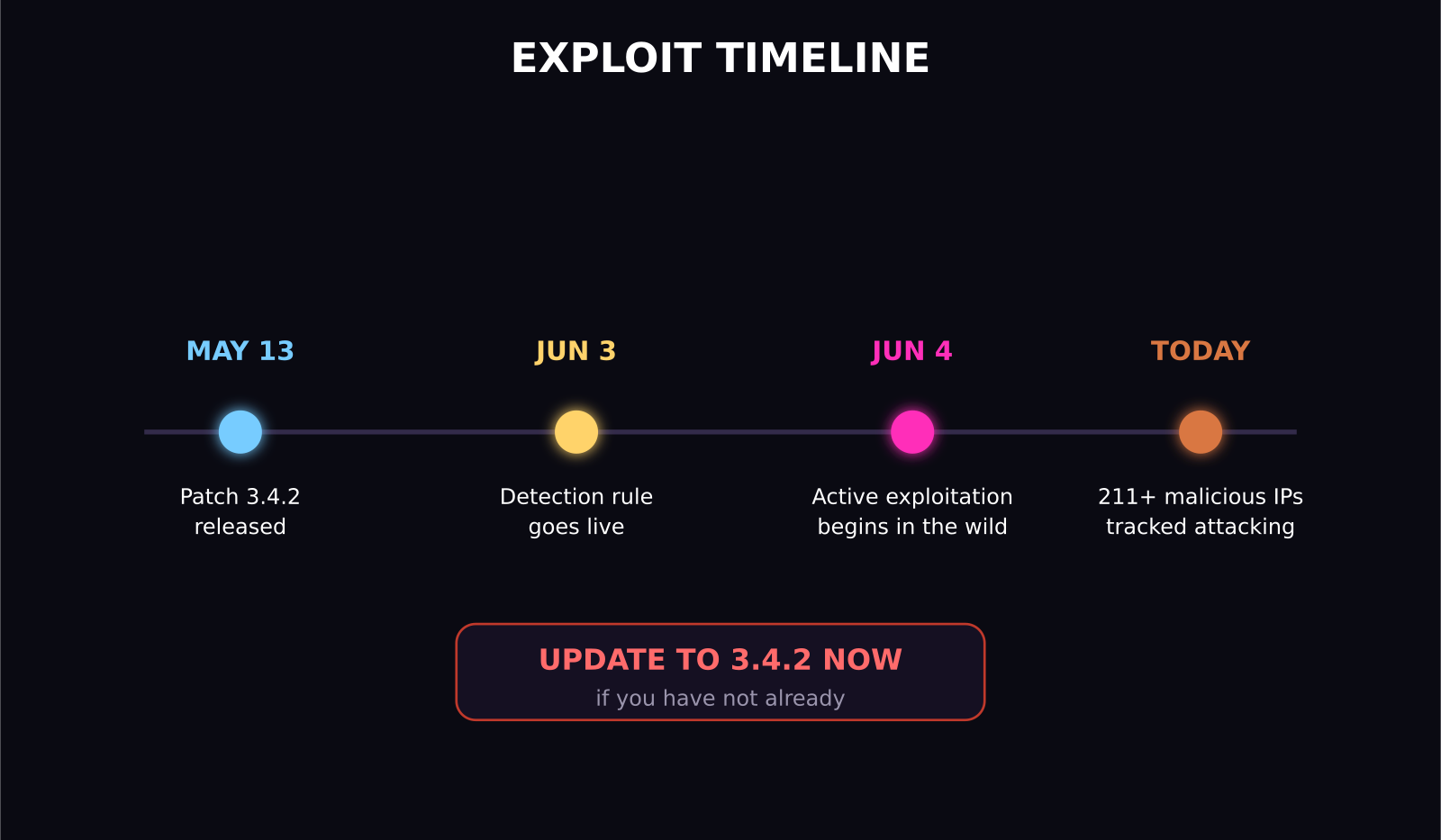
A critical flaw in the Burst Statistics WordPress plugin, tracked as CVE-2026-8181 with a CVSS score of 9.8, lets an attacker who just knows your admin username take over your site with a single HTTP request, no password needed. It affects Burst Statistics versions 3.4.0 through 3.4.1.1, roughly 200,000 active installs, and it has been under active exploitation since June 4, 2026. The fix has existed since May 13, 2026: update to version 3.4.2 or later today if you have not already.
Key takeaways
- CVE-2026-8181 is a critical authentication bypass in Burst Statistics, CVSS 9.8, affecting versions 3.4.0 to 3.4.1.1.
- An unauthenticated attacker who knows any admin username can obtain a valid Application Password and fully impersonate that account.
- Roughly 200,000 WordPress sites were running vulnerable versions when the flaw was disclosed.
- The fix shipped in version 3.4.2 on May 13, 2026; active exploitation in the wild began June 4, 2026.
- This sits inside a bigger 2026 pattern: a separate supply chain attack backdoored 30-plus purchased plugins, and mu-plugins are being used as a stealth persistence mechanism across multiple campaigns.
- Patch first, then audit for rogue admin accounts and unfamiliar files in wp-content/mu-plugins, since backdoors from earlier incidents can persist even after the original vulnerability is patched.
What exactly is broken in Burst Statistics?
The bug lives in a function called is_mainwp_authenticated, which is supposed to validate WordPress application passwords sent in an Authorization header. The function calls WordPress's own wp_authenticate_application_password, but it only checks whether that call returned a WP_Error. It never confirms the result was an actual, valid WP_User object. Under a specific condition, when WordPress's internal application_password_is_api_request filter returns false, WordPress hands back null instead of a WP_Error. Burst Statistics treats that null as "not an error," which the flawed logic reads as a pass.
The practical result: an attacker who knows any administrator's username, which is often just the site's public author name or a guessed common name like admin, can send a single request with a random, made-up password and be treated as that authenticated admin for the duration of the request. No password guessing, brute forcing, or phishing required.
How bad is this, actually?
Bad enough to earn the maximum-severity CVSS 9.8 rating. Once impersonated as an admin, an attacker can install backdoors, create new rogue administrator accounts for persistent access, exfiltrate database contents, or rewrite site content, including injecting hidden spam or malicious redirects. Security researchers tracking this vulnerability have logged 211 distinct malicious IP addresses actively attempting exploitation since a detection rule went live on June 3, 2026, with real-world attacks beginning the following day.
Is my site affected, and how do I fix it?
You are affected if you are running Burst Statistics, the privacy-friendly analytics plugin, at version 3.4.0, 3.4.1, or 3.4.1.1. Check your installed version from Plugins in wp-admin, or in the plugin's readme file.
The fix is straightforward:
- Update Burst Statistics to version 3.4.2 or later immediately. This is the complete, official fix; there is no acceptable workaround that lets you safely stay on an older version.
- After updating, review your list of administrator accounts for any you do not recognize. If exploitation happened before you patched, a rogue admin account is the most common calling card.
- Check wp-content/mu-plugins for any files you did not put there. Must-use plugins execute automatically on every page load and do not show up in your normal Plugins list, which makes this directory a favorite hiding spot for backdoors planted during a compromise.
- Rotate your WordPress application passwords and any API keys stored in the site after confirming you are on a patched version.
Why does this keep happening with WordPress plugins?
This vulnerability is not an isolated incident. In 2026, plugins have accounted for roughly 91 percent of new WordPress-ecosystem vulnerabilities, with themes at 9 percent and WordPress core itself contributing only a handful of low-priority issues. Security researchers have separately tracked over 64,000 total known vulnerabilities across the WordPress plugin and theme ecosystem this year.
The Burst Statistics bug is a coding flaw, but 2026 has also seen a more deliberate style of attack: earlier this year, an attacker purchased more than 30 established WordPress plugins, with a combined 400,000-plus installs, through the marketplace Flippa, then quietly inserted a PHP deserialization backdoor. That backdoor sat dormant for roughly eight months before activating in April 2026 to inject cloaked SEO spam that was only visible to search engine crawlers, not to site owners checking their own pages. A related campaign compromised Smart Slider 3 Pro through its own update server, reportedly affecting over 800,000 active installations.
The common thread across both the coding bug and the deliberate supply chain attacks: attackers are increasingly targeting the plugin layer specifically because it sits outside WordPress core's own security review process, and because must-use plugins and update channels are trusted by default in ways that make backdoors easy to hide.
What should WordPress site owners do this week?
Beyond patching Burst Statistics specifically if you run it, treat this as a prompt to do a broader plugin security pass:
- Audit every active plugin against its changelog for any critical security releases in the last 90 days that you may have missed.
- Turn on automatic updates for plugins where you trust the developer's release process, at minimum for security patches.
- Manually inspect wp-content/mu-plugins on every site you manage; this directory should almost never have unexpected content, and anything unfamiliar deserves investigation before assuming it is benign.
- Consider a reputable WordPress firewall or malware scanning service if you are managing sites for clients, since detection speed matters more than most site owners assume, given exploitation here started within 24 hours of a public detection rule.
What should agencies managing multiple client sites do differently?
If you manage WordPress sites for clients rather than just your own, a single-site patch mindset is not enough here, since the same vulnerable plugin is often installed across a whole portfolio of client sites through shared templates or a common starter build.
- Run a portfolio-wide plugin version audit rather than checking sites one at a time, so a single critical CVE like this one does not sit unpatched on a handful of sites you simply have not gotten to yet.
- Standardize on a security monitoring tool that alerts you to newly disclosed critical-severity CVEs across every plugin your client sites actually run, rather than relying on manually reading changelogs.
- Document a rapid-patch SLA with clients in advance, specifically for critical-severity vulnerabilities like this one, so there is no ambiguity about who is responsible for applying an emergency update within hours rather than during a routine monthly maintenance window.
- After any critical patch, keep a habit of checking wp-content/mu-plugins and the full admin user list across every site in the portfolio, not just the one that prompted the audit, since compromised credentials or backdoors from unrelated incidents can sit undetected for months.
Why this keeps recurring in the WordPress ecosystem
The scale of the numbers here is worth sitting with: over 64,000 tracked vulnerabilities across the WordPress plugin and theme ecosystem, a record 48,185 CVE disclosures in 2026 alone, a 20.6 percent jump over 2024's total. That growth rate is not simply because more vulnerabilities are being introduced. Security research and disclosure tooling has also gotten faster and more thorough, meaning a larger share of long-existing bugs are being found and reported now. Either way, the practical lesson for anyone running WordPress in 2026 is the same: plugin security cannot be a one-time setup task. It needs to be a recurring, ideally automated, part of how you operate a site, the same way you would treat backups or SSL renewal.
Frequently asked questions
What is CVE-2026-8181?
CVE-2026-8181 is a critical authentication bypass vulnerability, CVSS 9.8, in the Burst Statistics WordPress plugin, versions 3.4.0 through 3.4.1.1. It lets an unauthenticated attacker who knows an admin username fully impersonate that account with a single request.
How do I know if my WordPress site was compromised?
Check for administrator accounts you do not recognize, unfamiliar files in wp-content/mu-plugins, and unexpected content changes or redirects, especially ones that only appear to search engine crawlers rather than regular visitors. If you find any of these after running an affected version, treat the site as compromised and rotate all credentials and API keys.
Is updating to Burst Statistics 3.4.2 enough to fix this?
Yes, version 3.4.2, released May 13, 2026, fully resolves the authentication bypass. Updating is the complete fix. However, if your site was already compromised before you updated, you still need to separately check for and remove any backdoors, rogue admin accounts, or malicious files an attacker may have planted.
Was this article helpful?
SaaS Master
Creator behind SaaS Master — tutorials, walkthroughs, reviews, and explainers that help SaaS, AI, and WordPress products get understood and chosen. Writing here about the tools, trends, and tactics that actually move the needle. Work with me →
Want your product explained this clearly — in video?
Tutorials, walkthroughs, reviews, and shorts for SaaS, AI, and WordPress products.
Work With SaaS Master