Video Marketing
Best AI Video Repurposing Tools in 2026: Turn One Long Video Into a Month of Shorts
If you make long videos and want more out of each one, the fastest win in 2026 is a repurposing stack: Opus Clip or Vizard to carve Shorts out of long-form, Descript to edit by editing the transcript, and CapCut to finish clips for free. You do not need an all-in-one platform — you need two or three tools that each do one job well. Here is the stack I actually reach for and who each tool fits.
I produce tutorials and walkthroughs for software companies, which means every project starts as a long video and needs to become a dozen short ones. Repurposing is not a nice-to-have for me; it is how one shoot turns into a month of posts. These are the tools earning their place this year.
Key takeaways
- Opus Clip is the go-to for pulling viral-ready Shorts from long videos; its ClipAnything feature finds moments from a plain-language description. Free tier, Pro from about $19/month.
- Vizard is the strongest pure repurposing tool — turn one webinar or two-hour podcast into publish-ready Shorts and a full social campaign.
- Descript lets you edit video by editing text, which is the single biggest time-saver for talking-head and tutorial creators.
- CapCut is the budget finisher: free for most features, with auto-highlight that cuts short clips automatically.
- A curated stack of single-purpose tools beats one all-in-one platform for quality and control.
Which tool is best for turning long videos into Shorts?
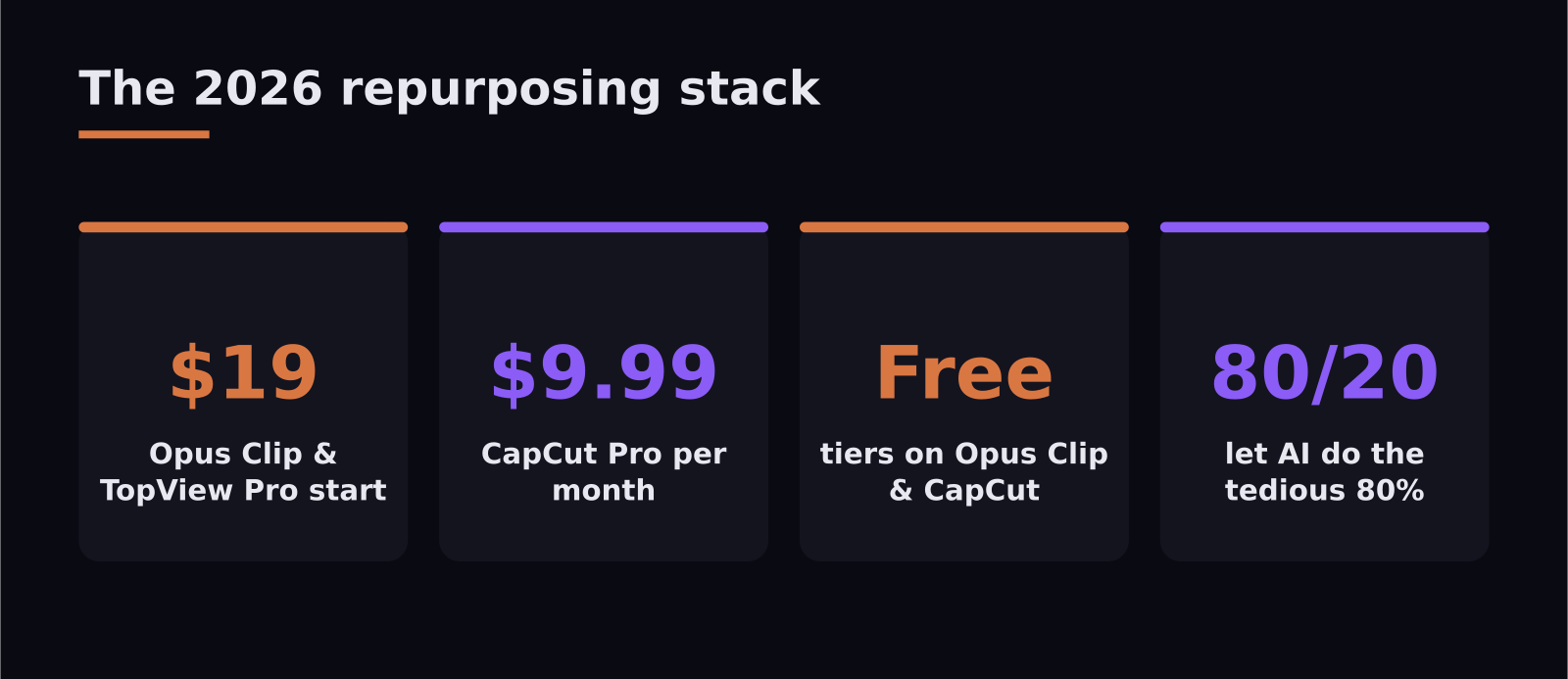
Opus Clip is the one most creators land on, and for good reason. Its ClipAnything feature lets you describe a moment — "the part where I explain pricing" — and it finds it, auto-frames it vertically, adds captions, and even scores each clip for viral potential. For a tutorial creator, that means a 30-minute walkthrough becomes a handful of focused Shorts in minutes instead of an afternoon. There is a free tier, and Pro plans start around $19/month.
Vizard is the other heavyweight here, and I lean on it when the source is long and dense — a webinar, a recorded demo, a podcast. It is built specifically to turn long-form into short-form that is genuinely ready to publish, not just roughly cut. A two-hour episode becomes a set of high-retention clips, and one webinar can seed an entire social campaign. If repurposing is the main job, Vizard is the most purpose-built choice.
What about editing the long video itself?
This is where Descript changes how you work. Instead of scrubbing a timeline, you edit a transcript — delete a sentence in the text and it disappears from the video, filler words and all. For anyone who talks to camera, records tutorials, or posts podcasts to YouTube, it removes the most tedious part of the job: cutting your own pauses and "ums." It is not the tool for heavy motion graphics, but for talking-head and explainer content it is the fastest path from raw recording to clean cut.
VEED.IO deserves a mention alongside it as a browser-based editor that blends traditional editing with AI subtitles, voice dubbing, and an AI clip generator that flags key moments. If you want one tool that handles both the long edit and basic repurposing without installing anything, it is a reasonable single-window option.
Is there a good free option?
CapCut is the answer for creators watching their budget. It started as a mobile short-form editor, but the desktop version now has legitimate AI features for repurposing long YouTube content into Shorts, Reels, and TikToks. Its auto-highlight feature identifies the most engaging moments and cuts a set of short clips for you. Most features are free; CapCut Pro at about $9.99/month removes watermarks and unlocks higher-quality exports.
For end-to-end production from a single prompt or URL — scripting, AI voiceover, avatar presenters, B-roll, and automatic repurposing — TopView AI bundles the whole pipeline, with paid plans from around $19/month. It is worth knowing about, though I find the curated-stack approach produces work that looks less templated.
The honest take from a creator
The temptation in 2026 is to buy one platform that promises to do everything. In practice the all-in-one tools tend to produce competent-but-generic output, and viewers can feel it. The clips that perform are the ones where a human made the judgment calls — which moment matters, where the joke lands, what to cut. Use AI to do the tedious 80%: finding clips, generating captions, cutting filler. Keep the taste-driven 20% for yourself. That hybrid is what makes repurposing scale without making your content feel mass-produced.
A simple workflow that actually works
Here is the pipeline I run, and it is repeatable enough that you can copy it. Start by recording or exporting your long video as usual. Drop it into Descript first to clean up the talking — cut filler words, tighten pauses, fix the obvious stumbles by editing the transcript. That gives you a clean master.
Next, send that master to Opus Clip or Vizard and let it identify the moments worth clipping. Review the suggestions — this is the human step — and keep the three or four that genuinely stand on their own. A clip that needs the surrounding context to make sense will not perform, no matter how good the hook looks.
Finally, finish the selected clips in CapCut: adjust captions for accuracy, tweak the framing if the auto-crop missed, and add a simple intro frame if the platform rewards it. The whole loop, for a 30-minute source, takes me well under an hour and produces a week's worth of posts. The key is that each tool does the one thing it is best at, and you only spend manual effort on the decisions that need taste.
How to measure whether it is working
Repurposing is only worth the effort if the clips earn attention, so watch two numbers. Retention in the first three seconds tells you whether your hook and framing are landing — if viewers drop instantly, the clip started in the wrong place, which is usually a clipping-tool or editorial choice you can fix. Watch-through rate tells you whether the moment actually stood on its own. If a clip holds attention to the end, that is a topic and format worth making more of. Let those two signals guide which long videos you mine hardest, and the stack stops being busywork and starts compounding.
Frequently asked questions
What is the best free AI tool for repurposing videos?
CapCut is the strongest free option — its desktop version includes an auto-highlight feature that automatically cuts short clips from long videos, and most features cost nothing. Opus Clip also offers a free tier worth trying.
Do I need multiple tools or just one?
For most creators, two or three single-purpose tools (one for the long edit, one for clipping, one to finish) produce better, less templated results than a single all-in-one platform. Start with a clipping tool plus a transcript editor.
Can AI fully automate my video repurposing?
It can handle the tedious parts — finding moments, captions, reframing, cutting filler — but the editorial judgment of which clips matter and how they land still benefits from a human. The best workflow is AI for the heavy lifting, you for the final calls.
SaaS Master
Creator behind SaaS Master — tutorials, walkthroughs, reviews, and explainers that help SaaS, AI, and WordPress products get understood and chosen. Writing here about the tools, trends, and tactics that actually move the needle. Work with me →
Want your product explained this clearly — in video?
Tutorials, walkthroughs, reviews, and shorts for SaaS, AI, and WordPress products.
Work With SaaS Master