AI Tools
Claude Sonnet 5 Prompt Engineering: 8 Techniques for Better SaaS Outputs in 2026
Claude Sonnet 5 responds to better prompts with better outputs, and the improvements in Sonnet 5's instruction following make the gap between a well-crafted prompt and a lazy one larger than it was with earlier models. These eight prompt engineering techniques work specifically well with Sonnet 5 in 2026 and cover both creative and technical use cases.
Key takeaways
- Sonnet 5's improved instruction following means complex, multi-part prompts are more reliably executed.
- XML tag structure is Anthropic's recommended format for organizing complex prompts and it produces measurably better outputs.
- Chain-of-thought prompting works well with Sonnet 5 but the model often reasons internally without being asked. For external reasoning traces, explicitly request them.
- Role assignment, output format specification, and example-based prompting are the three highest-ROI improvements for most SaaS use cases.
- Test prompts on 20 to 50 diverse examples before deploying to production. Sonnet 5's consistency is high but prompt bugs have compound effects at scale.
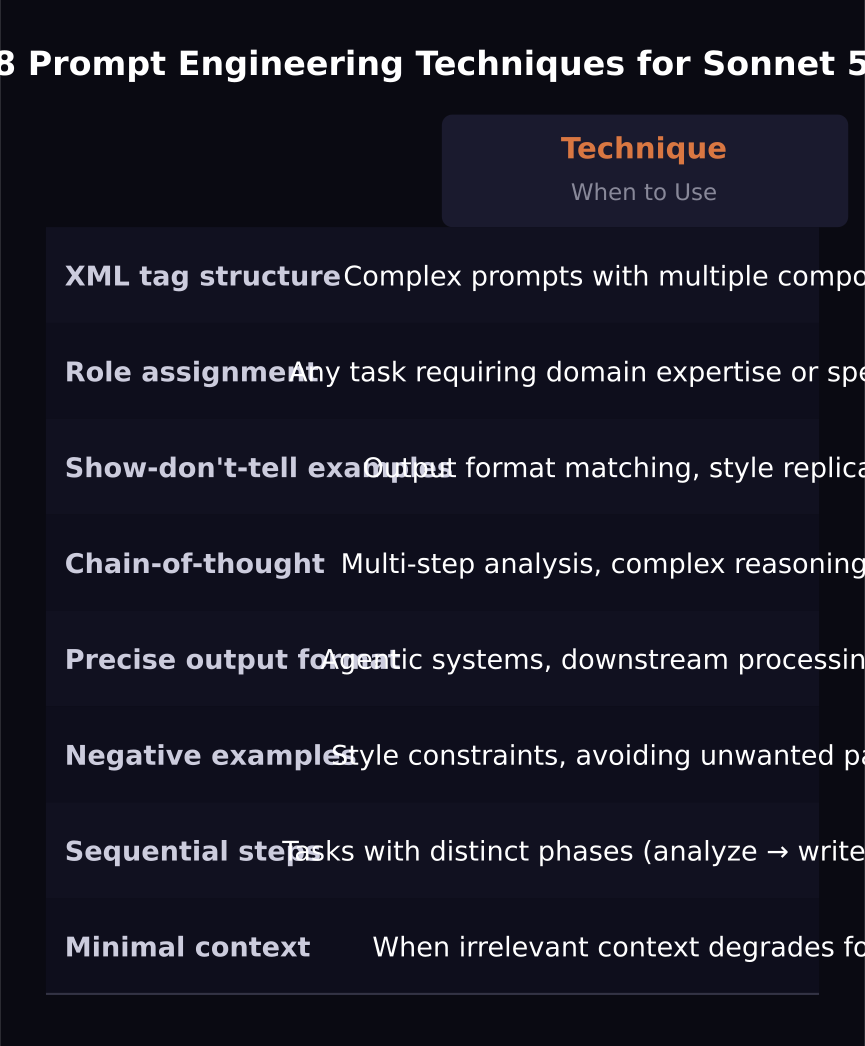
Technique 1: Use XML tags to structure complex prompts
Anthropic's recommended format for complex Sonnet 5 prompts uses XML tags to separate the different parts of your instruction. This produces more reliable parsing of long prompts with multiple components.
Structure: `<task>`, `<context>`, `<format>`, `<examples>`, `<constraints>`. The model reads each section clearly and follows each component more reliably than an unstructured paragraph prompt.
Technique 2: Assign a specific role before the task
Starting your prompt with a specific role assignment aligns Sonnet 5's response toward the expertise and perspective you want. Instead of "write a customer email," use "You are a customer success manager at a B2B SaaS company specializing in supply chain software. Write a follow-up email..."
The role assignment primes the model's word choice, tone, and depth of expertise. More specific roles produce more targeted outputs than generic ones.
Technique 3: Show, don't tell, with examples
Including one to three examples of the output format you want produces better results than describing the format in prose. If you want bullet points in a specific style, include an example bullet. If you want a table in a specific format, include an example row.
Sonnet 5's instruction following is strong enough that it will replicate the format of your examples across varying content.
Technique 4: Request chain-of-thought for complex tasks
For multi-step reasoning tasks, explicitly ask Sonnet 5 to reason step-by-step before giving its final answer. Add "Think through this carefully, then provide your answer after your reasoning." The model often reasons internally, but making the reasoning external improves accuracy on complex analytical tasks.
Technique 5: Specify the output format precisely
Tell Sonnet 5 exactly what format you want the response in. "Respond in JSON with these exact keys: title, summary, action_items (array), confidence (0-100)." The model's instruction following means it will return the exact format you specify, which is critical for downstream processing in agentic systems.
Technique 6: Use negative examples
Telling Sonnet 5 what NOT to do is as effective as telling it what to do. "Do not use bullet points. Do not use the phrase 'In conclusion.' Do not add unsolicited caveats." Including negative examples alongside positive ones produces the cleanest outputs on style-constrained tasks.
Technique 7: Break complex tasks into sequential steps
For tasks that involve multiple distinct phases, ask Sonnet 5 to complete them sequentially rather than simultaneously. "First, identify the three main themes. Then, for each theme, write one paragraph. Finally, write a synthesis paragraph that connects all three." Explicit sequential instructions prevent the model from blending phases.
Technique 8: Calibrate your context window usage
Sonnet 5's 1 million token context means you can include extensive background. But more context is not always better. Include only the context that is relevant to the specific task. Irrelevant context can dilute the model's attention on the most important information. Build your prompts starting from the minimum necessary context and add only what measurably improves output quality.
Frequently asked questions
Does prompt engineering matter less as models improve?
No. Better models execute good prompts better, which means the return on prompt quality increases with model capability. Sonnet 5's improved instruction following makes well-crafted prompts proportionally more effective, not less important.
How should I test prompt variations?
Build a test set of 20 to 50 diverse examples that cover the range of inputs your feature will receive. Run all prompt variations on the full test set and score outputs against your quality criteria. Never evaluate a prompt on fewer than 20 examples — single-example comparisons are noise.
Should I write different prompts for Sonnet 5 versus Haiku 4.5?
Yes. Haiku 4.5 handles simpler prompts well but benefits more from extremely explicit, structured instructions because it has less room to infer intent. Sonnet 5 handles implicit intent better and benefits from more nuanced instructions. Use the simplest prompt that works for Haiku tasks and invest in more detailed prompts for Sonnet 5 tasks.
Was this article helpful?
SaaS Master
Creator behind SaaS Master — tutorials, walkthroughs, reviews, and explainers that help SaaS, AI, and WordPress products get understood and chosen. Writing here about the tools, trends, and tactics that actually move the needle. Work with me →
Want your product explained this clearly — in video?
Tutorials, walkthroughs, reviews, and shorts for SaaS, AI, and WordPress products.
Work With SaaS Master