AI Tools
Cursor vs GitHub Copilot vs Devin Desktop: Best AI Coding Assistant in June 2026

If you're choosing one AI coding assistant in June 2026, the short answer is this: pick Cursor if you want the most polished day-to-day editor, GitHub Copilot if you live inside GitHub and want predictable team pricing, and Devin Desktop (the tool formerly known as Windsurf) if you want an IDE built around autonomous agents. All three are excellent now, and the gap between them is smaller than the marketing suggests.
I make videos walking people through software for a living, so I install and re-install these tools constantly to film them. The last two weeks were chaos: GitHub flipped Copilot to usage-based billing on June 1, and Cognition quietly turned Windsurf into Devin Desktop on June 2. Here's how the three actually compare right now, with current prices and the trade-offs nobody puts in the headline.
Key takeaways
- Cursor Pro is $20/month and remains the smoothest editor experience, with $60 (Pro+) and $200 (Ultra) tiers for heavy users.
- GitHub Copilot switched to usage-based "AI Credits" on June 1, 2026; the $10 Pro and $19/user Business prices held, but they're now credit allowances, not unlimited.
- Windsurf became Devin Desktop on June 2, 2026, rebuilt around an Agent Command Center and the open Agent Client Protocol. Its old Cascade engine is end-of-life July 1.
- There's no universal winner; the cheapest setup is usually one paid tool matched to how you actually work.
What changed in the last two weeks?
Two big moves reshaped this comparison almost overnight.
GitHub Copilot's flex billing went live on June 1. The plan names and prices stayed familiar, but the meaning changed: each tier now hands you a monthly pool of AI Credits instead of a flat all-you-can-use bucket. GitHub also added Copilot Max, a new $100/month individual tier with 20,000 credits (roughly $200 of usage) aimed at people who run agents all day.
The day after, Cognition retired the Windsurf brand and shipped Devin Desktop as an over-the-air update. Your old Windsurf settings carried over automatically, but the product's center of gravity moved: the first screen you now see is the Agent Command Center, an agent manager wrapped in an IDE rather than an editor with AI bolted on. Devin Local, a Rust rewrite of the old Cascade engine, is up to 30% more token-efficient and supports subagents. If you were a Windsurf user coasting along, note that Cascade is officially end-of-life on July 1, 2026.
How much does each one cost in 2026?
Pricing is where these tools feel most different, so let's be specific.
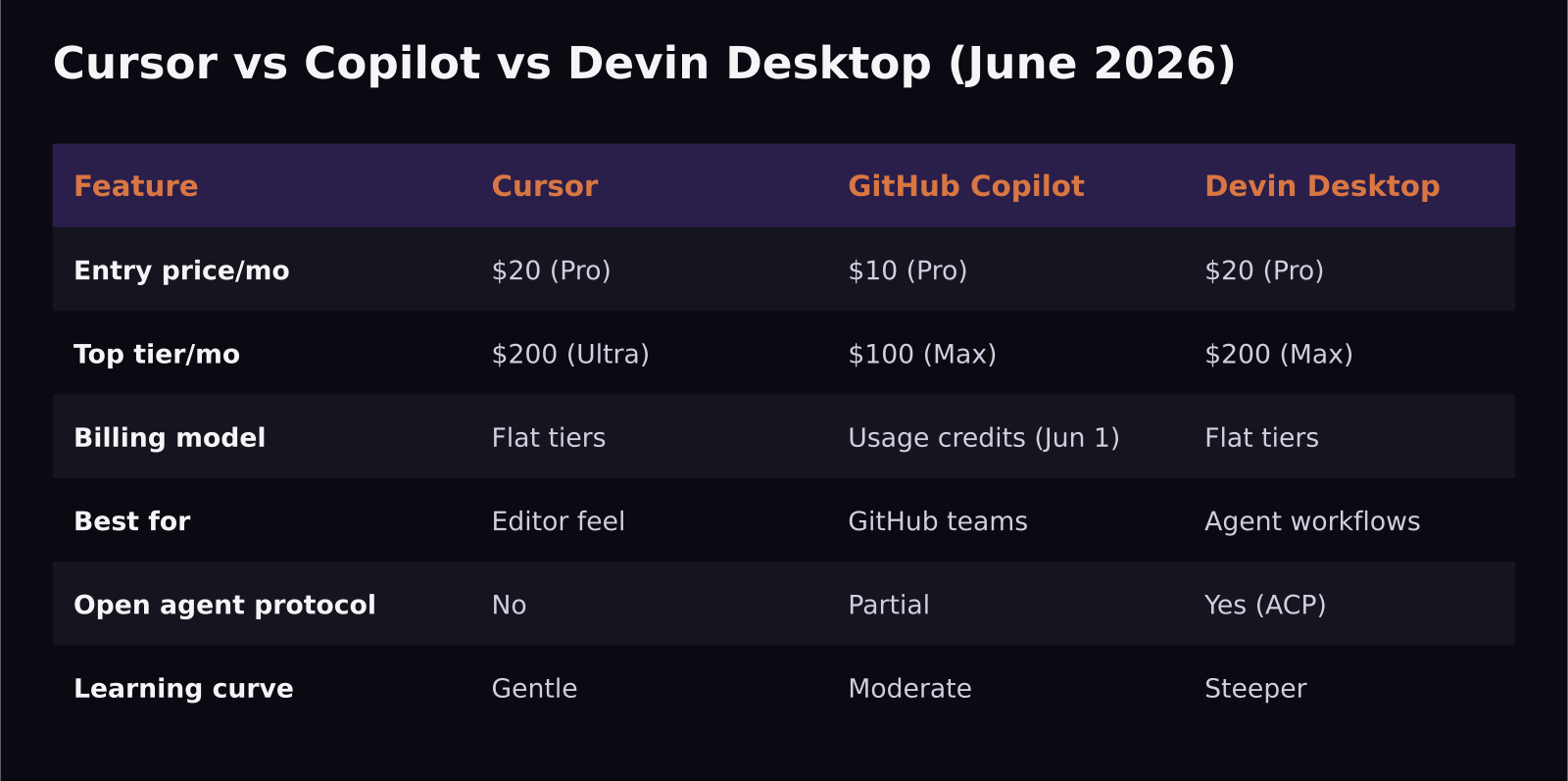
Cursor keeps the cleanest ladder: $20/month for Pro, $60 for Pro+, and $200 for Ultra. Most working developers I know stay on Pro and never hit a wall.
GitHub Copilot holds its headline prices — $10 Pro, $39 Pro+, $19/user Business, $39/user Enterprise — but each is now a monthly credit allowance under flex billing. The new $100 Copilot Max tier exists for people whose agents would otherwise blow through a smaller bucket.
Devin Desktop keeps Pro at $20/month (raised from $15 back in May) and offers a $200 Max tier for power users. Existing Windsurf subscribers didn't have to do anything; the price and quota carried over.
Which is cheaper for a small team?
For a two-to-five person team, GitHub Copilot Business at $19/user is still the most predictable line item, especially if your code already lives on GitHub and you want one invoice and central admin controls. The catch is that "predictable" now means predictable credits, not unlimited usage — a heavy agent user can burn their monthly pool and trigger overage.
Cursor at $20/user is nearly the same price and, in my experience, the nicer editor, but it leans more individual than org-managed. Devin Desktop makes the most sense when your team genuinely wants to delegate whole tasks to background agents rather than autocomplete-as-you-type; if you're not doing that, you're paying for a workflow you won't use.
Which one is actually best to use?
This is where personal taste matters more than benchmarks.
Cursor still wins on feel. The inline edits, the tab-completion, and the way it keeps you in flow are a half-step ahead of everyone else. If your work is mostly "I'm writing code and I want a fast, smart copilot riding along," Cursor is the easiest to recommend and the easiest to learn. The learning curve is gentle — you'll be productive in an afternoon.
GitHub Copilot is the safe institutional choice. It's deeply wired into pull requests, code review, and the GitHub ecosystem, and the new agent features are solid. It's the tool I'd hand a team that values stability and doesn't want to think about which IDE everyone uses.
Devin Desktop is the most forward-looking and the steepest learning curve. The Agent Command Center asks you to think in terms of tasks you hand off, not lines you type. Its support for the open Agent Client Protocol means you can run Codex, Claude Agent, OpenCode, and other compatible agents inside it — a genuinely open approach in a market full of walled gardens. If you're excited about agentic coding, this is the most interesting seat in the house. If you just want autocomplete, it's overkill.
Who should pick which?
Solo developers and creators who want the best editor: Cursor. Teams standardized on GitHub who want central billing and review integration: Copilot Business. Builders who want to orchestrate autonomous agents and like open protocols: Devin Desktop. Plenty of people I respect run two of these at once — Cursor for hands-on editing and a Copilot or Devin agent for background tasks — and the combined cost is still less than one junior contractor for an afternoon.
The honest meta-point: these tools now leapfrog each other every few weeks. Don't marry one. Track what you actually spend and revisit the choice each quarter.
What about benchmarks and raw model power?
A fair question: don't the underlying models decide this? They matter less than you'd think, because all three let you point at the same frontier models. Cursor, Copilot, and Devin Desktop can each route to top-tier models from the major labs, so the model isn't usually the differentiator — the workflow around it is. Independent agent benchmarks bounce around week to week, and by the time one tool "wins" a coding eval, a competitor has shipped an update that flips it. That's why I weight the day-to-day experience — how fast you can get a correct change merged — far above any single leaderboard number.
What does move the needle is how each tool manages context. Cursor is excellent at quietly pulling in the right files so its suggestions fit your codebase. Copilot leans on your GitHub history and pull-request context, which is a real advantage if your project lives there. Devin Desktop's agents are built to explore a repo autonomously before acting, which is powerful for larger tasks but can feel like overkill for a one-line fix. Pick the context model that matches the size of work you do most.
A simple way to choose this week
If you're paralyzed, do this: install the one that fits your stack — Cursor if you want the best editor, Copilot if you're on GitHub, Devin Desktop if you're sold on agents — and commit to it for two weeks of real work. Keep a tab open on your usage and your subscription cost. At the end, you'll know from experience rather than from a comparison table whether it earns its keep. Two weeks of honest use beats two hours of reading reviews, including this one.
Frequently asked questions
Is Windsurf gone for good? Effectively yes. Windsurf became Devin Desktop on June 2, 2026, with settings ported automatically. The old Cascade engine reaches end-of-life on July 1, 2026, so anyone still relying on it should migrate to Devin Local before then.
Did GitHub Copilot get more expensive? The sticker prices didn't change, but the model did. As of June 1, 2026, each plan is a monthly pool of AI Credits rather than unlimited usage, so heavy users can hit limits and pay overage. The new $100 Copilot Max tier targets sustained heavy workloads.
Can I just use the free tiers? You can start there, but for real daily work the paid tiers ($10–$20/month) remove the limits that interrupt you. For most professionals, one paid plan pays for itself in saved time within the first week.
SaaS Master
Creator behind SaaS Master — tutorials, walkthroughs, reviews, and explainers that help SaaS, AI, and WordPress products get understood and chosen. Writing here about the tools, trends, and tactics that actually move the needle. Work with me →
Want your product explained this clearly — in video?
Tutorials, walkthroughs, reviews, and shorts for SaaS, AI, and WordPress products.
Work With SaaS Master