AI Tools
Cursor vs Windsurf vs GitHub Copilot: Best AI Code Editor for SaaS Teams in 2026
Cursor wins for solo developers and SaaS product teams who write code every day. GitHub Copilot wins for organizations already embedded in GitHub who want low friction and low monthly cost. Windsurf — officially rebranded as Devin Desktop following Cognition's acquisition in June 2026 — is the strongest pick for privacy-sensitive teams that need autonomous agent behavior and the option to self-host.
All three tools crossed a meaningful threshold in 2026: they are no longer autocomplete assistants. They are autonomous coding agents that can plan, scaffold, test, and refactor multi-file projects from a single natural language prompt. That shift fundamentally changes how you evaluate them.
Key takeaways
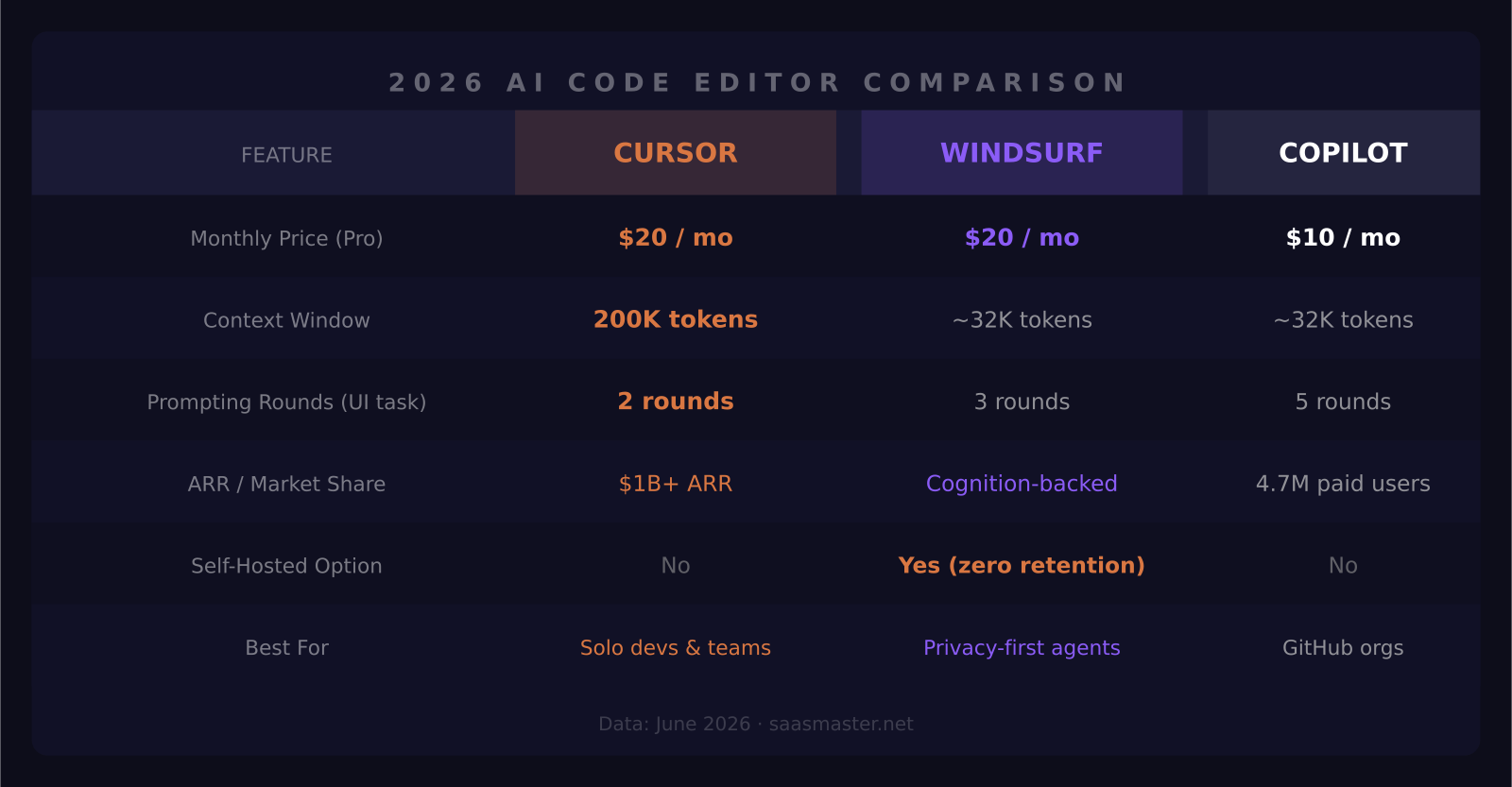
- Cursor Pro runs $20/month with a 200K token context window and the highest benchmark task completion rate in the category at 71%.
- GitHub Copilot's free tier now includes 2,000 completions and 50 chat requests per month — the lowest barrier to entry in this market.
- Windsurf rebranded to Devin Desktop in June 2026, raised its Pro plan from $15 to $20/month, and now matches Cursor on price.
- In a March 2026 head-to-head test, Cursor built a complex UI component in 2 prompting rounds, Windsurf in 3, and Copilot in 5.
- Cursor hit $1 billion ARR in under two years; GitHub Copilot has 4.7 million paid subscribers and 90% adoption across Fortune 100 companies.
What actually changed in 2026
A year ago, the main debate was about tab-completion quality. Today it is about which agent can plan and build a full feature from a one-sentence description without breaking your existing tests. That is a different evaluation.
Cursor restructured its Teams pricing in June 2026, splitting into Standard seats ($32/seat/month annual) and Premium seats ($96/seat/month annual) with 5x Standard usage included. GitHub released a new Max plan at $100/month — 20,000 credits targeting developers who exhaust standard plans on heavy agentic work. Windsurf, mid-rebrand to Devin Desktop, raised Pro to $20/month for the first time.
These are positioning bets. Cursor is betting on deep context and multi-file autonomy. Copilot is betting on ecosystem lock-in and breadth of integrations across every major IDE. Devin Desktop is betting on fully autonomous engineering with enterprise-grade privacy controls.
How each tool handles complex multi-file tasks
Cursor's Composer Mode with Subagents is the most capable multi-file editing interface in the category right now. The 200K token context window lets it reason across a large codebase in a single session without losing state between files. In March 2026 benchmark testing published by Codeant, Cursor completed a responsive data table component in 2 prompting rounds and scored a 71% task completion rate across the full benchmark suite — the highest published number in this class of tool.
Windsurf's Cascade agent is its flagship autonomous feature. On a published benchmark — migrating a 3,000-line Express.js codebase from CommonJS to ESM — Cascade handled the full task in a single attempt with just 2 test failures out of 47. That is a strong result for autonomous agent behavior. The Devin Desktop rebrand signals a push toward full end-to-end engineering autonomy rather than assisted pair-programming. The new Max plan at $200/month is clearly positioned for engineering teams that want to run the agent unsupervised on production tasks.
GitHub Copilot needed 5 prompting rounds on the same UI component task and required manual fixes. That does not make it the wrong choice — it is a different product. Copilot excels at inline suggestions, pull request review comments, and keeping developers inside their existing IDE without workflow friction. The Business tier at $19/seat gives organization-wide AI coding across VS Code, JetBrains, Neovim, and Vim — and at that price, the economics are hard to argue against for a growing engineering team.
How does pricing play out at scale?
GitHub Copilot Free is a real product: 2,000 completions and 50 agent requests per month, no credit card required, useful enough for part-time or hobbyist development. Copilot Pro at $10/month is the best deal in this category for developers who primarily want intelligent inline suggestions and conversational coding help. Pro+ at $39/month gives 7,000 credits for heavier agentic use, and the new Max plan at $100/month includes 20,000 credits — roughly $200 of usage — for developers who run AI-intensive sessions daily.
Cursor Pro at $20/month includes 500 fast premium requests plus unlimited slow requests. Developers who run multi-file Composer sessions at a sustained pace will reach the fast request ceiling and realistically land on the Standard Teams seat at $32/month (annual billing). That is still a good deal for the productivity gain on complex, multi-dependency tasks.
Windsurf Pro at $20/month — now matching Cursor — includes unlimited tab completions with meaningful session limits. The free tier provides 25 AI credits, enough to properly evaluate the Cascade agent before committing. For teams with data residency requirements, the zero-data-retention default and self-hosted deployment option are genuinely differentiated. No other tool in this category offers both.
Who should actually choose which tool?
Cursor: best for developers building actively every day
The Composer with Subagents workflow is the most productive autonomous coding experience available for iterating on a real product codebase. Crossing $1B ARR in under two years is not a marketing stat — it is the market's verdict. If you write code daily and want the highest throughput on complex, multi-file tasks, Cursor is the pick.
GitHub Copilot: best for teams already living in GitHub
The free tier makes the evaluation trivially easy. Copilot integrates tightly with pull request reviews, GitHub Actions, and Codespaces — it gets smarter about your specific project over time without extra setup. For a 20-person engineering team at $19/seat on Business, that is $380/month for AI coding across every developer's preferred IDE, and the ROI calculation is not complicated.
Windsurf/Devin Desktop: best for autonomous agents and privacy-first teams
The rebrand tells you what Cognition is building toward: a fully autonomous engineering agent, not a co-pilot. If you want to hand a ticket to an agent and have it return with code, tests, and a pull request ready for review — rather than collaborating on each step — Devin Desktop is the most serious bet on that future. And if your industry requires strict data handling, it is the only tool in this group that gives you genuine control over where your code goes.
Frequently asked questions
Is Windsurf still called Windsurf?
As of June 2026, the product has been rebranded to Devin Desktop following Cognition's acquisition. Core features including the Cascade agent, free tier, and Pro plan remain active under the new name. Existing Windsurf subscribers continue without interruption.
Does GitHub Copilot work without a GitHub repository?
Yes. Copilot Pro and above function in any project open in VS Code, JetBrains, or Neovim regardless of hosting platform. GitHub integration unlocks additional features like PR summaries and review automation, but the core inline completion and chat features are IDE-native and platform-agnostic.
Which AI code editor has the largest context window?
Cursor Pro leads with a 200K token context window, enabling it to reason across a large codebase in a single session. GitHub Copilot and Windsurf/Devin Desktop both offer smaller default windows, though Windsurf's Max plan at $200/month includes extended session capabilities designed for large-codebase autonomous tasks.
Was this article helpful?
SaaS Master
Creator behind SaaS Master — tutorials, walkthroughs, reviews, and explainers that help SaaS, AI, and WordPress products get understood and chosen. Writing here about the tools, trends, and tactics that actually move the needle. Work with me →
Want your product explained this clearly — in video?
Tutorials, walkthroughs, reviews, and shorts for SaaS, AI, and WordPress products.
Work With SaaS Master