AI Tools
OpenCode vs Claude Code vs Cursor: Best AI Coding Agent in June 2026
If you only want the short answer: pick Cursor if you like driving inside an IDE with AI riding shotgun, pick Claude Code if you want to hand off whole tasks and let an agent run them in your terminal, and pick OpenCode if you want a free, model-agnostic agent you fully control. All three are genuinely good in June 2026 — the right call comes down to how much you want to steer versus delegate, and how much you care about owning your stack.
I make videos that explain software for a living, so I spend a lot of time inside these tools figuring out how to demo them clearly. That means I care about the learning curve as much as the benchmark scores. Here is how the three actually compare today.
Key takeaways
- Cursor is the IDE-native accelerator: you write, it assists, and its visual diff review is the best of the three.
- Claude Code is the delegator: you describe a task in the terminal and Anthropic's agent does the work, but it only runs Claude models.
- OpenCode is free and open-source, supports 75+ models from any provider, and is the pick if you want zero lock-in.
- Headline pricing of "$20/month" is misleading for the paid tools — heavy Claude Code users routinely see $100–$200/month in real usage.
- Coding quality at the top is close: Claude Opus 4.8 leads SWE-bench Verified at 88.6%, so model choice often matters more than the wrapper.
What is each tool, really?
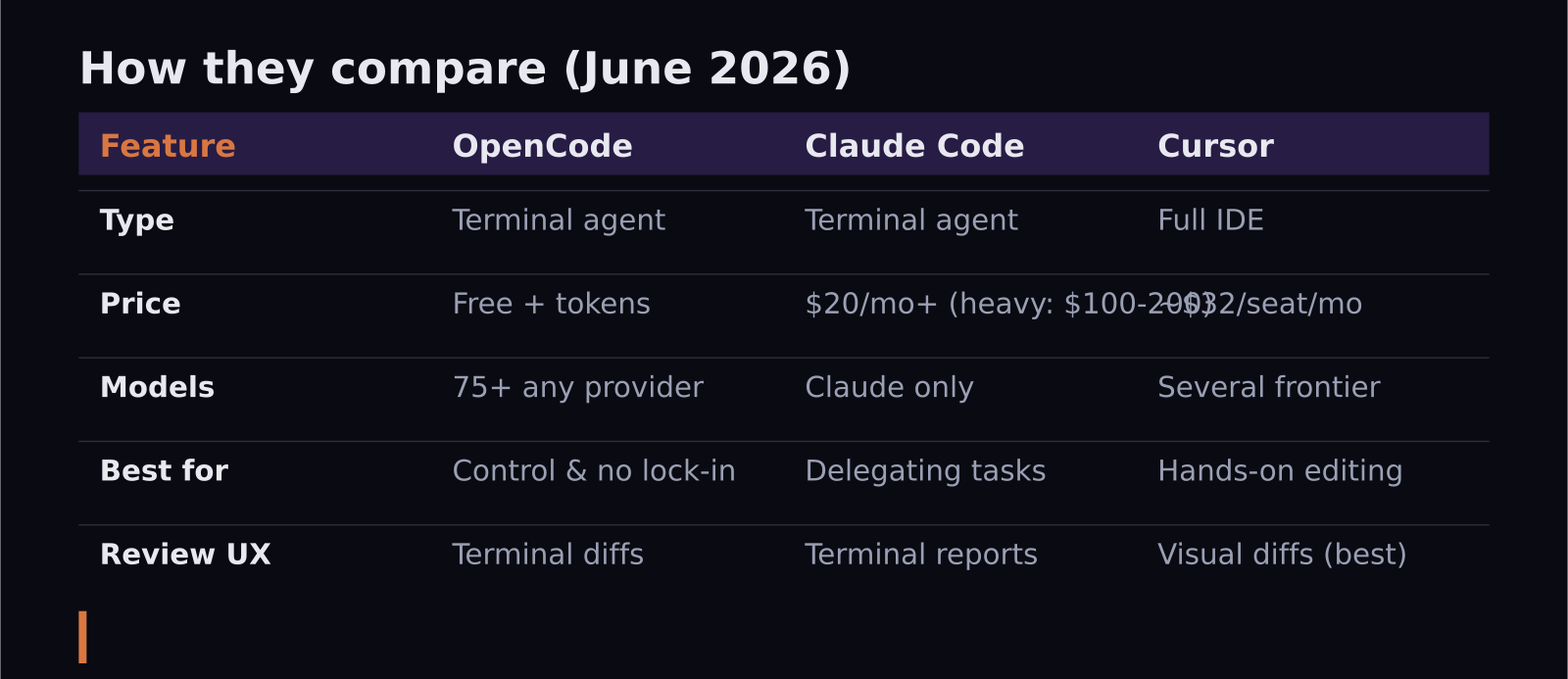
Cursor is a full editor — a fork of VS Code — with AI woven into every panel. You stay in a familiar IDE, and the AI suggests edits, answers questions about your codebase, and applies multi-file changes that you approve through a clean visual diff. It is an accelerator: you are still the driver.
Claude Code is a terminal-native agent from Anthropic. You give it an instruction like "add rate limiting to the API and write tests," and it plans the steps, edits files, runs commands, and reports back. With the Dynamic Workflows feature that shipped alongside Claude Opus 4.8 in late May 2026, it plans and runs multi-step jobs with noticeably less hand-holding. The trade-off: it only runs Claude models, so you cannot swap in a cheaper or different engine.
OpenCode is the open-source option, and in 2026 it became the surprise story of the category — it crossed 160,000 GitHub stars and reports millions of monthly active developers. It is also a terminal agent, but it is model-agnostic: Anthropic, OpenAI, Google, Groq, Together, OpenRouter, Bedrock, and local models through Ollama all work. You bring your own API key, or run everything locally for free.
Which one is cheapest?
OpenCode wins on raw price because the tool itself is free — your only cost is whatever model you point it at, which can be literally zero if you run a local model. In practice most people spend somewhere between $5 and $50 a month on tokens, depending on how hard they push it.
Claude Code and Cursor both advertise a $20/month entry point, and that number is honest for light use. But both push power users well past it. Real-world Claude Code usage for someone coding all day commonly lands in the $100–$200/month range once you account for token consumption. Cursor restructured its team pricing in 2026 into Standard seats at roughly $32/seat/month on an annual plan and Premium seats around $96/seat/month with 5x the usage allowance. So "cheapest" depends entirely on volume: occasional users barely notice, heavy users feel it.
Which one writes the best code?
This is where it gets interesting, because the answer is increasingly "it depends on the model, not the tool." Claude Code runs Anthropic's models, and Claude Opus 4.8 currently leads SWE-bench Verified — the standard benchmark for resolving real GitHub issues — at 88.6%, the highest verified score going into mid-2026. That makes Claude Code a strong default for complex, multi-file edits where reliability matters.
OpenCode can run the exact same Claude models if you want, but it can also run Gemini, GPT-5.5, DeepSeek, or anything else, which means you can match the model to the job — a cheap fast model for boilerplate, a frontier model for the hard refactor. Cursor's edge is not the underlying model so much as the experience around it: its diff review interface makes it easy to catch when the AI does something you did not ask for, which in day-to-day work saves real time.
Who should pick which?
If you are newer to AI coding or you like seeing every change before it lands, Cursor has the gentlest learning curve. If you are comfortable in a terminal and want to delegate whole chunks of work, Claude Code feels like handing tasks to a fast junior engineer. If you care about cost control, privacy, or never being locked to one vendor, OpenCode is the one that respects all three.
For what it is worth, the most common setup I see among developers I film with is a combination: Cursor for interactive editing and a terminal agent for delegated tasks. These tools are not mutually exclusive, and the marginal cost of trying a second one is low.
How does the learning curve differ?
This is the part benchmarks never capture, and it is the thing I watch for most when I record these tools. Cursor has the gentlest on-ramp because it looks and feels like VS Code — if you have used a modern editor, you already know 90% of the interface, and the AI features reveal themselves gradually as you need them. Most people are productive in an hour.
Claude Code asks for a small mental shift. You stop thinking in keystrokes and start thinking in instructions: what is the outcome you want, stated clearly enough that an agent can run with it. That is a skill, and it takes a few days to develop the habit of writing good task descriptions. Once it clicks, the speedup on multi-file work is dramatic, but the first week can feel awkward if you are used to driving every edit yourself.
OpenCode has the steepest setup because freedom has a cost — you configure which models to use, manage API keys, and make decisions Cursor and Claude Code make for you. The payoff is total control and no lock-in, but it rewards people who actually want to tune their setup rather than have one handed to them. If you just want to start coding, it is not where I would send a beginner.
What about privacy and data ownership?
For solo developers this rarely matters, but for teams working with proprietary or regulated code it can be the deciding factor. OpenCode is the strongest here: run it against a local open-weight model and your code never leaves your machine. Claude Code and Cursor both send context to their respective providers, which is fine for most work but worth checking against your company's policy before you commit. If data residency is a hard requirement, OpenCode with a local model is the only option in this trio that fully satisfies it.
Frequently asked questions
Is OpenCode actually free?
The tool is free and open-source, yes. You still pay for whatever model you connect it to through an API key, unless you run a local open-weight model — in which case your only cost is your own hardware and electricity.
Does Cursor or Claude Code give better results?
At the top end the gap is small. Claude Code benefits from Claude Opus 4.8's class-leading SWE-bench score for complex edits, while Cursor's strength is the review-and-approve workflow. For delegation, Claude Code; for hands-on editing, Cursor.
Can I use the same model across all three?
Mostly. OpenCode supports nearly any provider, and Cursor lets you choose among several frontier models. Claude Code is the exception — it runs Anthropic's Claude models only, with no third-party options.
SaaS Master
Creator behind SaaS Master — tutorials, walkthroughs, reviews, and explainers that help SaaS, AI, and WordPress products get understood and chosen. Writing here about the tools, trends, and tactics that actually move the needle. Work with me →
Want your product explained this clearly — in video?
Tutorials, walkthroughs, reviews, and shorts for SaaS, AI, and WordPress products.
Work With SaaS Master