AI Tools
Runway vs Kling vs Pika vs Veo 3.1: Which AI Video Generator Wins for Creators in 2026?
The AI video market hit a turning point this year. Four tools now clearly separate from the pack — Runway Gen-4, Kling 3.0, Pika 2.2, and Google's Veo 3.1 — and they are genuinely different enough that picking the wrong one for your workflow costs you time and money. I have spent hours testing each one, and this is the breakdown I wish I had when I started.
Key takeaways
- Kling 3.0 leads on benchmark scores and native audio with lip-sync at the lowest per-video cost
- Runway Gen-4 is the best choice for marketing teams that need brand-consistent characters and editorial control
- Veo 3.1 produces the most photorealistic output and the best native audio quality, but access is still limited
- Pika 2.2 is purpose-built for social content — TikTok, Reels, Shorts — and the effects library shows it
- Sora 2 is being deprecated: web app shut down April 26, 2026, API shuts down September 24, 2026 — do not build on it
What you are actually comparing here
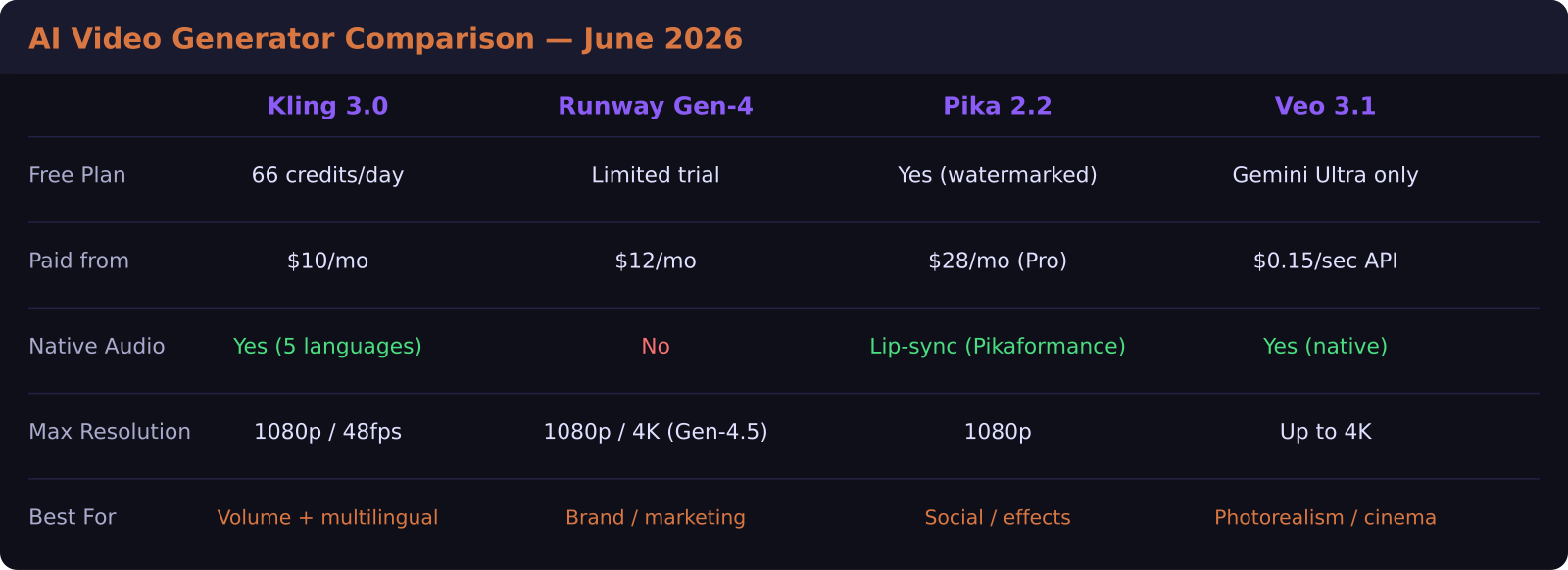
These are not interchangeable text-to-video boxes. By mid-2026, each tool has carved out a distinct lane, and the differences matter for how you actually work — not just in the quality of individual clips but in the whole production loop. Runway gives you a creative suite with fine-grained control. Kling gives you raw volume and multilingual output. Pika gives you creative effects no other tool ships. Veo gives you the closest thing to cinematic realism this category has ever produced.
Kling 3.0: Best all-rounder on a budget
Kling 3.0, from Chinese AI company Kuaishou, earned the top spot on video generation benchmarks earlier this year. Its chain-of-thought reasoning engine breaks complex prompts into logical scene components, which means multi-subject interactions — a group of people in conversation, a character moving through a crowd — come out coherent in a way earlier models could not manage.
Native audio and lip-sync in five languages is the headline feature. If you are producing product explainers for international markets, Kling's Omni model handles voiceover synchronization across the clip without any external audio pipeline. Output goes up to 1080p at 48fps.
On price, Kling is the most accessible of the four. The free tier gives you 66 credits per day — enough to test seriously. Paid plans: Standard at $10 per month, Pro at $25.99 per month, and Premier at $64.99 per month. Per-video cost at the Standard tier works out to roughly $0.10 to $0.12 per clip, which is the lowest among the major tools.
What it does not do as well: Kling's prompt sensitivity can be inconsistent. A prompt that generates something excellent on the first try may not replicate the same result on the second. If you need precise, brand-consistent character reproduction across dozens of clips, you will hit this limitation fast.
Which is cheaper, Runway or Kling?
The short answer: Kling is cheaper, but Runway delivers more value per dollar for professional brand workflows.
Runway Gen-4 starts at $12 per month billed annually with 625 monthly credits — around $0.40 to $0.48 per generated video at standard duration. That is notably higher than Kling. But Runway's reference image controls change the math for anyone running a production pipeline. You can anchor a character to a single reference photo and maintain visual consistency across dozens of clips. For branded content or product demo videos, that consistency is worth a significant per-clip premium.
Runway Gen-4 caps clips at 16 seconds. Gen-4.5 at higher credit cost unlocks 4K output and longer durations. There is no native audio — you bring your own or add it in post.
For creators making short-form social content or quick explainers, Runway's cost structure is hard to justify over Kling. For marketing teams running multi-clip campaigns with recurring brand characters, Runway earns its price.
Pika 2.2: The social creator's secret weapon
Pika is building something nobody else is building: a toolkit of video effects designed for the creative loop that powers Reels and TikTok. Pikaffects add physics-based transformations to existing footage — explosions, floods, crystallizations. Pikaswaps change the material or style of objects in a clip. Pikadditions insert new elements into existing scenes. Pikaformance generates talking-head clips with lip-sync from a single image.
None of the other tools in this comparison offer anything close to this creative effects library. If you are making content that needs to stop a scroll, Pika's effects give you instant visual moments the algorithm rewards.
The catch: the free plan watermarks everything and strips commercial rights. You need Pika Pro at $28 per month to use what you create commercially. That is competitive with Runway's lower tiers, and the use case is genuinely different — the comparison mostly depends on whether social effects or character-consistent brand video is your primary need.
Veo 3.1: Most photorealistic, hardest to access
Google Veo 3.1 produces video that looks, frame by frame, more like something shot on a camera than anything else in the category. Lighting, shadows, depth of field — the realism is a clear step ahead. Native audio generation is also exceptional: ambient sound, dialogue, and background noise generate in sync with the video without a separate audio pipeline.
The access problem is real. Veo 3.1 is available through Google's Gemini Ultra and Workspace tiers, through Vertex AI for enterprise, and via API at $0.15 per second in fast mode. For independent creators without a Google Cloud setup, the friction to access Veo regularly is higher than for Kling or Runway. Output quality is the best available — but the workflow barrier keeps it from being the obvious everyday choice for most creators.
Which AI video tool should you actually use?
Here is how I break it down after testing all four:
If you are making social content for TikTok, Reels, or Shorts and want creative effects that no other tool ships, use Pika 2.2. The $28 per month Pro plan is worth it for commercial rights alone.
If you are running a content agency or making multi-clip campaigns where character consistency matters, use Runway Gen-4. Accept the higher credit cost as the price of brand control.
If you need volume — lots of clips, multilingual output, strong benchmarks, and the lowest per-clip cost — use Kling 3.0. Start with the free tier, move to Standard when you are ready to produce seriously.
If you need the highest photorealism or cinematic quality and already have a Google Cloud or Gemini Ultra relationship, evaluate Veo 3.1 for premium projects.
And if you are still on Sora 2: start planning your migration now. The web experience is already gone. The API deprecates September 2026.
Frequently asked questions
Which AI video generator has the best quality in 2026?
Veo 3.1 produces the most photorealistic output and has the strongest native audio generation of the four. For overall benchmark performance and prompt coherence, Kling 3.0 leads the field. Quality is use-case dependent — the best tool shifts depending on whether you are prioritizing realism, creative effects, or brand-consistent character work.
Is Kling AI free to use?
Yes. Kling offers a free tier with 66 credits per day, which is enough for regular testing and light production. The free tier does include watermarks. Paid plans start at $10 per month for Standard, which removes watermarks and significantly increases credits.
What happened to Sora in 2026?
OpenAI announced in March 2026 that the Sora web and app experience would be discontinued on April 26, 2026, and the Sora API will be deprecated on September 24, 2026. OpenAI is integrating video generation capabilities into other products rather than running Sora as a standalone platform.
Was this article helpful?
SaaS Master
Creator behind SaaS Master — tutorials, walkthroughs, reviews, and explainers that help SaaS, AI, and WordPress products get understood and chosen. Writing here about the tools, trends, and tactics that actually move the needle. Work with me →
Want your product explained this clearly — in video?
Tutorials, walkthroughs, reviews, and shorts for SaaS, AI, and WordPress products.
Work With SaaS Master