AI Tools
ZoomMate Review 2026: Zoom's AI Agent That Turns Meetings Into Finished Work
For a decade, AI meeting tools have promised to replace your note-taker. Most delivered transcripts nobody reads and summaries that paraphrase things you already knew. Zoom's new ZoomMate, released June 1, 2026, is a bet that the category needs a completely different product: not a recorder, but an agent that actually does the work that meetings are supposed to trigger.
At $20 per user per month added onto any Zoom paid plan, ZoomMate is priced as a serious business tool. I wanted to understand what it actually does, whether the agentic angle is real or marketing, and who should evaluate it first.
Key takeaways
- ZoomMate launched June 1, 2026 at $20/user/month as an add-on to any Zoom paid plan
- It goes beyond transcription to autonomously create Jira tickets, update Salesforce, draft emails, and generate documents
- Each seat includes 2,200 AI credits per month, with usage-based charges beyond that
- It works across Zoom, Google Meet, and Microsoft Teams — not just Zoom calls
- Integrations cover Salesforce, Jira, Slack, ServiceNow, Workday, Google Workspace, and Microsoft 365
What most meeting AI tools get wrong
Otter.ai and Fireflies.ai are transcript tools that have added some workflow features. They are good at capturing what was said. What they do not do is close the loop — meaning that after a meeting, a human still has to take the summary, open Salesforce, and update the deal stage. Or open Jira and file the ticket. Or send the follow-up email.
That last mile between "the meeting happened" and "the work got done" is what ZoomMate is targeting. It is a different category of product dressed in similar packaging.
What ZoomMate actually does
ZoomMate is organized around three core capabilities.
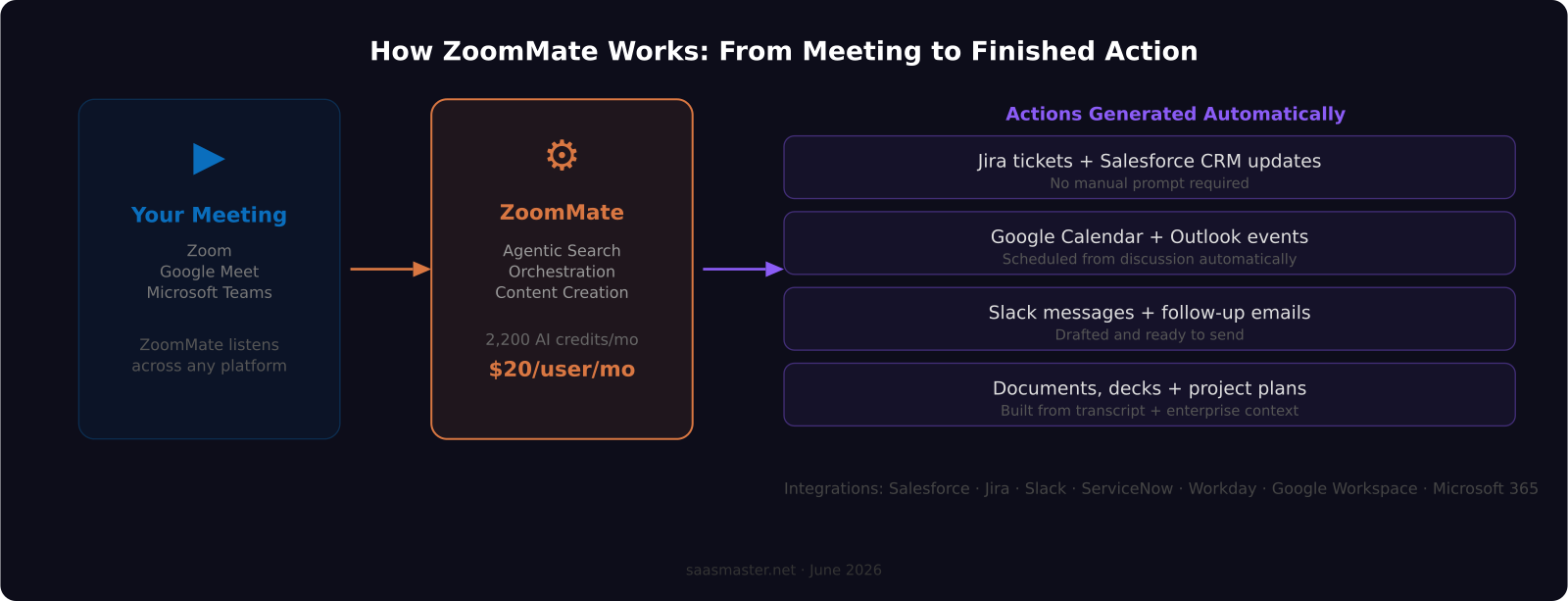
Agentic Search surfaces relevant information from your connected business systems during or after a meeting. Ask it about the deal you just discussed, and it queries Salesforce in real time and returns the opportunity status, last contact, and recent notes — without you switching apps. It treats your enterprise data as live context that belongs in the conversation.
Orchestration is where ZoomMate most clearly steps outside what other meeting tools do. Based on what was discussed, it can proactively create Jira tickets, update Salesforce opportunity stages, schedule follow-up events in Google Calendar or Outlook, draft follow-up emails in Slack or Gmail, and trigger multi-step workflows in ServiceNow or Workday — all without you prompting each action individually. The "Complete" feature transforms the meeting transcript plus enterprise context into a finished presentation, document, or project plan.
Content Creation rounds out the three: it generates polished follow-up emails, decision summaries, decks, or reports from what was said and what it found in your connected systems.
Pricing and what you actually get
ZoomMate is $20 per user per month on top of an existing Zoom paid plan. Each seat includes 2,200 AI credits per month. Different action types consume different credit amounts, with complex orchestration steps drawing more credits than simple search queries.
Zoom has not published a complete credit-consumption breakdown by action type, which is the biggest transparency gap in the pricing. For teams evaluating ZoomMate at scale, I would strongly recommend a one-month pilot with credit tracking before committing to a broad rollout. If your team runs 20 meetings a week with heavy Salesforce and Jira orchestration, you could run through those 2,200 credits faster than you expect.
North American availability started June 1, 2026. EMEA and APAC rollouts are planned for later in 2026 with no specific confirmed dates at the time of writing.
How ZoomMate compares to Otter.ai and Fireflies
Otter.ai's Business plan is $20 per user per month and focuses on real-time transcription, meeting highlights, and basic action item extraction. Fireflies.ai Business runs $19 per user per month and adds CRM logging, some workflow triggers, and a searchable meeting archive.
ZoomMate sits in a different category. It does not primarily compete on transcript quality — it competes on execution. If you mainly need accurate meeting records and a searchable archive, Otter or Fireflies are more focused tools and comparable in cost. If you want closed-loop execution — where a discussion creates a Salesforce entry or a Jira ticket without human intervention — ZoomMate is the only product that does this natively at the meeting platform level.
The integration depth is also different. ZoomMate connects to ServiceNow and Workday, which neither Otter nor Fireflies support. For mid-market and enterprise SaaS companies already running those systems, that matters.
One important clarification: ZoomMate ingests meetings from Google Meet and Microsoft Teams, not just Zoom. If your team uses multiple video platforms, you are not locked into running all meetings through Zoom to get the orchestration features.
Who it is for
ZoomMate fits SaaS teams who have a genuine problem with meeting-to-action latency: things get decided in calls, and the work of updating the CRM, filing the ticket, and scheduling the next step is slow, inconsistent, or skipped entirely.
If your sales team routinely leaves calls without updating Salesforce, ZoomMate is the product to evaluate. If your engineering team manually translates standup discussions into Jira, ZoomMate addresses that directly. If you are a growth or operations team that runs a lot of cross-functional calls and loses follow-through in the handoff, the orchestration layer is designed for exactly that.
It is probably overkill for smaller teams with light meeting cadences, or for use cases focused primarily on knowledge capture rather than workflow execution. Solo operators or individual creators will get less ROI from the $20/month than a team of five or more who have enterprise system integrations set up and active.
My take as a creator covering SaaS tools
The credit system is the thing I would watch most carefully. Any AI product where cost is an abstracted unit of "credits" has the potential to generate billing surprises in ways that per-token or per-seat pricing does not. I want to see Zoom publish a clear credit-per-action table before recommending this at scale. That transparency gap should be a question you ask before signing a team contract.
What I find genuinely interesting about ZoomMate is the category bet. Zoom is arguing that the value of meeting AI is not the transcript — it is the execution layer. I think that framing is correct. Meetings exist to produce decisions and actions, not records. The question is whether ZoomMate delivers on it consistently at the edge cases: complex multi-system workflows, large teams with varied CRM data quality, and meeting types where the action items are ambiguous.
For SaaS companies demoing this to enterprise buyers, it is also worth noting: an AI that takes actions on your behalf inside Salesforce and Jira requires solid permission scoping and audit logging. Make sure you review ZoomMate's permission model before granting it write access to production systems.
Frequently asked questions
Does ZoomMate only work with Zoom meetings?
No. ZoomMate ingests conversations from Google Meet and Microsoft Teams as well. It treats meetings on those platforms as potential action triggers, so you do not have to move all your video calls to Zoom to use the orchestration features.
What happens when I run out of AI credits?
Each ZoomMate seat includes 2,200 credits per month. Actions beyond that quota are billed at usage-based rates. Zoom has not published a per-action credit table, so monitoring usage in the first month is important, especially for teams with high meeting volume or complex multi-system workflows.
How does ZoomMate compare to just using Zapier automation after a meeting?
Zapier automation runs on pre-defined triggers and templates you build manually. ZoomMate understands meeting context dynamically and decides which actions to take based on what was actually discussed. It can create a Jira ticket for a specific bug mentioned by name, or update the exact Salesforce opportunity tied to the customer on the call, without you setting up a trigger for each scenario in advance. That contextual intelligence is what separates it from rule-based automation.
Was this article helpful?
SaaS Master
Creator behind SaaS Master — tutorials, walkthroughs, reviews, and explainers that help SaaS, AI, and WordPress products get understood and chosen. Writing here about the tools, trends, and tactics that actually move the needle. Work with me →
Want your product explained this clearly — in video?
Tutorials, walkthroughs, reviews, and shorts for SaaS, AI, and WordPress products.
Work With SaaS Master