AI & SaaS
ZoomMate and the Zoom AI Productivity Suite: What SaaS Teams Need to Know in 2026
Zoom just made a significant bet: that your next work assistant should live inside your meeting software. ZoomMate, launched June 1, 2026, at $20 per user per month, is Zoom's entry into the agentic AI space — not just a summary generator but a tool that takes action on what happens in your meetings. The question is whether it delivers on that promise or becomes another AI feature nobody uses after the first week.
Key takeaways
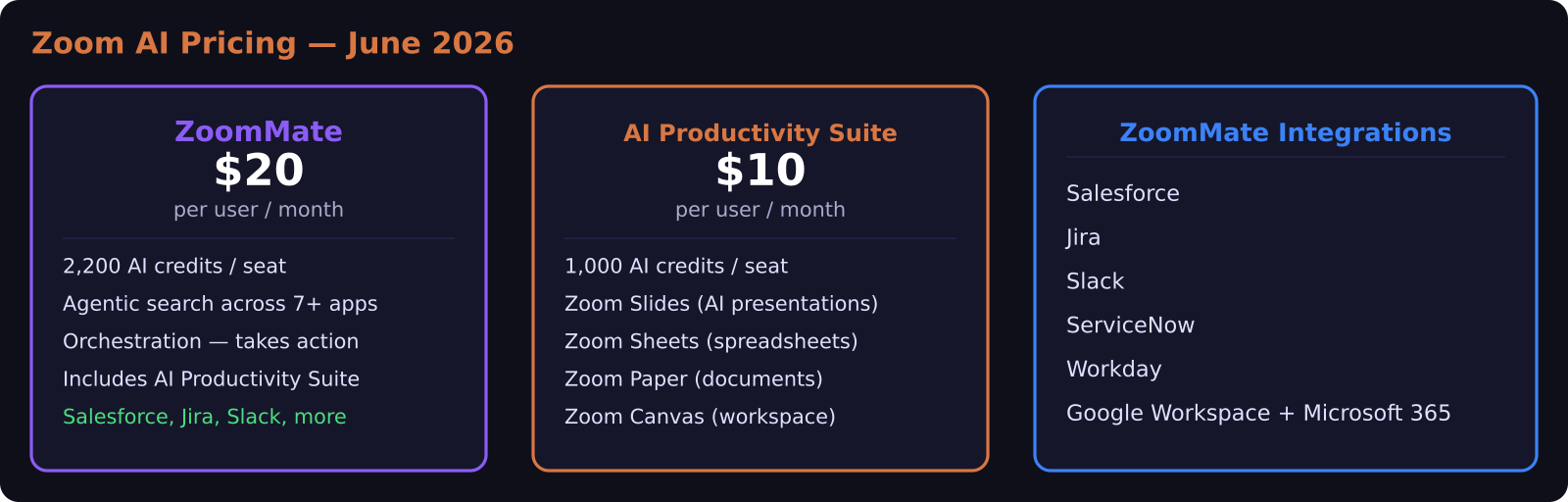
- ZoomMate launched June 1, 2026 at $20 per user per month, with the AI Productivity Suite available separately at $10 per user per month
- ZoomMate can search across Salesforce, Jira, Slack, ServiceNow, Workday, Google Workspace, and Microsoft 365 using live meeting context
- Each ZoomMate seat includes 2,200 AI credits per month; the AI Productivity Suite includes 1,000
- Zoom's new suite adds native Slides, Sheets, Paper, and Canvas tools — a direct challenge to Google Workspace and Microsoft 365
- The core promise: meetings become deliverables, not backlogs
Why Zoom moved this direction
The meeting transcript and AI summary feature has been table stakes across video platforms since 2023. Every major platform — Zoom, Teams, Google Meet, Webex — generates summaries and action items. The problem is that action items sit in a doc and someone has to manually execute them.
ZoomMate's design premise is that this execution gap is where the real cost lives. You leave a sales call with four agreed-upon follow-ups. Those four follow-ups need to become a Salesforce deal update, a Jira ticket, a Slack message to the team, and a calendar invite. Today that is 15 to 20 minutes of context-switching after the call. ZoomMate is built to close that gap by executing the follow-ups as agentic tasks rather than leaving them as list items.
What ZoomMate actually does
ZoomMate operates across three capability areas that Zoom calls search, orchestration, and content generation.
Agentic search means ZoomMate can pull information from your connected systems during or after a call. If someone mentions a deal on a customer call, ZoomMate can surface the relevant Salesforce opportunity details without anyone leaving the meeting to look it up. Supported integrations at launch include Salesforce, Jira, Slack, ServiceNow, Workday, Google Workspace, and Microsoft 365.
Orchestration is where ZoomMate crosses from AI assistant to AI agent. After a meeting, you can instruct ZoomMate to create the follow-up Jira ticket, update the Salesforce deal status, draft the follow-up Slack message, and send a recap email — all from the post-meeting summary interface. It is executing in your external tools, not just generating text about what needs to happen.
Content generation covers turning meeting transcripts and notes into polished deliverables: meeting summaries, action item lists, follow-up email drafts, project briefs, and presentations. This part is the most mature and the least differentiated from what Zoom AI Companion already offered.
The credit system is worth understanding upfront: each ZoomMate seat gets 2,200 AI credits per month. Light users with occasional meetings will likely stay well within this. Power users running ZoomMate on five meetings a day with active orchestration tasks may need to monitor usage. Zoom has not publicly detailed the credit cost per action at launch, which is worth pressing them on before committing.
The AI Productivity Suite: Zoom's play for your full workday
The $10 per user per month AI Productivity Suite is a separate purchase, though it is bundled with a ZoomMate subscription. It adds four tools to your Zoom subscription: Zoom Slides for presentations, Zoom Sheets for spreadsheets, Zoom Paper for documents, and Zoom Canvas (formerly Zoom Docs) for collaborative workspaces.
This is Zoom's most direct challenge to Google Workspace and Microsoft 365. The AI threading through each tool is native — you can generate a slide deck from a meeting transcript, create a project sheet from an action item list, and draft a full meeting brief from a collection of notes, all without leaving the Zoom environment.
Whether you would actually switch your documents, spreadsheets, and presentations to Zoom depends heavily on where your team's institutional knowledge already lives. If you are deep in Google Drive or SharePoint, the switching cost is high for features that have not been tested at scale over years the way Google Docs and Excel have.
The sharper sell is for teams that are primarily meeting-centric — customer success, sales, agencies that run a lot of client calls — where the meeting-to-deliverable workflow is genuinely the core daily loop.
How does ZoomMate compare to other meeting AI tools?
The comparison that comes up most often is against dedicated meeting AI tools like Otter.ai, Fireflies, or tl;dv, which have been doing AI meeting transcription and summaries for years. Those tools are typically cheaper for the base transcript-and-summary use case — Otter Business runs around $30 per month and Fireflies Business at $19 per month — but neither executes in your external tools the way ZoomMate's orchestration layer attempts to.
The more direct comparison is against Microsoft Copilot, which is embedded in Teams and does similar agentic work across the Microsoft 365 stack. If your company is standardized on Teams and Microsoft 365, Copilot is the more natural fit. ZoomMate is the more compelling option for teams that prefer Zoom's video experience but want parity with Copilot's cross-app AI capabilities.
What does this cost for a small team?
Running the numbers for a team of 10 people already on Zoom Business at $20 per user per month:
Adding ZoomMate for the full team costs $200 per month extra. Adding just the AI Productivity Suite costs $100 per month extra. Adding both costs $300 per month on top of existing Zoom spend.
That is a meaningful line item for a small business. The ROI math depends on how much time currently gets lost between meeting decisions and executed follow-ups. For a sales team where a Salesforce update or Jira ticket falling through the cracks means a missed deal or delayed sprint, the math can close quickly. For a team where meetings are primarily internal check-ins, the cost is harder to justify.
Should your team add ZoomMate?
The team that gets the most from ZoomMate is a customer-facing one: sales, customer success, or a consulting agency where meetings reliably produce structured action items that need to land in external tools. If your CRM, project tracker, and communication tools are all in the supported integration list and your team is disciplined about using Zoom for those meetings, ZoomMate's orchestration layer is worth testing.
For teams where meeting-to-execution is already working fine through existing workflows, the upgrade is harder to justify at $20 per user per month. The AI Productivity Suite at $10 per user per month is the lower-risk entry point — add the document, spreadsheet, and presentation tools and evaluate whether the native AI speeds up your actual production before committing to the full ZoomMate layer.
Zoom is rolling this out globally following the initial North American launch, so access outside the US will expand over the coming months.
Frequently asked questions
What is the difference between ZoomMate and Zoom AI Companion?
Zoom AI Companion is Zoom's existing AI assistant that handles meeting summaries, transcription, and basic question answering within meetings. ZoomMate is a separate, more advanced product that adds agentic capabilities — it can search your connected systems such as Salesforce, Jira, and Slack, and execute follow-up tasks in those tools after a meeting. ZoomMate costs $20 per user per month; AI Companion is included in most Zoom plans at no extra cost.
Does ZoomMate work with Google Workspace and Microsoft 365?
Yes. Both Google Workspace and Microsoft 365 are listed as supported integrations in the ZoomMate launch. This means ZoomMate can pull information from and post actions to your Google Workspace or Microsoft 365 environment using meeting context as the trigger.
Is the Zoom AI Productivity Suite a replacement for Google Docs or Microsoft Word?
Not at this stage, and Zoom would not make that claim either. The AI Productivity Suite adds native document, spreadsheet, and presentation tools to Zoom's environment, but teams with deep processes in Google Workspace or Microsoft 365 would face significant switching friction. The suite is most compelling for meeting-centric teams looking to reduce the distance between a Zoom call and a polished deliverable.
Was this article helpful?
SaaS Master
Creator behind SaaS Master — tutorials, walkthroughs, reviews, and explainers that help SaaS, AI, and WordPress products get understood and chosen. Writing here about the tools, trends, and tactics that actually move the needle. Work with me →
Want your product explained this clearly — in video?
Tutorials, walkthroughs, reviews, and shorts for SaaS, AI, and WordPress products.
Work With SaaS Master