AI Tools
Veo 3.1 vs Kling 3.0 vs Runway Gen-4.5: Best AI Video Generator in 2026
If you only want the short answer: Veo 3.1 is the best overall AI video generator in mid-2026, Kling 3.0 is the best value by a wide margin, and Runway Gen-4.5 is the one professionals pick when they need control over every shot. With OpenAI discontinuing Sora's app on April 26, 2026, and its API following on September 24, these three models are now where almost every serious video creator lands.
I make tutorials and short-form video for software companies for a living, so generated B-roll, intros, and concept shots are part of my weekly workflow now. Here is how the big three actually compare on the things that matter: price per second, audio, resolution, clip length, and how each one fits a real production pipeline.
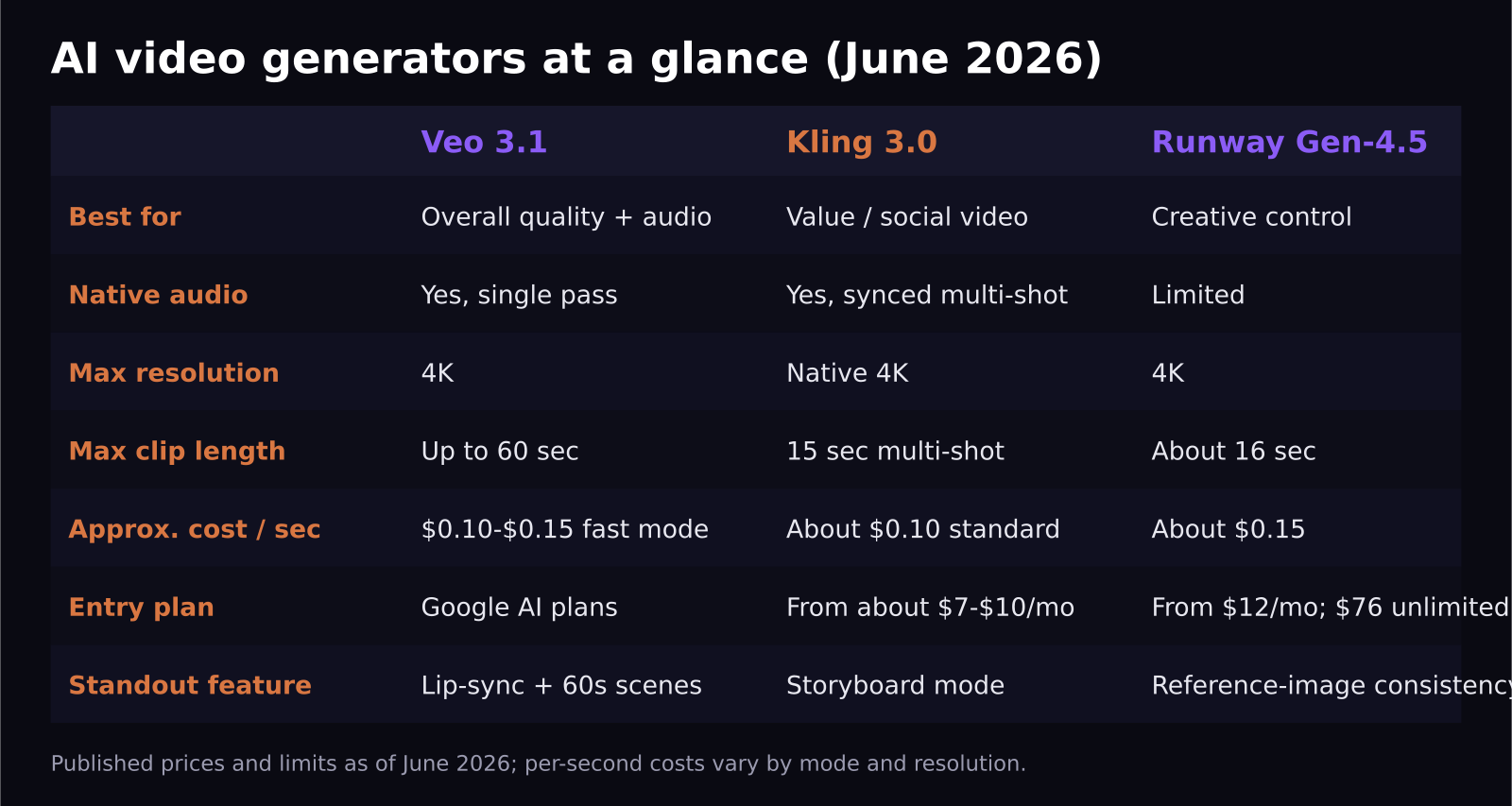
- Veo 3.1 generates dialogue, sound effects, and ambient audio in a single pass, and supports clips up to 60 seconds with 4K output.
- Kling 3.0 costs roughly $0.10 per second in standard mode and has the cheapest entry plan of the major platforms, with a multi-shot storyboard mode that keeps audio synced across cuts.
- Runway Gen-4.5 runs about $0.15 per second and locks character identity across shots using up to three reference images, with an unlimited plan at $76 per month for heavy users.
- Sora is effectively gone: the web and app experiences shut down April 26, 2026, and the API closes September 24, 2026.
- There is no single winner. The right pick depends on whether you optimize for audio, budget, or shot-to-shot control.
Why is Sora suddenly out of the picture?
On March 24, 2026, OpenAI announced it was discontinuing Sora across both the consumer app and the API. The app went dark on April 26, and the API has a hard stop on September 24, 2026. OpenAI did not give a detailed public reason, but reporting around the decision pointed to compute shortages and a strategic shift toward core enterprise products.
For creators, the lesson stings: people built workflows, templates, and even client deliverables around a tool that disappeared with about a month of notice. It is the strongest argument I have seen for keeping your video pipeline portable, and it is why this comparison focuses on what you can switch between, not just what is best today.
What does each generator actually do best?
Veo 3.1: the complete package
Google's Veo 3.1 owns one capability nobody else has fully matched: native audio generation. Dialogue, sound effects, and ambient noise come out of a single generation pass. If you have ever spent an evening syncing foley to AI footage, you understand why this matters. It eliminates an entire post-production step.
Veo also generates clips up to 60 seconds, which is dramatically longer than Runway's roughly 16-second ceiling or Kling's 15-second multi-shot cap. For explainer intros and YouTube B-roll, a single coherent 45-second shot changes how you storyboard. Fast mode at 720p costs around $0.10 to $0.15 per second, with 4K output costing more per second, and access is bundled into Google's AI subscription tiers.
Kling 3.0: the value king
Kuaishou's Kling 3.0, released February 5, 2026, is the model I recommend to creators on a budget. Standard mode works out to roughly $0.10 per second, professional mode around $0.18, and the entry subscription is the cheapest of any major platform, starting under $10 a month. Several community leaderboards currently rank its output quality at or near the top.
Its signature feature is multi-shot storyboarding: you describe a sequence, and Kling generates connected shots with audio that stays synced across the cuts, with strong subject consistency between angles. For short-form social content, which is most of what my clients ask for in 2026, that is close to a complete workflow in one tool.
Runway Gen-4.5: the control freak's choice
Runway's Gen-4.5 is less a generator and more a production environment. The headline feature is reference-based consistency: feed it up to three reference images and it holds a character's identity across multiple generated shots, which finally addresses the flicker-and-morph problem that made early AI video unusable for narrative work.
At roughly $0.15 per second it is not the cheapest, but the $76 per month unlimited tier is the best deal in the industry for high-volume users. If you are generating dozens of takes a day to find the perfect shot, unlimited generation beats any per-second price.
Which is cheaper, Veo 3.1, Kling 3.0, or Runway?
For occasional use, Kling 3.0 wins on raw cost. Its standard mode at about $0.10 per second and sub-$10 entry plan make it the cheapest way to produce usable AI video today. Veo's fast mode is competitive at the low end, but its higher-quality 4K output costs noticeably more per second, and the full experience sits inside Google's pricier AI bundles.
The math flips at volume. If you generate more than roughly 8 to 10 minutes of finished footage a month, with the usual pile of discarded takes behind it, Runway's $76 unlimited plan becomes the cheapest option per usable second, because everyone's real cost in AI video is the generations you throw away. My rule of thumb: hobby and social creators should start with Kling, working creators who bill clients should price out Runway unlimited, and teams already paying for Google's AI stack should use the Veo access they are likely already paying for. Whichever you choose, check current pricing pages before committing, because these numbers have shifted every few months.
Which one fits your workflow?
For short-form social video, Kling 3.0 is my pick. The storyboard mode maps directly onto how TikTok and Reels content is actually structured, and the price means you can experiment freely.
For YouTube explainers and product videos, Veo 3.1 wins. Longer clips mean fewer awkward cuts, and native audio means your rough cut sounds finished. When I need a 30-second conceptual intro for a SaaS tutorial, Veo gets me there in one generation more often than anything else.
For narrative, branded, or agency work, Runway Gen-4.5 is the safe choice. Character consistency across shots is non-negotiable for brand mascots and recurring characters, and Runway is the only one of the three where I trust that feature for client deliverables.
One honest caveat from daily use: all three still struggle with text on screen, interface close-ups, and software UI footage. For my core work, which is making software click on camera, generated video supplements real screen recordings; it does not replace them. Anyone selling you a fully generated SaaS demo in 2026 is overselling.
Frequently asked questions
What should former Sora users switch to?
Veo 3.1 is the closest like-for-like replacement in output quality and is the natural landing spot. If your Sora workflows were API-based, note the deadline: Sora's API shuts down September 24, 2026, so migrate before then. Kling 3.0 is the better switch if cost was your reason for choosing Sora in the first place.
Is AI video good enough for client work in 2026?
For B-roll, concept shots, intros, and stylized sequences, yes, and clients increasingly expect it. For anything showing a real product interface, precise text, or a specific real location, you still need traditional footage. Most professional work I see now is a hybrid.
Do these tools include commercial usage rights?
Paid tiers of Veo, Kling, and Runway all include commercial use of your generated output, but the details around indemnification and training-data provenance differ between providers and change often. For client work, read the current terms of the specific plan you are on rather than relying on a blog post, including this one.
SaaS Master
Creator behind SaaS Master — tutorials, walkthroughs, reviews, and explainers that help SaaS, AI, and WordPress products get understood and chosen. Writing here about the tools, trends, and tactics that actually move the needle. Work with me →
Want your product explained this clearly — in video?
Tutorials, walkthroughs, reviews, and shorts for SaaS, AI, and WordPress products.
Work With SaaS Master