WordPress
WordPress 7.0 'Armstrong' Goes Native AI: What It Actually Changes for Your Site
WordPress 7.0, code-named Armstrong and released on May 20, 2026, is the first WordPress version with AI built into core, and the most important thing to understand is what that does not mean: nothing runs by default, no content gets sent to any AI company automatically, and every feature is opt-in. What 7.0 actually ships is plumbing, a standard way for your site and its plugins to talk to AI models you choose.
I have built and filmed tutorials on WordPress sites for years, and I have watched the plugin ecosystem solve AI integration twenty incompatible ways since 2023. Armstrong is WordPress finally standardizing that mess, and if you run a site on WordPress, which is still the largest chunk of the web, this release will shape what your plugins can do for the next five years.
- WordPress 7.0 Armstrong shipped May 20, 2026, with native, provider-agnostic AI architecture in core.
- The new AI Client gives every plugin one shared interface to AI models, so each plugin no longer needs its own API keys and settings page.
- The Abilities API lets your site declare what it can do in a machine-readable way, the groundwork for AI agents interacting with WordPress sites.
- The official AI plugin supports OpenAI, Google Gemini, and Anthropic Claude, and all features are opt-in and manually triggered.
- WordPress.com layers extras on top, including an AI assistant in the editor and Feature Clips, which turns posts into short vertical videos.
What exactly did WordPress 7.0 add?
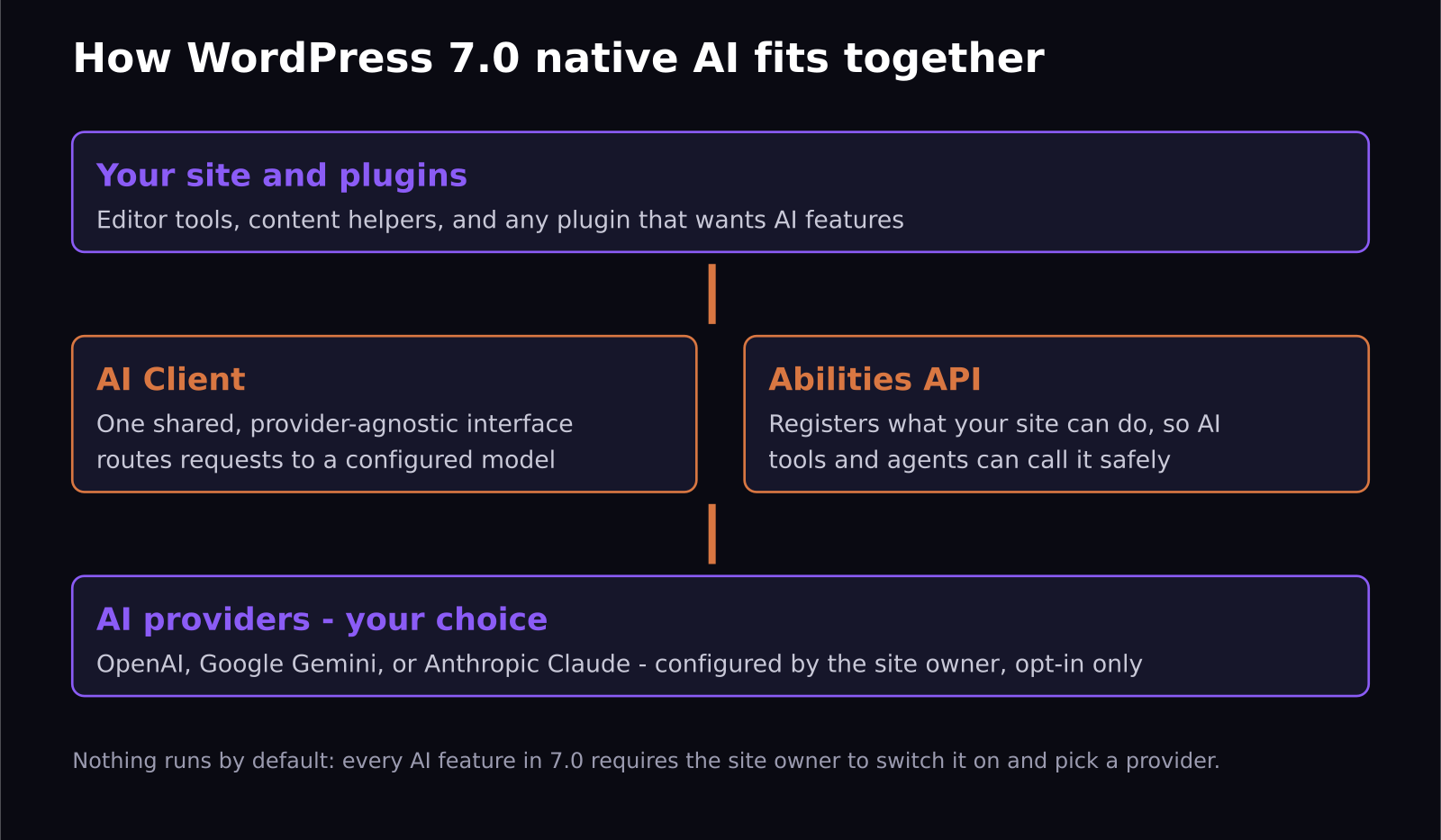
Two foundational pieces matter more than any single feature: the AI Client and the Abilities API.
The AI Client is a central interface that lets any plugin communicate with generative AI models without caring which provider sits behind it. Before 7.0, every AI-flavored plugin shipped its own integration: its own API key field, its own provider list, its own billing surprises. Now a plugin asks WordPress for an AI completion, and WordPress routes the request to whichever model the site owner configured. One key, one settings screen, every plugin shares it.
The Abilities API is the quieter half, and I think the more important one. It gives your site a structured way to declare what it can do, such as creating a post, listing products, or updating a menu, so that AI tools can discover and call those capabilities safely. If you have followed how AI agents are starting to browse and act on the web, you can see where this goes: WordPress is preparing sites to be readable and operable by agents, with the site owner defining the boundaries.
On top of those building blocks sits the official AI plugin, which combines the AI Client with the Abilities API into features you can actually click. It currently supports OpenAI, Google Gemini, and Anthropic Claude. Crucially, everything requires manual triggering. The AI does not rewrite your drafts or answer your comments unless you explicitly ask it to, a design decision I want to applaud loudly, because the fastest way to ruin trust in a CMS is to have it do AI things to your content uninvited.
How is WordPress.com different from self-hosted 7.0?
This release widened the gap between WordPress.com and self-hosted WordPress in a way worth understanding before you compare notes with a friend on the other setup.
WordPress.com ships with AI features already wired up: an assistant in the editor that can edit text, adjust styles, and generate images, which rolled out earlier this year, plus real-time collaboration on select plans so multiple people can write in the same post simultaneously. The standout for my world is Feature Clips: it generates a short vertical video from your post content directly in the editor sidebar, drops it into your Media Library, and makes it shareable to Instagram via Jetpack Social or downloadable for TikTok and YouTube Shorts.
Self-hosted sites get the core architecture and the official AI plugin, but you configure your own provider and bring your own API key. More setup, more control, and your AI costs are whatever your provider charges rather than a bundled subscription.
As someone who makes short-form video for a living, my honest take on Feature Clips: it is a real workflow saver for getting something onto Shorts and Reels from every post, and the output is exactly as generic as you would expect from one click. Treat it as a baseline, not a replacement for intentional short-form content. A clip that actually hooks viewers still needs a human deciding what the hook is.
Should you update to 7.0 now?
For most sites, yes, with the usual discipline: back up first, update staging before production, and check your critical plugins for compatibility notices. The AI architecture is new code, but because every feature is opt-in, a site that ignores AI entirely runs 7.0 exactly like it ran 6.x.
If you do want the AI features, my suggested order of operations is to update, install the official AI plugin, connect one provider, and try the content tools on drafts, not published posts. Watch your provider bill for the first month; AI features metered per request are a new kind of operating cost for a WordPress site, and costs scale with how trigger-happy your editors are.
If you build for clients, this is the moment to form an opinion. Clients are going to ask what WordPress AI means for them within the next quarter, and the honest answer is: standardized infrastructure now, with the interesting plugin generation arriving over the next year as developers build on the AI Client instead of rolling their own.
What should you watch over the next year?
Three things are worth tracking after this release. First, watch which major plugins adopt the AI Client: when the big SEO, e-commerce, and form plugins migrate onto the shared interface, the practical benefits of 7.0 stop being theoretical and start showing up in your admin screens. Second, watch what the Abilities API enables. The first wave of AI agents that can manage a WordPress site end to end, drafting, scheduling, updating product listings, will be built on it, and the difference between a useful agent and a security problem will come down to how carefully site owners scope those abilities. Third, watch the provider list. OpenAI, Gemini, and Claude are the launch options, but the provider-agnostic design means local and self-hosted models are an obvious next step for site owners who never want content leaving their server at all.
Frequently asked questions
Does WordPress 7.0 send my content to AI companies?
Not unless you configure it to. Core ships the plumbing, but no provider is connected by default, all features are opt-in, and each one runs only when manually triggered. Content goes to a provider only when you connect one and invoke a feature, and which provider sees it is your choice among OpenAI, Gemini, and Claude.
Do I have to pay extra to use the AI features?
WordPress 7.0 itself is free, as always. Self-hosted AI features require an API key from your chosen provider, and you pay that provider per usage. On WordPress.com, AI features are bundled into plans, with limits varying by tier.
Will my existing AI plugins break?
The established AI plugins continue to work; 7.0 does not remove anything they rely on. Over time, expect well-maintained plugins to migrate onto the core AI Client, which should mean fewer separate API keys and more consistent behavior across your site. A plugin that has not updated in a year is the one to scrutinize.
SaaS Master
Creator behind SaaS Master — tutorials, walkthroughs, reviews, and explainers that help SaaS, AI, and WordPress products get understood and chosen. Writing here about the tools, trends, and tactics that actually move the needle. Work with me →
Want your product explained this clearly — in video?
Tutorials, walkthroughs, reviews, and shorts for SaaS, AI, and WordPress products.
Work With SaaS Master