WordPress
WordPress's Official AI Plugin Just Hit 1.1.0: What Editorial Notes and the Abilities API Mean for Your Site
In short
WordPress's official AI plugin hit version 1.1.0 on July 1, 2026, adding Editorial Notes and an Abilities API. Here's what changed and why it matters.
WordPress's official AI plugin quietly jumped to version 1.1.0 on July 1, 2026, and it's a bigger deal than the changelog makes it look. The plugin dropped "Experiments" from its name, moved onto fixed monthly release milestones, and shipped a feature that lets any block-based post get an automated editorial pass for accessibility, readability, grammar, and SEO before you hit publish. If you run a WordPress site and haven't looked at this yet, this is the update that makes it worth a second look.
Key takeaways
- The WordPress AI plugin (formerly "AI Experiments") hit version 1.1.0 on July 1, 2026, built on the new AI Building Blocks initiative.
- Its core feature, Editorial Notes, reviews your post block-by-block and flags accessibility, readability, grammar, and SEO issues — then a separate Editorial Updates button applies the fixes you approve.
- The plugin's foundation is the Abilities API, a registry that lets any AI agent or automation tool discover exactly what a WordPress site can do, using defined input/output schemas.
- WordPress 7.1 enters Beta 1 on July 15, 2026, with a final release targeted for August 19 — timed to land during WordCamp US.
- The AI team switched from bi-weekly releases to fixed monthly milestones specifically to reduce contributor burnout, a small process change that signals this project is being built for the long haul, not shipped as a demo.
I build videos explaining WordPress tools for a living, and the plugins I get asked about most are the ones that quietly become infrastructure rather than the ones with flashy launch videos. This one is shaping up to be infrastructure.
What is the WordPress AI plugin, exactly?
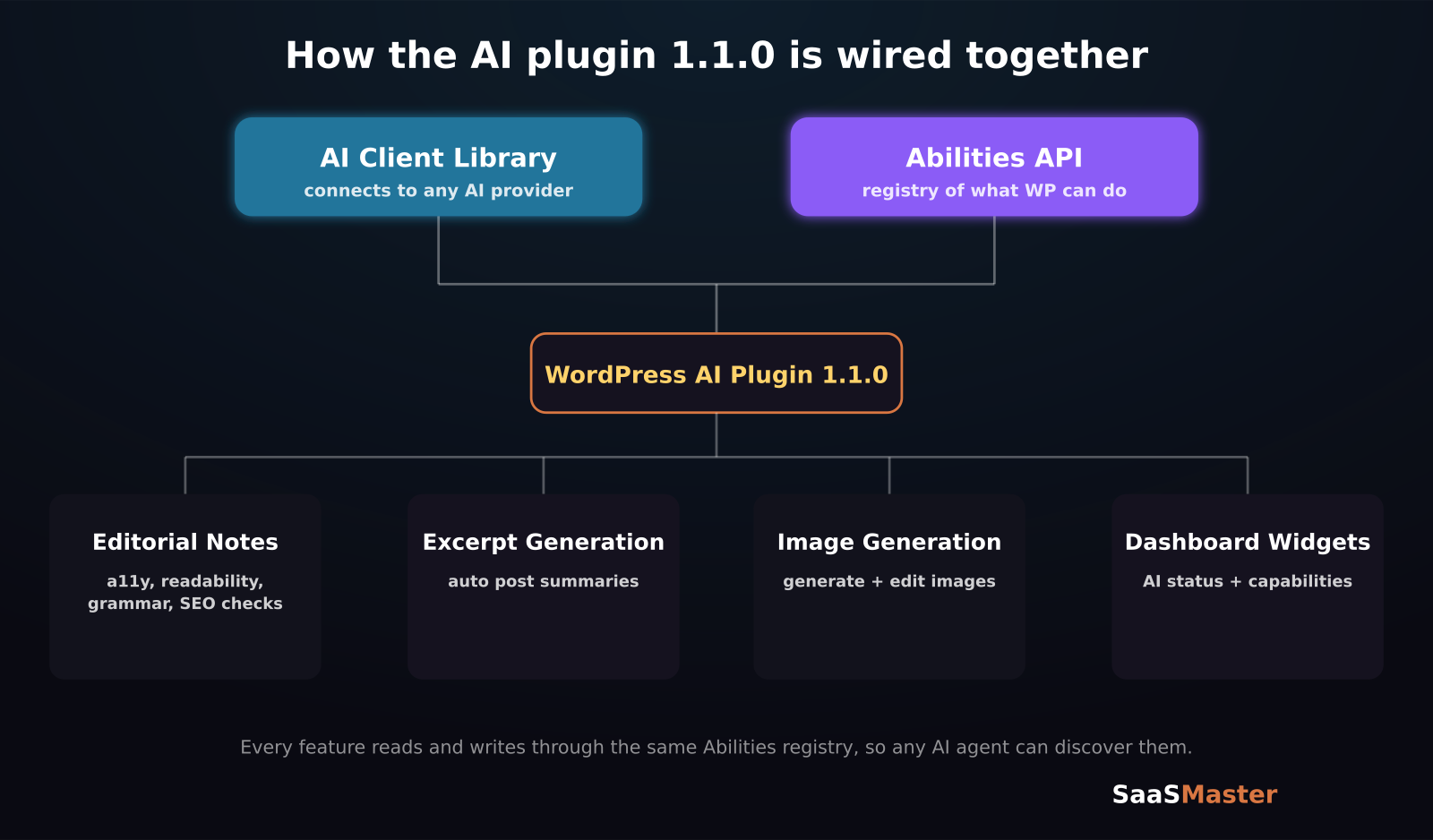
It's WordPress core's own first-party AI plugin — not a third-party tool, but the AI team's official, ongoing project to bring AI capabilities directly into WordPress. It started life late last year as "AI Experiments," a testing ground for ideas, and has now dropped that name and moved to simple version numbers, which is usually a sign a project is graduating from prototype to something meant to stick around. It's currently built on two building blocks: an AI Client library for connecting to AI providers, and the Abilities API for exposing what WordPress itself can do to any AI system that asks.
What does version 1.1.0 actually add?
The headline feature is Editorial Notes. It walks through your post content block by block and attaches notes with specific suggestions across four categories: accessibility, readability, grammar, and SEO. It's not a black box that silently rewrites your post — it surfaces suggestions as notes tied to specific blocks, and a companion feature, Editorial Updates, only appears once there are pending notes attached to blocks currently in your editor, so you approve changes rather than getting blindsided by them.
Beyond that, 1.1.0 adds:
- New dashboard widgets showing AI status and available AI capabilities at a glance
- Excerpt generation, so you're not hand-writing summaries for every post
- Image generation and editing built into the plugin
- A new core/read-settings Ability, letting AI tools query site settings through the same structured registry
- A new wpai_has_image_generation_support filter so plugin and theme developers can declare their own image-generation support and plug into the same system
None of these are revolutionary in isolation — plenty of third-party AI plugins already do excerpt generation or image editing. What's different is that they're now part of WordPress's own AI framework, using a standard registry (the Abilities API) instead of every plugin reinventing its own AI integration from scratch.
Why does the Abilities API matter more than any single feature?
Because it's the plumbing that everything else plugs into. An "Ability" in this system is a named, schema-defined unit of functionality — think "generate a title," "summarize content," or "read site settings" — each with a defined input schema and output schema. That structure is what lets an AI agent (whether that's WordPress's own plugin, a third-party tool, or an external automation system) discover what a given WordPress install can actually do and call it predictably, instead of guessing or scraping the admin UI.
If you've ever tried to get an AI coding assistant to reliably interact with a WordPress site's REST API and watched it hallucinate endpoints that don't exist, this is the fix. A registry of well-defined Abilities means an agent can query "what can this site do" and get a real, structured answer. That's less exciting to write a headline about than "AI writes your excerpts for you," but it's the part of this release that developers should actually be paying attention to.
How does this connect to WordPress 7.1?
WordPress core itself is moving in the same direction. WordPress 7.1 enters Beta 1 on July 15, 2026, with a final release scheduled for August 19 — deliberately timed to land during WordCamp US, which runs August 18–19 with a Showcase Day on August 17. The AI team is running its own booth at that event, an "AI Prompt Bar," which tells you how much internal priority this initiative has right now.
The AI plugin isn't part of WordPress core yet, but the Abilities API groundwork it's built on has already been proposed for core inclusion in earlier WordPress releases, and the pattern with WordPress features like this is usually: plugin first, prove it out, then fold into core once it's stable. If that pattern holds, expect AI-native features to show up in WordPress core itself within the next release or two after 7.1.
Should you install the WordPress AI plugin now?
If you're comfortable being an early adopter, yes — with a caveat. Editorial Notes is genuinely useful today: running a real post through it and getting concrete, block-level accessibility and SEO suggestions beats staring at a generic "your content could be better" score from a third-party SEO plugin. But the plugin is still labeled as being on a monthly milestone cadence with active development, meaning breaking changes between versions are more likely than with a mature, stable plugin. I'd install it on a staging site first, run your existing content through Editorial Notes, and see if the suggestions are actually good for your niche before turning it loose on a production site with real traffic.
For agencies and freelancers building WordPress sites for clients, the Abilities API is worth understanding now even if you don't install the plugin yet — it's the interface your future AI-assisted dev tools are going to expect a well-built WordPress site to expose.
Frequently asked questions
Is the WordPress AI plugin free?
Yes, it's a free, official WordPress.org plugin. It requires you to connect your own AI provider (through the AI Client library) for the actual generation features, so provider costs — if any — depend on which AI service you connect, not the plugin itself.
What happened to the "AI Experiments" plugin?
It's the same project, renamed. The plugin dropped "Experiments" from its name as of the current release cycle and moved to standard version numbers starting around 1.0, signaling the WordPress AI team considers it past the early prototype stage.
When does WordPress 7.1 come out?
WordPress 7.1 enters Beta 1 on July 15, 2026, with the final release targeted for August 19, 2026, timed to coincide with WordCamp US.
Was this article helpful?
Jorge Aguilar
Founder & Creator, SaaS Master
Producing SaaS and AI product videos since 2019 — 800+ videos for 200+ brands, covering tutorials, demos, walkthroughs, and explainers. Writing here about the tools, trends, and tactics that actually move the needle. LinkedIn · About · Work with me
Want your product explained this clearly — in video?
Tutorials, walkthroughs, reviews, and shorts for SaaS, AI, and WordPress products.
Work With SaaS Master