Video Marketing
Best Screen Recording and Demo Tools for SaaS Founders in 2026 (After the Loom Price Shock)
In short
Some Loom teams saw bills jump from 240 to 24,000 dollars a year in 2026. Here are the best screen recording and demo tools for SaaS founders to use now.
A handful of Loom customers opened their 2026 renewal invoice and watched their bill jump from 240 dollars a year to 24,000 dollars overnight, after Atlassian's migration quietly converted free viewer seats into paid Creator seats. If you make product videos and demos for a living the way I do, that single number is why this year's tool-picking decision is not really about features anymore, it is about which platform still respects your budget. I tested the current field of screen recorders and demo builders against real SaaS workflows this month, and here is where things actually stand.
Key takeaways
- Loom's Atlassian migration converted some free viewer seats into full paid Creator seats without warning, and users report lag, audio sync issues, and failed uploads since the infrastructure switch.
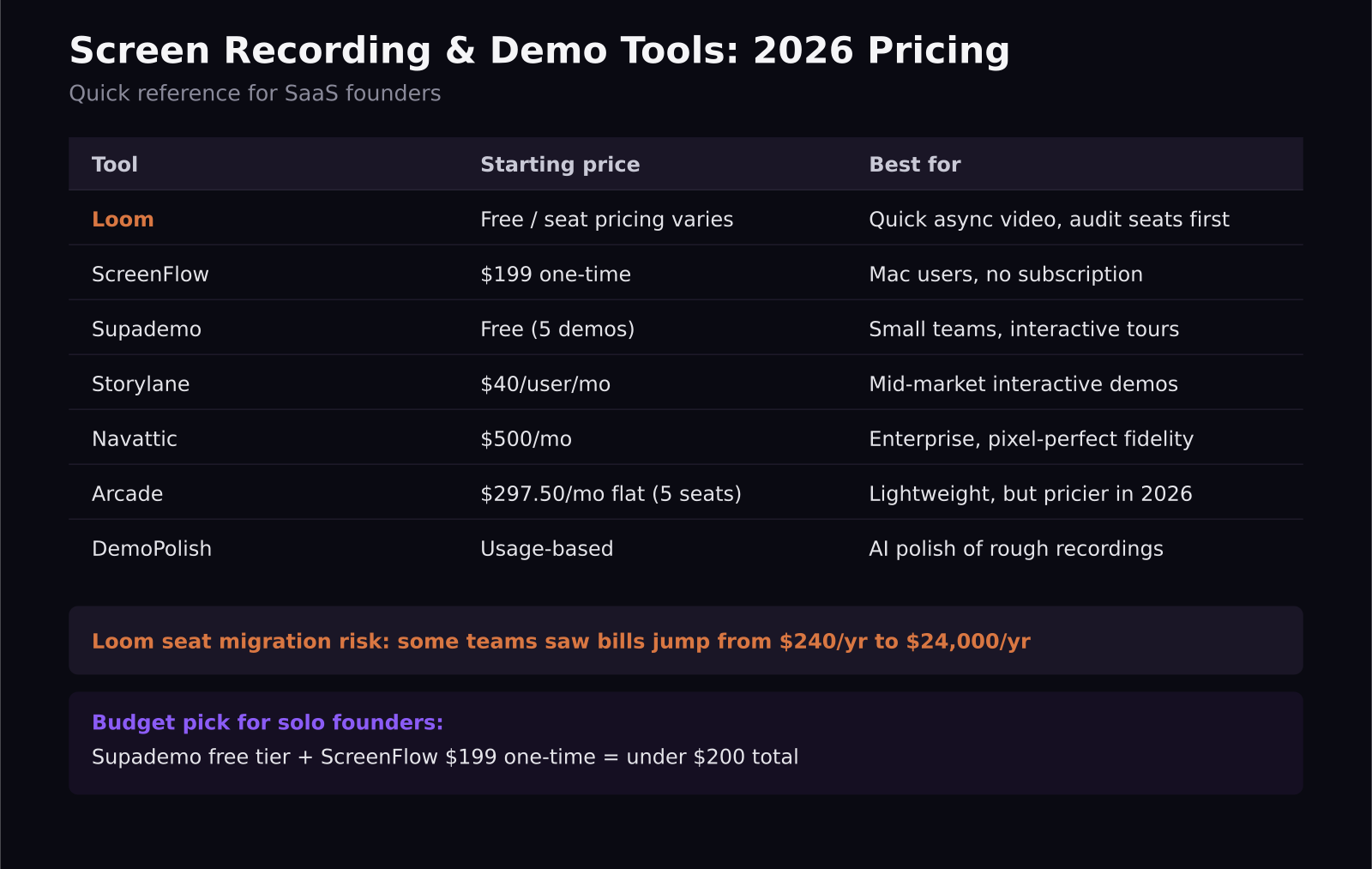
- Arcade raised its Growth plan from 42.50 dollars per user monthly to a flat 297.50 dollars monthly for 5 seats in 2026, a real hike for small teams that liked its lightweight, clickable demos.
- Supademo and Storylane are the strongest picks for interactive, click-through product tours, with Supademo's free tier covering 5 demos and Storylane starting at 40 dollars per user monthly.
- ScreenFlow remains the best one-time-purchase option at 199 dollars flat, no subscription, if you are a Mac user who wants a real editor instead of a recorder with a paywall.
- Navattic is worth the 500 dollar-a-month entry price only if your product is complex enough that pixel-perfect, fully interactive sandboxes actually change how prospects understand it.
What happened to Loom, and should you leave?
Loom has been the default screen recorder for SaaS teams for years, and for fast async updates it is still genuinely good. But since Atlassian folded Loom accounts into its own billing infrastructure, the complaints have piled up fast: performance lag during recording, audio that drifts out of sync on longer videos, uploads that silently fail. The bigger issue is the seat migration. Workspaces that used to add unlimited free viewers or Creator Lite users at no cost are finding those accounts auto-upgraded to full paid Creator seats at the standard per-seat rate, which is how a 240 dollar annual bill turns into 24,000 dollars without anyone on the team changing a setting.
My take: keep Loom if your team is small, your usage is light, and you have already checked your actual seat count post-migration. If you are a growing team that added a dozen people as free viewers over the years, go audit your billing today, not after the renewal email.
Which screen recorder is the best Loom alternative?
For straight video recording without the interactive layer, ScreenFlow is still my pick if you are on a Mac. It is a one-time 199 dollar purchase with a real timeline editor, clean audio capture, and no recurring fee eating into your tool budget every month, though you do pay again for major version upgrades. If you need cross-platform recording with built-in transcripts and light editing, Loom's core recorder is still fine, just watch your seat count.
If your actual goal is faster editing on short-form clips rather than long tutorials, that is a different tool category entirely, things like CapCut for fast captioned edits or OpusClip for turning long recordings into short highlight reels. Do not force a demo tool to do a short-form editor's job.
Are interactive demos worth switching to?
This is the bigger shift in 2026: more SaaS teams are moving from recorded video demos to clickable, interactive product tours that a prospect can navigate themselves. Supademo is the easiest entry point, its free tier includes 5 demos and unlimited screenshots, it adds AI-generated voiceover, and it translates a demo into more than 15 languages with one click, which is genuinely useful if you sell internationally and cannot afford to re-record every walkthrough.
Storylane sits a step up in fidelity and cost, starting around 40 dollars per user monthly with a Growth tier near 500 dollars monthly for HTML-based demos and a Premium tier near 1,200 dollars monthly if you need Salesforce integration. Most mid-market teams running 5 to 10 seats land somewhere between 12,000 and 25,000 dollars a year once they are fully set up, so budget for that before you fall in love with the demo.
Navattic plays at the enterprise end, 500 dollars monthly just to get in the door, 1,000 dollars monthly for SSO, and its Launchpad feature locked to the Growth plan. It buys you pixel-perfect fidelity, the kind where the interactive demo looks and behaves exactly like your real product, down to the pixel. That precision is worth paying for if your product is genuinely complex and a static screenshot undersells it. If your product is simpler to explain, you are paying enterprise pricing for a problem you do not have.
Arcade is the one to watch carefully. It used to be the lightweight, cheap option, a Chrome extension for quick clickable walkthroughs, but its 2026 price move to a flat 297.50 dollars monthly for 5 seats erased a lot of that advantage for small teams, and it still lacks the deeper automation and analytics that Storylane and Navattic offer at similar price points now.
Where do AI-generated demo tools fit in?
A newer category is worth knowing about even if you are not ready to switch: tools like DemoPolish take a rough, unedited screen recording and use AI to rewrite the narration into a clean script, generate a professional voiceover, and hand back a polished demo in about 60 seconds. Leadde goes further upstream, turning a PDF, a slide deck, or a product spec directly into an editable demo video without you ever opening a recorder. Puppydog.io tries to be the all-in-one version of this, bundling recording, script generation, AI avatars, voiceover, and multi-format export into a single workflow built for teams producing demos at real volume.
These tools are not yet a replacement for a human editor when the stakes are high, a launch video or a sales enablement piece still benefits from someone who understands your product's story. But for the tenth internal training clip this quarter, or a quick feature update video that needs to exist by Friday, AI-polished demos save real hours.
My recommendation for SaaS founders right now
If you are a solo founder or a small team on a tight budget, start with Supademo's free tier for interactive walkthroughs and ScreenFlow for anything you want as a polished video, that combination covers most onboarding and support needs for under 200 dollars total. If you are scaling past 10,000 dollars a year in demo tooling anyway, compare Storylane against Navattic directly on your own product before committing, the fidelity difference is real but it is not universal. And whatever you are running today, if it is Loom, spend fifteen minutes this week auditing your actual seat count before your next renewal finds it for you.
Frequently asked questions
Why did Loom prices increase so much in 2026?
Atlassian's integration of Loom accounts converted many free viewer and Creator Lite seats into full paid Creator seats billed at the standard per-seat rate, which is why some teams saw annual bills jump from around 240 dollars to as much as 24,000 dollars without changing their usage.
What is the cheapest good alternative to Loom for a small SaaS team?
Supademo's free tier, 5 demos with unlimited screenshots and AI voiceover, paired with ScreenFlow's one-time 199 dollar purchase for polished video recording, covers most small-team needs without an ongoing subscription.
Is Navattic or Storylane better for interactive product demos?
Storylane is cheaper to start, from 40 dollars per user monthly, and fits most mid-market teams well. Navattic costs more, from 500 dollars monthly, but delivers pixel-perfect fidelity that is worth it specifically for complex products where a slightly-off demo would undersell the real thing.
Was this article helpful?
Jorge Aguilar
Founder & Creator, SaaS Master
Producing SaaS and AI product videos since 2019 — 800+ videos for 200+ brands, covering tutorials, demos, walkthroughs, and explainers. Writing here about the tools, trends, and tactics that actually move the needle. LinkedIn · About · Work with me
Want your product explained this clearly — in video?
Tutorials, walkthroughs, reviews, and shorts for SaaS, AI, and WordPress products.
Work With SaaS Master