AI & SaaS
Flipsnack Review 2026: Turn a Boring PDF Into an Interactive Flipbook
In short
Flipsnack turns static PDFs into interactive flipbooks with embedded video, forms, and analytics. Full 2026 pricing breakdown, features, and honest verdict.
Flipsnack is a browser-based tool that converts a static PDF into an interactive, page-turning flipbook with embedded video, clickable hotspots, lead-capture forms, and a read-time analytics dashboard. The free plan caps you at 3 publications and 30 pages per document with a visible watermark, and paid plans start at 30 dollars a month billed annually. I spent this week testing it end to end to see whether it earns a spot in a real content workflow or just looks good in a demo.
Key takeaways
- Free plan allows 3 publications, 30 pages each, with a visible Flipsnack watermark on every page
- Professional plan is 30 dollars a month billed annually, or 38 dollars a month billed monthly, and unlocks video and audio embeds plus lead-capture forms
- Business plan is 85 dollars a month, billed annually only, and adds a custom domain and full brand kit
- Team plan is 258 dollars a month for 5 seats with shared collaboration
- The built-in vector editor lets you click into individual layers of a PDF, including maps and templates, without leaving the browser
- Analytics track impressions, click-through rate, average read time, and lead capture per document
[[video:6pHq8BtOU08]]
What is Flipsnack and how does it actually work?
Flipsnack takes a PDF you already have, whether that is a product catalog, a proposal, a magazine, or a company brochure, and rebuilds it as an HTML5 flipbook that opens instantly in any browser with no app to download. You upload the file, Flipsnack processes each page, and you land in a design customizer where you can set accent colors, background textures, and the page-turn animation, including the classic flip sound on mobile.
What separates it from just exporting a PDF to a web viewer is the editing layer underneath. Flipsnack includes a full vector editor, so if your PDF has a map, a chart, or a layered template, you can click into individual elements and move, resize, or restyle them directly inside the platform instead of going back to the original design file. That single feature is what pushes Flipsnack from a viewer into an actual publishing tool.
How much does Flipsnack cost in 2026?
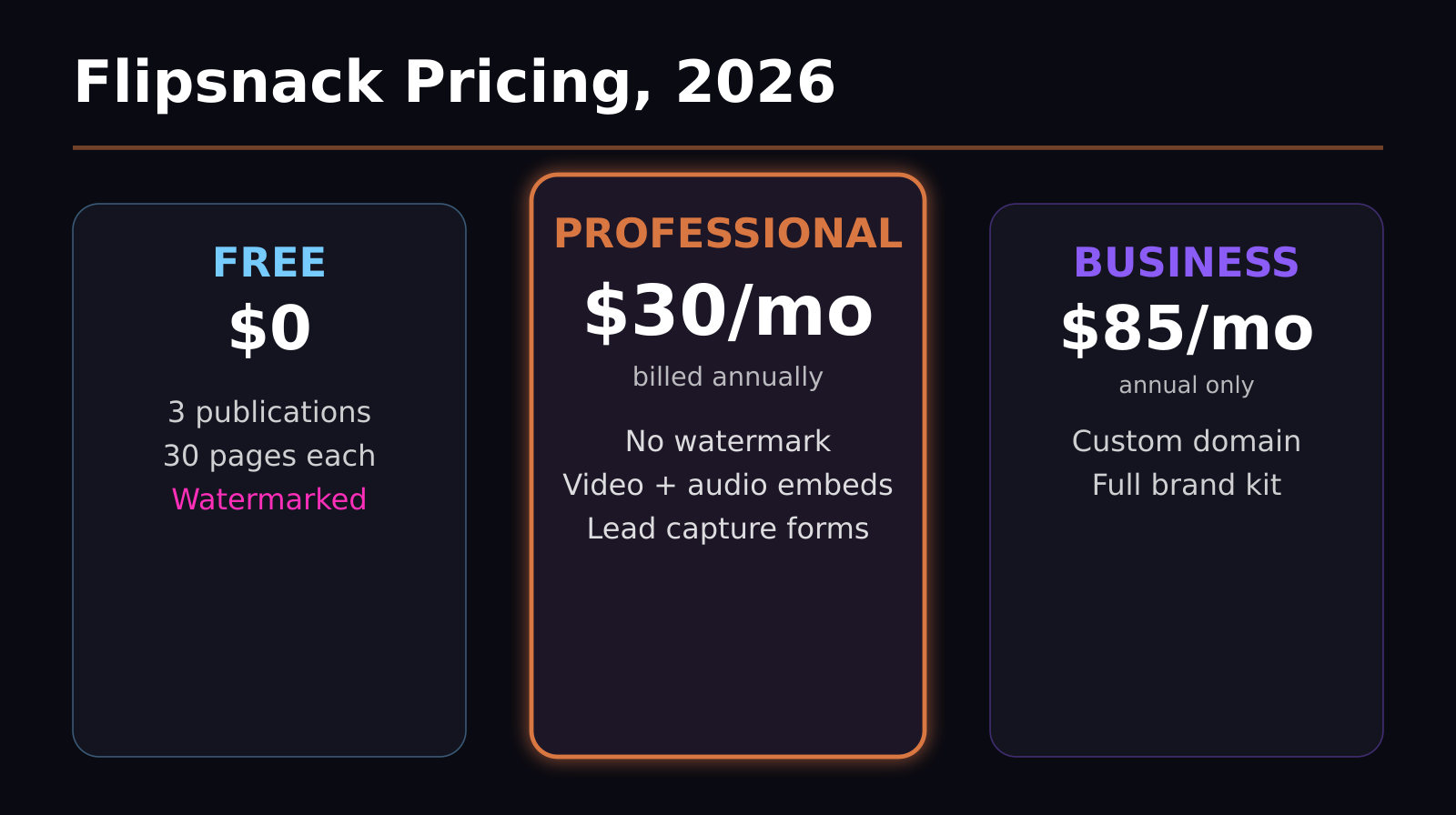
Flipsnack runs on five tiers. The free plan is genuinely free forever, but it caps you at 3 live publications, 30 pages per publication, and stamps a visible Flipsnack watermark on every page, which rules it out for anything client-facing.
The Professional plan is 30 dollars a month if you pay annually, or 38 dollars a month if you pay monthly, and this is the tier where the product actually becomes usable for business: it removes the watermark and unlocks video and audio embedding plus lead-capture forms and polls. The Business plan jumps to 85 dollars a month, billed annually only, and adds a custom domain so your flipbooks live on your own URL instead of flipsnack.com, along with a full brand kit for consistent styling across documents. The Team plan is 258 dollars a month and includes 5 seats for multi-user collaboration, which matters if more than one person on your team is publishing catalogs or reports. Enterprise pricing is quote-based and adds API access and single sign-on for larger organizations.
For a solo creator or small agency, the real decision point is Professional versus Business: pay 30 dollars a month if the flipsnack.com URL and default branding do not bother you, or 85 dollars a month once you need your own domain in front of clients.
What can you actually do inside a flipbook?
Once you are past the free tier, a Flipsnack publication stops behaving like a PDF and starts behaving like a lightweight landing page. You can embed stock or custom video directly onto a page, add clickable shopping links so a catalog becomes shoppable, drop in GIFs, and attach forms or polls so readers can submit information without leaving the document. Every one of those elements sits inside the same drag-and-drop editor used for layout and design, so adding a form to page 4 of a product catalog takes about the same effort as adding a text box.
Sharing options include a direct link, an embed code for dropping the flipbook into an existing website or CMS, and a print-ready QR code, which is useful for physical collateral like brochures or menus that need a digital companion. Privacy settings let you publish a flipbook as fully public, unlisted, or private, so internal documents and public marketing pieces can live on the same account without crossing over.
The analytics dashboard is the part most static PDFs cannot compete with at all. It tracks total views, click-through rate on embedded links, average read time per session, and, on paid tiers, captures leads directly from any form embedded in the document. For a sales team handing out a proposal or a marketing team running a catalog, that turns a document you email once into something you can actually measure.
Is the free plan good enough, or is it just a demo?
Honestly, the free plan is a demo. Three publications and a 30-page cap are workable for testing the platform, but the visible watermark on every single page is the disqualifying limit for professional use. Any reader will see Flipsnack branding stamped across your proposal, catalog, or report, which undercuts the point of making something look polished in the first place. If you plan to use this for actual client or customer-facing work, budget for at least the Professional tier from the start rather than building a workflow around the free version and hitting the wall later.
How does Flipsnack compare to FlippingBook and Issuu?
FlippingBook is Flipsnack's closest direct competitor and the two are frequently compared feature for feature: both offer page-flip animation, embedded media, and lead capture, with FlippingBook generally seen as slightly stronger on white-label branding options and Flipsnack ahead on its in-browser vector editor and template library. Issuu, by contrast, leans more toward a publishing and distribution network, with a built-in audience of readers browsing public content, which makes it a better fit if discovery matters more than lead capture. If your priority is editing PDFs directly and embedding interactive elements without leaving the browser, Flipsnack's editor is the more capable option of the three.
Who should actually use Flipsnack?
Flipsnack makes the most sense for teams that already produce PDF-based collateral on a recurring basis: product catalogs, real estate listing books, restaurant menus, sales proposals, internal reports, and digital magazines. If you are sending the same proposal template to prospects every week, the lead-capture forms and read-time analytics alone can justify the Professional plan. If you only ever generate one static PDF a year, the effort of learning a new editor probably is not worth it, and a plain PDF export will do the job just as well.
Is Flipsnack fast to set up, or is there a learning curve?
Uploading a PDF and getting a working flipbook takes only a few minutes. Flipsnack processes most documents quickly, and the design customizer defaults to sensible presets, so a first draft is usable almost immediately after upload. The learning curve shows up once you go past the basics: the vector editor for restyling individual layers of a map or template, the hotspot and multimedia slideshow tools, and the analytics dashboard all take a bit of exploring before they become second nature. Budget an afternoon to get comfortable with the deeper features rather than expecting to master them in your first 10 minutes.
Frequently asked questions
Is Flipsnack free to use?
Yes, Flipsnack has a permanently free plan, but it limits you to 3 publications of up to 30 pages each and adds a visible watermark to every page. Removing the watermark and unlocking video embeds and lead forms requires the Professional plan, which starts at 30 dollars a month billed annually.
Can I embed video inside a Flipsnack flipbook?
Yes, on the Professional plan and above you can embed video and audio directly onto any page of a flipbook, alongside GIFs, shopping links, forms, and polls, all through the same drag-and-drop editor used for the rest of the layout.
Does Flipsnack work for lead generation?
Yes, paid plans let you embed lead-capture forms directly inside a flipbook page, and the analytics dashboard tracks those submissions alongside views, click-through rate, and average read time, so you can see which document and which page is actually converting readers into leads.
Was this article helpful?
Jorge Aguilar
Founder & Creator, SaaS Master
Producing SaaS and AI product videos since 2019 — 800+ videos for 200+ brands, covering tutorials, demos, walkthroughs, and explainers. Writing here about the tools, trends, and tactics that actually move the needle. LinkedIn · About · Work with me
Want your product explained this clearly — in video?
Tutorials, walkthroughs, reviews, and shorts for SaaS, AI, and WordPress products.
Work With SaaS Master