AI & SaaS
Zapier vs Make vs n8n in 2026: What Automation Actually Costs at Scale
In short
Zapier runs 4 to 15 times more than Make at the same workload, and self-hosted n8n cuts costs another 80 percent. Here is the real 2026 pricing math.
Zapier is the fastest way to get a non-technical team automating today, Make gives you the same visual workflow power at roughly 60 percent lower cost, and n8n is the only one of the three built for true self-hosting with unlimited executions. The homepage pricing pages do not show what any of these actually cost once a workflow runs thousands of times a month, so here is the real math.
Key takeaways
- Zapier costs 20 to 100 dollars a month for most business tiers, backed by over 7,000 integrations and the simplest setup of the three
- n8n Cloud starts at 20 euros a month for 2,500 executions, with a Pro plan at 50 euros a month for 10,000 executions, plus a free, fully self-hosted community edition with unlimited executions
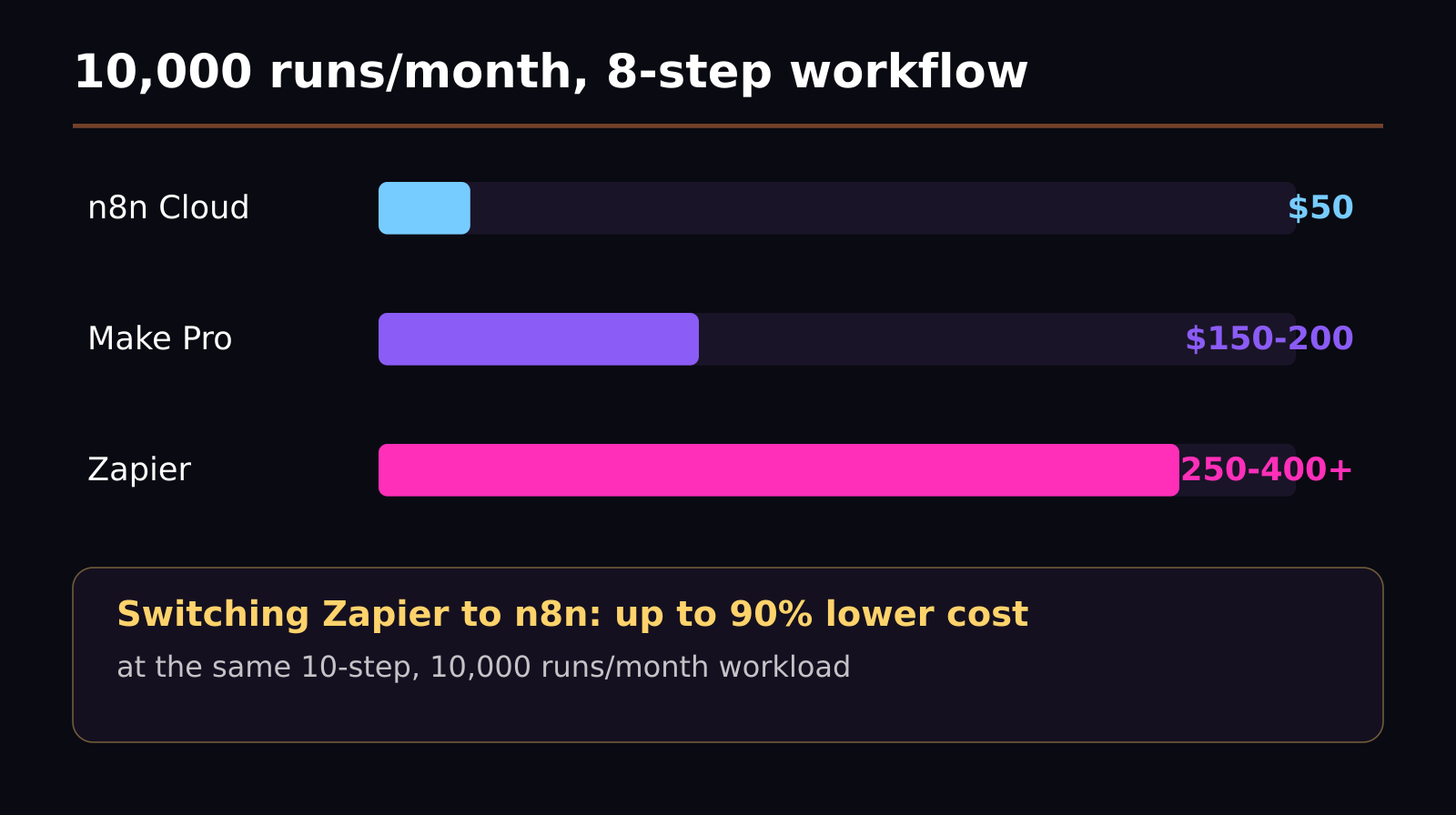
- At 10,000 monthly workflow runs across an 8-step workflow, real costs land around 50 dollars a month on n8n Cloud, 150 to 200 dollars a month on Make Pro, and 250 to 400-plus dollars a month on Zapier
- Zapier runs 4 to 15 times more expensive than Make at the same workload, and Make runs 3 to 5 times more expensive than self-hosted n8n
- For a 10-step workflow running 10,000 times a month, switching to n8n can cut automation costs by 80 to 90 percent compared to Zapier
- All three platforms now offer native connections to OpenAI, Anthropic, and Google Gemini, plus prebuilt AI agent workflow templates
Why does the same automation cost so differently across these three tools?
The gap comes down to how each platform counts usage. Zapier bills per task, where a task is roughly one action inside one automation run, which means a single workflow with several steps can burn through your monthly task allowance fast once volume grows. Make bills by operations, which are counted similarly but priced lower per unit, and its visual scenario builder lets you construct branching, multi-path logic that would require a more expensive Zapier plan to replicate. n8n breaks from both models: its cloud plans bill by workflow execution rather than individual steps within that execution, and its self-hosted option removes per-execution pricing from the equation entirely, since you are running the software on your own server rather than paying per action.
That structural difference is why the gap widens so dramatically as volume increases. A workflow that costs a few dollars a month at low volume on any of the three tools can diverge into wildly different totals once you are running it thousands of times a month, because Zapier's per-task pricing scales linearly with every single action inside every run, while n8n's self-hosted execution cost is effectively flat regardless of how complex each individual workflow gets.
What does each tool actually cost at real volume?
For a realistic mid-size workflow, an 8-step automation running 10,000 times a month, the numbers land like this: n8n Cloud costs around 50 dollars a month, Make Pro runs approximately 150 to 200 dollars a month, and Zapier lands at 250 dollars a month or more, frequently exceeding 400 dollars depending on plan tier and add-ons. Scale that further to a 10-step workflow at the same 10,000 monthly runs, and switching from Zapier to n8n can cut the automation bill by 80 to 90 percent.
Put another way, Zapier consistently runs 4 to 15 times more expensive than Make for the same workload, and Make itself runs 3 to 5 times more expensive than n8n's self-hosted community edition. None of this means Zapier is a bad product; it means Zapier's pricing is built around teams that value the fastest path to automation over the lowest per-task cost, and that trade-off gets more expensive the more you automate.
What do you actually get for the extra cost with Zapier?
Zapier's main advantage is breadth and simplicity. With more than 7,000 app integrations, it is the most likely of the three to already support whatever niche tool your business runs on, and its setup flow is built for non-technical users who want to connect two apps in a few clicks without touching branching logic or self-hosting infrastructure. For a small team automating a handful of simple, low-volume workflows, that convenience is worth paying for, and the cost gap versus Make or n8n barely matters until volume climbs into the thousands of runs per month.
Is Make the better middle ground?
For most growing teams, yes. Make delivers the same category of visual, branching workflow builder as the higher tiers of Zapier, at roughly 60 percent lower cost for comparable workloads, and its scenario builder handles complex, multi-path logic without forcing you onto Zapier's most expensive plans. The trade-off is a steeper learning curve than Zapier's simplest flows and a smaller integration library, though Make covers the large majority of common business tools already.
When does self-hosting n8n actually make sense?
n8n's self-hosted community edition is the only option of the three with true unlimited executions and no per-task or per-operation billing, since you are running the automation engine on infrastructure you control. That makes the most sense once your workflow volume is high enough that per-execution pricing on any hosted platform starts adding up meaningfully, or when your team already has the technical capacity to manage a VPS or container deployment. n8n also offers a hosted cloud version starting at 20 euros a month for teams that want the cost model without managing their own server, which is a reasonable middle step before committing to full self-hosting.
How do the AI features compare across the three?
Automation platforms have all leaned hard into AI over the past year, and the baseline capability now looks similar across Zapier, Make, and n8n: each one offers native connector nodes for OpenAI, Anthropic, and Google Gemini models, so you can drop an AI step directly into an existing workflow to summarize text, classify incoming data, draft a reply, or route a task based on model output. Zapier packages this as prebuilt AI agent templates aimed at non-technical users who want a working automation without designing the logic themselves. Make exposes the same category of AI step inside its visual scenario builder, giving more control over how the AI call fits into branching logic. n8n, being the most developer-oriented of the three, gives the most direct control over prompt structure, model parameters, and chaining multiple AI calls together within a single self-hosted workflow, which matters if you are building something closer to a genuine AI agent than a simple automation.
None of the three has a meaningfully exclusive AI advantage right now; the difference is really about how much control you want over the AI step versus how quickly you want a working template.
Which one should you actually pick?
If you are a solo founder or a small team automating a handful of workflows and value speed over cost, start with Zapier and its 7,000-plus integrations, since the cost difference will not matter until your volume climbs significantly. If you are running dozens of workflows with real branching logic and want to cut your automation bill by roughly 60 percent without sacrificing the visual builder experience, Make is the more efficient middle ground. If you have any in-house technical capacity and your workflow volume is high enough that per-task pricing has become a real budget line item, self-hosting n8n is very likely worth the setup effort, given the 80 to 90 percent cost reduction at scale versus Zapier for comparable workloads.
Frequently asked questions
Is n8n actually free?
The self-hosted community edition is free and includes nearly the complete feature set with unlimited workflow executions, though you need to provide and manage your own server. The hosted cloud version is not free, starting at 20 euros a month for 2,500 executions.
Which of the three is easiest for a non-technical team to use?
Zapier is generally the easiest to start with, thanks to its simple, linear setup flow and library of more than 7,000 pre-built integrations, though that ease of use comes at a meaningfully higher per-task cost once volume grows.
Do Zapier, Make, and n8n support AI workflows?
Yes, all three now offer native connections to OpenAI, Anthropic, and Google Gemini, along with prebuilt AI agent workflow templates, so you can trigger an AI step, such as summarizing an email or classifying a support ticket, as part of a larger automation without custom code.
Was this article helpful?
Jorge Aguilar
Founder & Creator, SaaS Master
Producing SaaS and AI product videos since 2019 — 800+ videos for 200+ brands, covering tutorials, demos, walkthroughs, and explainers. Writing here about the tools, trends, and tactics that actually move the needle. LinkedIn · About · Work with me
Want your product explained this clearly — in video?
Tutorials, walkthroughs, reviews, and shorts for SaaS, AI, and WordPress products.
Work With SaaS Master