AI Tools
Cursor vs GitHub Copilot vs Windsurf: Best AI Coding Assistant for SaaS Builders in 2026
Cursor, GitHub Copilot, and Windsurf are the three AI coding assistants most SaaS teams land on in 2026. Cursor is the strongest choice for complex multi-file feature work, GitHub Copilot is the safest pick for enterprise and regulated teams, and Windsurf has the most generous free tier and the best autonomous test-fix behavior. Here is how they compare when you are building and shipping a real product.
Key takeaways
- Cursor Pro and Windsurf Pro both cost $20 per month. GitHub Copilot Individual is $10 per month.
- GitHub Copilot has 4.7 million paid subscribers, 42% market share, and runs in 90% of Fortune 100 companies.
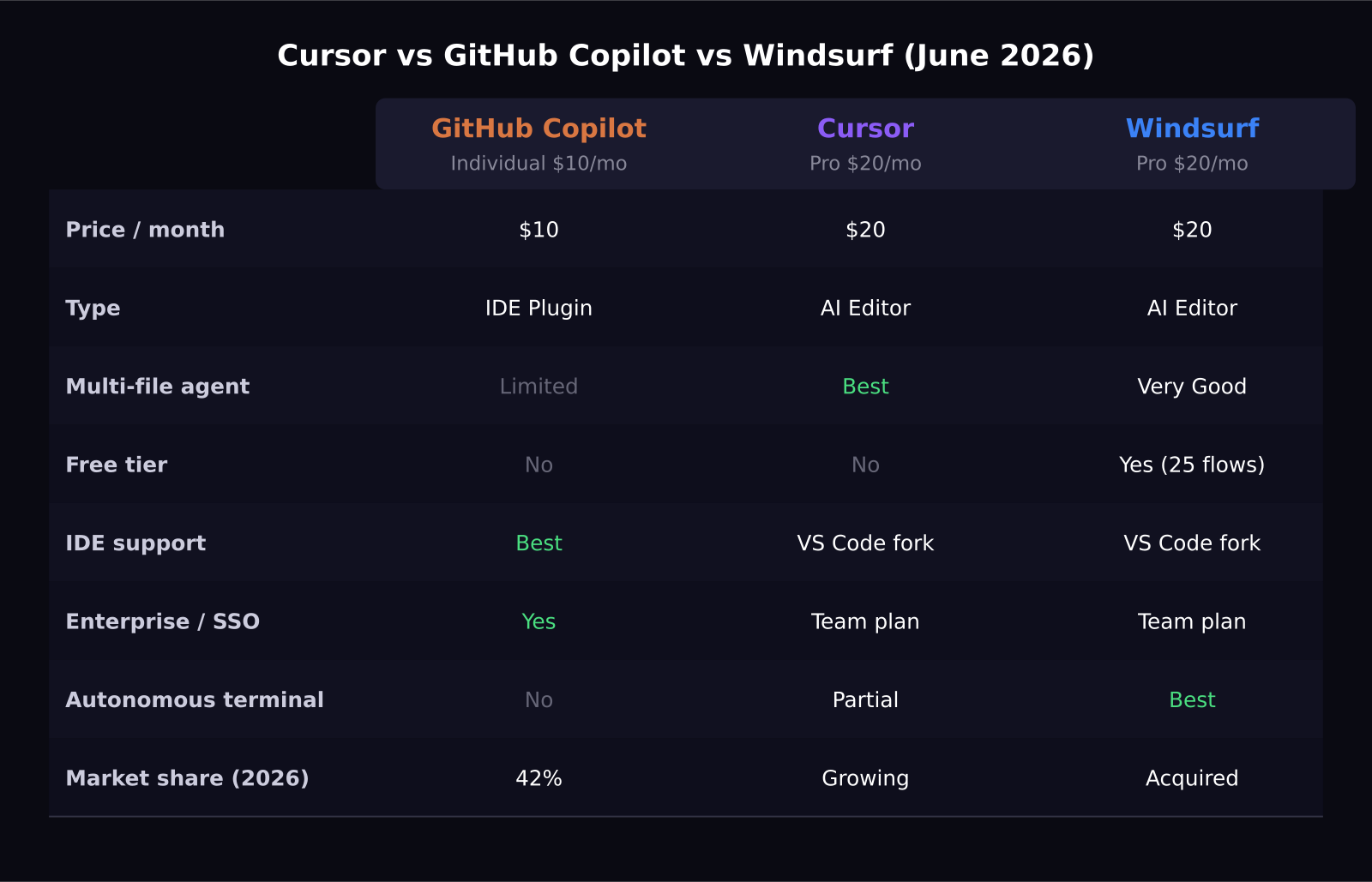
- Cursor Composer wins on multi-file agentic tasks. Windsurf Cascade wins on autonomous test-fix loops. Copilot wins on IDE breadth and enterprise governance.
- Windsurf was acquired by Cognition for $250 million in 2026 after Google hired its founding team for $2.4 billion.
- All three tools support multi-file agent workflows, but reliability and depth differ significantly.
The two categories in AI coding
The AI coding assistant market split into two clear categories a couple of years ago and that divide is now fully settled. GitHub Copilot is an IDE plugin that layers AI on top of your existing workflow, primarily in VS Code and JetBrains. Cursor and Windsurf are AI-native editors, both built as forks of VS Code, rebuilt from the ground up with AI as the primary interface.
That architecture difference matters for how you work day to day. With Copilot, you are still the one writing code, accepting or rejecting suggestions as you go. With Cursor or Windsurf, you describe a feature and the tool opens files, writes code across them, runs tests, and iterates on failures without you typing a line.
Pricing breakdown
GitHub Copilot Individual is $10 per month, which includes unlimited code completions, chat inside the IDE, and Copilot in the terminal. Copilot Business, which adds centralized license management and organization policy controls, is $19 per user per month.
Cursor Pro is $20 per month and includes 500 fast premium model requests per month plus unlimited slower requests. Above that limit you wait in the slower queue or purchase extra credits.
Windsurf Pro is also $20 per month. The free tier is notable: 25 free Cascade agent flows per month before the paywall, which is enough to know whether it fits your workflow before committing.
Multi-file and agentic task performance
Cursor wins here. Cursor Composer, the flagship feature of Cursor Pro, takes a task described in plain language and executes it across every affected file in the project. In testing published in early 2026, Cursor completed a responsive data table component in 2 rounds of prompting versus 3 for Windsurf and 5 for GitHub Copilot with manual fixes.
On migrating a 3,000-line Express.js codebase, Windsurf Cascade edged ahead in one benchmark, completing the job in a single attempt with only 2 test failures out of 47. Cursor took 3 attempts. Neither tool dominates the other on every task. Cursor is faster for building new features from scratch. Windsurf is better at autonomous iteration when something breaks.
Windsurf's autonomous terminal behavior
Windsurf has the most autonomous terminal behavior of the three. Its Cascade agent will run your test suite, read the failures, update the code, and loop without stopping to ask permission between each step.
For SaaS teams that want to hand off a bug fix and return to a resolved pull request, this is genuinely useful. The downside is that Cascade can make decisions you did not intend, and the undo history is not always clean enough to fully trust a reversal.
GitHub Copilot for enterprise and regulated teams
Copilot wins this category entirely. It integrates with GitHub Actions, pull request review, code scanning, and the broader DevSecOps stack. It supports VS Code, Visual Studio, JetBrains IDEs, Neovim, and the terminal, giving it wider IDE support than either Cursor or Windsurf.
The practical enterprise argument is also simple: 90% of Fortune 100 companies are already running Copilot, which means your IT and legal teams have probably already reviewed and approved it. Copilot Business adds policy controls to restrict models or block specific types of suggestions, which matters in regulated industries.
Code completion quality day to day
On single-line completions, Copilot still leads on speed and accuracy for most languages. It has the most training data and the lowest latency. On multi-line completions, Cursor has the edge. On multi-file edits, Windsurf surprises people who expect it to fall behind Cursor given its smaller market share.
For daily autocomplete-as-you-type, Copilot feels the most natural. For structured task-based work where you describe what you want built, Cursor and Windsurf change how much of the work you are actually doing.
The Cognition acquisition question
Windsurf was acquired by Cognition for $250 million in 2026 after Google separately hired its founding team for a reported $2.4 billion. The acquisition raised fair questions about the product roadmap and whether Cognition would continue investing in Windsurf as a standalone tool.
As of late June 2026, Windsurf is still shipping updates and the product feels maintained. Whether that continues is a reasonable concern before betting your engineering workflow on it long-term.
My recommendation
If I were starting a new SaaS product today with no existing commitments, I would start with Windsurf's free tier. If I hit the limits quickly, I would move to Cursor Pro. For teams already deep in the GitHub ecosystem or in a regulated environment, Copilot Business is the path of least resistance.
The $10 price difference between Copilot and the others is not the decision. What matters is how much time you spend on tasks the AI can own versus tasks that require you at the keyboard. On that measure, Cursor and Windsurf pull further ahead the more complex your codebase gets.
Frequently asked questions
Is Cursor worth $20 per month for solo SaaS developers?
For most solo developers building SaaS products, yes. Cursor Composer compresses multi-file feature work that would otherwise take several hours down to 20 to 40 minutes for developers who use it fluently. The learning curve is real but the payoff shows up in the first week.
Does GitHub Copilot work outside of VS Code?
Yes. GitHub Copilot supports VS Code, Visual Studio, JetBrains IDEs, Neovim, and the terminal. No other tool in this comparison has comparable IDE reach, which is a key reason enterprise teams standardize on it.
Can Windsurf replace Cursor?
For agentic terminal workflows and autonomous test-fix loops, Windsurf is competitive with Cursor and sometimes faster. For raw autocomplete speed and multi-file Composer tasks, Cursor still leads. Many developers keep both installed and use each for different jobs.
Was this article helpful?
SaaS Master
Creator behind SaaS Master — tutorials, walkthroughs, reviews, and explainers that help SaaS, AI, and WordPress products get understood and chosen. Writing here about the tools, trends, and tactics that actually move the needle. Work with me →
Want your product explained this clearly — in video?
Tutorials, walkthroughs, reviews, and shorts for SaaS, AI, and WordPress products.
Work With SaaS Master