AI Tools
Cursor vs GitHub Copilot vs Windsurf: Which AI Code Editor Actually Wins in 2026?
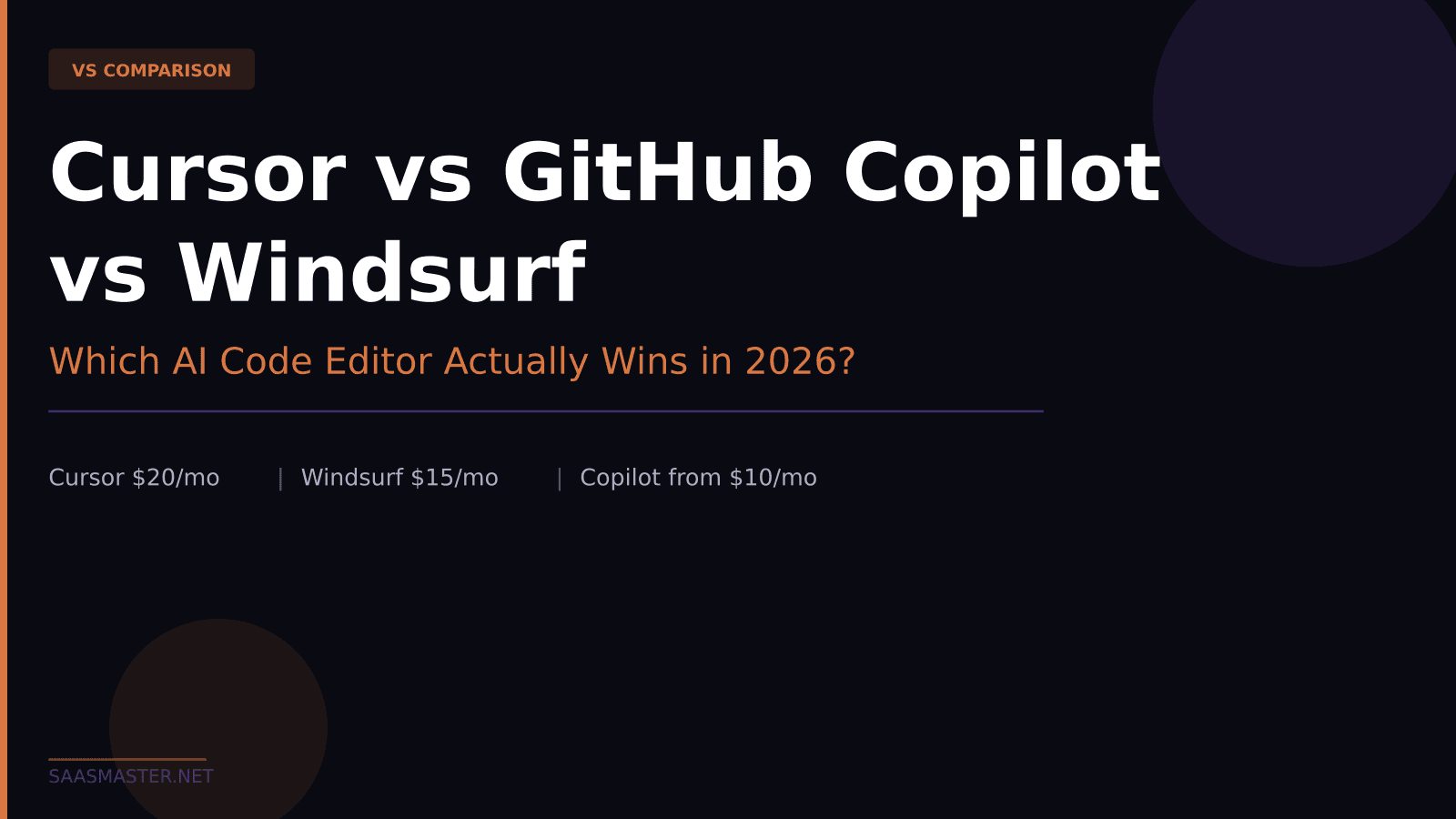
Cursor is $20 per month, Windsurf is $15 per month, and GitHub Copilot starts at $10 per month with a free tier. In mid-2026 all three are serious AI code editors with agent modes, multi-file editing, and autonomous pull request creation — so the price tag alone does not tell the whole story. After using each environment extensively, here is my breakdown of what each one does better and which one to pick depending on how you actually work.
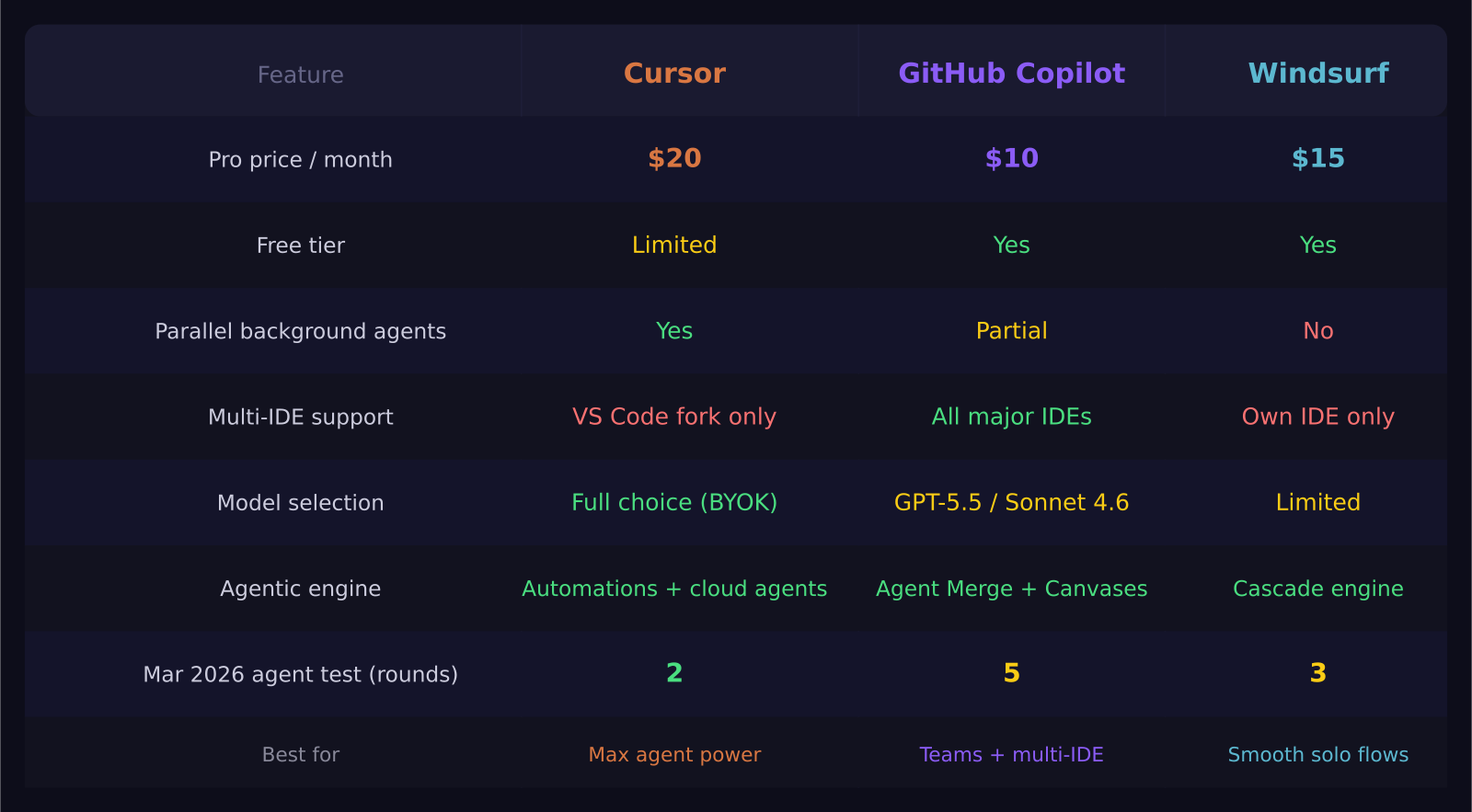
Key takeaways: - Cursor leads on autonomous background agents and model flexibility at $20 per month - Windsurf's Cascade engine delivers the smoothest single-task agentic coding experience at $15 per month - GitHub Copilot is the only tool here that works natively across VS Code, JetBrains, Xcode, Neovim, and Visual Studio without switching editors - Windsurf changed ownership three times in early 2026 — worth tracking if you plan to build deep workflows around it - A March 2026 benchmark by iBuildR Research found Cursor completing a coding task in 2 prompting rounds vs Windsurf at 3 and Copilot at 5
What each tool actually is
Cursor is an AI-first fork of VS Code. You keep the entire VS Code extension ecosystem and every keybinding you already know, plus an AI layer that runs parallel background agents, edits multiple files at once, and pushes changes to GitHub without requiring you to stay in the loop. The $20 per month Pro plan includes unlimited completions and full agent mode. Cursor also lets you choose your underlying model — Claude Opus 4.8, GPT-5.5, Gemini 3.5 Flash, or your own API key via BYOK — which is a meaningful advantage when you need to swap models for cost or capability reasons mid-project.
Windsurf is also an AI-first IDE, built by Codeium. Its defining feature is Cascade, an agentic flow engine that reads your files, runs terminal commands, watches the output, and keeps iterating until a task is complete. You are not directing every step — you hand it a goal and it works. Windsurf Pro is $15 per month with a free tier available. The critical context for 2026: Windsurf changed ownership three times in the first quarter of 2026, landing with Cognition. The product works well today, but the long-term roadmap is less predictable than it is for Cursor or Copilot.
GitHub Copilot is the plugin approach taken to its logical extreme. It works across VS Code, JetBrains, Xcode, Neovim, Visual Studio, and Eclipse — more IDE coverage than anything else in this comparison. The Individual plan is $10 per month with a generous free tier. A new standalone desktop app went generally available on June 17, 2026, built around supervised agent sessions and pull request management. But the core value of Copilot is still the extension: frictionless AI assistance inside the editor you already use.
Which is cheapest, and does price reflect value?
GitHub Copilot at $10 per month is the clear winner on price for individual developers. The free tier offers limited completions and is genuinely enough to evaluate whether AI-assisted coding changes how you work before committing a dollar. Windsurf Pro at $15 per month adds unlimited completions and the Cascade engine. Cursor Pro at $20 per month is the most expensive, but it includes features that neither competitor offers at any tier — parallel subagents, background automations running while you sleep, and cloud agents that continue working without your laptop open.
For teams the math shifts. GitHub Copilot Business is $19 per user per month. Cursor Enterprise requires a sales conversation. On a 20-person engineering team, a $5 to $9 per seat per month difference compounds into real budget impact. If standardizing at scale is the goal, Copilot wins the financial argument.
How do the agents actually compare?
This is where the gap between the three tools shows most clearly. In a standardized March 2026 test by iBuildR Research, Cursor built a responsive data table component in 2 rounds of prompting, Windsurf required 3 rounds, and GitHub Copilot needed 5 rounds with some manual fixes in between. The test was designed to favor autonomous task completion, which aligns with Cursor's architectural strengths.
Cursor's Automations feature runs background agents on scheduled tasks — refactoring, test generation, dependency updates — while you focus on other work. Parallel subagents let you run multiple independent coding tasks simultaneously. Cloud agents handle GitHub issues without requiring your laptop to remain open. If you are juggling a complex project with many independent parts, this is a genuine architectural advantage over the alternatives.
Windsurf's Cascade engine is the smoothest single-task agentic experience available. You give it a goal, it reads the relevant files, runs terminal commands, reads the output, and adjusts — without requiring you to guide every step. The experience feels qualitatively different from typing prompts into an AI chat window. It is closer to handing off a task to a capable colleague than to directing a tool. For focused, contained work sessions, Cascade is arguably the best agentic engine in this comparison.
Copilot's agent mode lets you assign GitHub issues directly to Copilot, which autonomously writes code, opens a pull request, and responds to review comments. The new Agent Merge capability in the standalone Copilot App monitors CI status, tracks required reviewers, addresses failing checks, and shepherds the PR through to merge. This is genuinely impressive infrastructure — it just takes more rounds of prompting to get to the same output as Cursor or Windsurf on complex, ambiguous tasks.
What about model selection?
Cursor gives you the widest choice. You can run Claude Opus 4.8, GPT-5.5, Gemini 3.5 Flash, or bring your own API key entirely. This matters when the right model for a detailed refactoring job is different from the right model for a quick autocomplete suggestion.
Windsurf runs Codeium's own models on the base plan and adds frontier model access on Pro tiers. The selection is narrower than Cursor, and you cannot swap models freely during a session.
Copilot runs on GPT-5.5 and Claude Sonnet 4.6 depending on the task type. There is no manual model selection, which is a real limitation if you have a strong preference or need to manage API costs at the model level.
Who should pick which tool?
Cursor is the right choice if you want maximum agent autonomy, are comfortable with $20 per month, and want the freedom to choose your AI model per task. Developers who already live in VS Code will find the transition nearly seamless — you get the same environment with a fundamentally more capable AI layer.
Windsurf is the right choice if you want the smoothest hands-off agentic coding experience at a lower price and are comfortable tracking how the Cognition acquisition plays out. For focused, single-thread work sessions, Cascade is hard to beat at $15 per month.
GitHub Copilot is the right choice if you work across multiple IDEs, are on a team that needs a standardized tool, or want to stay in VS Code or JetBrains without installing a full replacement. The new standalone Copilot App makes it a stronger project-level tool than it has ever been. For beginners, the free tier is the lowest-friction way to start — no commitment, works inside the editor you already have open.
The combination many experienced developers land on is Cursor for in-editor work plus Claude Code for large autonomous tasks running in the background. If budget is not the hard constraint, that pairing covers more ground than any single tool here.
Frequently asked questions
Is Cursor worth twice the price of GitHub Copilot?
For solo developers and freelancers who want maximum agent autonomy and model flexibility, yes. For teams where IDE diversity matters and standardizing across many seats is the priority, Copilot's broader compatibility often matters more than the agent speed gap.
Can I use GitHub Copilot without leaving VS Code?
Yes. The Copilot extension works exactly as it always has inside VS Code, JetBrains, Neovim, and other editors. The new standalone Copilot App is a separate product for project-level agent sessions tied to GitHub issues — powerful but not required for daily AI-assisted coding.
Is Windsurf still worth choosing after the ownership changes in 2026?
Yes, with the caveat that you track the roadmap. The Cascade engine remains one of the best agentic experiences available and the $15 price is competitive. The risk is long-term product direction under Cognition. If your team builds deep automation workflows around a tool, stability of the company behind it matters.
Was this article helpful?
SaaS Master
Creator behind SaaS Master — tutorials, walkthroughs, reviews, and explainers that help SaaS, AI, and WordPress products get understood and chosen. Writing here about the tools, trends, and tactics that actually move the needle. Work with me →
Want your product explained this clearly — in video?
Tutorials, walkthroughs, reviews, and shorts for SaaS, AI, and WordPress products.
Work With SaaS Master