Video Marketing
How to Use Gemini Omni for SaaS Product Videos: A Creator's Honest Take (2026)
Google launched Gemini Omni at I/O on May 19, 2026, and it ships something most AI video tools still promise but don't deliver: you describe what you want your product clip to look like, get a result, say "make the lighting warmer," and the model re-reasons the scene — it doesn't just paste a new layer. After putting it through real SaaS use cases, here's what Gemini Omni actually does well for creators, what it still can't replace, and whether the credit-based pricing makes sense for your workflow.
Key Takeaways
- Gemini Omni launched May 19, 2026 at Google I/O and is available free through YouTube Create for eligible users 18 and over.
- It edits video through plain-English conversation across multiple turns — no timeline, no keyframes.
- The physics-consistent world model foundation maintains character continuity even when you swap backgrounds or change lighting mid-session.
- For SaaS teams, the strongest use case right now is short-form social clips and product teasers, not long-form walkthroughs.
- Every output carries a mandatory SynthID watermark — there is no flag to disable it, at any subscription tier.
What Gemini Omni Actually Does (And What the Keynote Underplayed)
Let's get the fundamentals straight, because the demo reel looked more polished than the day-one reality.
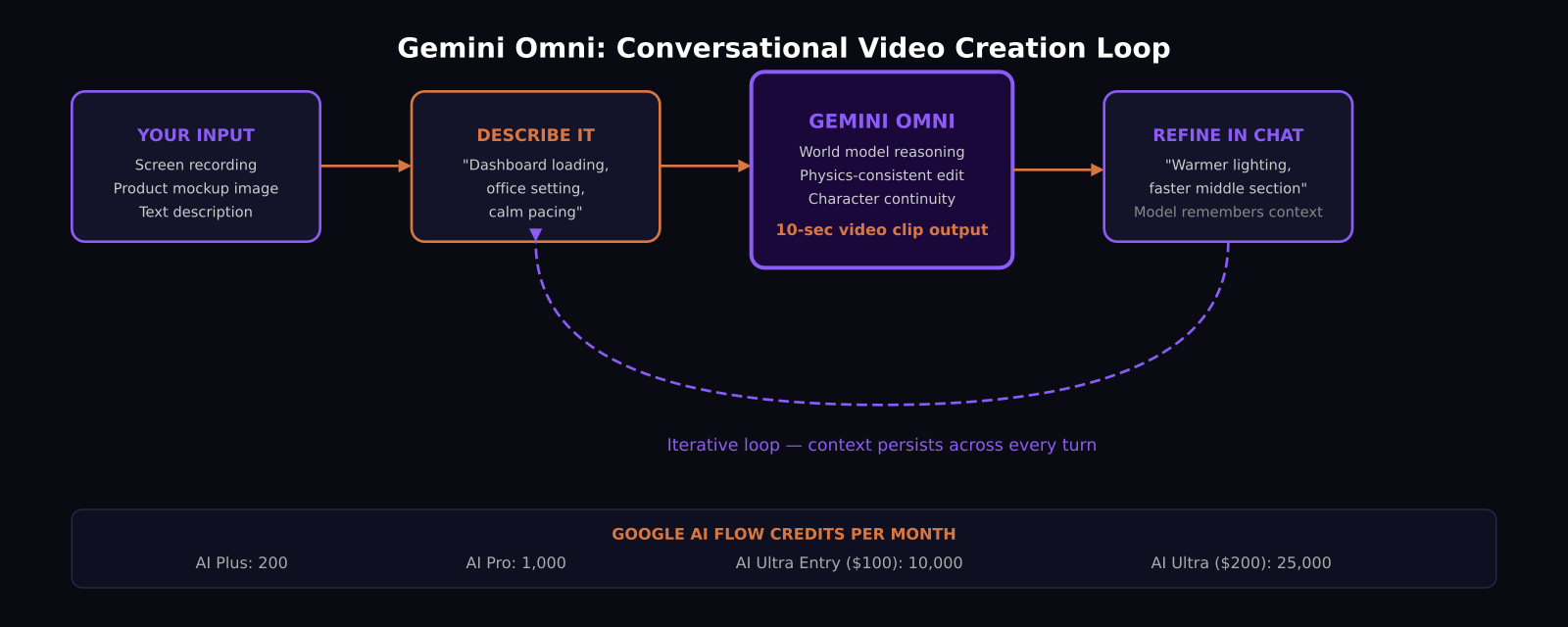
Gemini Omni is Google's any-to-any multimodal model. It takes text, images, audio, and video as input and generates video output — currently in 10-second clips. The architectural difference that matters is the world model foundation: when you instruct it to change a background or adjust lighting through conversation, the model doesn't composite a new layer on top of the existing clip. It re-reasons the physical relationship between your subject, the new environment, and the light source. That's why character consistency holds across multi-turn edits in a way older tools couldn't manage.
The editing happens through conversation, not menus. You describe what you want. You get a clip. You respond with refinements. The model keeps the context. In practice, two to three turns usually produces something usable.
What the keynote underplayed: raw visual fidelity on Gemini Omni Flash is not best-in-class compared to dedicated video generators if you're doing high-end cinematic production. The model's edge is iteration speed and the conversational editing loop, not photorealism alone.
What a SaaS Product Video Looks Like Inside Google Flow
Google Flow is where Gemini Omni becomes a real production tool. Think of it as a creative studio wrapping conversational prompting, multi-turn editing, and export — accessible from the Gemini app, with tight integration into YouTube Create.
For a SaaS marketing team, a realistic workflow runs like this: you start with a screen recording or product mockup image. Drop it into Flow, describe the scene you want — "10-second clip showing this dashboard loading, office setting, calm pacing." The model generates a clip. You reply: "faster in the middle, warmer background, keep the same character across scenes." It adjusts. You export.
The character consistency feature is significant for software brands. If you have a mascot, a spokesperson, or even a recurring UI avatar, Gemini Omni keeps that identity stable across scene changes without you explicitly re-instructing the model each turn. That matters when brand consistency is non-negotiable.
One deliberate omission at launch: voice and speech editing are withheld. So if your walkthrough needs voiceover synced to UI actions, you're still pairing Omni with a separate tool for narration.
Where Gemini Omni Fits in a Creator's Toolkit Right Now
After testing, I'd put it this way: Gemini Omni is a strong short-form content engine and an early-stage tool for anything longer.
For SaaS teams specifically, it fits in three places. First, social ads under 60 seconds — the conversational editing loop is fast enough to produce multiple variants for A/B testing in a single session. Second, product teaser clips for launch announcements, where the visual quality lands at polished LinkedIn post rather than TV commercial. Third, quick motion graphics and animated thumbnails for YouTube Shorts or blog hero images.
Where it's not ready: full-length product walkthroughs where precise UI detail matters at every frame, or videos that need voiceover synced to specific on-screen moments. For those, tools like Loom, Descript, or HeyGen still outperform it.
The developer and enterprise API for Gemini Omni is still rolling out as of June 2026. Once it lands, teams who want to build Omni into their own workflows or CI pipelines get a much more powerful option. Right now, you're working inside Google's own interfaces.
How Much Does Gemini Omni Cost for Teams?
Access is tied to Google's AI subscription tiers, which were restructured at I/O 2026. AI Ultra dropped from $250 to $200 per month, and a new entry AI Ultra tier at $100 per month was added. Gemini Omni Flash is available across AI Plus, AI Pro, and AI Ultra.
The limiting factor is Flow credits, which determine how many video generation sessions you can run per month. AI Plus gives you 200 credits, AI Pro gives 1,000, AI Ultra entry at $100 gives 10,000, and AI Ultra at $200 gives 25,000.
For a solo creator doing occasional social clips, AI Plus at 200 credits is workable for light use. For a SaaS team running regular campaign content, AI Ultra entry is the practical minimum. Enterprise pricing with dedicated API access has not been published yet.
For YouTube users: if you already publish to YouTube and are 18 or older, you get access to Omni features inside YouTube Create and YouTube Shorts Remix at no additional cost. That free tier is the fastest way to start experimenting.
Is the SynthID Watermark a Problem for SaaS Brands?
Every video Gemini Omni generates carries a SynthID watermark embedded in the content. This is Google's deepfake-safety label. It does not appear as a visible logo or text overlay on screen — it's an embedded signal. But it is present in every generated video, and there is no API flag or subscription tier that removes it.
For internal use, A/B testing, and early-stage social content, this is unlikely to matter. For enterprise video that requires clean brand assets without embedded provenance markers, it is a genuine constraint. Google has not indicated when or if a commercial watermark-free tier will arrive. This is the one detail I'd tell SaaS brand teams to weigh before fully committing production workflows to Omni.
What Gemini Omni Gets Right That Other AI Video Tools Don't
The persistent conversational loop is the real innovation, and it's a meaningful one for anyone who spends time explaining creative intent. Every other AI video tool puts you in a generate-and-regenerate cycle where each iteration starts fresh. Gemini Omni maintains context across turns, so your third iteration builds on your second rather than fighting it.
For software creators who explain product workflows for a living, the persistent-context model removes a genuine point of friction. You describe your vision once, refine in plain English, and the model tracks the conversation.
The YouTube integration is also underrated. If your SaaS company already invests in YouTube for product education, generating short clips natively inside YouTube Create without exporting from a separate tool removes meaningful production overhead.
The conclusion: Gemini Omni is the right tool for short-form SaaS content right now, and it will likely become the right tool for more use cases as the API opens up and fidelity improves across future model releases.
Frequently Asked Questions
Is Gemini Omni free to use?
Gemini Omni Flash is available at no cost through YouTube Create for eligible users 18 and over who are already publishing in the YouTube ecosystem. For teams accessing it through Google's AI subscriptions, it is available on AI Plus ($20/month), AI Pro, and AI Ultra tiers, with usage gated by monthly Flow credits.
Can Gemini Omni make full-length product walkthrough videos for SaaS?
Not well yet. Gemini Omni currently generates 10-second clips optimized for short-form content. For detailed UI walkthroughs requiring precise screen recording and voiceover sync at every step, tools like Loom or Descript remain better choices. Omni is strongest for social clips, launch teasers, and short promotional content.
Does the SynthID watermark appear visibly in the video?
SynthID is an embedded provenance signal, not a visible logo or overlay. It does not appear as text or a badge on screen. However, it is present in every generated video and cannot be removed at any subscription tier, which matters for brands with strict policies around digitally certified content.
Was this article helpful?
SaaS Master
Creator behind SaaS Master — tutorials, walkthroughs, reviews, and explainers that help SaaS, AI, and WordPress products get understood and chosen. Writing here about the tools, trends, and tactics that actually move the needle. Work with me →
Want your product explained this clearly — in video?
Tutorials, walkthroughs, reviews, and shorts for SaaS, AI, and WordPress products.
Work With SaaS Master