How to Script and Place a SaaS Landing Page Video That Actually Converts
In short
A converting SaaS landing page video runs 60-90 seconds, stays muted, and answers "what is this" within 10 seconds. Here's the full script and placement guide.
A SaaS landing page video converts when it answers "what does this do for me" in the first 10 seconds, runs 60-90 seconds total, and sits muted and above the fold where a visitor can't miss it. Get any one of those three wrong — too slow to the point, too long, or buried below the scroll — and the video becomes something people skip rather than something that moves them toward a signup. This guide is the script structure and placement checklist I use whenever a client asks me to build the video for their homepage or a paid landing page.
Key takeaways
- Keep it to 60-90 seconds. One widely cited case study saw conversions jump from 2.1% to 8.3% simply by cutting a demo from four minutes down to 90 seconds.
- Nearly 1 in 5 viewers drop off in the first 10 seconds, and 44% are gone by the one-minute mark — so the value proposition has to land immediately, not after a logo animation and a tagline.
- Autoplay is fine; autoplay with sound is not. Mute by default and let people opt into audio, or use a click-to-play thumbnail for anything longer than a background loop.
- Show the product doing something specific in the first 15 seconds — a generic brand montage before the product appears is the single most common reason these videos underperform.
- Placement above the fold, not behind a "watch demo" button three scrolls down, is what actually gets the video seen.
What a landing page video needs to do that a demo video doesn't
It's worth separating this from a full product demo video, because the job is different. A product demo video is built for someone who's already curious enough to click "watch demo" — they've opted in, so a 3-5 minute walkthrough can earn their attention. A landing page video has no such buy-in. It's playing to someone who arrived from an ad or a search result and hasn't decided the page is worth their next 10 seconds, let alone three minutes.
That means the landing page video's real job is triage, not education: prove in under a minute that this product solves the visitor's specific problem, then hand off to the page's own copy, screenshots, and CTA to close the rest of the way. Trying to make one video do both jobs — quick hook and full walkthrough — is why so many of these end up too long and too generic at the same time.
The 60-90 second script structure
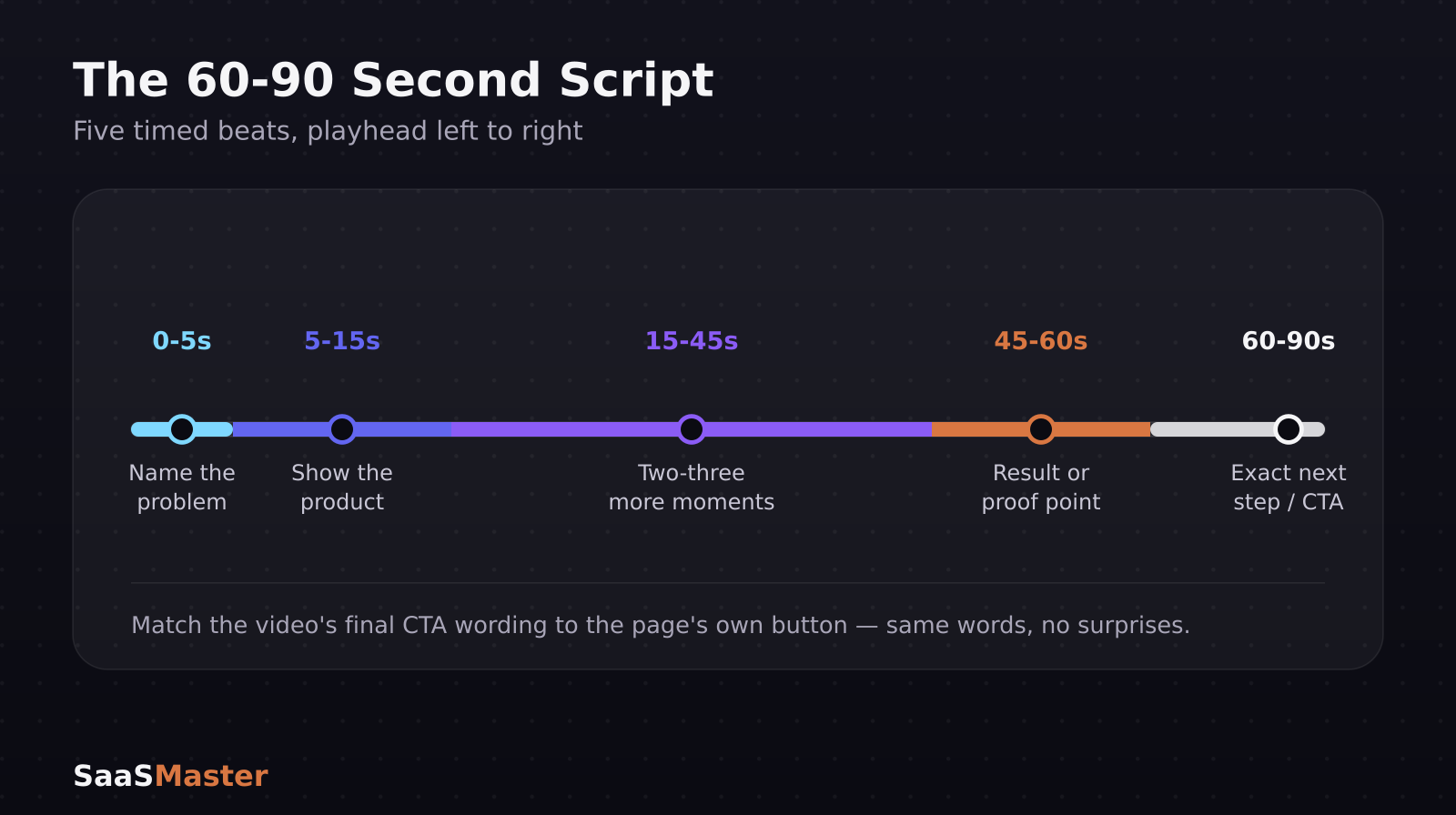
Here's the structure that consistently holds attention, broken into timed beats:
- 0-5 seconds: state the problem in the visitor's language, not your product's category ("Chasing down invoice status across three tools" beats "AI-powered accounts receivable platform")
- 5-15 seconds: show the product doing the specific thing that solves it — a real screen, a real action, not a logo animation or stock footage
- 15-45 seconds: two or three more concrete moments of the product working, each tied to a different benefit (speed, accuracy, one less tool) — resist the urge to cram in every feature
- 45-60 seconds: a result or proof point, ideally a number ("teams cut invoice follow-up time by half") — this is where a specific stat lands better than a superlative claim
- Final 10-15 seconds: the exact next step, matching the page's own CTA button word-for-word so the video and the page feel like one experience, not two separate pitches
If your product is genuinely hard to explain in a single sentence, our guide on how to explain complex software without losing buyers covers how to simplify the hook without lying about what the product does.
Autoplay, sound, and captions — get this part wrong and nothing else matters
This is the most common technical mistake I see on client sites, and it's an easy fix. Autoplaying video with sound on is one of the fastest ways to make a visitor bounce immediately — the instinct is to close the tab, not turn down the volume. If the video autoplays, it must be muted by default, full stop.
From there, you have two reasonable options depending on the video's role:
- Background/hero loop (under 30 seconds, showing motion or product texture rather than a full pitch): autoplay muted, no captions needed since there's no narration to follow.
- Full pitch video (the 60-90 second structure above, with a voiceover): click-to-play with a strong static thumbnail rather than autoplay, since a narrated video needs the visitor's attention on purpose, not as background noise. Include captions here — a meaningful share of visitors will watch with sound off, especially on mobile, and losing the narration means losing the pitch entirely.
Don't split the difference by autoplaying a 90-second narrated pitch muted and hoping people turn the sound on. Almost nobody does. If it's long enough to need narration, it should be a deliberate click, not a passive loop.
Where to place it (and what "above the fold" actually means in 2026)
Above the fold means visible without scrolling on the device and viewport your traffic actually uses — check your analytics before assuming desktop-first, because for most SaaS landing pages a majority of paid traffic now lands on mobile. A video that's beautifully placed on a 1440px desktop screen but pushed below three lines of navigation on mobile isn't above the fold for most of your visitors.
Two placements consistently outperform the alternatives:
1. Directly beside or below the headline and primary CTA, at the same vertical position a hero image would otherwise occupy — replacing static, not competing with it 2. As the very next section after the fold, immediately following a short headline-and-subhead combo, for pages where the video needs a beat of text context first
What consistently underperforms: a "watch demo" video linked from the navigation bar or buried under a testimonials section. If the video is meant to do conversion work, it needs the same real estate you'd give your best headline.
Aspect ratio and format specs
Build to a 16:9 frame at 1920x1080 for the desktop hero placement, then export a vertical or square-cropped version for mobile rather than letterboxing the same 16:9 file into a narrow viewport — a horizontally-cropped hero video on a phone often loses the exact product detail you built the video to show. Keep file size and load time in mind too: a slow-loading hero video that stalls on first paint costs you more conversions than a slightly lower bitrate ever will, so compress for fast start over maximum sharpness.
Frequently asked questions
Should a SaaS landing page video be an animated explainer or real product screens?
Real product screens, in almost every case. Animated explainers work when a product is genuinely invisible (infrastructure, background automation) and there's nothing to show on screen. If a visitor can see your actual interface, showing the real thing builds more trust than an animated metaphor for it — and it sets accurate expectations before signup, which also reduces early churn.
Does adding a video to a landing page always increase conversions?
No — it depends on execution and fit. The lifts marketers report (commonly cited in the 34-86% range) come from videos that are short, load fast, and clearly show the product solving a real problem. A slow-loading, generic, or overlong video can just as easily hurt conversion by delaying the page and burying the CTA, so treat the 60-90 second structure and placement rules above as requirements, not suggestions.
How is a landing page video different from an explainer video?
They often overlap, but a landing page video is scoped tightly to one page's specific offer and CTA, while an explainer video is usually a broader, more evergreen asset about the product or category that can live in multiple places (homepage, YouTube, sales decks). If you need the broader asset first, our SaaS explainer videos service is built for that use case specifically, with landing page cuts as a follow-on deliverable.
For the full system connecting your landing page video to the rest of your funnel — demo videos, onboarding, and retargeting content — see The Complete SaaS Video Marketing Strategy Guide and what a B2B SaaS product demo should show for the next stage after someone clicks past the landing page.
Was this article helpful?
Jorge Aguilar
Founder & Creator, SaaS Master
Producing SaaS and AI product videos since 2019 — 800+ videos for 200+ brands, covering tutorials, demos, walkthroughs, and explainers. Writing here about the tools, trends, and tactics that actually move the needle. LinkedIn · About · Work with me
Need a product demo, walkthrough, or SaaS explainer?
Client-owned videos that make your product easy to understand — demos, walkthroughs, onboarding, and explainers.
Explore SaaS video production