How to Use YouTube to Drive SaaS Product Discovery
In short
A practical playbook for using YouTube to get your SaaS product found — covering search intent, titles, thumbnails, and the video types that drive signups.
YouTube is the second-largest search engine in the world, and for SaaS products it is one of the highest-intent discovery channels available. When someone searches "how to automate my CRM" or "best project management tool for freelancers," they are not browsing — they are in buying mode. Getting your product into those results can drive more qualified signups than paid ads, because the viewer already did the work of raising their hand.
Key takeaways: - YouTube and Google share results — a well-optimized video ranks on both surfaces simultaneously - Buyer-intent keywords like "how to do X" and "best X for Y" outperform brand keywords for discovery - Watch time matters more than view count — a useful 8-minute tutorial beats a polished 90-second ad - Titles should be 50-60 characters with the main keyword in the first 35 - Topical consistency — pillar video plus supporting tutorials — builds algorithm authority faster than scattered content
Why YouTube works differently for SaaS than for other businesses
SaaS buyers are researchers. Before committing to a tool, they want to see it working — not a screenshot, not a customer quote, but the actual product doing the thing they need it to do. YouTube is built for exactly this. A well-made tutorial that shows your product solving a real problem can carry a viewer from zero awareness to "start free trial" in under ten minutes.
The other reason YouTube works specifically for SaaS: Google owns it, and Google increasingly surfaces YouTube videos in standard search results. A video that ranks on YouTube often also ranks on Google for the same query. That means one piece of content works across two of the largest search surfaces on the internet. For product video strategy teams with limited content budgets, that is a high-leverage investment.
What types of videos actually drive product discovery
Not all video types drive discovery equally. These are the formats that consistently work:
Workflow tutorials
"How to [do specific task] with [your product]" — this is the highest-intent video type. Someone searching this is already close to buying. They want to know if your product can do the specific thing they need. Show them step by step, and the conversion essentially happens inside the video itself.
Comparison videos
"[Your product] vs [competitor]" videos target buyers who have narrowed their list and are deciding between two options. These don't have to be aggressive — a fair, detailed, genuinely useful comparison builds more trust than a one-sided sales pitch.
Best-of roundups
"Best [category] for [specific use case]" roundups rank for high-volume queries and can include your product alongside others. Being in a credible roundup builds awareness even among viewers who hadn't heard of you yet.
Problem-first tutorials
"How to [achieve outcome]" without naming your product in the title. These rank for the problem, not the solution, and introduce your product as the answer mid-video. They attract viewers earlier in the journey and are especially useful for building top-of-funnel awareness.
How to optimize titles so YouTube and Google find your videos
A YouTube title has two jobs: tell the algorithm what the video is about, and convince a human to click. Most SaaS teams favor one at the expense of the other.
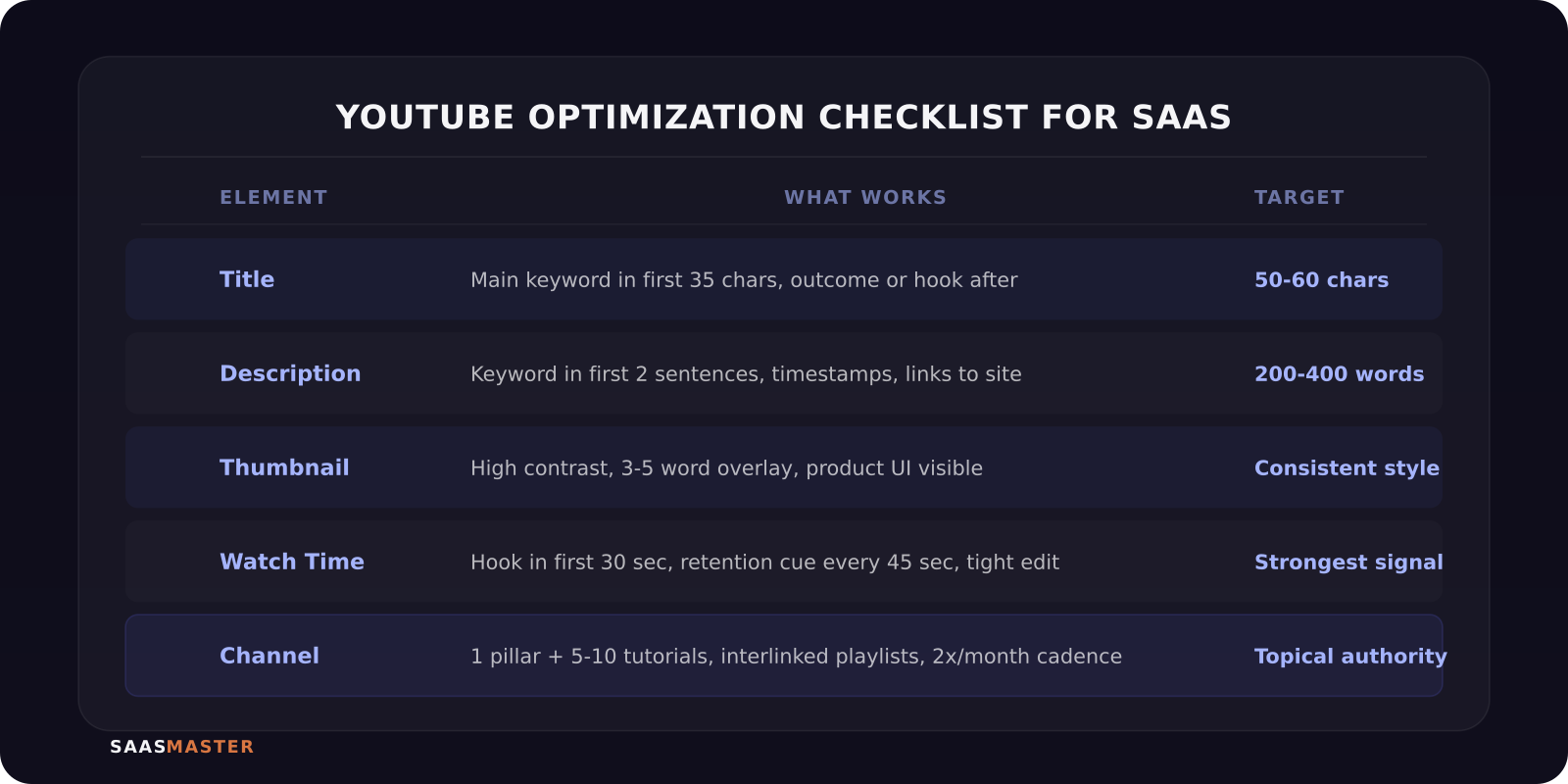
The practical approach: put the exact keyword phrase your buyer would search in the first 50 characters, then add the human hook after. "How to Automate Your CRM in 5 Steps (Without Code)" works because "how to automate your CRM" is the search query, and "without code" is what makes a specific buyer click.
Keep titles between 50-60 characters. YouTube truncates anything beyond 60 on most surfaces, and the first 35 characters are what show on mobile. If your keyword isn't in the first 35, most mobile viewers won't see it before they scroll past.
Avoid leading with your brand name unless you have strong search volume on it already. If you're not a household name, leading with the problem or outcome gets you more impressions than leading with your product name.
Descriptions and thumbnails: the underrated ranking signals
Descriptions don't drive clicks directly, but they carry significant algorithmic weight. Write 200-400 words per video description, using the main keyword naturally in the first two sentences. Include related terms, a timestamp breakdown for longer videos, and links back to your product pages — this pulls viewers from YouTube onto pages where you can convert them as leads.
Thumbnails are the single highest-leverage element for click-through rate. What consistently works for SaaS product videos: - A short text overlay of 3-5 words that calls out the outcome or the problem - High contrast — dark background with bright text, or the reverse - A consistent visual style across all your videos so repeat viewers recognize your channel before they even read the title - Your actual product UI visible in the thumbnail so viewers know exactly what they are getting
How to build channel authority over time
YouTube rewards channels that build topical authority, not one-off viral videos. For a SaaS product, that means building topic clusters: one pillar video on the core use case, supported by shorter tutorials that go deeper on specific features or workflows.
The structure that works: one "what is [product] and how does it work" overview video, then 5-10 tutorials covering specific tasks. Each tutorial links to the overview in the description and to at least one other related tutorial. This keeps watch time on your channel and signals to YouTube that you are a reliable source on the topic.
Post consistently. Channels that publish at least twice a month maintain algorithm momentum better than channels that post eight videos in one week and then go quiet. One well-made tutorial a week is more valuable than a burst of thin content.
For a broader look at how YouTube fits into the full software marketing stack, the complete SaaS video marketing strategy guide maps the whole system. And if you are building out your first library of product content, how to create a product demo video that converts covers the production fundamentals.
If your team is ready to build a YouTube presence but doesn't have the production bandwidth, I offer SaaS video production — scripting, recording, editing, and delivery.
Frequently asked questions
How many videos does a SaaS channel need before it sees real discovery traffic?
There is no magic number, but most channels start seeing consistent organic discovery traffic between 15-25 videos, assuming solid keyword targeting and consistent optimization. A smaller set of well-optimized videos always outperforms a large library of poorly titled ones.
Should I create a separate YouTube channel for my SaaS product or use the company channel?
Use one channel. Splitting your audience divides your watch time signals and slows algorithm growth. If your product is the company, it's the same channel. If you're a multi-product company, use one channel and organize by product with playlists.
Does video watch time affect Google ranking too?
Indirectly, yes. YouTube videos that accumulate strong watch time and engagement rank higher on YouTube, which increases the chance Google surfaces them in standard search results. The watch time signal is primarily a YouTube ranking factor, but higher YouTube rankings lead to more Google visibility — so yes, it matters for both.
Was this article helpful?
Jorge Aguilar
Founder & Creator, SaaS Master
Producing SaaS and AI product videos since 2019 — 800+ videos for 200+ brands, covering tutorials, demos, walkthroughs, and explainers. Writing here about the tools, trends, and tactics that actually move the needle. LinkedIn · About · Work with me
Need a product demo, walkthrough, or SaaS explainer?
Client-owned videos that make your product easy to understand — demos, walkthroughs, onboarding, and explainers.
Explore SaaS video production