How to Make a WooCommerce Setup Video That Cuts Support Tickets
In short
How to script, record, and place a WooCommerce setup video that cuts support tickets in half and speeds up plugin or theme configuration for new users.
A good WooCommerce setup video walks a store owner through installing your plugin or theme, configuring the settings that actually affect their store, and fixing the two or three things people always get wrong, in under six minutes. Do that well and you cut activation support tickets dramatically, because most WooCommerce support requests are really just "I didn't know I had to configure that" in disguise. Here's how to plan, script, and place one.
Key takeaways
- Most WooCommerce support tickets for plugins and themes trace back to a missed setup step, not a bug, so a setup video is a support-deflection tool as much as an onboarding one.
- Clear, actionable step-by-step guidance can cut support tickets substantially by resolving the "how do I configure this" question before anyone has to ask it.
- Keep setup videos to three to six minutes and focused only on settings that change the outcome, not a full feature tour.
- Record at 1080p or higher in 16:9, and place the video where the confusion actually happens: the settings screen, the plugin's welcome page, and the knowledge base article, not just a blog post.
- If you sell through WooCommerce's product gallery too, a separate short product video can lift landing-page conversion meaningfully, but that's a different video with a different job than a setup guide.
Why does a setup video reduce support tickets more than better documentation?
Documentation assumes the reader knows what to look for. A setup video shows the actual screen, in the actual order, with the actual defaults your customer will see, which removes the guesswork that generates tickets in the first place. New store owners installing a WooCommerce extension are often mid-way through a dozen other setup tasks, and a two-minute video that says "watch this before you touch settings" gets watched in a way a five-page doc rarely does.
The ticket categories this eliminates are predictable: wrong default left unchanged, a required field skipped because it wasn't obvious it was required, or a setting that conflicts with a common combination of other plugins. Naming those specific traps on camera, not just walking through every tab, is what actually moves the support number. This is the same principle behind SaaS onboarding videos that reduce support and improve activation, applied to the WordPress and WooCommerce ecosystem specifically.
What should a WooCommerce setup video actually cover?
- Installation and activation, shown fast. Ten seconds of "install, activate, you'll see this new menu item" is enough. Don't narrate a process every WordPress user has done a hundred times.
- The one or two settings that determine whether the plugin works at all. Every extension has a handful of fields that, if left wrong, make the whole thing appear broken. Lead with those, not with the settings tab in alphabetical order.
- The defaults worth changing immediately. If your recommended setting differs from the shipped default, say so explicitly and explain why, so the viewer doesn't have to guess whether the default is "fine" or "needs changing before launch."
- One common conflict or gotcha. If your plugin behaves differently with a popular theme, a caching plugin, or a specific WooCommerce setting, call it out. This is usually the single highest-value minute in the whole video for ticket reduction.
- Where to go next. Point to one specific place: an advanced settings guide, a support form, or a community forum, so the viewer has exactly one next step instead of being left to search.
How long should a WooCommerce setup video be, and where should it live?
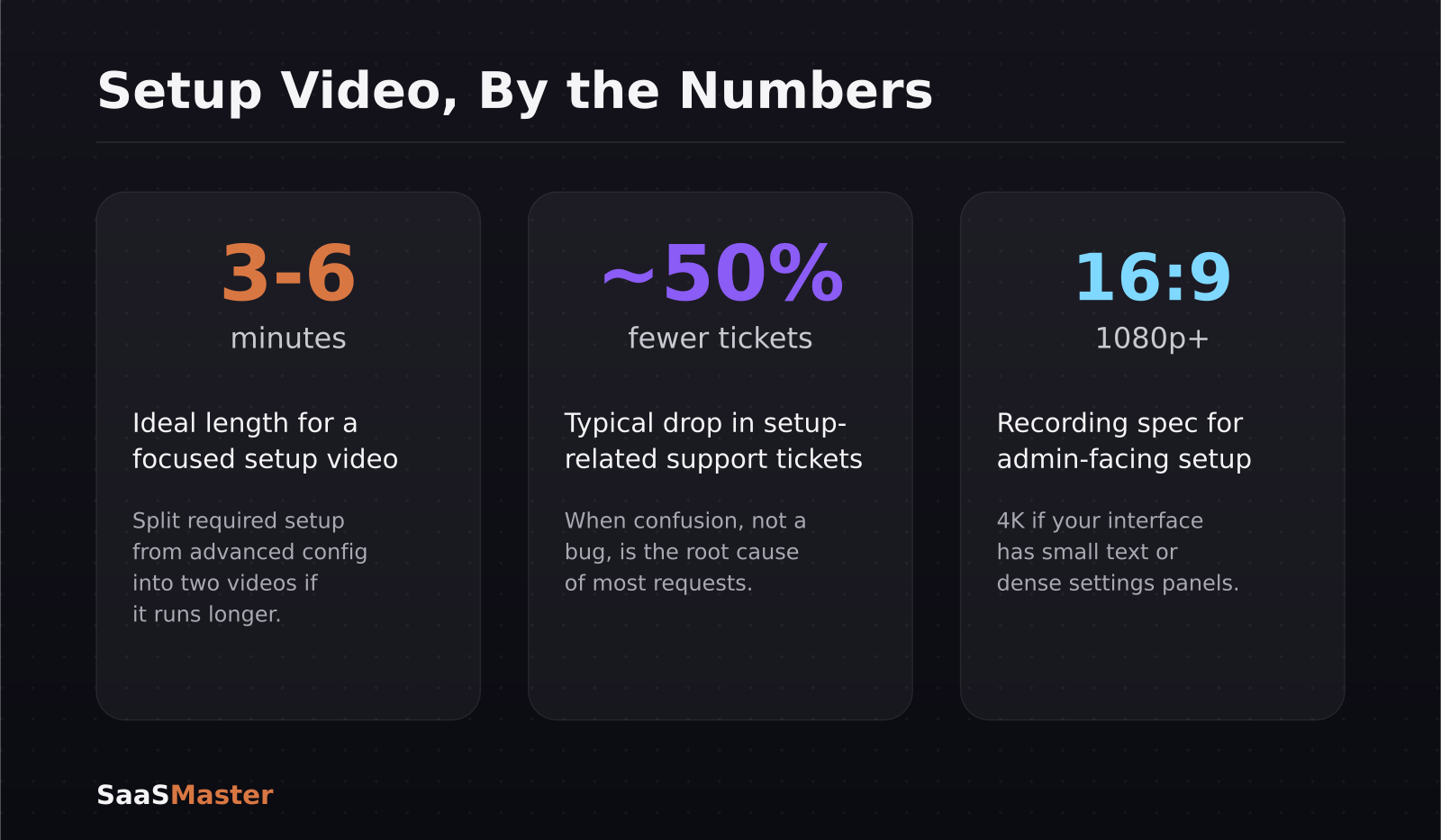
Three to six minutes is the range that covers real configuration without turning into a full product tour. If your plugin genuinely has that much complexity, split "required setup" from "advanced configuration" into two videos rather than one long one, so new users aren't sitting through content meant for power users.
Placement matters as much as length. The highest-performing spot is directly on the settings screen inside WP-Admin, either embedded or linked, since that's the moment the user actually needs it. After that: the plugin's activation or welcome screen, the knowledge-base article that already ranks for your setup questions, and the confirmation email after purchase. A setup video sitting only on your marketing site rarely gets watched by someone who's already mid-install.
What are the technical specs for a setup video versus a shopper-facing product video?
A setup video is admin-facing, so screen clarity is what matters: record at 1080p minimum (4K if your interface has small text) in 16:9, since that's what plays cleanly in WP-Admin embeds and help-center players. A shopper-facing WooCommerce product video is a different asset entirely, usually square or 16:9 in the product gallery, focused on the item rather than the interface, and aimed at conversion rather than configuration. Landing pages that include a product video have been shown to lift conversion meaningfully, but that's a separate video with a separate script from the setup guide covered here. Don't combine the two into one video trying to do both jobs.
How do you keep a setup video accurate as your plugin updates?
WordPress plugins and themes ship updates constantly, and a setup video that shows an old settings screen erodes trust fast, sometimes generating more tickets than it prevents. Two habits keep this manageable. First, script around what a setting does rather than exactly where a button sits, so minor UI shifts don't force a full rerecord. Second, put a visible last-updated date near the video and note major settings-screen changes in your changelog, so support agents can tell at a glance whether the video is still accurate before pointing a customer to it.
When a redesign does change the setup flow meaningfully, rerecord rather than patch. A setup video that contradicts the current interface, even in one small spot, does more damage to trust than having no video at all, because the customer now doesn't know which other steps to believe either.
Frequently asked questions
How much can a setup video actually reduce support tickets?
It varies by product, but clear step-by-step video guidance has been shown to cut related support tickets by roughly half in cases where the tickets were caused by unclear configuration rather than an actual bug. The bigger the gap between your default settings and your recommended settings, the more a setup video will help.
Do I need a separate video for every plugin setting?
No. Cover only the settings that change whether the plugin works correctly or that commonly get misconfigured. A setup video that walks through every tab in order tends to get abandoned; one that leads with the two or three settings that matter gets watched to the end.
Where should I host a WooCommerce setup video?
Host it wherever the confusion happens: embedded on the plugin's settings screen or welcome page, in the knowledge-base article for setup, and linked from the post-purchase confirmation email. A setup video living only on a blog post gets far less use than one placed at the moment of decision.
If you'd rather have this scripted, recorded, and placed for you, that's the exact workflow behind our WordPress video production service. For the wider picture of how plugin and theme companies use video across the whole customer journey, see the WordPress video marketing guide for plugin and theme companies, and for the demo-versus-tutorial decision behind any of these formats, how to choose between a SaaS demo, tutorial, explainer, and launch video is a useful next read.
Was this article helpful?
Jorge Aguilar
Founder & Creator, SaaS Master
Producing SaaS and AI product videos since 2019 — 800+ videos for 200+ brands, covering tutorials, demos, walkthroughs, and explainers. Writing here about the tools, trends, and tactics that actually move the needle. LinkedIn · About · Work with me
Launching a plugin, theme, or WordPress product?
Client-owned videos that make your product easy to understand — demos, walkthroughs, onboarding, and explainers.
Explore WordPress video productionRelated guides
More WordPress & Website Tools →
How to Connect AI to Your WordPress Site with MCP (2026 Guide)
How to Use Angie, Elementor's Free Agentic AI Plugin for WordPress
How to Make a WordPress Plugin Demo Video That Drives Adoption