How to Use Angie, Elementor's Free Agentic AI Plugin for WordPress
In short
Angie is Elementor's free agentic AI plugin for WordPress. Here is how it works, how to set it up, and what it can build on your site in 2026, step by step.
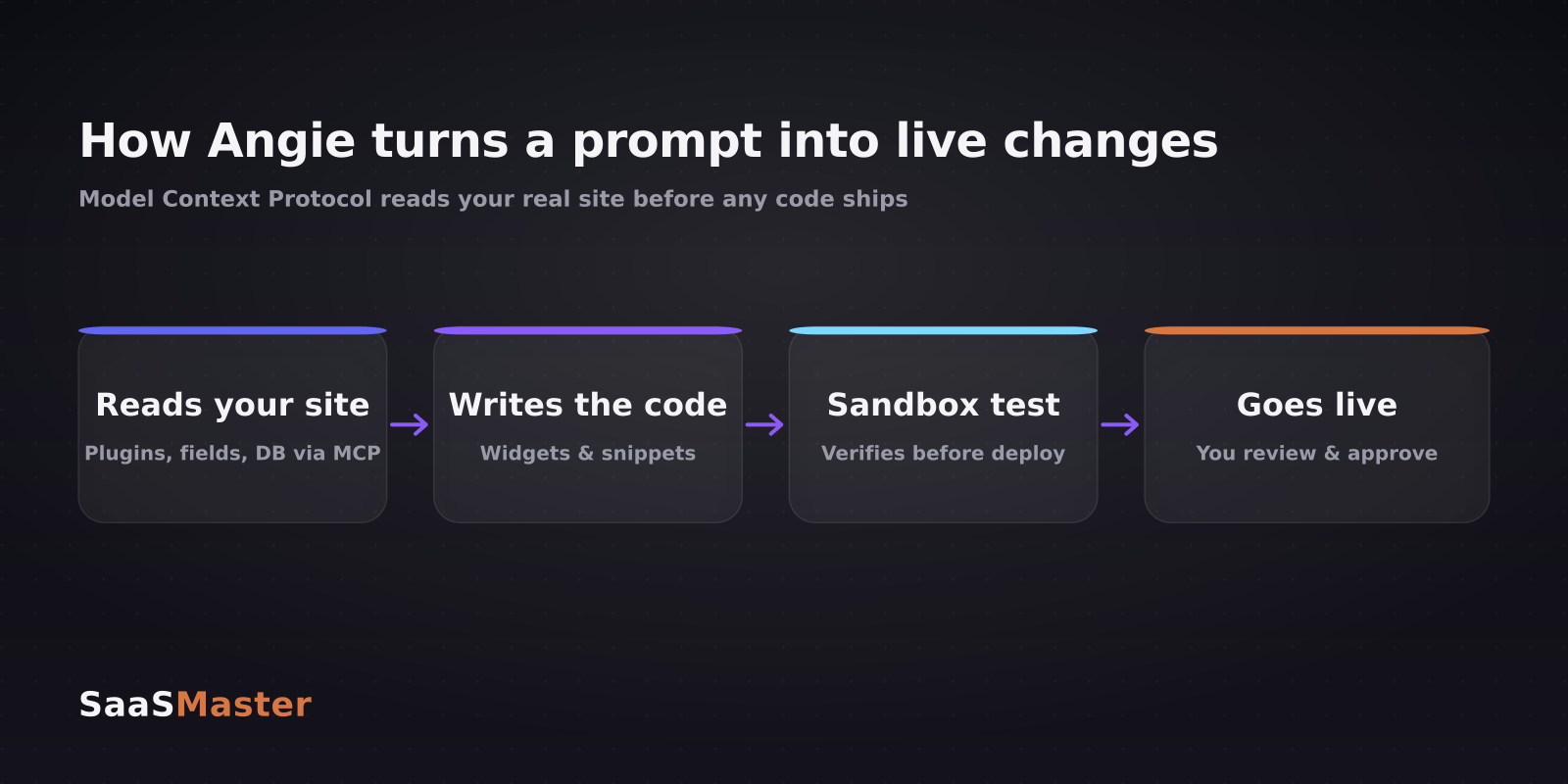
Elementor just shipped Angie, a free agentic AI plugin that installs on any WordPress site and actually does the work: writing production-ready code, building custom widgets, publishing posts, even installing other plugins, all from plain-language prompts. What sets it apart from every AI writing plugin before it is that Angie reads your real site structure through the Model Context Protocol before it acts, then tests its changes in a sandbox before anything goes live. Here is how it works and how to set it up today.
Key takeaways
- Angie is a free agentic AI plugin from Elementor, available on the official WordPress.org repository, and it runs on any WordPress site, not just sites using Elementor.
- It uses the Model Context Protocol (MCP) to read your active plugins, custom fields, custom post types, database schema, and theme, so the code it writes fits your actual site instead of a generic template.
- Angie can build custom widgets from scratch, extend existing ones, write front-end and back-end snippets, publish content, handle media, install plugins, and manage users.
- Every change is generated and tested in a sandboxed environment before it goes live, and during the beta you get free daily AI credits through a free Elementor account.
- It is genuinely useful for non-developers, but you should still run it on staging with backups before pointing it at a live production site.
What is Angie, and how is it different from Elementor AI?
The word that matters is agentic. Most WordPress AI tools are generative: you ask, they hand back a block of text or an image, and you paste it in. Angie is agentic, meaning it takes actions across your whole site on your behalf. You describe an outcome in plain language and it plans the steps, writes the code, tests it, and applies it.
That is a different thing from Elementor AI, the company's existing feature that generates sections, copy, and images inside the editor and is metered against Elementor Pro credits. Angie sits at the site-management level. It can touch settings, users, media, and plugins, not just the canvas you are designing. And crucially, Angie works on any WordPress install, so you do not need to be an Elementor customer to use it. It is part of a busy year for AI in WordPress.
If you have followed the WordPress AI space this year, you will recognize the direction. I compared the builder-level tools in my Elementor AI vs Divi AI breakdown; Angie is Elementor's move up the stack from help-me-design to help-me-run-the-site.
How does Angie use the Model Context Protocol?
This is the part that makes Angie more than a fancy chatbot. The Model Context Protocol is an open standard, introduced by Anthropic, for letting AI agents securely read and act on external systems. In plain English, MCP is the bridge that lets the AI see your specific WordPress environment instead of guessing at a generic one.
When Angie reads your site through MCP, it can see which plugins are active, what custom post types and custom fields you have defined, your database schema, your theme, and your Elementor components if you use them. So when you ask it to build a widget that pulls from a custom field, it already knows that field exists and what it is called. The output is code tailored to your site's reality, which is why it works on the first try far more often than a general-purpose model pasting boilerplate.
MCP is also why this pattern is spreading beyond Elementor. I walked through connecting Claude and ChatGPT to WordPress over MCP in a separate guide, and Angie is the packaged, no-setup version of that same idea.
How do you install and set up Angie?
Setup takes a few minutes and no code. Here is the flow:
- In your WordPress dashboard, go to Plugins, then Add New, and search for Angie.
- Click Install, then Activate.
- Check the box to agree to the terms and click Sign in to continue.
- Sign in with your Elementor account. If you do not have one, create it. It is free.
- Open the Angie panel from anywhere in the WordPress admin and start typing what you want.
That is it. From the panel you type requests in natural language, such as create a testimonials widget that pulls from my Reviews custom post type, or publish this draft and set the featured image, and Angie handles the steps. During the beta phase, Elementor includes free daily AI credits tied to your account, so you can try real tasks without wiring up a separate billing setup.
What can Angie actually build?
The range is wider than most AI plugins because it operates at the site level, not just the content level. In practice it covers:
- Custom Elementor widgets built from scratch to your description.
- Extensions to existing widgets, adding functionality they did not ship with.
- Front-end and back-end code snippets, written to production standards.
- Content operations: publishing posts, drafting pages, and handling media.
- Site management: installing plugins, managing users, and updating core settings.
The pattern that makes this safe-ish is the sandbox. Angie writes and runs its code in a sandboxed environment first, verifies it works, and only then offers to apply it live. That is a meaningful step up from AI tools that dump untested code into your functions file and wish you luck.
Is Angie safe to run on a live site?
The sandbox testing is real and helpful, but safe-ish is the honest framing. Any tool that can install plugins, edit code, and manage users has real power, and agentic tools occasionally do the wrong confident thing.
Treat it like you would any capable new team member. Run Angie on a staging site first for anything non-trivial. Take a full backup before you let it modify a production site. Read the code it generates before approving; the point of MCP-tailored output is that this review is quick, not that you can skip it. And give it the least access it needs for the task. None of this is Angie-specific paranoia. It is the same discipline that keeps any automation from becoming an outage.
A creator's take: who should actually use Angie?
Angie is most valuable for two groups. First, non-developers and small teams who know what they want but not how to code it. Angie collapses the gap between I need a widget that does X and having it. Second, agencies and freelancers doing repeatable site work, where describing a snippet is faster than writing it and the MCP context cuts down on debugging.
Where it is less of a fit: mission-critical, high-traffic production sites where you want a human owning every line, at least until the tool has a longer track record. The learning curve is genuinely low, since if you can write a clear instruction you can drive it, but low friction is exactly why the guardrails above matter. It slots into the broader shift I track across my WordPress coverage.
For plugin and theme makers, there is a second-order opportunity here. As AI tools like Angie make building faster, the bottleneck shifts to explaining what you built. That is why I put so much weight on a clear WordPress plugin demo; the code being easy to generate makes the story around it more valuable, not less.
Frequently asked questions
Is Angie really free?
The plugin is free to install from the WordPress.org repository, and during its beta Elementor includes free daily AI credits through your free Elementor account. There is no Pro purchase required to start, though credit limits and pricing may change as it leaves beta.
Do I need Elementor Pro to use Angie?
No. Angie runs on any WordPress site and does not require Elementor or Elementor Pro. It integrates more deeply if you do use Elementor components, but a stock WordPress install works fine.
Can Angie break my site?
It can, like any tool that edits code and settings. The sandbox testing lowers the risk by verifying changes before they go live, but you should still use a staging site and backups for anything important and review generated code before approving it.
Was this article helpful?
Jorge Aguilar
Founder & Creator, SaaS Master
Producing SaaS and AI product videos since 2019 — 800+ videos for 200+ brands, covering tutorials, demos, walkthroughs, and explainers. Writing here about the tools, trends, and tactics that actually move the needle. LinkedIn · About · Work with me
Launching a plugin, theme, or WordPress product?
Client-owned videos that make your product easy to understand — demos, walkthroughs, onboarding, and explainers.
Explore WordPress video productionRelated guides
More WordPress & Website Tools →
How to Make a WordPress Plugin Demo Video That Drives Adoption
WooCommerce Product Video Setup Guide: Gallery Placement, Hosting, and What Converts
WordPress 7.1 Beta Is Live: What Site Owners and Plugin Developers Need to Know