Cursor vs Claude Code vs GitHub Copilot in 2026: Which AI Coding Tool Is Worth Your Money?
In short
Cursor vs Claude Code vs GitHub Copilot compared in 2026 — real pricing, usage costs after SpaceX deal, and a clear pick for indie developers and SaaS teams.
The AI coding tool landscape shifted dramatically in mid-2026. SpaceX announced a $60 billion deal to acquire Anysphere (the company behind Cursor). Windsurf rebranded to Devin Desktop after Cognition acquired it for $250 million. OpenCode emerged as a serious open-source alternative. And GitHub Copilot quietly became more capable than most developers realize. If you're deciding where to put your $20 per month — or whether to pay anything at all — here's where each tool actually stands.
Key Takeaways
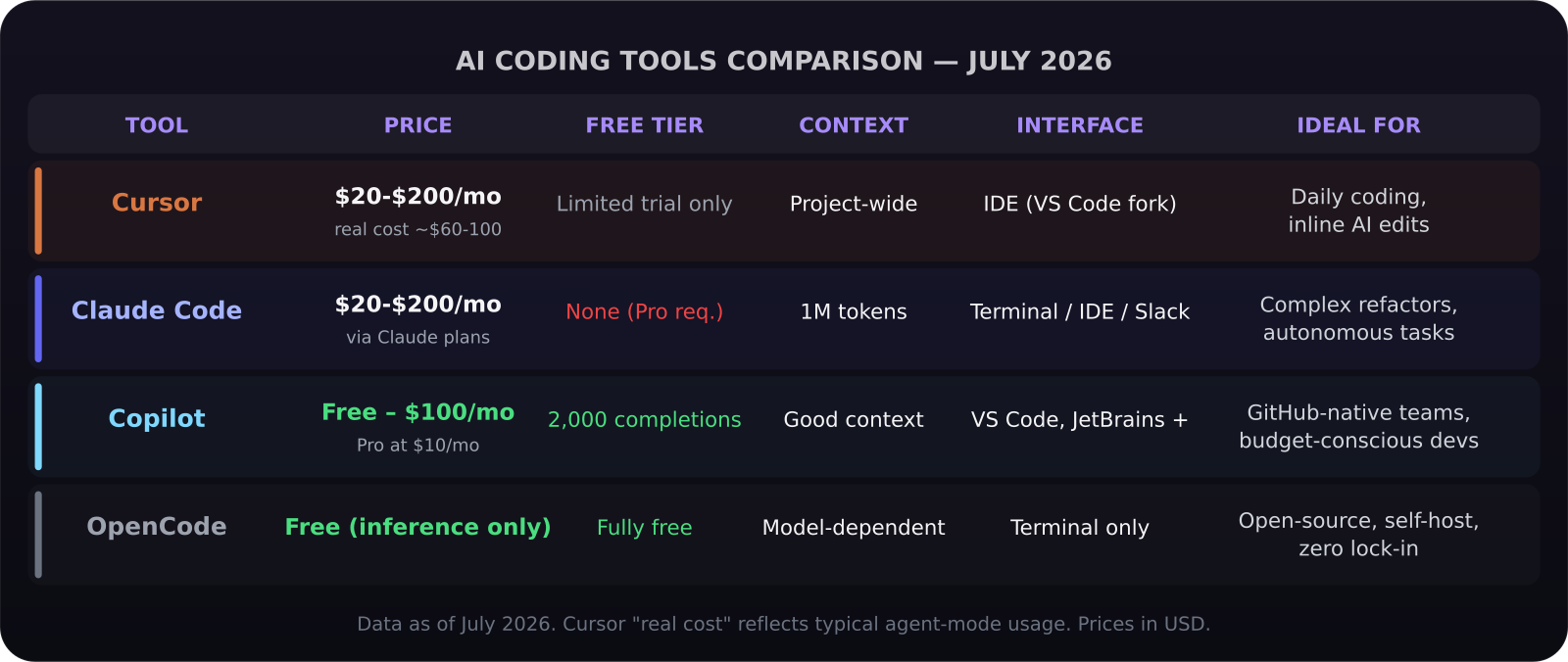
- GitHub Copilot has a genuinely useful free tier: 2,000 completions and 50 chat/agent requests per month, no credit card required
- Cursor Pro is $20/month but real daily usage typically costs $60-100/month once agent mode is factored in
- Claude Code requires at least a $20/month Claude Pro subscription and uses $20 of credit — heavy users move to Max at $100-200/month
- Claude Code uses 5.5x fewer tokens on complex tasks than Cursor on identical workloads, per independent benchmarks
- SpaceX's $60B acquisition bid for Anysphere (Cursor's creator) is pending; expected to close Q3 2026
- The most common power-user pattern in 2026: Cursor for daily editing + Claude Code for complex autonomous tasks
The Market as It Stands in July 2026
A lot has moved since the beginning of the year. The clearest summary: Cursor's market share slid from roughly 41% to 26% per Ramp spending data after the SpaceX acquisition announcement, while Anthropic's share of AI spending among developers climbed toward 50%. That's not because Cursor got worse — it's because uncertainty about its future under SpaceX ownership is pushing developers to evaluate alternatives more seriously.
Windsurf (now officially Devin Desktop after Cognition's acquisition) retired its Cascade agent in July 2026, replacing it with the Agent Command Center. The Windsurf brand is gone; if you were using Windsurf, you're now using Devin Desktop whether you realized it or not.
OpenCode, the open-source terminal-first coding agent, has become a real option for developers who want to self-host, run locally, or avoid vendor lock-in entirely.
GitHub Copilot: The Underrated Contender
Most developers still think of GitHub Copilot as the tab-autocomplete tool from 2022. That's not what it is in 2026.
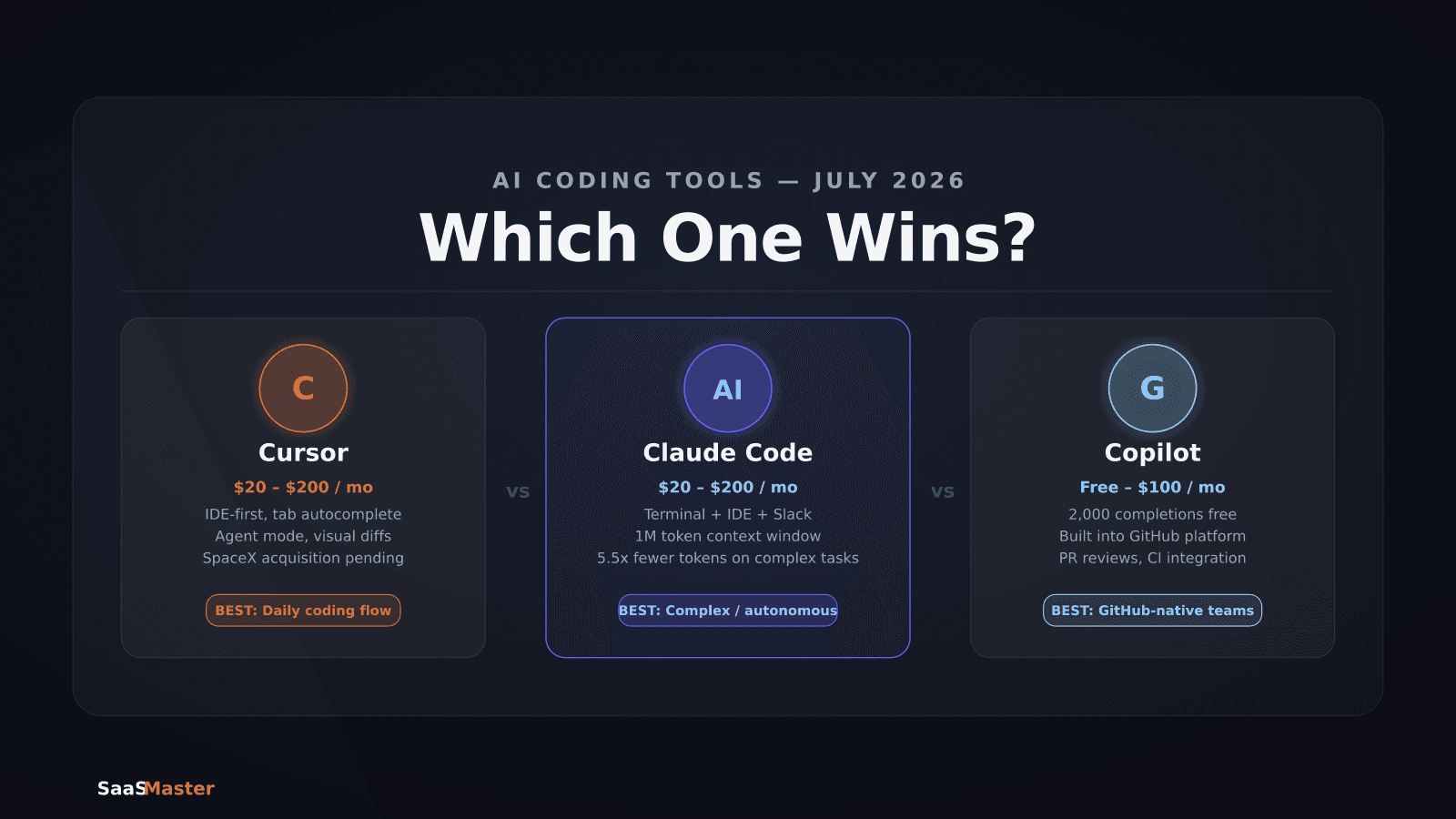
GitHub Copilot's free tier now includes: - 2,000 code completions per month - 50 chat and agent mode requests per month - Access to Claude Haiku 3.5 and GPT-4o mini - Copilot CLI integration - Works in VS Code, JetBrains, Neovim, and Visual Studio
The paid tier, Copilot Pro at $10/month, adds higher limits and access to Claude Sonnet and GPT-4o. Pro+ at $39/month adds Claude Opus and priority processing. A new Max tier at $100/month targets teams doing high-volume agent work.
As of June 1, 2026, Copilot moved to usage-based billing on top of the subscription — 1 AI Credit equals $0.01, which kicks in after your included allowance. This is the same structure Cursor uses.
The key advantage Copilot holds over everything else: it's built into GitHub. Pull request reviews, issue summarization, codebase search, and CI integration all happen inside the platform developers already live in. For teams that treat GitHub as their development hub, Copilot's ambient presence there is hard to replicate.
Cursor: Still the Best IDE Experience
Cursor's product hasn't suffered from the acquisition news. It remains the most polished AI-native IDE: a VS Code fork where AI is woven into every layer of the editing experience. Sub-second tab completions, multi-file edits with visual diffs, inline chat that understands your entire project context, and the best agent mode UI of any IDE-based tool.
Cursor Pro is $20/month. Here's the catch that the pricing page doesn't lead with: if you're using Agent mode daily — which is where Cursor's real power lies — you'll regularly hit the included usage ceiling and move into consumption-based billing. Cursor's own documentation acknowledges that daily Agent users are "usually closer to $60-100/month than $20/month."
Cursor Pro+ at $60/month and Ultra at $200/month are designed for exactly this usage pattern. If you're a power user, price the $60 tier, not the $20 one.
What Cursor does better than anything else: inline editing flow. The experience of writing code and having AI suggestions appear inline, accepting them with Tab, and doing rapid iterations on a function without leaving the editor is still the smoothest in the category. For developers who write code all day and want AI deeply embedded in that flow, Cursor is the benchmark.
Claude Code: The Terminal-First Agent
Claude Code is Anthropic's answer to a different question. Where Cursor asks "how do we make AI feel like a natural extension of your IDE?", Claude Code asks "how do we give AI the ability to actually do the work?"
Claude Code runs in your terminal, inside VS Code (via extension), in JetBrains, in the desktop app, and even in Slack. It's designed for multi-step autonomous tasks: "refactor this authentication module," "find and fix all instances of this pattern across the codebase," "write tests for this service." It executes the task, shows you what it changed, and asks for your input at decision points.
The core advantage: Claude Code uses the full Anthropic model stack with a 1 million token context window at no extra charge. It can hold an entire large codebase in context simultaneously. On complex tasks requiring deep codebase understanding, independent benchmarks show Claude Code using 5.5x fewer tokens than Cursor on identical workloads — which at token pricing, means it's often cheaper even though the per-task compute is heavier.
Pricing runs through Claude plans: - Claude Pro: $20/month, includes $20 of model credits, Claude Sonnet 5 as default - Claude Max: $100/month or $200/month for heavier usage - Direct API: pay-as-you-go, no subscription required
There is no free tier for Claude Code as of July 2026.
The Hybrid Pattern Most Power Users Adopt
The "pick one" framing is how most comparisons approach this, but most experienced developers in 2026 are using a hybrid stack. The most common pattern:
- Cursor for daily coding: fast tab completions, inline edits, quick file-level changes where visual feedback in the IDE matters
- Claude Code for complex tasks: multi-file refactors, large feature builds, code reviews, debugging sessions that require deep context
This costs roughly $20/month for Cursor Pro plus $20-100/month for Claude Code depending on usage intensity. It's not cheap, but for developers whose time is worth $100+ per hour, recouping even two to three hours per month justifies both subscriptions.
For solo developers or early-stage SaaS founders where budget matters, Copilot Free plus occasional Claude Code API usage is the cost-efficient path. You get genuinely useful AI assistance for zero fixed cost and pay only for the heavy tasks.
What the SpaceX Deal Actually Means for Cursor Users
Cursor users reasonably want to know what the SpaceX acquisition means for the product. The deal — $60 billion all-stock, with SpaceX paying $10 billion alternatively for joint AI development work — is expected to close Q3 2026 and is pending regulatory review.
SpaceX's interest in Cursor is engineering capacity and AI talent, not consumer software distribution. The most likely outcome is that Cursor continues as a standalone product with an accelerated roadmap. The risk that concerns developers is pricing changes post-acquisition and whether Cursor's model-agnostic philosophy (it currently routes to Claude, GPT, and Gemini models) changes if SpaceX steers it toward OpenAI (in which SpaceX has a relationship via Starlink and computing infrastructure).
None of this is certain. For now, Cursor is functioning normally and the product team is still independent. But it's a fair reason to evaluate your dependence on a single tool.
OpenCode: For Developers Who Want Zero Lock-In
OpenCode deserves a brief mention because it's the only serious option in this category that's fully open-source and self-hostable. It runs in the terminal, it's model-agnostic (point it at any API), and it's free beyond your inference costs.
If you're running Claude Code through the API anyway, OpenCode is essentially the same workflow with no Anthropic subscription requirement — you pay only for the tokens you use. For developers who want maximum control, or who are in organizations with data residency requirements that prevent using cloud-hosted IDE tools, OpenCode is the answer.
Clear Picks by Developer Type
Individual developer, daily coding, IDE-first: Cursor Pro at $20/month (budget for $40-60 realistically). The IDE experience is worth the premium over Copilot if you'll actually use agent mode.
Startup team, cost-sensitive, needs autonomous agents: Claude Pro at $20/month for Claude Code, plus Copilot Free for ambient completions in the editor. Best value per capability.
Senior developer, complex codebases, high throughput: Cursor Ultra ($200/month) or Claude Max ($100-200/month) depending on whether you prefer IDE-first or terminal-first work. Many senior developers use both.
Team building AI products or SaaS on Anthropic: Claude Max plan, because Claude Code's ability to work inside your own codebase with full context aligns directly with what you're building. See how this fits into a broader SaaS growth toolset and our guide on n8n AI agents for workflow automation.
If you're building AI-powered software and want to see how video documentation fits into your product strategy, our AI tool video production services are built for exactly this.
Verdict
Cursor is the best IDE for developers who want AI deeply embedded in their code-writing flow. Claude Code is the best agent for complex autonomous tasks across large codebases. GitHub Copilot is the most accessible entry point — especially for teams already in the GitHub ecosystem — and the free tier is more capable than most people assume. In 2026, the smartest move is not choosing one but knowing which to reach for in which context.
Frequently Asked Questions
Can I use Claude Code and Cursor at the same time?
Yes, and many developers do. Claude Code runs in your terminal or as a VS Code extension, while Cursor is the editor itself. They don't conflict. The practical setup is: open your project in Cursor for daily editing, then run Claude Code via the terminal for large refactors or autonomous multi-file tasks. You use one Claude Pro or Max subscription for Claude Code regardless of which editor you're in.
Does the SpaceX acquisition of Anysphere affect Cursor's pricing today?
No. As of July 2026, Cursor's pricing is unchanged and the deal has not closed. The concern for users is post-acquisition direction: whether pricing increases or model routing changes once Cursor is inside a larger organization. If you're evaluating Cursor now, the product works as advertised. The acquisition uncertainty is a reason to avoid building deep workflow dependencies on any single tool rather than a reason to avoid Cursor entirely.
Is GitHub Copilot's free tier actually useful or just a trial?
It's genuinely useful for developers who write code in shorter sessions or in codebases that don't require heavy agent mode. 2,000 completions and 50 chat/agent requests per month is sufficient for part-time developers, students, and teams working on stable codebases. Where it falls short is sustained daily development work on complex projects — you'll hit the ceiling in about two weeks of normal use, at which point Pro at $10/month becomes the obvious upgrade.
Was this article helpful?
Jorge Aguilar
Founder & Creator, SaaS Master
Producing SaaS and AI product videos since 2019 — 800+ videos for 200+ brands, covering tutorials, demos, walkthroughs, and explainers. Writing here about the tools, trends, and tactics that actually move the needle. LinkedIn · About · Work with me
Building an AI product that needs a clearer onboarding flow?
Client-owned videos that make your product easy to understand — demos, walkthroughs, onboarding, and explainers.
Explore AI product video production