Claude Code vs Cursor vs Windsurf: The Best AI Coding Agent in 2026
In short
Claude Code vs Cursor vs Windsurf compared for 2026: terminal power, IDE flow, and self-driving agents, with pricing and who each coding agent is really for.
There is no single best AI coding agent in 2026, but there is a clear best pick for each job. Claude Code is the terminal-first powerhouse for big refactors and gnarly debugging, Cursor is the fastest, most polished in-editor experience for daily coding, and Windsurf is the IDE that drives itself when you want fewer prompts and more autonomy. In fact, most working developers no longer choose one, and I will explain why below.
Key takeaways
- Claude Code leads on complex, multi-file work: large refactors, deep debugging, and reasoning over a big codebase from the terminal.
- Cursor wins on flow: the fastest autocomplete and the most polished chat-in-your-editor experience for everyday coding.
- Windsurf is the self-driving IDE, where its Cascade agent plans across files, runs commands, and holds one coherent context.
- Pricing is close: Claude Code Pro and Cursor Pro are both about $20 per month, with Copilot at $10 and Codex from free.
- Around 65% of engineers now run two agents daily; Claude Code plus Cursor covers roughly 95% of what most developers need.
The three types of AI coding agent
Before comparing tools, it helps to see the three categories they fall into, because the category explains the behavior. IDE-embedded agents like Cursor, Windsurf and Google Antigravity live inside your editor, understand your project, and edit across files in your environment. Terminal-first agents like Claude Code, OpenAI Codex and Kiro plan, execute and verify whole features from the command line, running tests and iterating on their own. Open-source options like Cline, Aider, opencode and Zed are free as tools, and you pay only for the model tokens they consume.
The category matters more than any single benchmark, because it decides how the tool fits into your day. An IDE-embedded agent meets you where you already write code; a terminal-first agent asks you to delegate and review; an open-source agent asks you to assemble the workflow yourself. None is universally better, and the fastest way to waste a week is to force a terminal-first tool into an autocomplete-shaped need or vice versa.
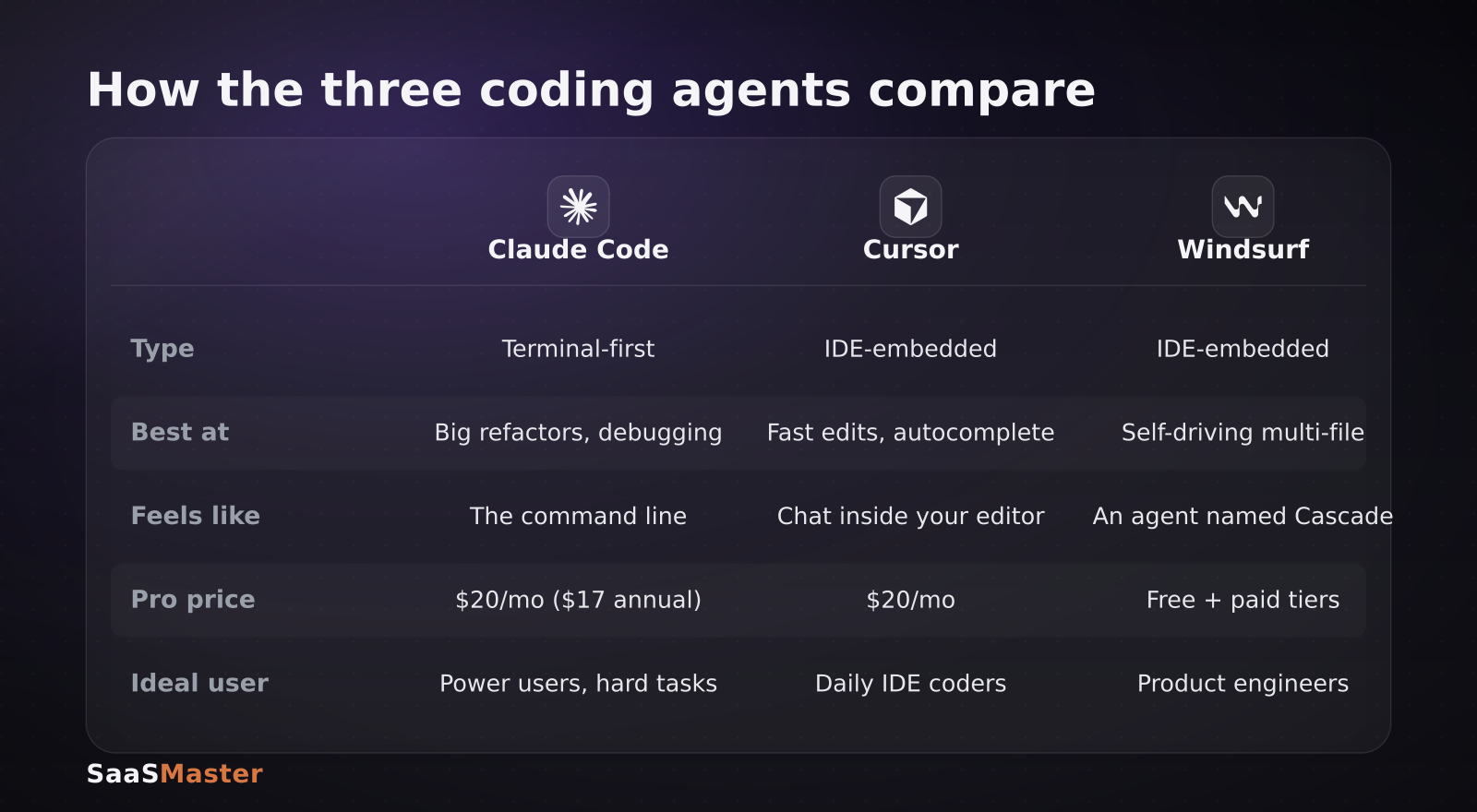
The table above is the quick version. The sections below are the nuance behind each column, because the right choice depends less on benchmarks and more on how you like to work.
Claude Code: the terminal powerhouse
Claude Code is built for developers who want to stay in the command line and hand off the hard stuff. Its strength is deep, multi-file reasoning: point it at a large refactor, an intermittent bug, or a feature that touches a dozen files, and it will plan, make changes, run tests, and iterate with a large context window holding the whole picture. It is less about moment-to-moment autocomplete and more about delegating an entire chunk of work and reviewing the result.
That makes it the tool I would reach for when a task feels too big to hold in my head. It is not the flashiest editing experience, but for the gnarly work, it is the one that most often gets there. Claude Code Pro runs about $20 per month, or roughly $17 per month billed annually.
Cursor: the flow-state IDE
Cursor's whole identity is flow. Autocomplete feels fast and genuinely useful, chat lives directly inside the editor, and small-to-medium scoped tasks get handled with minimal friction. For the daily rhythm of writing code, jumping between files, and making quick edits, nothing else feels as smooth. It is the tool you keep open all day because it stays out of your way.
Where it is less suited is the very largest autonomous jobs, which is exactly where a terminal-first agent shines. Cursor Pro is about $20 per month, the same ballpark as Claude Code, which is part of why so many developers simply pay for both.
Windsurf: the IDE that drives itself
Windsurf is the pick if you want an editor that takes the wheel. Its Cascade agent plans across files, runs commands, and keeps a single coherent context, so you can describe an outcome and let it work through the steps rather than nudging it line by line. That autonomy is a great fit for product engineers who would rather review a completed change than co-write every function.
The trade-off is control: the more an agent drives, the more carefully you want to review what it did. Windsurf offers a free tier plus paid plans, so it is easy to try before you commit. If you are evaluating any of these the way I do, my tool testing process is a good template for a fair head-to-head.
Where do Copilot and open-source agents fit?
The three headliners are not the only options, and for some teams they are not even the right ones. GitHub Copilot is still the most widely deployed assistant, and at about $10 per month it is the cheapest paid entry point. It excels at inline suggestions and is tightly woven into GitHub, even if it is less autonomous than the agents above. If your team already lives in GitHub, it is the path of least resistance and a perfectly good default.
On the other end sit the open-source agents. Cline, Aider, opencode and Zed are free as software, so you pay only for the model tokens they consume, which can work out cheaper at scale and keeps you in control of exactly which model runs. The trade-off is setup and polish: you assemble the experience yourself instead of getting it out of the box. For a cost-conscious team that is comfortable wiring things together, they are a serious option rather than an afterthought.
How much do they cost?
Pricing is close enough that cost is rarely the deciding factor. GitHub Copilot Pro is about $10 per month, Cursor Pro and Claude Code Pro are both around $20 per month (Claude is roughly $17 per month on an annual plan), and OpenAI's Codex ranges from a free tier up to the $20-per-month ChatGPT Plus level. Open-source agents are free as software; you only pay for the model tokens they burn.
Because the paid tiers cluster around the same number, the real cost question is not the subscription, it is your time. A tool that saves an hour a week easily justifies $20 a month, which is why the two-agent approach has become normal rather than extravagant.
Which AI coding agent should you choose?
If you want one tool, match it to your default workflow: pick Cursor if you live in an editor and value flow, Claude Code if you spend your day in the terminal and delegate big tasks, and Windsurf if you want maximum autonomy inside an IDE. If you can run two, the popular and effective combination is Cursor for the daily rhythm and Claude Code for the heavy lifting, which reportedly covers about 95% of what most developers need.
For SaaS teams choosing tooling more broadly, the wider AI tools library collects these comparisons in one place, my Gemini Enterprise versus Claude Cowork versus ChatGPT Work comparison covers the workspace layer, and the Inkling open-weight model breakdown looks at running your own models. When you need to teach a team how one of these tools actually works on screen, that is what my software walkthrough videos are for.
Frequently asked questions
Is Claude Code better than Cursor?
It depends on the task. Claude Code is better for large, complex, multi-file work like big refactors and deep debugging from the terminal. Cursor is better for the daily flow of coding, with faster autocomplete and a more polished in-editor experience. Many developers use both, letting each handle what it does best.
Do I really need two AI coding agents?
You do not need two, but a majority of engineers now use two because the strengths are complementary. A terminal-first agent handles autonomous heavy lifting while an IDE agent handles quick edits and flow. With Pro tiers near $20 per month each, the combined cost is modest against the time saved.
Is Windsurf free?
Windsurf offers a free tier alongside paid plans, so you can try its self-driving Cascade agent before paying. As with Cursor and Claude Code, the free or entry tier is enough to evaluate whether its autonomous style fits how you like to work before you commit to a subscription.
Was this article helpful?
Jorge Aguilar
Founder & Creator, SaaS Master
Producing SaaS and AI product videos since 2019 — 800+ videos for 200+ brands, covering tutorials, demos, walkthroughs, and explainers. Writing here about the tools, trends, and tactics that actually move the needle. LinkedIn · About · Work with me
Building an AI product that needs a clearer onboarding flow?
Client-owned videos that make your product easy to understand — demos, walkthroughs, onboarding, and explainers.
Explore AI product video productionRelated guides
More AI Tools & AI Workflows →
Kimi K3 vs DeepSeek V4 vs Qwen 3.7 Max: The Best Chinese AI Model in 2026

GEO for SaaS: How to Get Your Software Cited in AI Answers
Gemini 3.5 Pro Is Here: What Google's July 17 Launch Means for SaaS Teams