Independent Analytics Review 2026: WooCommerce Tracking Without Google
In short
Independent Analytics Pro gives WooCommerce stores real-time traffic, customer journeys, and UTM attribution without Google Analytics. Privacy-first, GDPR-ready, from $49 per year. Here is my honest review.
Independent Analytics is a WordPress analytics plugin that runs entirely on your own server. No Google. No cookies. No external data sharing. And as of 2026, it auto-connects to WooCommerce, SureCart, FluentCart, Easy Digital Downloads, and Paid Memberships Pro to give you revenue data, customer journeys, and conversion source attribution in one place.
If you have been running Google Analytics on a WooCommerce store and dealing with GDPR consent banners, data delays, and the complexity of GA4, this plugin is worth a serious look. The free version is available on WordPress.org. The paid Pro tiers go up to $199 per year for unlimited sites.
Key takeaways
- Runs on your server — no third-party data sharing, no cookies required
- Auto-detects WooCommerce, SureCart, EDD, FluentCart, and Paid Memberships Pro
- Customer Journey sidebar appears on every WooCommerce Order Details page
- User Journeys feature shows full visitor session timelines with clicks and form submissions
- Real-time visitor monitoring and UTM campaign tracking included in Pro
- 2026 update adds referrer type filter including an AI category for ChatGPT, Perplexity, and Claude
- Free on WordPress.org; Pro from $49 per year per site or $147 as a one-time lifetime purchase
[[video:0WDl_cIJ46Y]]
What does Independent Analytics actually track?
The free version tracks page views, unique visitors, referral sources, device breakdown, and top pages — the core metrics most WordPress site owners want without needing a setup wizard or a Google Tag Manager container.
The paid Pro tiers add campaign tracking with a built-in UTM builder, real-time visitor monitoring, click tracking without modifying code, automated email reports for you or your clients, and the full eCommerce analytics suite.
For WooCommerce, the eCommerce integration tracks revenue, orders, and conversion rates by product, top landing pages by sales volume, top referrers by revenue generated, and top campaigns by conversion rate.
Once you activate the WooCommerce integration, a Customer Journey box appears in the sidebar of every WooCommerce Order Details page. It shows when the customer arrived, where they came from, the first page they landed on, and the full path to checkout. This is exactly the kind of attribution data that usually requires a separate analytics platform or an expensive GA4 custom report.
What are User Journeys?
User Journeys is a Pro feature that lets you explore every recorded session with a full timeline. For each visitor you can see every page they visited, every form they submitted, and every eCommerce order they placed — in sequence, with timestamps.
For a WooCommerce store owner, this is useful for understanding where people drop off before purchase, which content drives the most conversions, and whether a specific landing page or blog post is pulling its weight in the buyer journey. It is the kind of behavioral data that would cost hundreds of dollars per month through a dedicated session analytics tool.
How does the 2026 AI referrer update work?
One of the most practically useful 2026 updates is the ability to filter traffic by referrer type. The new categories are Search, Social, and AI.
The AI category captures traffic from ChatGPT, Perplexity, Claude, and other AI chat interfaces that are now sending meaningful referral traffic to content-heavy WordPress sites. If your blog is being cited by AI assistants, Independent Analytics now shows you which ones are actually driving visitors — and which of those visitors convert.
This matters because AI-referred traffic behaves differently from search traffic. It tends to arrive with higher intent and spend more time on the site, but the source is hard to capture in standard referrer reports. Independent Analytics makes it visible without any additional configuration.
What does Independent Analytics Pro cost?
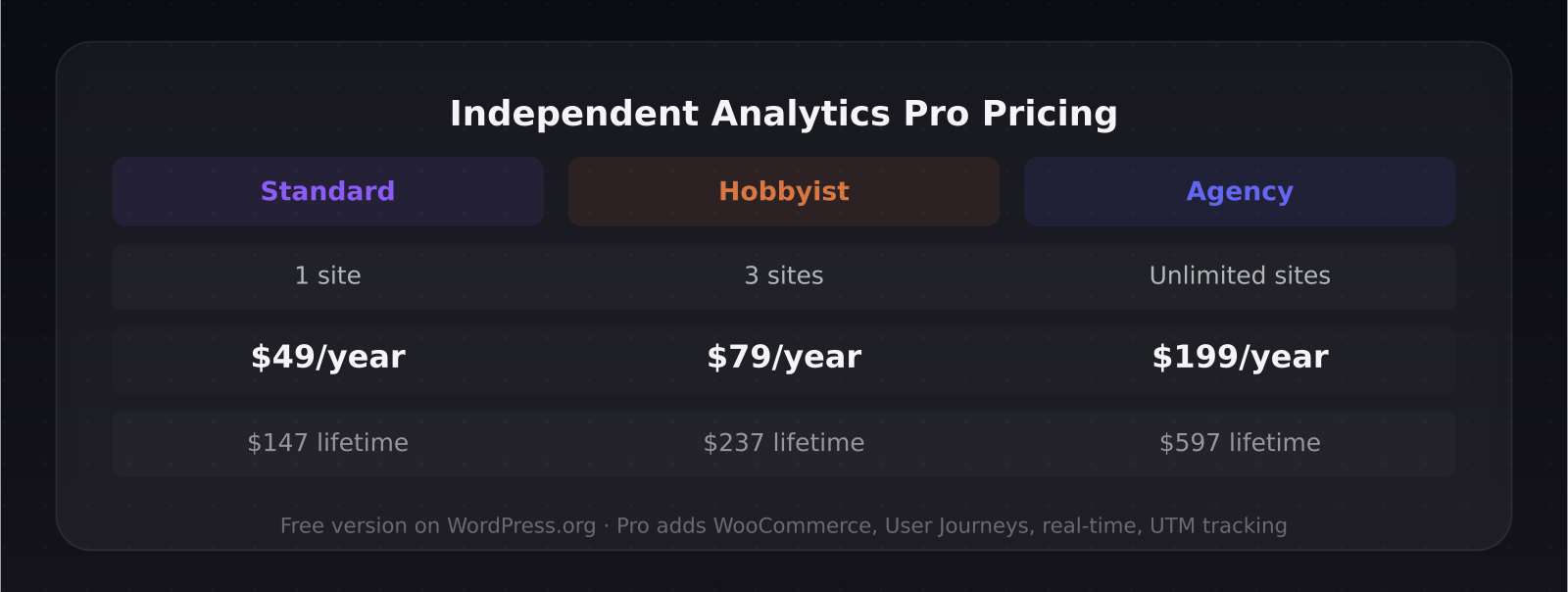
The pricing is straightforward. PRO Standard is $49 per year for one site, or $147 as a one-time lifetime payment. PRO Hobbyist is $79 per year for three sites, or $237 lifetime. PRO Agency is $199 per year for unlimited sites, or $597 lifetime.
The free version on WordPress.org covers most of what a small blog or content site needs. If you run WooCommerce or need customer journeys, you need at minimum the Pro Standard tier.
For agencies managing multiple client sites, the $199 per year unlimited plan or the $597 lifetime option is the strongest value. The plugin gets regular updates, so the lifetime deal is a compelling offer while it remains available.
How does it compare to Google Analytics 4?
GA4 is more powerful for cross-domain tracking, audience segmentation, and integration with Google Ads. If you are running paid search campaigns and need conversion data flowing back into Google Ads, GA4 remains the right tool.
Where Independent Analytics wins: simplicity, privacy compliance, and data ownership. There is no learning curve for non-technical users, no cookie consent banner required, no data processing delays on most features, and no risk of your analytics data being used to train advertising models.
For a typical WooCommerce store that is not running heavy paid search, Independent Analytics Pro is a cleaner solution at a lower total cost of ownership than GA4 combined with a GDPR consent management platform.
The AI tools hub on this site covers other privacy-conscious analytics tools for SaaS and content products.
Frequently asked questions
Does Independent Analytics require cookies or consent banners?
No. The plugin tracks visitors using server-side logging without setting cookies in the browser. In most jurisdictions this means you do not need a cookie consent banner for your analytics. Always consult your legal advisor for your specific situation and region.
Can I use Independent Analytics alongside Google Analytics?
Yes. Both can run simultaneously. Many store owners run them in parallel for a month to compare the numbers before migrating fully to Independent Analytics.
Does the WooCommerce integration work with WooCommerce subscriptions?
The core WooCommerce integration tracks standard orders and revenue. For subscription-specific metrics like MRR, churn rate, and renewal tracking, you would need a dedicated WooCommerce subscriptions analytics plugin in addition to Independent Analytics.
Was this article helpful?
Jorge Aguilar
Founder & Creator, SaaS Master
Producing SaaS and AI product videos since 2019 — 800+ videos for 200+ brands, covering tutorials, demos, walkthroughs, and explainers. Writing here about the tools, trends, and tactics that actually move the needle. LinkedIn · About · Work with me
Launching a plugin, theme, or WordPress product?
Client-owned videos that make your product easy to understand — demos, walkthroughs, onboarding, and explainers.
Explore WordPress video productionRelated guides
More WordPress & Website Tools →
WordPress 7.0 Armstrong: What's New, What Got Cut, and How to Upgrade Safely

How to Make a WordPress Plugin Demo Video That Drives Installs

How to Connect Claude or ChatGPT to Your WordPress Site with MCP (WPVibe Guide, 2026)