How to Make a WordPress Plugin Demo Video That Drives Installs
In short
Learn how to script, shoot, and place a WordPress plugin demo video that actually drives installs, with proven length, format, and placement specifics.
A WordPress plugin demo video drives installs when it shows the plugin solving one specific problem inside a real WordPress dashboard within the first 15 seconds - not a logo animation, not a feature list, and not a voiceover explaining what plugins are. Shoppers on a plugin page are already comparing three or four alternatives with the same core feature set, and the video is often what breaks the tie. Here's how to script, shoot, and place one that actually moves people from "browsing" to "install now."
Key takeaways
- Open on the result the plugin produces, not the plugin's settings screen.
- Keep it under 90 seconds - plugin shoppers are comparing options, not settling in for a tutorial.
- Show the real WordPress dashboard and real plugin UI, never a mockup or stock screenshot.
- Place the video above the fold on your own site and as the first screenshot slot on WordPress.org.
- Pair the video with a live WordPress Playground demo where possible - it's the fastest way to remove doubt before install.
Why does a demo video matter more for WordPress plugins than most SaaS products?
WordPress.org lists tens of thousands of plugins, and in most categories, five or six of them do roughly the same thing on paper. A shopper reading feature bullet points can't tell your form builder from the other four they have open in other tabs. A 60-90 second video showing the actual plugin, inside a real dashboard, producing a real result, is the fastest way to differentiate - it proves the interface isn't clunky, the setup isn't a nightmare, and the plugin does what the readme claims. If you're building a full content plan around this and not just one video, our WordPress video marketing guide covers the broader system plugin and theme companies use to turn views into installs.
How do you script a plugin demo video?
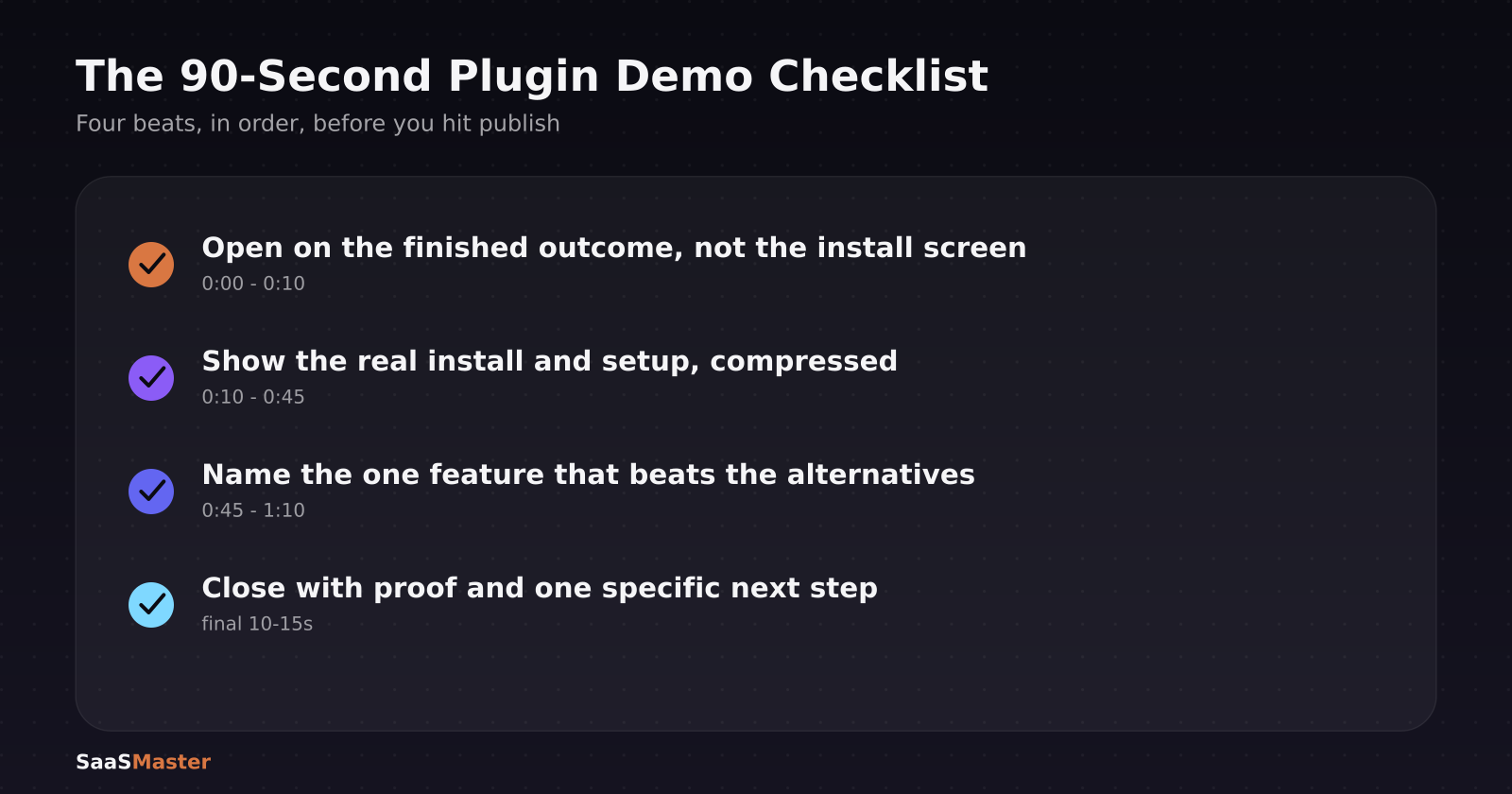
Open on the outcome, not the install screen (0:00-0:10)
Skip "Let's install and activate the plugin" as an opener - that's the least interesting ten seconds you have. Instead, open on the finished result: the popup that captured the lead, the form that validated correctly, the page that loaded fast. Then cut back and say "here's how that took three minutes to set up." You've just shown value before asking for a single second of patience.
Show the real setup, compressed (0:10-0:45)
This is the actual walkthrough portion, sped up where it makes sense. Real installs from the WordPress plugin directory, real activation, real settings screen - viewers are specifically checking whether the admin UI looks dated or confusing, so don't skip past it with a jump cut. If a step genuinely takes two minutes in real time, say so on screen ("this step takes about 90 seconds - here it is in 15") rather than pretending everything is instant.
Highlight the one feature that beats the competition (0:45-1:10)
Every plugin has one thing it does better than the alternatives - a cleaner UI, a specific integration, a setting the others bury three menus deep. Name it directly on screen. Shoppers comparing options in adjacent tabs need a reason to pick yours, and "it just works" is not a reason; "it's the only one that syncs directly with WooCommerce without a separate add-on" is.
Close with proof and a specific next step (final 10-15 seconds)
End with a install count, a rating, or a one-line testimonial if you have one, followed by a specific action: "Install it free from the WordPress plugin directory" beats a generic "try it today."
What length and format actually convert?
Keep it to 60-90 seconds for the primary demo video - this isn't a full tutorial, it's a trailer for the plugin. Record at 1920x1080, 16:9, since that's what displays correctly both on your own site and embedded via WordPress.org's oEmbed support in readme.txt. Add captions by default; muted autoplay previews are common on plugin comparison sites and roundup blogs that embed your video, so the message has to land without sound.
If your plugin has more depth than a 90-second video can cover, that's exactly the gap a separate walkthrough video is built for - use the short demo to win the install, then use a longer walkthrough inside onboarding to drive activation.
Where should the video actually live?
Put it in three places, in this order of priority. First, above the fold on your own plugin or theme landing page, autoplaying muted with sound-on controls - this is the highest-intent traffic you have. Second, as the featured item in your WordPress.org readme.txt using the built-in video embed syntax, since that page is often the first place a shopper lands from a Google search. Third, as the pinned or featured video on your YouTube channel, tagged and titled with the plugin name plus "demo" or "tutorial" - a meaningful share of plugin research now happens as a YouTube search rather than a WordPress.org search.
Do you need a live interactive demo too?
If your budget allows it, yes - pair the video with a live sandbox demo (WordPress Playground-based demos now work for the overwhelming majority of plugins) linked directly beneath the video. The video sells the outcome in 90 seconds; the live demo removes the last bit of doubt for someone who wants to click around before installing anything on their own site. Not every team can build this, and it's not a replacement for the video - it's the next step for the shoppers the video didn't fully convince.
What ruins an otherwise good plugin demo video?
Stock footage of unrelated people typing on unrelated laptops is the single fastest way to lose credibility - shoppers want to see your actual plugin, immediately, not a generic office scene. A voiceover reading the readme.txt file line by line is a close second; if your script sounds like documentation, it will be watched like documentation, which is to say, skipped. And a demo that only shows the settings panel, never the front-end result a site visitor would actually see, leaves the single most important question - "will this look good on my site?" - completely unanswered.
Once you've got a demo video working, the same real-dashboard, real-result approach applies to your other assets. Our guide on scripting a software walkthrough video is the natural next step if you need a longer onboarding video to go with the short demo, and How to Create a Product Demo Video That Converts covers the same conversion principles for SaaS products if you sell both a plugin and a hosted service. When you're ready for a finished, professional cut, WordPress video production is built specifically for plugin and theme companies shipping this kind of asset regularly.
Frequently asked questions
How long should a WordPress plugin demo video be?
60-90 seconds for the main demo video on your landing page and WordPress.org listing. If you need to cover advanced configuration or edge cases, make that a separate, longer walkthrough rather than extending the demo - shoppers comparing plugins rarely finish anything longer than two minutes at the discovery stage.
Can I just use screenshots instead of a video on my WordPress.org page?
You can, and many plugins do, but video consistently outperforms static screenshots for demonstrating interactive behavior - drag-and-drop builders, live previews, and animated transitions are nearly impossible to communicate through a still image. Use both: screenshots for quick visual scanning, video for anyone who pauses long enough to consider installing.
Do I need a professional studio to make a plugin demo video?
No. Most effective plugin demos are screen recordings with clear voiceover and simple callout annotations, not on-camera productions. What matters far more than production value is showing the real plugin doing something a shopper actually needs, in under 90 seconds, with clean audio and readable captions.
Was this article helpful?
Jorge Aguilar
Founder & Creator, SaaS Master
Producing SaaS and AI product videos since 2019 — 800+ videos for 200+ brands, covering tutorials, demos, walkthroughs, and explainers. Writing here about the tools, trends, and tactics that actually move the needle. LinkedIn · About · Work with me
Launching a plugin, theme, or WordPress product?
Client-owned videos that make your product easy to understand — demos, walkthroughs, onboarding, and explainers.
Explore WordPress video productionRelated guides
More WordPress & Website Tools →
How to Connect AI to Your WordPress Site with MCP (2026 Guide)
How to Use Angie, Elementor's Free Agentic AI Plugin for WordPress
How to Make a WordPress Plugin Demo Video That Drives Adoption