WordPress 7.0 Armstrong: What's New, What Got Cut, and How to Upgrade Safely
In short
WordPress 7.0 Armstrong released May 20, 2026, bringing an AI Client, Data Views admin overhaul, four new blocks, and responsive controls. Here is what changed and how to upgrade without breaking your site.
WordPress 7.0 "Armstrong" landed on May 20, 2026, and it is the most structurally significant release since Gutenberg shipped in WordPress 5.0. This version does not just add features — it changes how WordPress communicates with AI, redesigns the admin interface for the first time since 2013, and introduces a new block architecture that sets the foundation for the next phase of the platform.
The short answer to "should I upgrade?" is yes — but with a few steps taken first. Here is what changed, what got removed at the last minute, and the exact upgrade path to follow if you want to avoid problems.
Key takeaways
- Released May 20, 2026, named Armstrong after Louis Armstrong
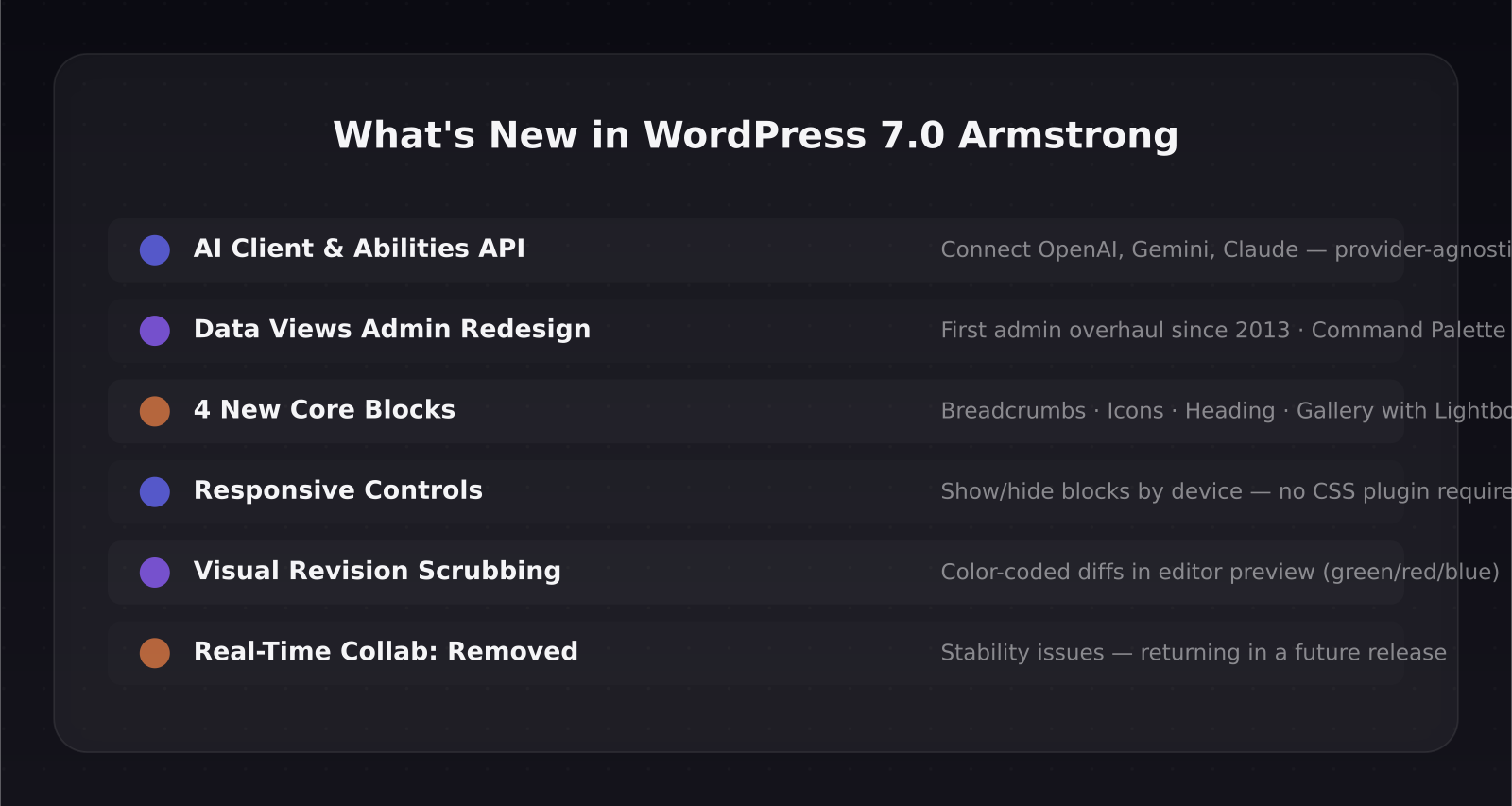
- Native AI Client built into core for the first time — connects to OpenAI, Gemini, and Claude
- Admin dashboard redesigned with Data Views (first visual overhaul since 2013)
- Four new blocks: Breadcrumbs, Icons, Heading, and redesigned Gallery
- Responsive controls: hide or show any block by device without writing CSS
- Real-time collaborative editing was removed before final release due to stability issues
- 875+ contributors, 200+ first-timers, 420+ enhancements and fixes
[[video:CRUaL3Az5Os]]
What is WordPress 7.0 Armstrong?
WordPress 7.0 is the launch release of Gutenberg Phase 3, focused on collaboration, performance, and AI infrastructure. The name Armstrong honors jazz legend Louis Armstrong — a nod to the improvisational, collaborative spirit the release team wanted to embody.
More than 875 contributors across dozens of countries worked on this release, including over 200 first-time contributors. The result is 420+ enhancements and bug fixes that touch nearly every part of the platform.
What is the AI Client and why does it matter?
This is the headline feature, and it is deliberately understated at launch. The AI Client is a new provider-agnostic interface in WordPress core that lets any plugin or theme communicate with external AI models through a standardized connection layer.
A new Connectors screen in the dashboard serves as the central hub. Out of the box you can connect OpenAI, Google Gemini, and Anthropic Claude. Once connected, plugins can use those AI models through the Abilities API — a standardized request format that means plugins do not need to hard-code API calls for each provider.
At launch, WordPress ships no active AI-powered features. Think of it as the plumbing. Once this infrastructure exists, plugin developers can build on top of it: auto-generating alt text, suggesting SEO titles, drafting excerpts, building assistant interfaces inside the admin. The consistency of the API means switching from OpenAI to Claude does not require rebuilding integrations.
If you are running a SaaS product on WordPress or building for clients, this is the architectural change to pay attention to over the next 12 months.
How does the new admin dashboard work?
The WordPress admin dashboard received its first significant visual overhaul since 2013. The redesign is powered by Data Views, a new framework for organizing, filtering, and managing content.
The most visible changes include a new color scheme and visual refresh across all screens, smooth animated transitions between admin pages, and a Command Palette accessible with Ctrl+K on Windows or Command+K on Mac that gives you fast access to any tool from anywhere in the admin.
Data Views also powers a new way to browse posts, pages, and custom content types — closer to a modern content management tool than the traditional WordPress list tables. You can filter, sort, and manage content in ways that previously required separate plugins.
What are the four new blocks?
WordPress 7.0 ships four new blocks in core:
Breadcrumbs adds automatic navigation breadcrumbs to any template without a plugin.
Icons is a native icon insertion block that pulls from a curated library of SVG icons directly in the editor.
Heading is a discrete heading block from H1 to H6 that is now separate from paragraph-level formatting, giving cleaner semantic HTML and easier styling control.
Gallery now includes a built-in lightbox slideshow, handling the most common reason people installed a gallery plugin.
What do responsive controls do?
This feature alone replaces several lightweight plugins. Responsive controls let you show or hide any block based on the visitor's device type — phone, tablet, or desktop — without writing a single line of CSS and without installing a plugin. You can also define custom breakpoints.
Combined with the new Heading block's cleaner semantic output and the redesigned Gallery, a basic content site on WordPress 7.0 needs fewer plugins than it did on 6.x.
What happened to real-time collaboration?
Real-time collaboration — the Google Docs-style feature where multiple users can edit the same post simultaneously — was removed from WordPress 7.0 before the final release. The team cited stability concerns, race conditions under load, memory efficiency problems, and recurring bugs that appeared during the beta cycle.
This is worth noting if you were planning to use it immediately. The feature was heavily promoted during the Gutenberg Phase 3 announcements and its absence will be felt by teams using WordPress as a collaborative content platform. It will return in a future release.
How to upgrade to WordPress 7.0 safely
If you are running WordPress 6.x, here is the upgrade path I recommend.
Test on a staging site first. Use InstaWP, LocalWP, or your host's staging environment to run the upgrade before touching your live site. This catches plugin conflicts before they become outages.
Update plugins and themes before upgrading WordPress. Many compatibility issues come from outdated plugins, not the core upgrade itself.
Check for PHP compatibility. WordPress 7.0 requires PHP 7.4 minimum, with PHP 8.2 or 8.3 recommended for performance. If your host is still on PHP 7.x, upgrade that first.
Deactivate caching plugins before running the upgrade. Re-activate and clear the cache after the upgrade completes.
Run the upgrade, then verify. Check your site front end, test forms, check WooCommerce checkout if you have one, and verify the admin dashboard loads correctly.
If you are building tutorial content or product documentation for WordPress-based tools, the WordPress video production services on this site cover walkthroughs and onboarding videos for plugin developers and theme companies.
Does WordPress 7.0 affect WooCommerce?
Yes, in a few important ways. The responsive controls work on WooCommerce product pages, letting you hide or show blocks by device without additional plugins. The new Data Views admin interface will extend to WooCommerce screens over time, though full integration depends on WooCommerce's own update cadence.
The AI Client is relevant to WooCommerce store owners: once plugin developers build on top of it, expect AI-powered product descriptions, alt text generation, and SEO tools that do not require separate API key management per plugin.
For more on tools that extend WooCommerce analytics, the WordPress hub on this site covers plugins I have tested for WooCommerce performance and tracking.
Frequently asked questions
Is WordPress 7.0 compatible with my existing plugins and themes?
Most themes and plugins that were compatible with WordPress 6.7 will work with 7.0. The main exception is plugins that hook deeply into the admin UI or post list tables, which may need updates to work with the new Data Views framework. Test on staging first before updating a live production site.
Do I need to connect an AI provider to use WordPress 7.0?
No. The AI Client is opt-in infrastructure. If you do not connect a provider in the new Connectors screen, nothing changes in your workflow. The feature only activates when you configure it and only affects plugins that have built integrations for it.
When is real-time collaboration coming to WordPress?
The feature was removed from 7.0 due to stability concerns during beta testing. There is no confirmed release date as of July 2026. The WordPress core team has indicated it will return in a future major release, most likely 7.1 or later.
Was this article helpful?
Jorge Aguilar
Founder & Creator, SaaS Master
Producing SaaS and AI product videos since 2019 — 800+ videos for 200+ brands, covering tutorials, demos, walkthroughs, and explainers. Writing here about the tools, trends, and tactics that actually move the needle. LinkedIn · About · Work with me
Launching a plugin, theme, or WordPress product?
Client-owned videos that make your product easy to understand — demos, walkthroughs, onboarding, and explainers.
Explore WordPress video productionRelated guides
More WordPress & Website Tools →
Independent Analytics Review 2026: WooCommerce Tracking Without Google
How to Make a WordPress Plugin Demo Video That Drives Installs
How to Connect Claude or ChatGPT to Your WordPress Site with MCP (WPVibe Guide, 2026)