How I Turned a Boring PDF Into an Interactive Flipbook With Flipsnack (2026 Pricing & Workflow)
In short
Flipsnack turns static PDFs into interactive flipbooks with video, forms, and clickable links. Here's the real 2026 pricing, features, and full workflow.
Flipsnack is a browser-based tool that turns a static PDF into an interactive, page-turning flipbook, complete with a 3D flip animation, clickable links, embedded video, and lead-capture forms built right into the pages. I use it whenever a plain PDF (a lookbook, a report, a course workbook) needs to feel like a real digital product instead of a file nobody opens twice. This post covers what it actually does, what it costs in 2026, and where it beats or loses to Canva and Issuu.
Key takeaways
- Flipsnack converts a PDF into a page-flip publication with video, audio, forms, and clickable hotspots in minutes, with no design software required.
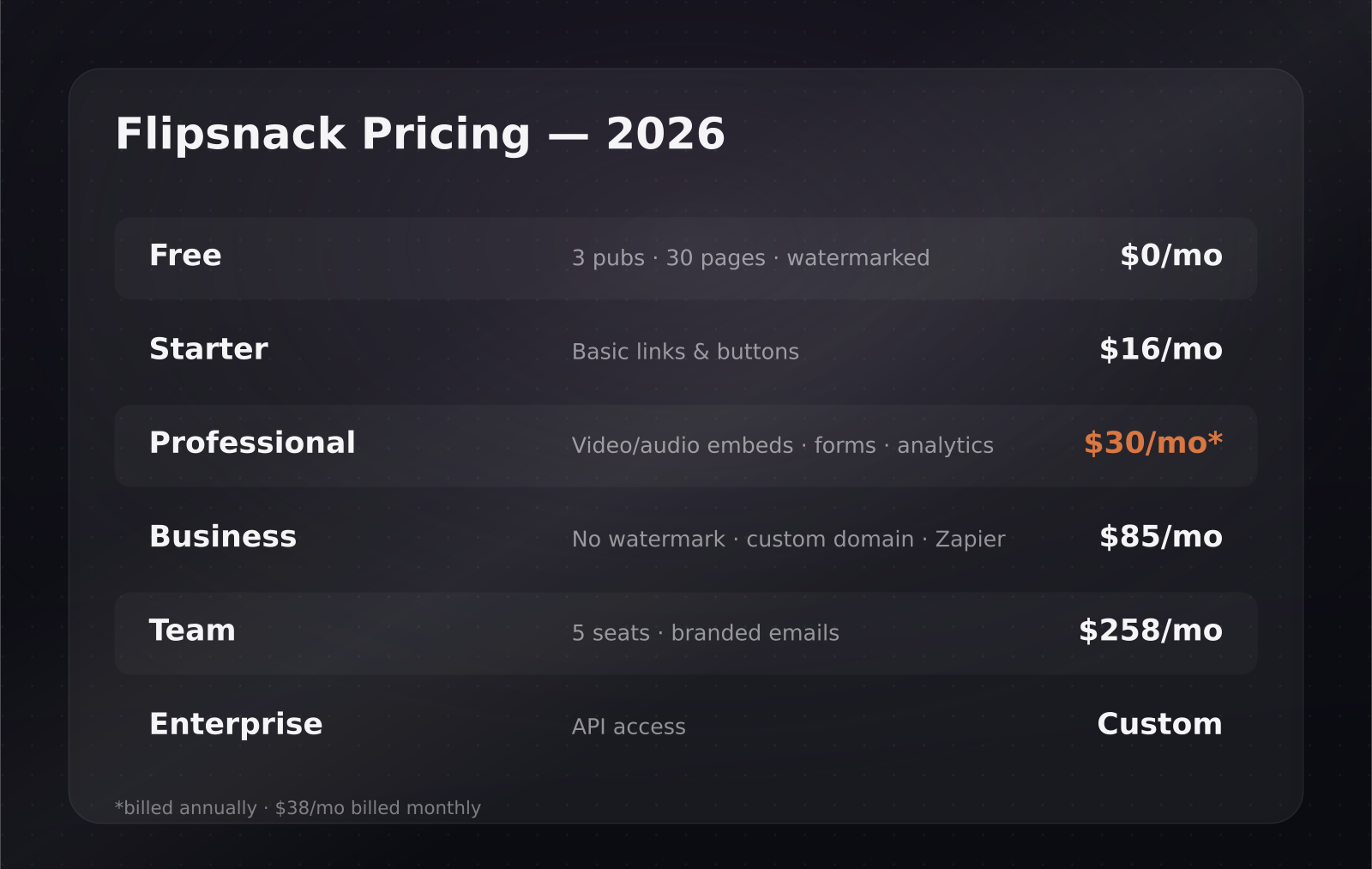
- Pricing runs from a free plan up to $258/month for a 5-seat Team plan; the free tier caps you at 3 publications, 30 pages each, all watermarked.
- The Professional plan, $30/month billed annually ($38/month monthly), is the real unlock: video and audio embeds, lead-capture forms, and Google Analytics.
- Removing the Flipsnack watermark and using a custom domain requires the Business plan at $85/month.
- Canva doesn't do true page-flip animation; Issuu leans editorial with a built-in discovery network; FlipLink undercuts both with a one-time $129 lifetime deal.
What is Flipsnack and how does it turn a PDF into a flipbook?
You upload a PDF and Flipsnack automatically converts each page into a flippable spread with a realistic paper-turn animation. From there you drop into a built-in drag-and-drop editor with templates, layout grids, and a stock asset library, so you can redesign pages from scratch instead of just wrapping the PDF as-is. Once you're happy with it, you get a shareable link or an embed code for your own site, and readers flip through it the way they would a physical magazine or catalog, except the pages can do things a printed page never could.
[[video:6pHq8BtOU08]]
How much does Flipsnack cost in 2026?
Flipsnack runs five tiers, and the jump between them is really about which interactive features unlock, not just page limits.
- Free: 3 publications max, 30 pages each, Flipsnack watermark on everything, no analytics, no custom domain, no lead capture.
- Starter: $16/month, basic links and buttons, still no white-labeling.
- Professional: $30/month billed annually, or $38/month billed monthly. This is where video and audio embeds, lead-capture forms, and Google Analytics integration turn on.
- Business: $85/month, annual billing only. Custom domain, a full brand kit, and Zapier automation. This is also where the Flipsnack watermark disappears entirely.
- Team: $258/month for 5 seats, with branded emails and multi-user collaboration workflows.
- Enterprise: custom pricing, with API access for teams that want to generate flipbooks programmatically.
Nonprofits get a 30% discount across every paid plan, which is worth checking if you run content for an education or nonprofit-adjacent product.
What can you actually do inside a Flipsnack publication?
This is the part that separates it from "a PDF with a page-turn effect." On Professional and above, you can drop video embeds, shopping links, GIFs, forms, and polls directly into a page, so a product catalog can carry an embedded demo clip next to the SKU, or a report can gate a chapter behind a lead form. The editor itself is genuinely built for this — grids, templates, and an asset library mean you're not exporting from Illustrator or Canva first; you can lay the whole thing out inside Flipsnack. Business-tier accounts add Zapier automation, so a form submission inside a flipbook can push a lead straight into your CRM without anyone touching a spreadsheet. If your team already automates lead routing, that's worth pairing with a broader look at no-code automation workflows.
How does Flipsnack compare to Canva and Issuu?
Canva is not a flipbook tool, even though people reach for it first because they already have a Canva subscription open. You can design a document in Canva and share a view-only link, and Canva's Magic Write can help you draft the copy that goes on the page, but there's no native page-turn animation, no embed code for hotspots, and no lead-capture layer. It's a design tool wearing a distribution hat.
Issuu is the closer competitor, and it plays a different game entirely. It leans editorial: it has a built-in content network that gives your publication organic discoverability other tools don't offer, plus one-click social posts and auto-generated individual articles pulled from your content. Pricing starts around $19/month once you need custom branding or embeds, and the free plan carries Issuu branding, similar to Flipsnack's free tier. If you're publishing something magazine-style that benefits from being found by strangers browsing Issuu's network, it's a legitimate alternative. If you're publishing a sales asset that only your own prospects will ever see, that discovery layer doesn't do much for you.
There's also a newer option worth knowing about: FlipLink, which converts a PDF into a 3D page-flip flipbook or a clean scrollable viewer, and instead of a subscription, it sells a lifetime deal — a one-time $129 payment per code for up to 100 active publications. For a small team publishing a handful of PDFs a year, that math can beat years of Flipsnack subscription costs, though you give up Flipsnack's deeper interactive editor and Zapier integration in the trade.
Is Flipsnack worth it for a SaaS or software company?
It depends entirely on how often you're turning PDFs into something people need to engage with rather than just download. If you publish an occasional one-pager, a case study, or an onboarding guide once or twice a quarter, the free plan or Starter tier covers it, and the watermark is a minor cost for something that isn't a core lead channel. If PDFs are actually part of your funnel — a gated whitepaper, a pricing one-pager, a sales deck you want form-gated and tracked — Professional's $30-38/month buys you the lead capture and analytics that make the flipbook accountable to a number instead of a vague "content marketing" line item.
Business tier only makes sense once the flipbook needs to live convincingly on your own domain as a product surface, rather than obviously being hosted on flipsnack.com. That's a branding call more than a features call. For a broader view of how document and content tools fit into a SaaS growth stack, our SaaS growth guides cover the adjacent onboarding and activation side of this problem, and if the flipbook is standing in for a proper walkthrough of your actual product, it's worth comparing it against how to script a software walkthrough video — video and an interactive flipbook solve overlapping but not identical problems.
If a flipbook needs to sit alongside an actual explainer video on the same landing page, that's exactly the kind of pairing we build in our SaaS explainer video production work — the flipbook carries the reference material, the video carries the first sixty seconds of attention.
What's the actual workflow, start to finish?
In the video walkthrough above, the process runs in roughly four steps: drop in a PDF that was originally built for print or a plain download, let Flipsnack auto-convert it into flippable spreads, then go page by page adding the interactive layer — a video embed on the product page, a lead form ahead of the pricing chapter, hotspot buttons linking out to a signup page. The part that's easy to skip and shouldn't be is the analytics setup on the Professional plan: connecting Google Analytics before you share the link is what turns "we published a flipbook" into "we know which page readers stop on before they leave," which is the only reason to gate content in the first place. Publish, grab the link or embed code, and drop it wherever the PDF used to live — a resource center, an email footer, a sales follow-up.
One workflow note worth flagging: Flipsnack's auto-conversion handles clean, well-structured PDFs far better than dense, text-heavy ones. If your source PDF was built for print with small margins and tight text blocks, budget time to rework the layout inside Flipsnack's editor rather than assuming the auto-convert will look right on the first pass.
Frequently asked questions
Does Flipsnack have a free plan?
Yes. The free plan allows up to 3 publications, capped at 30 pages each, and every publication carries a visible Flipsnack watermark. Analytics, custom domains, white-label branding, and lead-capture forms are all locked behind paid tiers, so the free plan works best for testing the format rather than running it as a lead channel.
Can I embed a video inside a Flipsnack flipbook?
Yes, but only from the Professional plan ($30/month annual, $38/month monthly) upward. Video and audio embedding is one of the specific features that separates Professional from the free and Starter tiers, alongside lead-capture forms and Google Analytics integration.
What's the cheapest way to remove the Flipsnack watermark?
Full white-labeling requires the Business plan at $85/month, billed annually only. If that's out of budget for how often you publish, a one-time alternative like FlipLink's $129 lifetime deal removes the ongoing subscription question entirely, though you lose Flipsnack's built-in editor depth and Zapier automation in that trade.
Was this article helpful?
Jorge Aguilar
Founder & Creator, SaaS Master
Producing SaaS and AI product videos since 2019 — 800+ videos for 200+ brands, covering tutorials, demos, walkthroughs, and explainers. Writing here about the tools, trends, and tactics that actually move the needle. LinkedIn · About · Work with me
Need to show users how an automation workflow works in practice?
Client-owned videos that make your product easy to understand — demos, walkthroughs, onboarding, and explainers.
Explore product walkthrough video productionRelated guides
More Automation & No-Code →
How to Automate LinkedIn Outreach with Lemlist and Claude Without Sounding Like a Bot
Skywork 3.0 Review: Can One Agent Platform Replace Your Whole Workflow Stack?
How to Collect Donations and Sell Products Online Without a Website