How to Automate LinkedIn Outreach with Lemlist and Claude Without Sounding Like a Bot
In short
Automate LinkedIn outreach with Lemlist and Claude in 2026: safe sending limits, a five-touch sequence, real pricing, and personalization that actually works.
You can automate LinkedIn outreach with Lemlist and Claude without sounding like a bot, but only if you invert the usual order of operations: use Claude to do the research a human would do before writing, and use Lemlist to schedule and pace what you send. Most automated outreach fails because people use AI to write more messages faster. The setup below uses it to write fewer, better ones — and it stays inside LinkedIn's sending limits, which is the part that actually protects your account.
[[video:NysxiJUgLcQ]]
Key takeaways
- Lemlist's Multichannel Expert plan, which is the one that includes LinkedIn automation, runs $109 per user per month monthly or $87 annually. Email Pro at $79 does not include LinkedIn.
- Safe sending is roughly 15–20 connection requests per day, or 100–200 a week. Under 80 a week is safer without Sales Navigator.
- The limit is not fixed. It moves with your account age, acceptance rate and SSI score. New accounts can be capped at 20–30 a week.
- Claude's job is research and angle-finding, not mass copywriting. One prompt per prospect, not one prompt for the whole list.
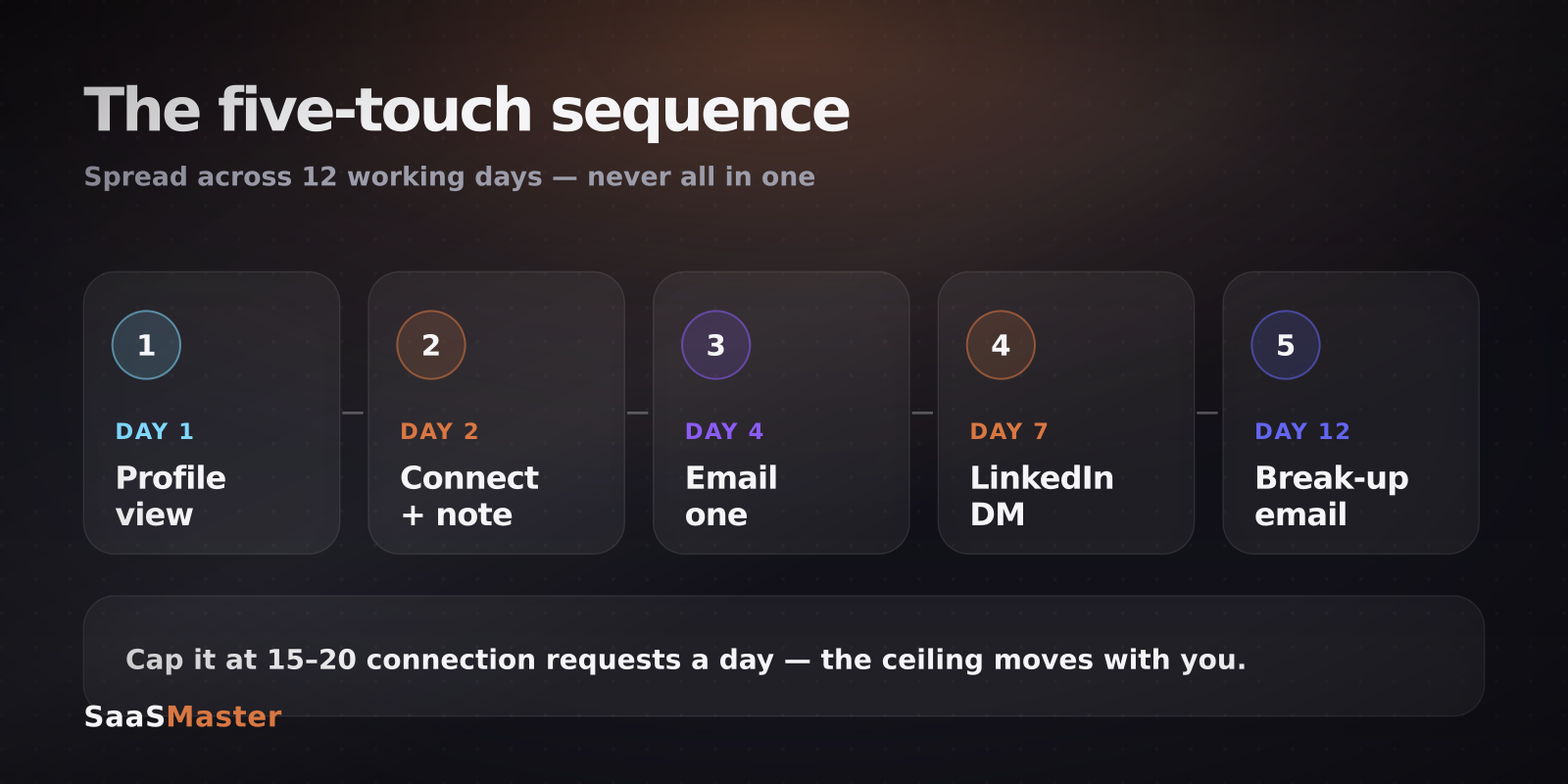
- Spread five touches across twelve working days. Compressing them is what makes a sequence feel automated.
Why does most automated LinkedIn outreach fail?
Because it optimises the wrong number. The instinct with any automation tool is to raise volume, and LinkedIn is specifically built to punish that. Its spam detection watches the volume and frequency of your outreach, and exceeding the thresholds gets you a temporary restriction that people call LinkedIn jail — anywhere from 24 hours to several days.
The second failure is subtler. AI-written outreach that mentions nothing a stranger could not have guessed reads worse than a plain, short, honest message. "I loved your post about scaling" with no evidence you read it is a tell. Recipients have been trained to spot it, and once they do, every subsequent message from you is discounted.
So the goal is not more messages. It is messages that could only have been written to that specific person, sent at a pace a human could plausibly sustain.
What are the safe LinkedIn sending limits in 2026?
LinkedIn generally tolerates 100–200 connection requests per week, which works out to about 15–30 per day. If you are not on Sales Navigator, staying under 80 a week is the safer play. Most sales professionals settle at 60–100 a week with 15–20 requests a day, which creates a pattern that looks like a person working a list rather than a script running a loop.
The important nuance: this is a dynamic ceiling, not a fixed one. It shifts with your account age, your acceptance rate, your SSI score and your recent activity. A new account, a low-SSI profile, or a profile with a pile of unanswered invitations can find its real ceiling down at 20–30 per week regardless of what the published guidance says.
If your profile is under 60 days old or has fewer than 150 connections, start at 10–15 requests a day and increase by about five per week. Warming up is not optional. It is the difference between a sending account and a restricted one.
What does Lemlist actually cost, and which plan do you need?
This trips people up, so be precise about it. Lemlist's entry plan for new customers in 2026 is Email Pro at $79 per user per month, $71 quarterly, or $63 annually. Email Pro does not include LinkedIn automation.
The plan you need is Multichannel Expert at $109 per user per month, or $87 per user per month on annual billing. That tier adds native LinkedIn automation for connection requests and messaging, in-app cold calling, Aircall integration, a centralised multichannel inbox, and 1,500 enrichment credits per user per month. Outreach Scale is the custom-quoted enterprise tier with SSO/SAML, custom roles, and a five-seat minimum on annual billing only.
There is a 14-day full-access trial of the Multichannel plan with no credit card required, which is enough time to run one real sequence end to end.
Credits are Lemlist's internal currency for enrichment, verification, AI features and call minutes, and they are only charged when an action succeeds. Lemwarm, the deliverability warmup, is included with the subscription rather than sold separately.
How do you use Claude for research instead of mass copywriting?
Here is the shift that makes the whole thing work. Do not ask Claude to write fifty messages. Ask it to find you one true, specific thing about each prospect, and write the message yourself from that.
A prompt that works looks roughly like this: here is a prospect's title, company, recent public activity and the page they landed on; identify the single most likely operational problem this person has this quarter, and the one sentence I could open with that proves I understand it. Then judge the output. If the answer could apply to any of the fifty people on your list, throw it out — that is the bot-detector firing before your prospect's does.
Claude is also good at the unglamorous middle of this job: reading a company's changelog, pricing page and careers listings and telling you what changed recently. A careers page hiring three support engineers tells you something real about their ticket volume. That is an opening line no template generates.
If you want the AI to act rather than advise, the comparison of Claude in Chrome, Comet and Atlas covers where agentic browsing is reliable enough to trust and where it is not. For the wider picture of what small teams are actually automating this year, AI agents for small business in 2026 is the broader survey.
What does a five-touch sequence look like?
Twelve working days, five touches, deliberately unhurried.
Day one is a profile view and nothing else. It is a signal, it costs no quota, and a meaningful share of people look back.
Day two is the connection request with a note. Keep the note under 200 characters and make it about them. No pitch, no calendar link, no "I'd love to pick your brain."
Day four, once connected, is the first email. This is where the research earns its keep — one specific observation, one question, one line about what you do. Nothing else.
Day seven is a LinkedIn direct message, and it should reference the email without repeating it. Different channel, same person, so acknowledge that you have already reached out.
Day twelve is the break-up email. Short, gracious, and genuinely final. Say you will stop, then actually stop. The break-up email consistently outperforms the middle touches, mostly because it is the only one that is not asking for anything.
Set this up in Lemlist as a multichannel sequence with the LinkedIn and email steps in one flow, and let the centralised inbox catch replies from both channels in one place. Then leave the pacing alone. The temptation to compress twelve days into five is the single most common way a good sequence turns into an obvious one.
Where does automation stop and video start?
Somewhere around the second reply. Once someone is engaged, the bottleneck is no longer getting attention — it is explaining what your product does without a 40-minute call. That is a different problem, and text is bad at it.
A short, specific walkthrough sent as the third touch converts better than a fourth written follow-up, which is why SaaS explainer videos sit in the middle of most sales sequences rather than at the top of the funnel. Lemlist supports custom video personalization in campaigns for exactly this reason.
If you are building the wider system rather than one campaign, the automation and no-code library has the rest, and n8n vs Zapier vs Make covers the plumbing you will eventually want behind it.
Frequently asked questions
Will LinkedIn ban my account for using Lemlist?
Not for using it, but potentially for how you use it. LinkedIn's detection watches volume and frequency rather than the tool itself. Stay at 15–20 connection requests a day, warm up new accounts slowly, and keep your acceptance rate healthy by sending to people who plausibly want to hear from you. The accounts that get restricted are almost always the ones that jumped straight to the published maximum on day one.
Do I need the $109 Lemlist plan, or will the cheaper one work?
If LinkedIn is part of your sequence, you need Multichannel Expert at $109 per user monthly or $87 annually. The $79 Email Pro tier covers email campaigns, Lemwarm, CRM integrations and personalization, but not LinkedIn automation. Run the 14-day multichannel trial before committing, since it gives you full access without a card.
Can Claude write the whole sequence for me?
It can, and you should not let it. Sequences written entirely by AI converge on the same structure and the same phrasing, which is precisely what recipients have learned to filter out. Use Claude for the research layer — finding the specific, checkable detail about each prospect — and write the connecting sentences yourself. The result is fewer messages that get materially better response rates.
Was this article helpful?
Jorge Aguilar
Founder & Creator, SaaS Master
Producing SaaS and AI product videos since 2019 — 800+ videos for 200+ brands, covering tutorials, demos, walkthroughs, and explainers. Writing here about the tools, trends, and tactics that actually move the needle. LinkedIn · About · Work with me
Need to show users how an automation workflow works in practice?
Client-owned videos that make your product easy to understand — demos, walkthroughs, onboarding, and explainers.
Explore product walkthrough video productionRelated guides
More Automation & No-Code →
Skywork 3.0 Review: Can One Agent Platform Replace Your Whole Workflow Stack?
How to Collect Donations and Sell Products Online Without a Website
Zapier vs Make vs n8n in 2026: Which Automation Tool Saves You the Most?