Bunny.net for Video Hosting in 2026: Is It Finally Smarter Than Vimeo or Wistia?
In short
Bunny.net Stream review for 2026 — real pricing, WordPress embeds, geo-replication, and how it compares to Vimeo and Wistia for creators and SaaS teams.
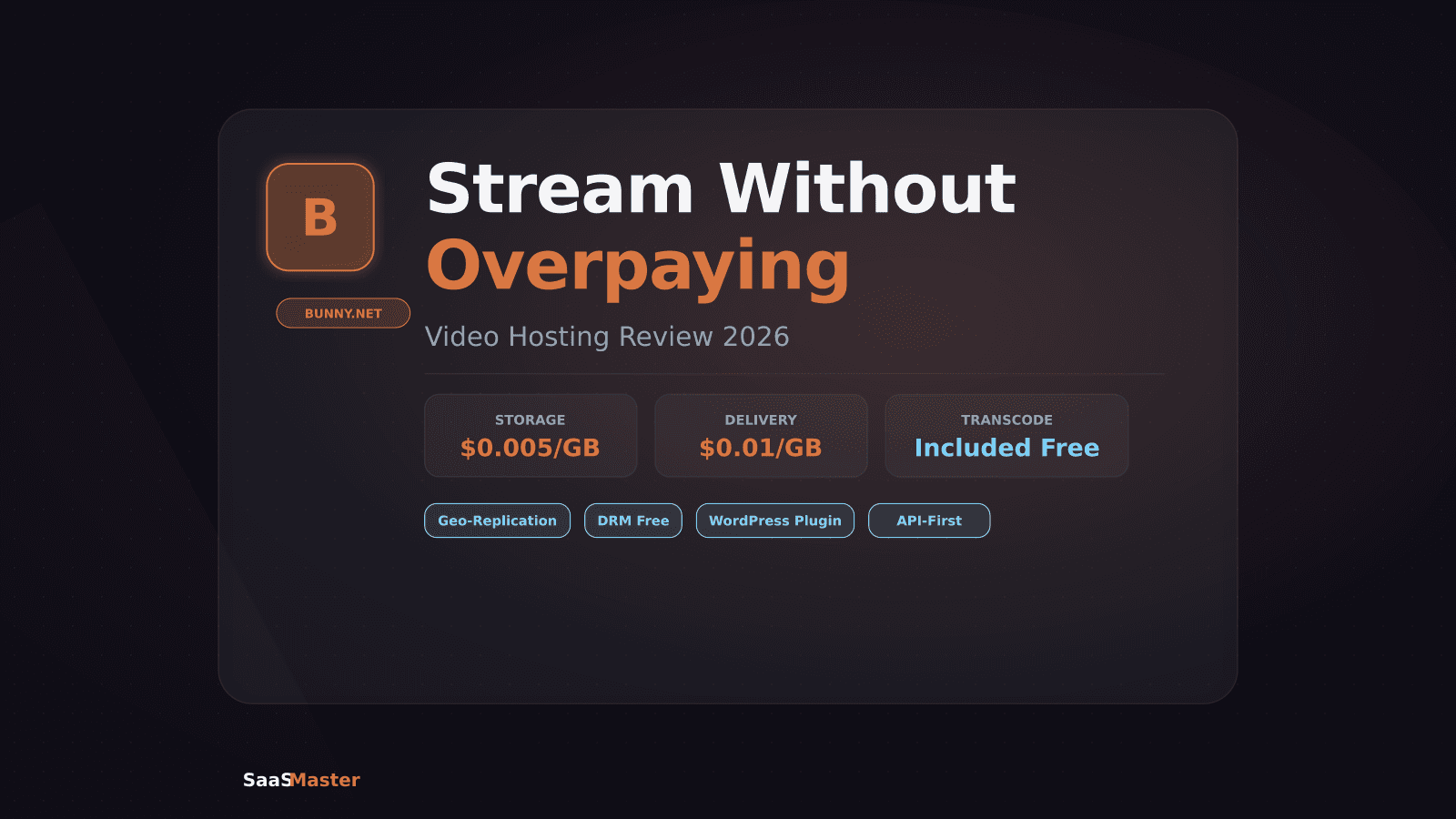
Bunny.net's video hosting arm (Bunny Stream) lets you host, transcode, and deliver video globally for a fraction of what Vimeo or Wistia charges — starting at $0.005 per GB of storage and $0.01 per GB of delivery. For a creator or SaaS team hosting 100 hours of video and serving 10,000 views a month, the total bill is typically $5 to $15. That's the headline. But the real question is whether the tradeoffs in interface and features are worth it for your workflow.
Key Takeaways
- Bunny Stream pricing: $0.005/GB storage, $0.01/GB CDN delivery, transcoding included at no extra charge
- 14-day free trial, then $1/month minimum
- 100 hours of video plus 10,000 monthly views costs roughly $5-15 per month total
- Vimeo was acquired by Bending Spoons in late 2025 and restructured pricing; Wistia Business starts at $79/month
- Bunny.net includes geo-replication, DRM, a built-in player, and direct WordPress embed support
- API-first architecture means it integrates with any CMS or custom app
[[video:LHRUkiFHyWA]]
What Changed in the Video Hosting Market in 2025-2026
Video hosting is no longer stable territory. In a six-month window between November 2025 and May 2026, Vimeo was acquired by Bending Spoons, restructured its pricing tiers, and laid off its entire video engineering team. That last point deserves attention: Vimeo is now primarily a software business being run as a portfolio product rather than a platform with a dedicated engineering roadmap.
Wistia remains an excellent choice for marketing teams who need analytics, lead capture forms, and CRM integrations baked into the player. But it starts at $79/month for the Business plan, and a 10-person marketing team using HubSpot integrations and automation can exceed $500/month once per-seat charges stack up.
That context makes Bunny.net's pricing and roadmap look particularly good in 2026.
How Bunny Stream Actually Works
Bunny.net is fundamentally a CDN company that built video hosting on top of its global delivery infrastructure. When you upload a video to Bunny Stream, it:
- Transcodes the file into multiple quality levels automatically (360p through 4K depending on source quality)
- Stores the master file and all transcoded versions in Bunny's distributed storage
- Distributes the content to edge nodes across its global PoP network
- Serves the right quality level to each viewer based on their connection speed and location
This is the same infrastructure pattern that Cloudflare Stream, Mux, and Amazon CloudFront use — Bunny Stream just brings it at significantly lower unit cost.
The player is fully customizable: you can set brand colors, control behavior (autoplay, loop, muted start), add captions, and embed it anywhere via iframe or the Bunny API. DRM is included at no additional cost, which is significant — most competing platforms charge separately for DRM or only offer it at enterprise tiers.
Pricing Compared: Bunny vs Vimeo vs Wistia
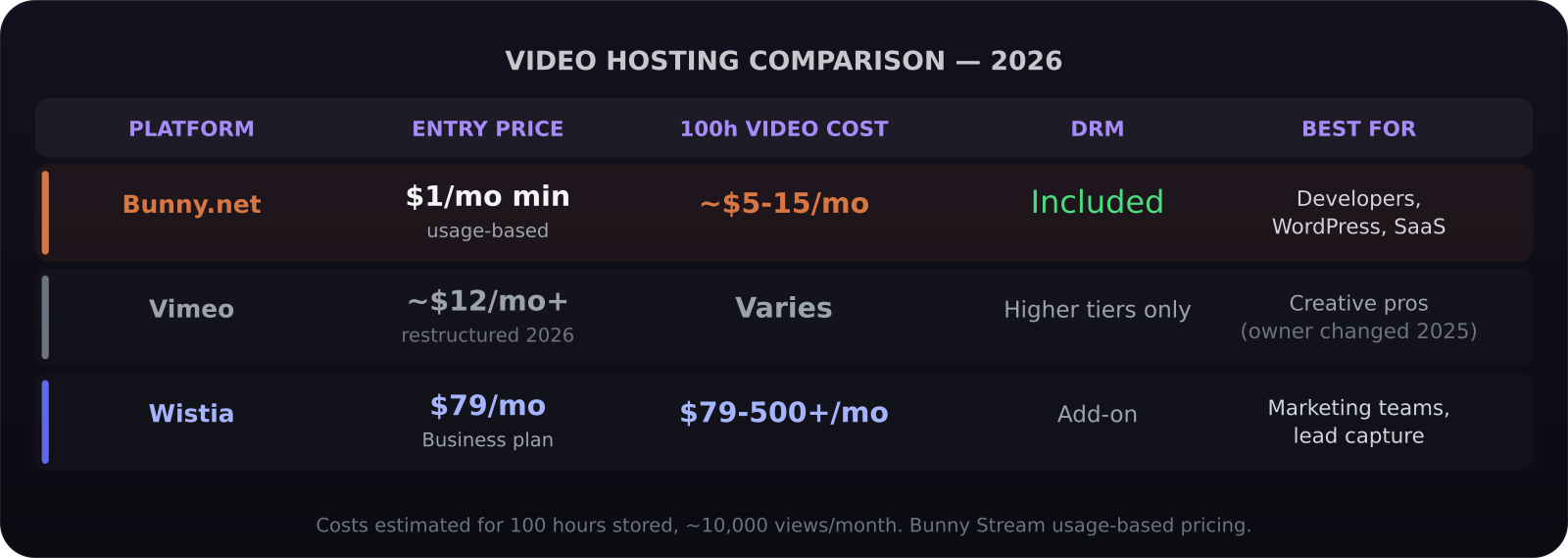
Bunny Stream's billing is usage-based, which makes it genuinely hard to compare against subscription platforms. Here's a practical translation:
Small creator (20 hours stored, 5,000 views/month): roughly $3-6/month on Bunny Stream. Vimeo's lowest paid plan starts around $12/month but has limited storage and bandwidth caps. Wistia's free tier caps out quickly.
Mid-size SaaS team (100 hours stored, 30,000 views/month): roughly $15-35/month on Bunny. Wistia Business starts at $79/month before any add-ons. Vimeo's equivalent tier varies following the 2026 restructure.
Enterprise (500+ hours, 200,000+ views/month): Bunny remains dramatically cheaper at scale. Wistia moves to custom pricing. Bunny's costs grow linearly rather than jumping at tier boundaries.
The tradeoff is that Bunny's dashboard is simpler than Wistia's. You get upload management, player settings, analytics on views and bandwidth, and the API. You don't get Wistia's conversion funnels, email capture within the player, or deep HubSpot integration out of the box. If your video strategy is directly tied to lead generation inside the player interface, Wistia earns the premium. If you're serving product documentation, tutorials, or educational content, Bunny is almost certainly the right choice.
Geo-Replication: What It Means in Practice
Bunny.net's geo-replication means your video files are automatically pushed to edge locations close to your viewers. A user in Brazil and a user in Japan both pull from nodes near them rather than a single origin server.
For SaaS companies with global users, this is meaningful. A 50ms reduction in video load time and buffering directly affects whether users complete onboarding videos and product tutorials. Video abandonment rates spike sharply with every second of buffering. Bunny Stream's geo-replication is enabled by default — there's no configuration required.
WordPress Integration
Bunny Stream has a dedicated WordPress plugin that handles the full upload-to-embed workflow from inside the WordPress dashboard. You upload directly from the media library, the video is sent to Bunny Stream for processing, and an embed code is returned that you can drop into any block or page builder.
The player renders cleanly in Gutenberg, Elementor, and Divi. Caption files, custom thumbnails, and player branding all sync through the plugin. If you're running an LMS, a documentation site, or a product tutorial library on WordPress, this is the path of least resistance. Our WordPress video production services are built around hosting setups exactly like this. You can find more context on the tools behind efficient video delivery in our automation no-code workflows guide.
API-First Architecture: Why Developers Prefer It
Bunny Stream's API-first design means you can integrate video upload, processing status, and player embed into your own product without being constrained by Bunny's interface. Your app can trigger uploads, check transcoding progress, generate signed URLs for private video access, and pull analytics via API.
This is Bunny's clearest advantage over Wistia and Vimeo for software teams. Wistia and Vimeo are built around their own branded dashboards — APIs exist but the platforms are primarily designed for users who live inside those dashboards. Bunny Stream is designed to be invisible infrastructure underneath your product.
For SaaS teams embedding tutorial videos, demo libraries, or onboarding flows directly in their application, Bunny's API approach means you're not coupling your product to a third-party interface your users ever see.
Bunny Stream in 2026: What's New
Bunny added several features in late 2025 and early 2026 that close previous gaps:
- Chapters and timestamps are now supported natively in the player
- Per-video analytics include heatmaps showing which sections viewers rewatch or skip
- AI-powered automatic caption generation in 30+ languages, included in base pricing
- Direct integration with popular video editing tools for upload without leaving the editor
The caption feature in particular removes a previous workflow gap. Before, you had to generate captions externally and upload a .vtt file. Now Bunny handles it on ingest. For international SaaS companies where video accessibility matters for compliance, this is a meaningful update.
Who Should Use Bunny Stream
Bunny Stream is the right choice when cost efficiency, API flexibility, and global delivery matter more than an all-in-one marketing dashboard.
Strong fit: - SaaS companies embedding video in their product (onboarding, tutorials, help documentation) - WordPress sites running LMS platforms or product education libraries - Content creators and YouTubers who want a cheap, reliable home for unlisted or gated video - Agencies managing video hosting for multiple client sites
Vimeo or Wistia may still win when: your team needs lead capture directly inside the video player, you rely on Wistia's HubSpot integration for attribution, or your workflow is built around the visual editor experience of those platforms.
If you're building professional product demo videos or walkthrough videos for SaaS, the combination of professional production and Bunny Stream delivery is a cost-effective stack that scales without surprise invoices.
Verdict
Bunny Stream in 2026 is the clear cost leader in video hosting for developers and SaaS teams. Usage-based pricing, API-first design, included DRM and captions, and Bunny's global CDN infrastructure deliver enterprise-grade video at startup-budget prices. The interface won't win any awards compared to Wistia, but for teams where video is a product feature rather than a marketing touchpoint, that's exactly the right tradeoff.
Frequently Asked Questions
Is Bunny Stream suitable for private or gated video content?
Yes. Bunny Stream supports signed URLs for private video delivery, meaning you can generate a time-limited access token for each viewer. This is the standard approach for gated content in online courses, LMS platforms, and member-only video libraries. Configuration is handled via the API.
How does Bunny.net's video hosting compare to Cloudflare Stream?
Both use usage-based pricing and global CDN delivery. Cloudflare Stream charges $5/month per 1,000 minutes of stored video and $1/1,000 minutes delivered. Bunny Stream typically works out cheaper for high-storage, lower-delivery use cases (lots of videos, moderate view counts), while Cloudflare Stream can win on high-traffic, lower-storage scenarios. Both are API-first and suitable for developer use.
Can I migrate from Vimeo or Wistia to Bunny Stream?
Yes. Bunny Stream accepts direct URL imports, so you can point it at your existing Vimeo or Wistia video URLs and pull them into your Bunny library without re-downloading and re-uploading. The process is straightforward for most video counts. At very large scales (1,000+ videos), you'd want to use the bulk import API endpoint and script the migration.
Was this article helpful?
Jorge Aguilar
Founder & Creator, SaaS Master
Producing SaaS and AI product videos since 2019 — 800+ videos for 200+ brands, covering tutorials, demos, walkthroughs, and explainers. Writing here about the tools, trends, and tactics that actually move the needle. LinkedIn · About · Work with me
Launching a plugin, theme, or WordPress product?
Client-owned videos that make your product easy to understand — demos, walkthroughs, onboarding, and explainers.
Explore WordPress video productionRelated guides
More WordPress & Website Tools →
Independent Analytics Review 2026: WooCommerce Tracking Without Google
WordPress 7.0 Armstrong: What's New, What Got Cut, and How to Upgrade Safely
How to Make a WordPress Plugin Demo Video That Drives Installs