The 5 Video Types Every SaaS Company Needs (And When to Use Each)
In short
Explainer, demo, walkthrough, onboarding, feature announcement — the complete guide to which SaaS video type goes where and why it matters for conversion.
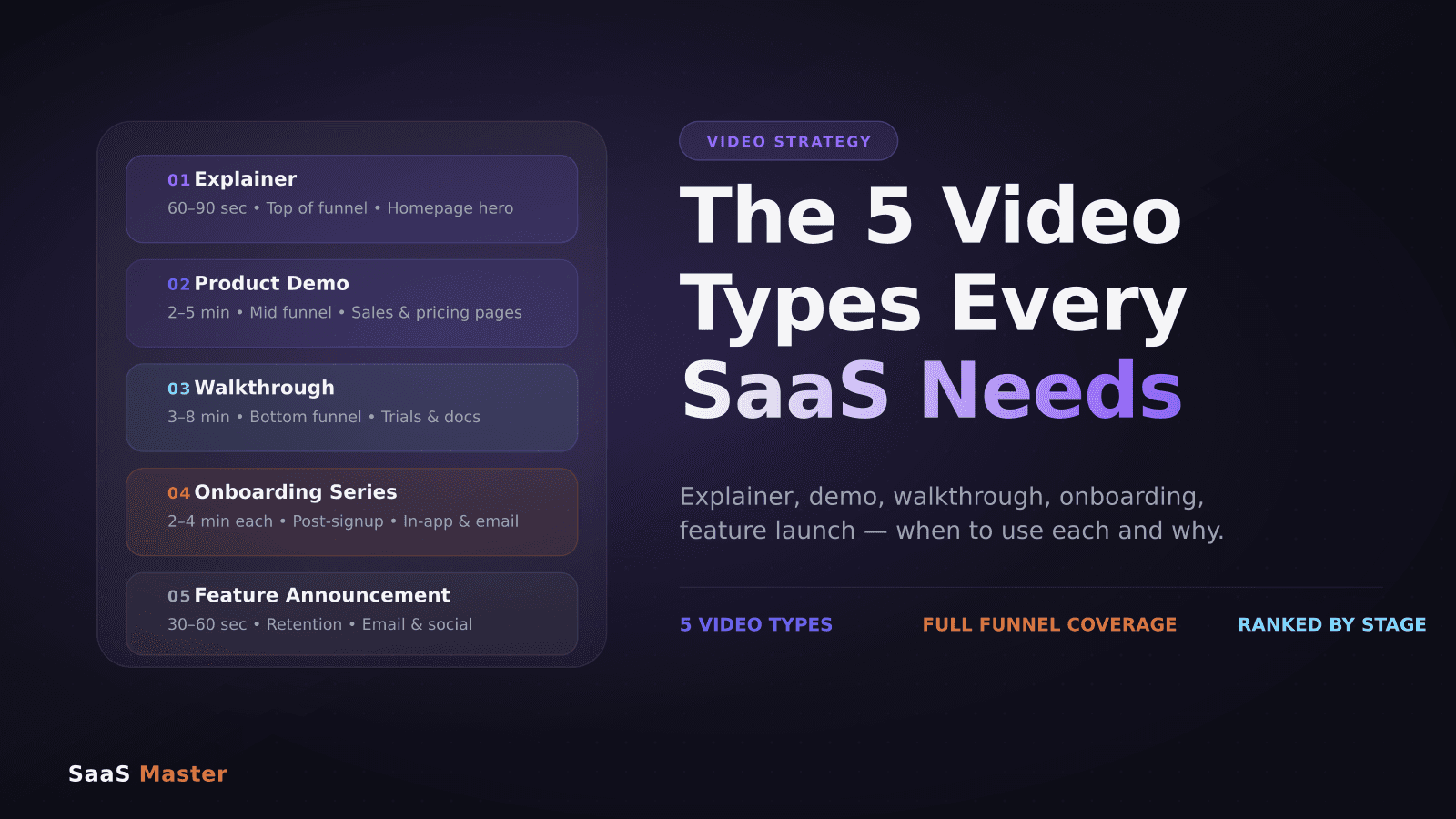
The 5 Video Types Every SaaS Company Needs (And When to Use Each)
The right SaaS video in the wrong place is almost as bad as no video at all. A 6-minute walkthrough embedded on your homepage will tank your conversion rate. A 30-second teaser clip dropped into your onboarding flow will leave new users confused. Before you film anything, you need a map — and that map starts with understanding the five core video types every software company needs, what each one does, and exactly where it belongs.
Key takeaways
- There are 5 distinct video types for SaaS: explainer, product demo, walkthrough, onboarding series, and feature announcement.
- Each type serves a different stage of the customer journey — awareness through expansion.
- Mixing up formats (e.g., using a walkthrough where an explainer belongs) hurts conversion.
- You don't need all 5 on day one — start with explainer plus one demo, then build out.
- Video length is not a style choice — it's determined by the funnel stage you're targeting.
What is an explainer video, and where does it live?
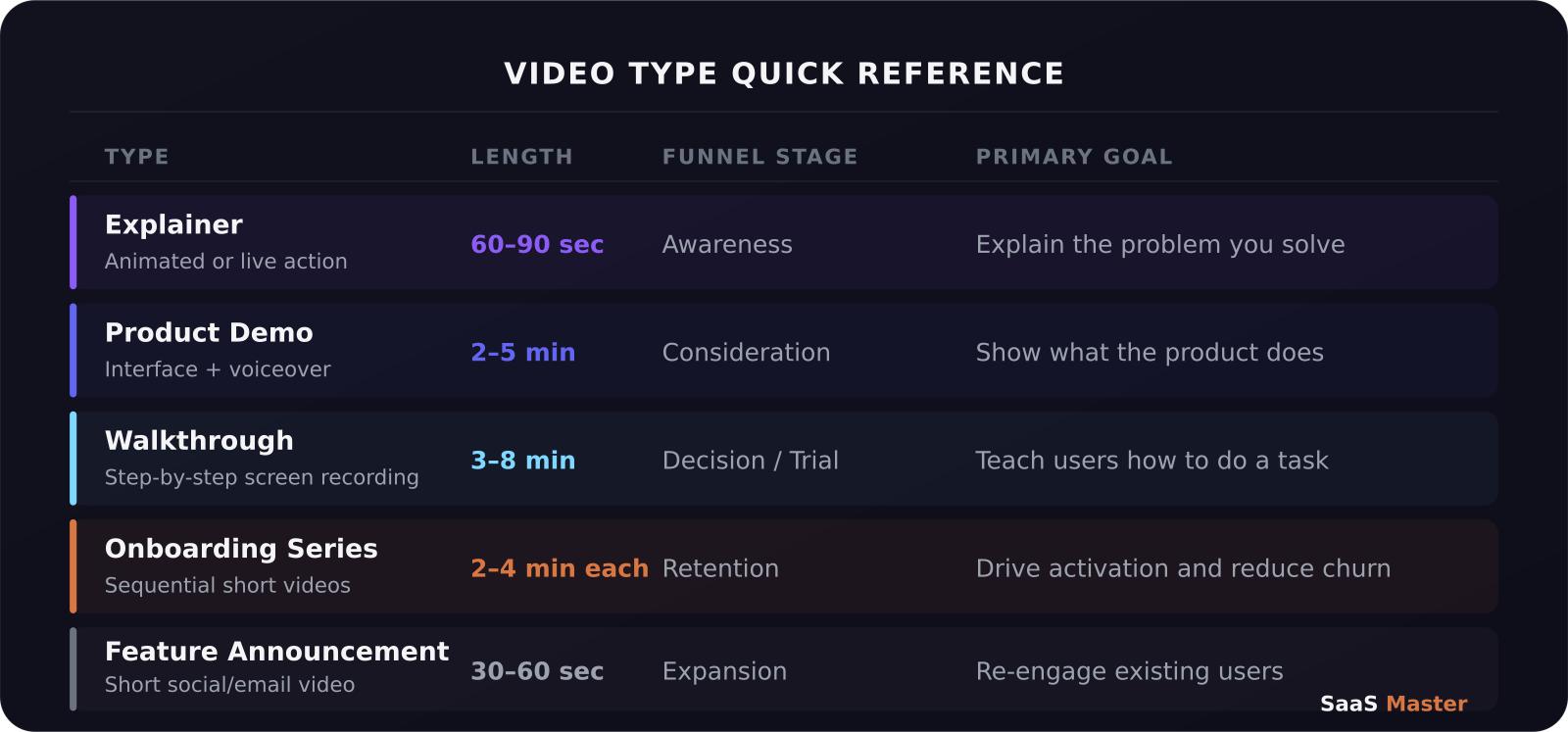
An explainer video answers one question: "What is this and why should I care?" It doesn't show the product in detail — that's what demos are for. Its job is to make your value proposition land in 60 to 90 seconds, so a visitor who has never heard of you walks away with a clear picture of the problem you solve and the kind of company that benefits.
Homepage hero sections, paid ad creatives, and the top of your YouTube channel page are the natural homes for an explainer. The animation style tends to work well here because you're not yet trying to show the actual UI — you're telling a story. Keep it under 90 seconds. Lead with the problem, not a product tour. End with a single call to action.
If you work with a SaaS video production team, the explainer is almost always the first video they'll want to build because it anchors everything else.
What makes a product demo different from a walkthrough?
This is the single most common point of confusion I see from software companies, so let me be direct: a demo shows what the product does; a walkthrough shows how to do a specific thing inside the product.
A demo is mid-funnel. Its audience is an interested prospect who wants to evaluate whether your product solves their problem. It runs two to five minutes and focuses on the outcomes — the dashboards, the reports, the end states — rather than the step-by-step path to get there. Think of it as a highlight reel of the product's best moments.
A walkthrough is bottom-of-funnel or post-signup. Its audience is someone who has already decided they're interested and needs to learn how to use a specific feature or workflow. It runs three to eight minutes and goes step by step. It narrates intent ("now we set the trigger so the automation fires when a contact updates") rather than actions ("now I click this button"). The distinction matters because your viewer is following along, not just watching.
For teams getting started, I'd prioritize a strong product demo first — it supports sales and the website simultaneously. You can find more on building that in How to Create a Product Demo Video That Converts.
Why SaaS onboarding videos are the highest-ROI videos you can make
If I had to pick one video type that consistently pays back the most for SaaS companies, it would be the onboarding series. The reason is simple: your highest-value audience is the people who already paid you. A user who churns in week one because they couldn't figure out your core workflow is worth $0. A user who hits their first win in day three because a 3-minute video guided them there is worth however many months they stay active.
An onboarding series is not one long video — it's a sequence of short, focused videos, each covering a single workflow. Getting started (account setup), core workflow (the one thing users need to do first), advanced features, and integration setup are the typical chapters. Each should be completable in two to four minutes. Automate delivery inside your product or via email sequences. If you've struggled with activation rates or early churn, this is where I'd start. See also SaaS Onboarding Videos for a deeper dive.
Feature announcement videos: the most underused format
Most SaaS teams skip feature announcement videos entirely, or they write a changelog post that no one reads. A 30 to 60 second video announcing a new feature lands differently — it shows the feature working, it's shareable on social media, and it gives your email campaigns something visual to anchor to. These are genuinely quick to produce once you have a screen recording setup, and they compound over time: every feature you ship becomes a content asset.
The rule here is narrow focus. One feature, one video, one benefit. If you find yourself wanting to mention three features in a single announcement video, make three videos.
How to build your SaaS video library in the right order
You don't need all five types to launch. Here is the order I recommend for most software companies:
Start with an explainer video for your homepage. This is your single most-watched asset and will likely generate the most return on the investment. Second, add a product demo for your pricing or features pages — this is what prospects watch before they decide to try or buy. Third, build your first onboarding video for your most common new-user workflow, the one your support team answers most often. After that, layer in walkthroughs for power-user features and feature announcements as you ship.
The complete SaaS video marketing strategy guide covers how to sequence these builds into a full content calendar if you want a longer framework to follow. You can also explore our product video hub for more strategy resources.
Frequently asked questions
Do I need all five video types before I launch?
No. Start with an explainer and one product demo — those two will cover your website and most of your sales conversations. Add an onboarding video once you have paying users whose activation you want to improve. Build out walkthroughs and feature announcements as your team and content needs grow.
How long should a SaaS explainer video be?
60 to 90 seconds is the sweet spot for a homepage explainer. Under 60 seconds often doesn't give you enough time to clearly establish the problem and solution. Over 90 seconds and you'll lose viewers before you've converted them. For explainers embedded in ads, aim for 45 to 60 seconds.
Can one video serve multiple funnel stages?
Rarely, and trying to make it work usually produces a video that does none of them well. A demo that tries to also onboard new users ends up too long to keep prospects engaged and too shallow to help new users learn. Build purpose-built videos for each stage — the production cost is lower than you think once you have a repeatable workflow.
Was this article helpful?
Jorge Aguilar
Founder & Creator, SaaS Master
Producing SaaS and AI product videos since 2019 — 800+ videos for 200+ brands, covering tutorials, demos, walkthroughs, and explainers. Writing here about the tools, trends, and tactics that actually move the needle. LinkedIn · About · Work with me
Need a product demo, walkthrough, or SaaS explainer?
Client-owned videos that make your product easy to understand — demos, walkthroughs, onboarding, and explainers.
Explore SaaS video productionRelated guides
More Product Demos & Video Marketing →
How to Write a Software Walkthrough Video Script That Actually Gets Watched
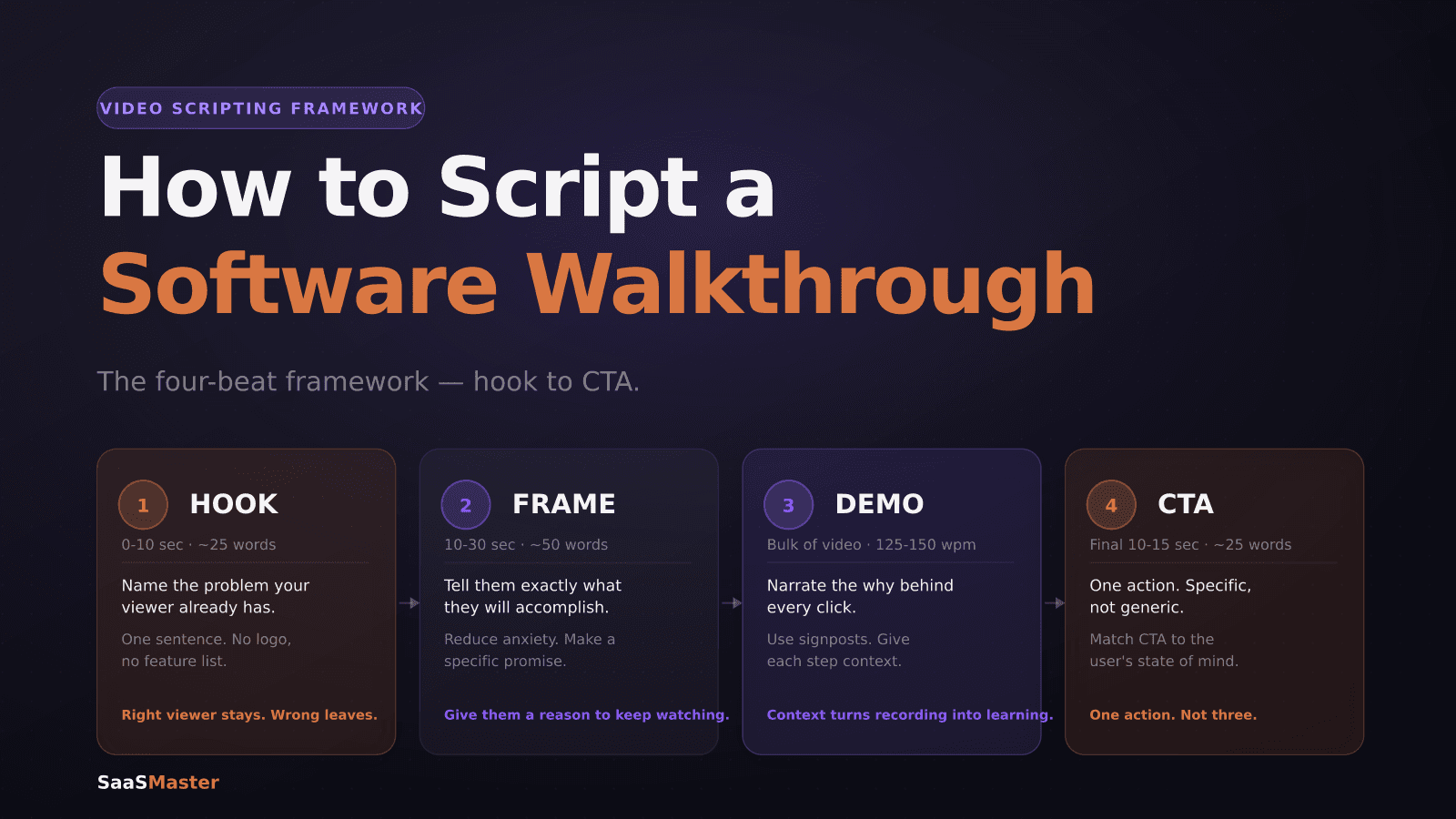
How to Script a Software Walkthrough Video (A Step-by-Step Framework)
SaaS Onboarding Videos: What New Users Need to See First