How to Make AI Music With Mureka: The Complete Studio and Video Guide
In short
Mureka turns a single prompt into a finished song with vocals and instruments. Here is how Studio, Agent Studio, and 2026 pricing actually work step by step.
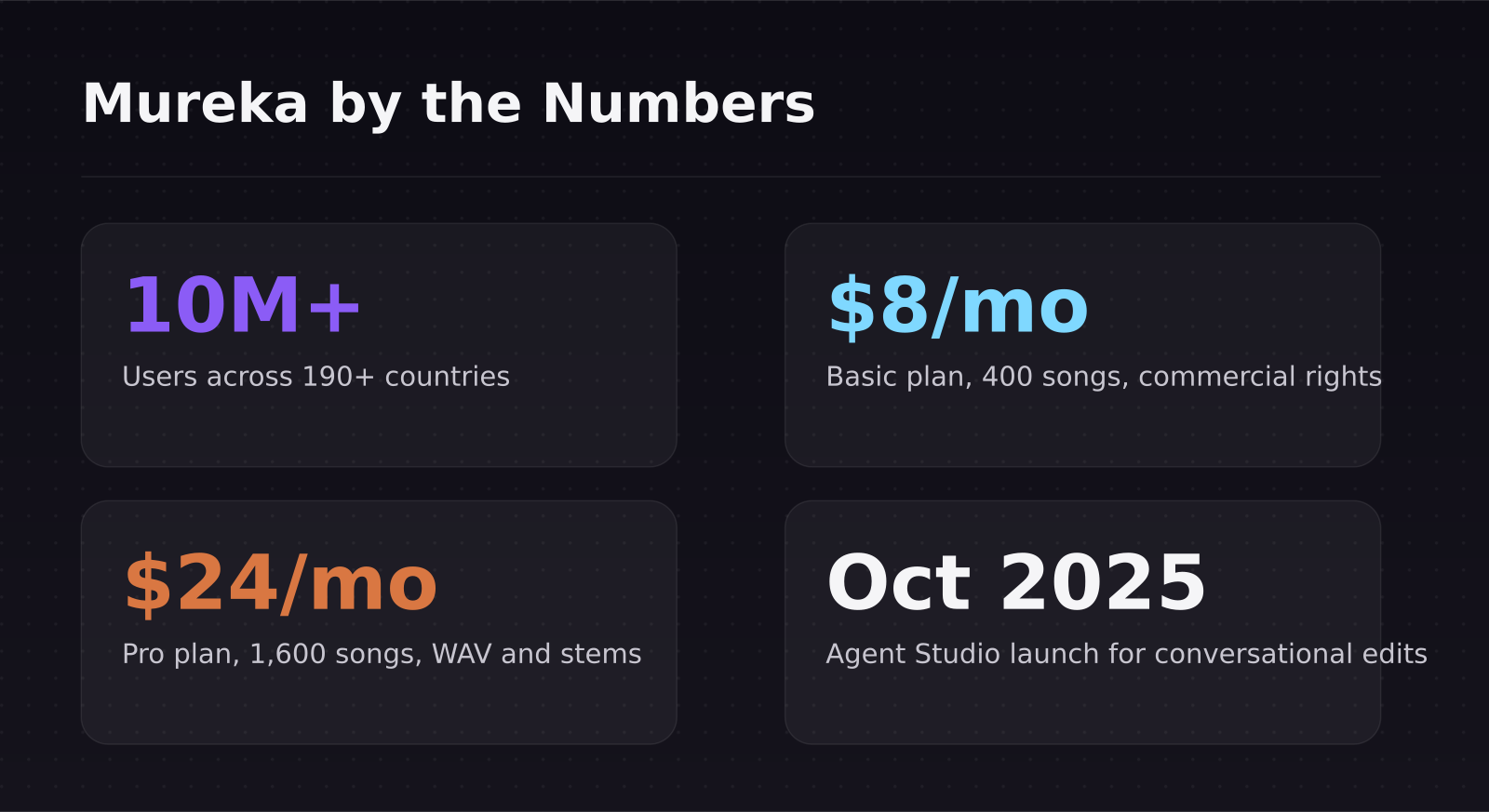
Mureka is an AI music generator that turns a text prompt, a lyric sheet, or even a hummed melody into a finished song — vocals, instruments, and mix included. It has grown to nearly 10 million users across more than 190 countries, and its newest Studio and Agent Studio tools let you edit a track the way a producer would instead of regenerating the whole song and hoping the next take is better.
Key takeaways: - Mureka's Basic plan is $8/month billed annually and covers roughly 400 songs a month with commercial rights included. - The Pro plan is $24/month billed annually, unlocking 1,600 songs, WAV/stem exports, reference-audio uploads, and voice cloning. - Studio adds multi-track editing and lip-synced music videos — the exact workflow SaaS Master walks through in the video below. - Agent Studio, launched October 2025, lets you direct a song conversationally instead of regenerating the entire track for one small change. - Mureka undercuts Suno and Udio on entry pricing ($8 vs. $10/month) while matching their commercial licensing terms.
[[video:bWdnpCbldtI]]
What is Mureka and how does it actually generate a song?
Mureka is built by Skywork AI and works in four modes. Easy Mode takes a single sentence and returns a complete track — vocals, instrumentation, structure, all of it. Custom Mode hands you full control over lyrics, genre, vocal gender, BPM, and instrument selection. Reference Mode lets you upload a track you like and generates something in a similar style. Remix Mode transforms an existing song into a new version.
Under the hood, Mureka uses an internal credit system called Gold on paid accounts. A single generation costs 24 Gold and returns two song variations to choose from, pulling isolated stems and MIDI out of a finished track costs 100 Gold, and rendering a full music video costs 400 Gold. That's worth knowing before you burn through a month's allowance rendering videos for songs you haven't finalized yet.
How do you make a song with Mureka's Studio?
The video above walks through the entire pipeline SaaS Master used to produce a fully custom track:
- Start in Easy or Custom Mode and generate two or three variations from the same prompt.
- Open the winning take in Studio for multi-track editing — this is where you swap instruments, adjust the mix, and extend a section without regenerating the full song.
- Use the Custom Creator to apply a specific musical style and render lip-synced vocals against a chosen character or video reference.
- Selectively regenerate a verse or chorus in Agent Studio by describing the change in plain language, rather than rerolling the whole track.
- Export the final version as MP3 for social platforms or WAV for anything that needs studio-quality audio.
Agent Studio is the newest piece of that pipeline. Instead of the standard prompt-and-generate loop, it lets you build a track conversationally — refining structure, adjusting individual sections, and iterating on a specific eight bars without touching the rest of the song. For anyone making music for videos on a deadline, that's the difference between three revisions and thirty.
What does Mureka cost in 2026?
Mureka runs a freemium model, but the free tier comes with a real catch: Mureka retains ownership of anything you generate on it, so it's fine for testing the workflow but not for anything you intend to publish or monetize.
- Free: unlimited testing, no commercial rights, lower quality caps.
- Basic — $8/month billed annually ($96/year), or roughly $9/month month-to-month: about 400 songs or 200 minutes of speech per month, MP3 exports, 48 topical tracks, unlimited personal albums, commercial licensing, and 10 concurrent generation jobs.
- Pro — $24/month billed annually ($288/year): roughly 1,600 songs or 800 minutes of speech, MP3/WAV/instrumental/stem downloads, 120 topical tracks, region and melody-extension editing, reference-audio uploads, and voice cloning from any source, including humming.
What does the Gold credit system actually mean for real usage?
The Gold economy is worth doing the math on before you commit to a plan, because "400 songs a month" sounds generous until you factor in revisions and video exports.
- A single generation (two song variations) costs 24 Gold. On the Basic plan's monthly allotment, that works out to roughly 16 generations a day if you spread usage evenly across the month.
- Extracting stems or MIDI from a track you like costs 100 Gold on top of the original generation cost — worth doing only on takes you're keeping.
- Rendering a lip-synced music video costs 400 Gold, which is by far the most expensive single action in the platform. Three video exports in a day can burn through more Gold than a full day of song generation.
- The practical workflow that avoids waste: generate and audition several variations cheaply in Easy or Custom Mode first, refine the winner in Studio, and only spend Gold on stem extraction or video rendering once you're confident it's the final cut.
How does Mureka compare to Suno and Udio?
Suno and Udio remain the two names most people default to for AI music, and both sit in a similar price band to Mureka but land slightly higher at the entry tier.
- Suno Pro is $10/month with about 2,500 credits (roughly 500 songs); Premier is $30/month with 10,000 credits and includes Suno Studio, a AI-native DAW with up to 12-stem separation and MIDI export.
- Udio Standard is about $10/month for 2,400 credits (roughly 1,200 songs); Udio Pro is $30/month for 6,000 credits with effectively unlimited generation.
- Mureka's Basic tier at $8/month undercuts both on entry price while matching their commercial-use terms, though its top Pro tier ($24) still trails Suno and Udio's $30 flagship plans on total monthly volume.
The honest takeaway: if you mostly need finished tracks for videos, ads, or social content and want to keep editing in one place, Mureka's Studio workflow is hard to beat for the price. If you're building a catalog of stems for a DAW-first workflow, Suno's Premier tier currently has the deeper post-production toolkit.
Who should actually use Mureka?
Mureka fits anyone producing video content who needs a soundtrack without hiring a composer — which is exactly the use case SaaS Master demonstrates when building AI-generated background tracks and custom jingles for SaaS product videos. It's also a reasonable fit for indie creators building a music catalog for YouTube, podcasts, or short-form content, since the commercial license is included starting on the cheapest paid tier.
It's a weaker fit if you need broadcast-grade mastering out of the box, or if your workflow depends on deep DAW integration — in that case, pairing Mureka's raw generation with a traditional editor, or stepping up to Suno's Premier tier, will get you further.
A few practical notes for anyone starting out: generate several variations before committing Gold to stems or video, since the two-song-per-generation output usually gives you a usable option without extra spend. Keep vocal style and reference audio consistent across a project if you're building multiple tracks for the same series or channel, since Mureka's Reference Mode works best when it has a clear, single style to match rather than a new mood each time. And if a track needs to loop seamlessly under a longer video, generate a few seconds of extra padding on each end in Studio rather than trying to trim a track to an exact loop point after the fact.
If you're experimenting with AI tools across your stack, it's worth reading how SaaS Master evaluates AI tools before adding another subscription, and comparing Mureka's video workflow against other AI creative tools like the ones covered in the AI video generator comparison. For teams already pairing Claude with generation tools for web builds, the same "cheap generation engine plus a capable orchestrator" pattern shows up in how Claude AI and MiniMax M3 work together.
Frequently asked questions
Is Mureka actually free to use?
Yes, but with a hard catch: anything generated on the free tier is owned by Mureka and can only be used for personal, non-commercial purposes. If you plan to publish or monetize the track anywhere, you need at least the $8/month Basic plan, which includes full commercial licensing.
Can Mureka clone a specific voice?
Voice cloning, including from a hummed reference, is available on the Pro plan ($24/month billed annually). The Basic plan supports reference audio uploads for style matching but not full voice cloning.
How is Mureka different from Suno or Udio?
Mureka is priced lower at entry ($8 vs. $10/month) and folds video generation and lip-sync directly into Studio, while Suno and Udio lean harder into deep post-production — particularly Suno's Studio DAW on its $30 Premier tier. Mureka is the faster path from prompt to finished, publishable video; Suno's top tier is the deeper production toolkit.
Tools mentioned
Was this article helpful?
Jorge Aguilar
Founder & Creator, SaaS Master
Producing SaaS and AI product videos since 2019 — 800+ videos for 200+ brands, covering tutorials, demos, walkthroughs, and explainers. Writing here about the tools, trends, and tactics that actually move the needle. LinkedIn · About · Work with me
Need to show users how an automation workflow works in practice?
Client-owned videos that make your product easy to understand — demos, walkthroughs, onboarding, and explainers.
Explore product walkthrough video productionRelated guides
More Automation & No-Code →
How to Automate LinkedIn Outreach with Lemlist and Claude Without Sounding Like a Bot
Skywork 3.0 Review: Can One Agent Platform Replace Your Whole Workflow Stack?
How to Collect Donations and Sell Products Online Without a Website