How to Repurpose One SaaS Video Into a Month of Short-Form Clips
In short
Learn how to repurpose one SaaS video into a month of short-form clips: which moments to cut, how to reframe 16:9 to vertical 9:16, ideal length, and hooks.

The fastest way to get more mileage from your SaaS videos is not to film more of them, it is to cut the ones you already have into short vertical clips. A single eight to twelve minute demo or walkthrough usually holds six to ten self-contained moments, and each one can become a 20 to 45 second clip for TikTok, Instagram Reels, YouTube Shorts, or LinkedIn. Recorded and edited with intent, one session can feed a month of posting.
I do this for almost every long-form video I make. The full walkthrough lives on YouTube and your site as the deep resource; the clips go out all week to pull new viewers back to it. Here is the exact system, the specs that matter, and the mistakes that quietly kill reach.
Key takeaways
- One long video typically yields 6 to 10 usable short clips, enough to post several times a week for a month.
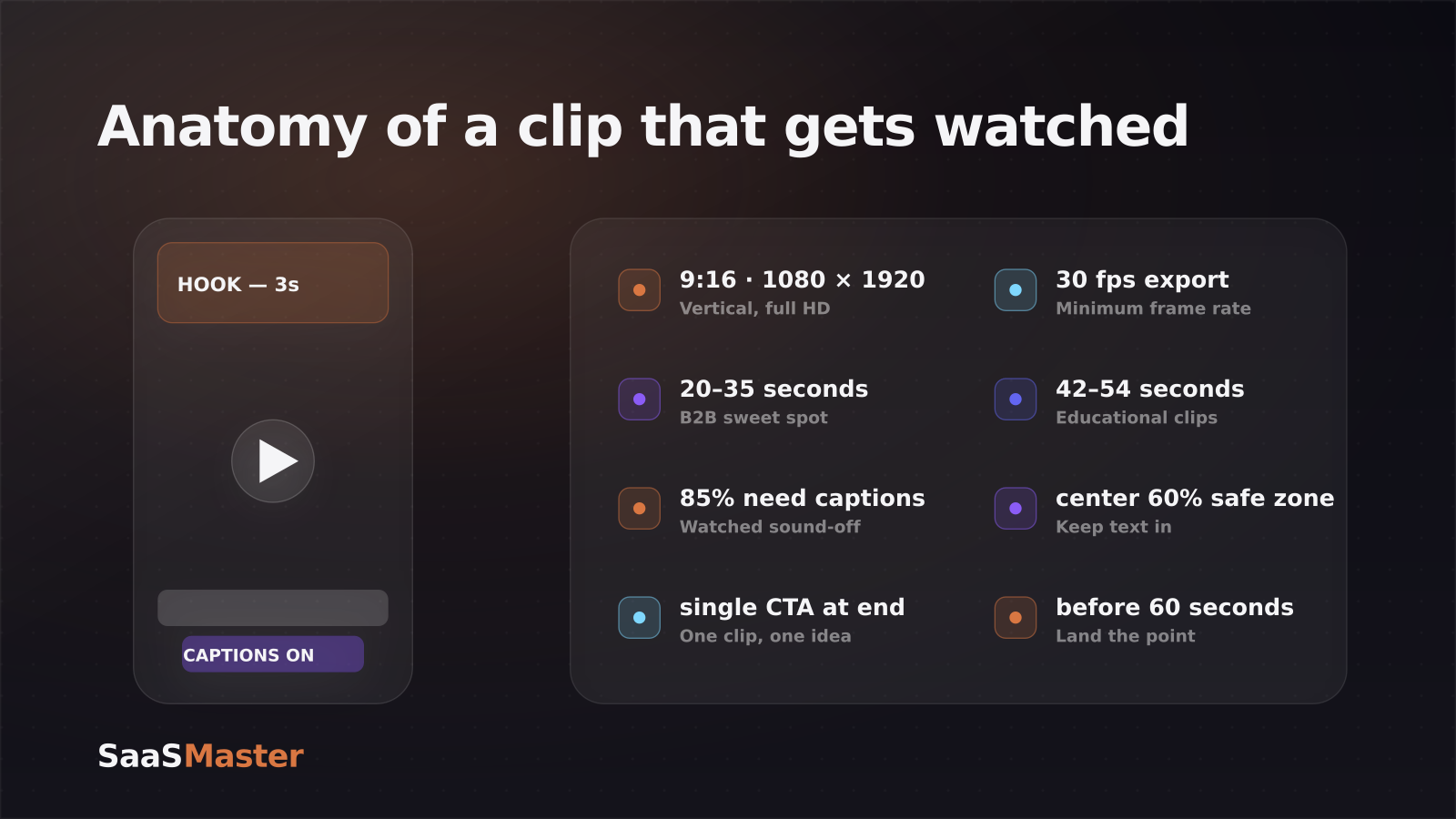
- Short-form is vertical 9:16 at 1080 x 1920, exported at 30fps or higher. Repurposing is mostly a reframing and captioning job.
- Roughly 85% of social video is watched with the sound off, so burned-in captions are not optional.
- B2B software clips perform best around 20 to 35 seconds; educational clips can stretch to 42 to 54 seconds. Hook in the first 3 seconds or you lose the viewer.
- Plan the clips before you record, not after. The best source video is one you filmed knowing it would be sliced.
Why repurpose instead of filming more?
Making a good product video is the expensive part, the scripting, the screen capture, the retakes. Once that work is done, the marginal cost of a clip is tiny: you are trimming, reframing, and captioning a moment that already exists. That is the whole argument. You get five to ten more pieces of content for a fraction of the effort of a new shoot.
There is a distribution argument too. Long-form and short-form do different jobs. A full product demo video that converts is where someone decides to sign up. A clip is how a stranger discovers you exist. Clips are top of funnel; they earn the click that sends someone to the full video, your site, or a trial. If you treat short-form as its own silo you will burn out. If you treat it as the distribution arm of your long-form, it runs almost on autopilot. This is exactly the kind of repeatable engine covered in the complete SaaS video marketing strategy guide.
Which moments in a video actually become good clips?
Not every 30 seconds is clip-worthy. A good clip is a complete thought, it makes sense to someone who never saw the full video. Scan your source footage for these:
- A single feature solving a single, nameable problem ("here is how to stop double-booking").
- A surprising number or result ("this cut our onboarding emails from nine to three").
- A before-and-after, the messy manual way, then the tool doing it in two clicks.
- A common mistake and the fix, these frame naturally as a hook.
- A fast tip or keyboard shortcut power users will save and share.
The test: could you drop the viewer into this moment cold and have it still land? If yes, it is a clip. If it only makes sense with three minutes of setup, it is not.
How do you reframe a 16:9 video for vertical?
Most SaaS footage is recorded 16:9 (landscape) because that is how software looks on a screen. Short-form is 9:16 (vertical). The reframing is the main technical task, and there are two clean ways to handle it.
The first is the split layout: put the screen recording in the top two-thirds and your talking-head or captions in the bottom third. This keeps the interface readable while filling the vertical frame. The second is punch-in: crop into the part of the screen that matters for that moment, a single button, a menu, one panel, so the detail is actually legible on a phone. Never just letterbox a full landscape screen into the middle of a vertical frame; the UI becomes too small to read and the clip dies.
Whichever you choose, keep the important stuff, captions, titles, the CTA, inside the center 60% of the frame. Leave roughly 20% clear at the top and bottom and about 10% on each side so platform buttons and the username do not cover your content.
What is the ideal length and hook for a SaaS clip?
Two numbers decide whether a clip works: the first three seconds and the total length.
You have about 1.5 seconds before a viewer's thumb decides to swipe, so the hook has to land immediately. Open on the payoff or the problem, never a logo or a slow "hey everyone." On-screen text that states the value ("Stop losing leads in your inbox") does more work than any intro. B2B software audiences respond especially well to proof-driven hooks, a result, a number, a bold claim you then justify.
On length, keep most software clips in the 20 to 35 second range, that window consistently performs best for B2B. If the clip is genuinely educational and needs room to set up a problem and land a takeaway, 42 to 54 seconds is fine. Past 60 seconds, completion rates drop hard and platforms show the clip to fewer people. When in doubt, cut it shorter, one clip should make one point and end on one ask.
A repeatable clip system: one video, a month of posts
Here is the workflow I use, and it takes the guesswork out of it.
- Script the long video in segments. When you write the walkthrough, mark natural "clip beats", each feature or tip as its own module. This is easier if the source is already a clean software walkthrough rather than a rambling screen share.
- Record once, in full HD, with clean audio. Everything downstream inherits this quality.
- Pull 6 to 10 clip candidates from the timeline, the complete-thought moments from the section above.
- Reframe each to 9:16 and add burned-in captions. AI clipping tools can auto-detect highlights, reframe, and caption to speed this up, though I still review every cut by hand.
- Write a distinct hook and caption for each, then schedule them across three to four weeks. Point each clip back to the full video or a trial.
That is the leverage: one recording day, a month of posts, and every clip feeding traffic to the asset that actually converts. If producing the volume in-house is the bottleneck, that is exactly what a dedicated short-form video service for software is built to solve. For a full picture of how clips sit alongside demos, onboarding, and launch content, browse the product video library.
Frequently asked questions
How many clips can I get from one video?
Realistically 6 to 10 strong clips from an 8 to 12 minute demo or walkthrough. You can technically cut more, but chasing volume past that point gives you weak clips that make no sense on their own. Quality of the hook matters far more than quantity.
Do I need captions on every clip?
Yes. Around 85% of social video is watched with the sound off, so a clip without burned-in captions is invisible to most of its audience. Captions also boost completion because viewers can follow along while scrolling in silence. Treat them as a required layer, not a nice-to-have.
Should each clip link back to the full video?
Point people to it, but do not rely only on a link, most short-form platforms bury or disable outbound links. Instead, name the destination in the clip and caption ("full walkthrough on our channel"), pin a comment with the link, and keep the full video easy to find. The clip's job is discovery; the full video and your site do the converting.
Was this article helpful?
Jorge Aguilar
Founder & Creator, SaaS Master
Producing SaaS and AI product videos since 2019 — 800+ videos for 200+ brands, covering tutorials, demos, walkthroughs, and explainers. Writing here about the tools, trends, and tactics that actually move the needle. LinkedIn · About · Work with me
Need a product demo, walkthrough, or SaaS explainer?
Client-owned videos that make your product easy to understand — demos, walkthroughs, onboarding, and explainers.
Explore SaaS video productionRelated guides
More Product Demos & Video Marketing →
What a B2B SaaS Product Demo Should Show
How to Script a Software Walkthrough Video: A Step-by-Step Framework
Google Photos Video Remix vs CapCut vs Runway: Is Gemini Omni a Real SaaS Video Tool Yet?